Azure-functions-core-tools: Azure Functions output illegible in Light theme and Integrated Terminal
Hello ! It seems the terminal output colours used in Azure functions don't not allow to differentiate well the text in default white theme.

Perhaps more neutral colors could be used to make them compatible for MacOS default themes
https://github.com/Azure/azure-functions-core-tools/blob/cfde63b40651ad7c49f7368d62a90fa5c8f24b89/src/Azure.Functions.Cli/Common/DurableManager.cs#L86
 netonjm
All 7 comments
@netonjm Thanks for reporting and we should address this.
@ahmelsayed @fabiocav Is it possible to address this in Colors.net? If not, we should update the colors we use to avoid anything that's too light or too dark.
 anthonychu
on 1 Jul 2020
anthonychu
on 1 Jul 2020
We should be able to just use appropriate colors here that would work with those themes. That would be the simple approach.
Another option is to have a default and support themes based on categories (e.g. warning, error, emphasis, etc.)
 fabiocav
on 1 Jul 2020
fabiocav
on 1 Jul 2020
There is something like this here https://github.com/Azure/azure-functions-core-tools/blob/dev/src/Azure.Functions.Cli/Common/OutputTheme.cs but i guess it's not used everywhere. I think moving all those there and having the theme switch dark/bright based on the background color could work. I'm not sure how to get the background color reliably though. Console.BackgroundColor works only on classic windows console, but I don't have a Mac handy to check on it. I should add an option in Colors.Net to turn all colors off as well.
 ahmelsayed
on 2 Jul 2020
ahmelsayed
on 2 Jul 2020
Thanks @ahmelsayed !
Yeah, detection was my concern as well. I can check that on a Mac.
I was also thinking about the possibility of a theme file we could load when the tool runs, which would give users the ability to change that if needed.
fabiocav
on 2 Jul 2020
For this issue, the scope is limited to improving the colors so they're more readable in both, dark and and light themes.
fabiocav
on 20 Jul 2020
It seems that detection doesn't really work in a mac. I tried it (it returns -1), and also found this https://github.com/dotnet/corefx/commit/14f36001ee138522f496318fc685d37c9f3ab9ae which was introduced to return a Console.BackgroundColor as -1 for unix based systems as it claims there's no proper way to find it.
Maybe as discussed here, we can check in Colors.NET themes if BackgroundColor is unknown, just use the default font color? Though, that gives up the niceness of color in a mac (even in dark themes). For such environments with unknown backgrounds, we can probably get away with a few colors like "red" for error, and then use ANSI escape sequences for "bold" ("\033[1m") for warnings etc (that will bold the default color and use that).
 ankitkumarr
on 5 Aug 2020
ankitkumarr
on 5 Aug 2020
Some suggestions here for colors that work on both black and white backgrounds:
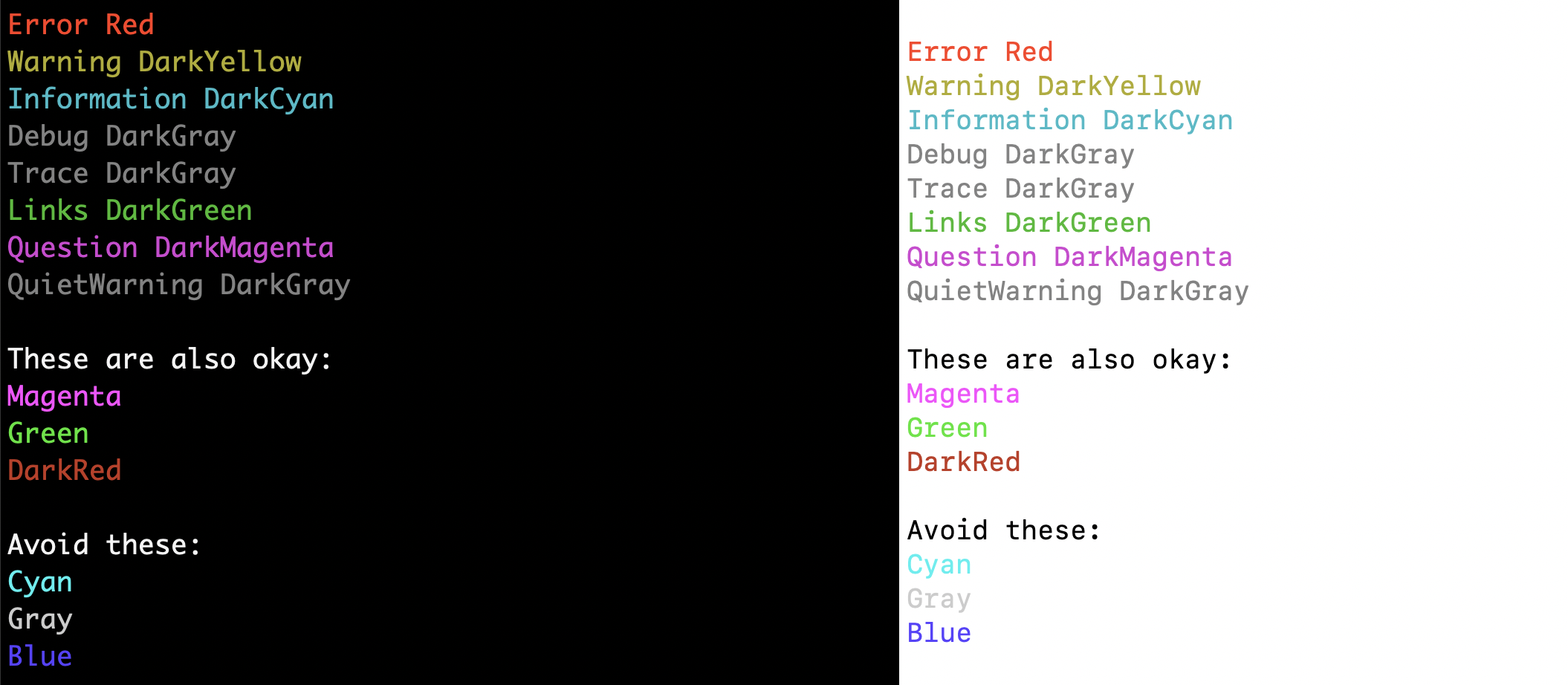
Also note that some terminals like VS Code don't distinguish between the "dark" and "normal" versions, probably for legibility reasons (for instance, it renders DarkYellow in light theme whether we use DarkYellow or Yellow).
anthonychu
on 6 Aug 2020
Related issues
 christopheranderson
·
6Comments
christopheranderson
·
6Comments
 dstaley
·
3Comments
dstaley
·
3Comments
 AssassinTee
·
3Comments
AssassinTee
·
3Comments
 Mikey032
·
3Comments
Mikey032
·
3Comments
 cgillum
·
4Comments
cgillum
·
4Comments
Most helpful comment
Some suggestions here for colors that work on both black and white backgrounds:
Also note that some terminals like VS Code don't distinguish between the "dark" and "normal" versions, probably for legibility reasons (for instance, it renders DarkYellow in light theme whether we use DarkYellow or Yellow).