Azure-functions-core-tools: Misleading error message for incompatible java version
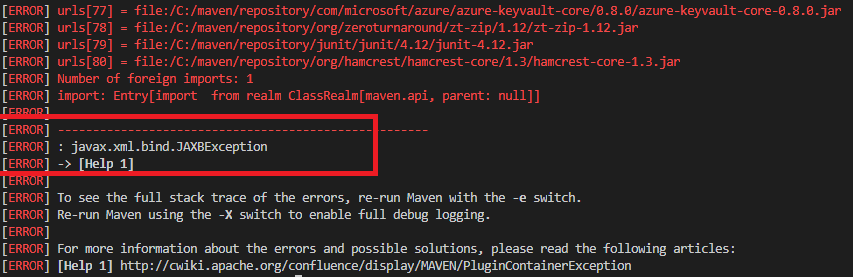
I was following the document https://code.visualstudio.com/docs/java/java-azurefunctions for creating and deploying a Java Azure Functions application using the Azure Functions extension in Visual Studio Code. While doing so, I chose the wrong java version (jdk 11 instead of jdk 8) and hence the maven build failed. But I think the error message is misleading. The error is showing 'javax.xml.bind.JAXBException' . I believe the error message should be related to the java version incompatibility.
[ERROR] urls[78] = file:/C:/maven/repository/org/zeroturnaround/zt-zip/1.12/zt-zip-1.12.jar
[ERROR] urls[79] = file:/C:/maven/repository/junit/junit/4.12/junit-4.12.jar
[ERROR] urls[80] = file:/C:/maven/repository/org/hamcrest/hamcrest-core/1.3/hamcrest-core-1.3.jar
[ERROR] Number of foreign imports: 1
[ERROR] import: Entry[import from realm ClassRealm[maven.api, parent: null]]
[ERROR]
[ERROR] -----------------------------------------------------
[ERROR] : javax.xml.bind.JAXBException
[ERROR] -> [Help 1]
[ERROR]
[ERROR] To see the full stack trace of the errors, re-run Maven with the -e switch.
[ERROR] Re-run Maven using the -X switch to enable full debug logging.
[ERROR]
[ERROR] For more information about the errors and possible solutions, please read the following articles:
[ERROR] [Help 1] http://cwiki.apache.org/confluence/display/MAVEN/PluginContainerException
The terminal process terminated with exit code: 1
and the document should also add a note that only jdk 8 compatible.
 JohnyzHub
All 2 comments
@amamounelsayed @anirudhgarg Is it possible to do this in the Java worker? If the version doesn’t match at startup, print out a more descriptive error?
 anthonychu
on 12 Apr 2020
anthonychu
on 12 Apr 2020
Thank you @anthonychu and @JohnyzHub we will investigate and get back to you.
 amamounelsayed
on 14 Apr 2020
amamounelsayed
on 14 Apr 2020
Related issues
 rhummelmose
·
5Comments
rhummelmose
·
5Comments
 nebosite
·
3Comments
nebosite
·
3Comments
 solvingj
·
5Comments
solvingj
·
5Comments
 sonic1981
·
4Comments
sonic1981
·
4Comments
 brandonh-msft
·
4Comments
brandonh-msft
·
4Comments
Most helpful comment
@amamounelsayed @anirudhgarg Is it possible to do this in the Java worker? If the version doesn’t match at startup, print out a more descriptive error?