Azure-functions-core-tools: Feature Request: app.config in azure functions
Currently we are utilizing local.settings.json for app settings when running the azure function app locally and it fetches settings from the app settings tab in azure portal when in production.
Problems with this approach:
- How does a referenced assembly (data service) fetch
connection strings,app settingsfrom parent project in local testing and in production? This would be addressed if azure functions fetches settings from
web.configorapp.configfile.Creates confusion as most .NET projects follow
app.configandweb.config. People have to informed thatlocal.settings.jsonis just for testing in local environment and that referenced assembly won't look for settings in this file.
 shyamal890
All 10 comments
json-based settings seem to be the new standard for .NET Core projects, so I guess functions just follow along that trend
 mikhailshilkov
on 17 Jan 2018
mikhailshilkov
on 17 Jan 2018
Yes would agree with @mikhailshilkov here - as far as I know #1 also works today and connection strings and app settings will correctly redirect to fetch from the right source. Have you hit any limitations where this doesn't work?
 jeffhollan
on 23 Jan 2018
jeffhollan
on 23 Jan 2018
I think I hit a limitation, kinda, not exactly related to the problems mentioned above though. I implemented a wcf proxy for logic apps to call (wsdl had recursive reference in a message response schema -> couldn't use the SOAP connector). I wanted to add wcf message logging but couldn't find a way to do this in code, in app.config it would be easy.
 maakku
on 8 Feb 2018
maakku
on 8 Feb 2018
 ahmelsayed
on 30 Apr 2018
ahmelsayed
on 30 Apr 2018
I am afraid that the current approach easily doesn't work. When someone uses existing class libraries expecting to be setup using standard general configuration sections, for example something as common as the Unity dependency injection framework, and not just plain AppSettings or ConnectionString keys, Azure functions become the first .NET citizen breaking all of these in the ecosystem, because these libraries otherwise run successfully in console apps, WPF, ASP.NET, everywhere else. Thus, in my opinion, this decision constitutes a poor design move. If for some reason one thinks that a different way of setup is preferred, it should be an extra feature and not break what runs in all other environments.
I solved the problem of running my existing logic layer objects in Azure functions by delegating the work into a different AppDomain which has an App.config associated with it, and created the necessary cross-AppDomain communication. It should be simpler, though. This feature request is valid.
 grammophone
on 13 Jun 2018
grammophone
on 13 Jun 2018
I agree app.config approach should be supported by Azure functions..
 manishsg
on 6 Jul 2018
manishsg
on 6 Jul 2018
@grammophone Can you give a small example of this?
 rlightner
on 10 Jul 2018
rlightner
on 10 Jul 2018
Of course, @rlightner.
The contents of the ZIP file:
- In
ITraceWriterinterface, we abstract theTraceWriter. The
MarshalledTraceWriteris anITraceWriterimplementation which can be marshalled by reference accrossAppDomains.The
IWorkeris a disposable interface abstracting the work to take place. Its single methodDoWorkmethod takes anITraceWriterargument. But you can define your own interface.- The
Workeris an abstract base implementation forIWorkerwhich is marshallable by reference accrossAppDomains. Subclass and override theDoWorkmethod. - The
NopWorkeris an example worker which logs that it does nothing. - The
WorkerProvider<IW>provides transparent proxies of objects running in a separateAppDomainand implementing a genericIWinterface. Function1is a demo Azure Function which uses aWorkerProvider<IWorker>to create aNopWorkerrunning in a differentAppDomainand calls the methodDoWorkon the proxied interface in order to successfully do nothing.
Add an App.Config to your project and remember to press F4 on it and set "Copy to Output Directory" to "Copy if newer". Good luck!
grammophone
on 10 Jul 2018
@grammophone Thank you kindly! Are you doing any type of DI in your created AppDomain?
rlightner
on 10 Jul 2018
@rlightner you are welcome. Yes, the referenced libraries in my function use extensive DI based on Unity and defined in various .config files, included from the main .config of the running AppDomain:

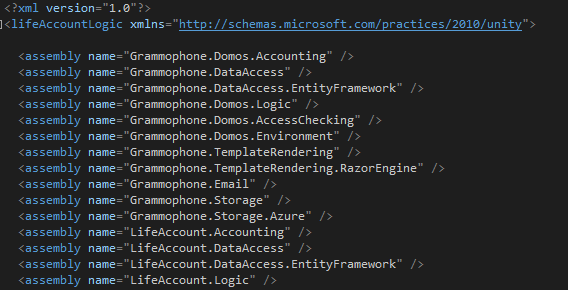
This is just the same as including the configuration sections inline; the libraries make no distinction between inline and included sections.
grammophone
on 10 Jul 2018
Related issues
 brandonh-msft
·
4Comments
brandonh-msft
·
4Comments
 christopheranderson
·
6Comments
christopheranderson
·
6Comments
 AssassinTee
·
3Comments
AssassinTee
·
3Comments
 nzthiago
·
3Comments
nzthiago
·
3Comments
 nebosite
·
3Comments
nebosite
·
3Comments
Most helpful comment
I am afraid that the current approach easily doesn't work. When someone uses existing class libraries expecting to be setup using standard general configuration sections, for example something as common as the Unity dependency injection framework, and not just plain AppSettings or ConnectionString keys, Azure functions become the first .NET citizen breaking all of these in the ecosystem, because these libraries otherwise run successfully in console apps, WPF, ASP.NET, everywhere else. Thus, in my opinion, this decision constitutes a poor design move. If for some reason one thinks that a different way of setup is preferred, it should be an extra feature and not break what runs in all other environments.
I solved the problem of running my existing logic layer objects in Azure functions by delegating the work into a different AppDomain which has an App.config associated with it, and created the necessary cross-AppDomain communication. It should be simpler, though. This feature request is valid.