Azure-functions-core-tools: Pre-Compiled assembly not working with EFCore 2.0
I am experiencing an error in Visual Studio 2017 15.5.1 using the package versions below:
Microsoft.NET.Sdk.Functions 1.0.7
Microsoft.EntityFrameworkCore 2.0.1
The function is setup to use .NET Standard 2.0
When running the function, the function throws an exception:
Could not load file or assembly 'Microsoft.EntityFrameworkCore, Version=2.0.1.0, Culture=neutral, PublicKeyToken=adb9793829ddae60'. Could not find or load a specific file. (Exception from HRESULT: 0x80131621)
To replicate the problem:
Create a Time Trigger function.
Add Microsoft.EntityFrameworkCore package
Update the SDK package to 1.0.7
Reference EF in the Run method. Any object in the package is sufficient.
Run the function
Check that a FileLoadException occurs.
Possible related issue: https://github.com/Azure/azure-functions-cli/issues/253
 DOMZE
DOMZE
All 46 comments
Seems to be related to VS Studio. Stick with the SDK 1.0.6 and it works.
See https://github.com/Azure/Azure-Functions/issues/625#issuecomment-351563570
Stick to 1.0.6 and EFCore 2.0.0 for it to work
DOMZE
on 19 Dec 2017
i had the same error message while running a .NET Core 2 app i am working on, the app crashed on BuildWebHost.
after hours what worked for me was to delete all folders in bin folder and build the app again.
before delete i noticed i have an older version of Microsoft.EntityFrameworkCore in bin after deletion and build the bin folder don't have a copy any more of Microsoft.EntityFrameworkCore
hope this help someone
 alfred-zaki
on 31 Jan 2018
alfred-zaki
on 31 Jan 2018
Hi!
We are having the same problem using
Microsoft.NET.Sdk.Functions 1.0.13
Any Microsoft.EntityFrameworkCore greater than 2.0.0, including 2.1 prerelease doesn't work
If we stick to EF 2.0.0 it works.
The exception is the following:
Warning: 'connection' property in 'C:\Users\pablo.castilla\Documents\Visual Studio 2017\Projects\PruebaAFCore\PruebaAFCore\bin\Debug\netstandard2.0\Function1\function.json' is empty.
Warning: 'connection' property in 'C:\Users\pablo.castilla\Documents\Visual Studio 2017\Projects\PruebaAFCore\PruebaAFCore\bin\Debug\netstandard2.0\Function2\function.json' is empty.
Hosting environment: Production
Content root path: C:\Users\pablo.castilla\Documents\Visual Studio 2017\Projects\PruebaAFCore\PruebaAFCore\bin\Debug\netstandard2.0
Now listening on: http://localhost:7071
Application started. Press Ctrl+C to shut down.
[03/05/2018 10:02:13] Reading host configuration file 'C:\Users\pablo.castilla\Documents\Visual Studio 2017\Projects\PruebaAFCore\PruebaAFCore\bin\Debug\netstandard2.0\host.json'
[03/05/2018 10:02:13] Host configuration file read:
[03/05/2018 10:02:13] {}
[03/05/2018 10:02:13] Starting Host (HostId=qesevpc159-1495511143, InstanceId=0d9ea784-a02c-45e6-9d8b-75f96ca7aedd, Version=2.0.11651.0, ProcessId=12584, AppDomainId=1, Debug=False, ConsecutiveErrors=0, StartupCount=1, FunctionsExtensionVersion=)
[03/05/2018 10:02:13] Unable to configure java worker. Could not find JAVA_HOME app setting.
[03/05/2018 10:02:13]
[03/05/2018 10:02:13] Could not configure language worker Java.
[03/05/2018 10:02:13]
Warning: Only got partial types from assembly: PruebaAFCore, Version=1.0.0.0, Culture=neutral, PublicKeyToken=null
Exception message: System.Reflection.ReflectionTypeLoadException: Unable to load one or more of the requested types. Retrieve the LoaderExceptions property for more information.
   at System.Reflection.RuntimeModule.GetTypes(RuntimeModule module)
   at System.Reflection.Assembly.GetTypes()
   at Microsoft.Azure.WebJobs.Host.Indexers.DefaultTypeLocator.FindTypes(Assembly assembly, IEnumerable`1 extensionAssemblies) in C:\projects\azure-webjobs-sdk-rqm4t\src\Microsoft.Azure.WebJobs.Host\Indexers\DefaultTypeLocator.cs:line 120
[03/05/2018 10:02:14] Generating 0 job function(s)
[03/05/2018 10:02:14] Found the following functions:
[03/05/2018 10:02:14] PruebaAFCore.Function1.Run
[03/05/2018 10:02:14] PruebaAFCore.Function2.Run
[03/05/2018 10:02:14]
[03/05/2018 10:02:14] Host initialized (1251ms)
[03/05/2018 10:02:14] Host lock lease acquired by instance ID '00000000000000000000000041845402'.
[03/05/2018 10:02:14] Host started (1300ms)
[03/05/2018 10:02:14] Job host started
[03/05/2018 10:02:14] The following 2 functions are in error:
[03/05/2018 10:02:14] Function1: Unable to load one or more of the requested types. Retrieve the LoaderExceptions property for more information.
[03/05/2018 10:02:14] Function2: Unable to load one or more of the requested types. Retrieve the LoaderExceptions property for more information.
[03/05/2018 10:02:14]
[03/05/2018 10:02:14]
Listening on http://localhost:7071/
Hit CTRL-C to exit...
Thanks!
 pablocastillaquintas
on 3 May 2018
pablocastillaquintas
on 3 May 2018
Is the owner of this issue EF Core 2 or Azure Functions? Should this issue be in https://github.com/Azure/Azure-Functions ?
 johnwc
on 11 May 2018
johnwc
on 11 May 2018
I think it's an AzFunc issue. If you stick to just 2.0 refs the AzFunc host is fine. But that gets harder to do as other lib update. Now that 2.1 is RC it's going to be more of a problem.
 espray
on 11 May 2018
espray
on 11 May 2018
@muratg @Eilon @DamianEdwards @glennc The implication of this thread is that people can't update to use .NET Core patch releases (or point releases) when using Azure functions. Is this this something we should follow up on on our side?
 ajcvickers
on 11 May 2018
ajcvickers
on 11 May 2018
@davidfowl
 DamianEdwards
on 11 May 2018
DamianEdwards
on 11 May 2018
Microsoft.NET.Sdk.Functions having a specific Newtonsoft.Json package dependency does not help either
espray
on 11 May 2018
@ajcvickers It's not clear to me where the issue is. Is it something that affects EF patches only, or or others as well?
 muratg
on 12 May 2018
muratg
on 12 May 2018
@muratg It's not just EF--some of the other linked issues reference other assemblies with the same problem. I have no idea what is causing the issue.
ajcvickers
on 12 May 2018
@muratg @Eilon @DamianEdwards @glennc @davidfowl @ahmelsayed
prob related to https://github.com/Azure/azure-functions-core-tools/issues/322
Same issue with <PackageReference Include="Microsoft.Extensions.Options" Version="2.0.1" /> down graded to <PackageReference Include="Microsoft.Extensions.Options" Version="2.0.0" /> to resolve the issue
              %%%%%%
             %%%%%%
        @   %%%%%%    @
      @@   %%%%%%      @@
   @@@    %%%%%%%%%%%    @@@
 @@      %%%%%%%%%%        @@
   @@         %%%%       @@
     @@      %%%       @@
       @@    %%      @@
            %%
            %
Hosting environment: Production
Content root path: C:UsersericsSourceReposConnectBooster SuitesrcMicroservicesConnectBooster.Host.SynchronizationbinDebugnetstandard2.0
Now listening on: http://localhost:7071
Application started. Press Ctrl+C to shut down.
[5/14/2018 2:13:05 PM] Reading host configuration file 'C:UsersericsSourceReposConnectBooster SuitesrcMicroservicesConnectBooster.Host.SynchronizationbinDebugnetstandard2.0host.json'
[5/14/2018 2:13:05 PM] Host configuration file read:
[5/14/2018 2:13:05 PM] {}
[5/14/2018 2:13:05 PM] Starting Host (HostId=bngdsktp029-1966213432, InstanceId=77f4eb63-255e-4169-83f9-388d1d60fce0, Version=2.0.11651.0, ProcessId=16084, AppDomainId=1, Debug=False, ConsecutiveErrors=0, StartupCount=1, FunctionsExtensionVersion=)
[5/14/2018 2:13:05 PM] Generating 1 job function(s)
[5/14/2018 2:13:06 PM] Found the following functions:
[5/14/2018 2:13:06 PM] ConnectBooster.Host.Synchronization.Functions.GraphQLFunction.RunGraphQL
[5/14/2018 2:13:06 PM]
[5/14/2018 2:13:06 PM] Host initialized (533ms)
[5/14/2018 2:13:06 PM] Host started (731ms)
[5/14/2018 2:13:06 PM] Job host started
[5/14/2018 2:13:06 PM] Host lock lease acquired by instance ID '0000000000000000000000003E437901'.
Listening on http://localhost:7071/
Hit CTRL-C to exit...
Http Functions:
graphql: http://localhost:7071/api/graphql
[5/14/2018 2:13:09 PM] Executing 'graphql' (Reason='This function was programmatically called via the host APIs.', Id=8a3feaea-8fea-4140-b833-df8c7cac1a43)
[5/14/2018 2:13:09 PM] Executed 'graphql' (Failed, Id=8a3feaea-8fea-4140-b833-df8c7cac1a43)
[5/14/2018 2:13:09 PM] System.Private.CoreLib: Exception while executing function: graphql. graphql-dotnet-builder: Could not load file or assembly 'Microsoft.Extensions.Options, Version=2.0.1.0, Culture=neutral, PublicKeyToken=adb9793829ddae60'. Could not find or load a specific file. (Exception from HRESULT: 0x80131621). System.Private.CoreLib: Could not load file or assembly 'Microsoft.Extensions.Options, Version=2.0.1.0, Culture=neutral, PublicKeyToken=adb9793829ddae60'.
espray
on 14 May 2018
This is an Azure Functions issue and the initial work to address these assembly resolution and load issues is rolling out right now.
The runtime version 2.0.11776 is being deployed and the matching CLI/Azure Functions Core Tools, 2.0.1-beta.26, has been published.
Some of the enhancements discussed here are still being actively worked on, but a large number of assembly load and resolution issues (including the one discussed here) should be resolved in the current release.
 fabiocav
on 16 May 2018
fabiocav
on 16 May 2018
@fabiocav Thanks for the update!!!
Looking forward to giving beta26 a try
espray
on 16 May 2018
@fabiocav, is the runtime container also going to be updated?
 NickDarvey
on 16 May 2018
NickDarvey
on 16 May 2018
Yes. The containers will be updated as well.
@ahmelsayed @davidebbo or @bala16 can provide more information on that.
fabiocav
on 16 May 2018
@NickDarvey That image is being replaced with these ones (pick your language runtime)
azure-functions-dotnet-core2.0
azure-functions-node8
azure-functions-python3.6
 ahmelsayed
on 16 May 2018
ahmelsayed
on 16 May 2018
This is excellent news! Is there a VS extension feed for beta releases of the VS extension "Azure Functions and Web Jobs Tools"?
I'm assuming we have to wait for it to be updated to use the new beta26 tools in VS? If I'm wrong, is there documentation on how to update the tools so VS can start using it with the beta26 build?
johnwc
on 18 May 2018
We're working on making a beta channel available, but the new CLI is out:
https://github.com/Azure/app-service-announcements/issues/109
fabiocav
on 22 May 2018
Hi!
After upgrading to the new beta (2.0.1-beta.26) I still have problems. Now I can migrate to the latest EFCore and I don't have problems when the cli starts, but at run time I have exceptions with dependencies:
Could not load file or assembly 'Microsoft.Extensions.Logging.Abstractions, Version=2.1.0.0, Culture=neutral, PublicKeyToken=adb9793829ddae60'. The system cannot find the file specified.
Could not load file or assembly 'Microsoft.Extensions.DependencyInjection.Abstractions, Version=2.1.0.0, Culture=neutral, PublicKeyToken=adb9793829ddae60'. The system cannot find the file specified.
I have added the nuget packages with no luck. They are rc1-final, maybe they have to be the 2.1.0.0 which still are not published.
Thanks
pablocastillaquintas
on 22 May 2018
I am also watching this :) I am also using rc1-final and have got also similar problem;
EF 2.1.0
Is working for me but with https://github.com/Azure/azure-functions-core-tools/releases/tag/2.0.1-beta.29
EF 2.1.0-rc-1
A ScriptHost error has occurred
System.Private.CoreLib: Could not load file or assembly 'Microsoft.AspNetCore.Identity.EntityFrameworkCore, Version=2.1.0.0, Culture=neutral, PublicKeyToken=adb9793829ddae60'. The system cannot find the file specified. System.Private.CoreLib: Could not load the specified file.If I am using Microsoft.Extensions.Configuration.Json 2.1.0-rc1-final in my class library then there is Newtonsoft.Json 11.0.2 conflict with Azure Function Newtonsoft.Json 10.0.3.
EF 2.0.2, 2.0.3
Microsoft.Azure.WebJobs.Host: Error indexing method 'MyApp.Run'. MyApp: Method Microsoft.Extensions.DependencyInjection.EntityFrameworkServiceCollectionExtensions.AddDbContext: type argument 'MyApp.Data.MyAppDbContext' violates the constraint of type parameter 'TContext'.
EF 2.0.1
Is working for me.
 VaclavElias
on 22 May 2018
VaclavElias
on 22 May 2018
The issue is expected with 2.1.0 (this is a point in time issue).
@VaclavElias would it be possible to open an issue here with your function details and a possible repro?
fabiocav
on 22 May 2018
@fabiocav sure, will try to put it all together.
VaclavElias
on 23 May 2018
@ahmelsayed is there a nano server variant available for azure-functions-dotnet-core2.0?
NickDarvey
on 24 May 2018
@fabiocav, in your link for https://github.com/Azure/app-service-announcements/issues/109 you mentioned that VS will auto download it. Do we need to update VS to 15.7.2 for that to happen?
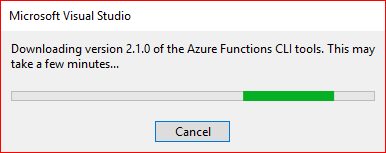
Update: Well out of the blue today after starting project to debug and test it, I received this. So I guess the "Azure Functions and Web Jobs Tools" VS extension auto downloads the latest version that is published. I was not aware of this, I thought it's version was tied to a specific version of the CLI.
johnwc
on 24 May 2018
Hey @VaclavElias - I have a similar issue - posted here: https://github.com/Azure/azure-functions-host/issues/2901
.cc @fabiocav
 ChristianWeyer
on 26 May 2018
ChristianWeyer
on 26 May 2018
@ChristianWeyer , @fabiocav I think my issue is now resolved with https://github.com/Azure/azure-functions-core-tools/releases/tag/2.0.1-beta.29. I had no issue with this. Does anybody know when this is going to be part of Visual Studio and when corresponding runtime will be published to Azure Platform? Thanks :)
VaclavElias
on 9 Jun 2018
Glad to hear! That update is rolling out to Azure now and will come to VS early in the coming week.
fabiocav
on 9 Jun 2018
@VaclavElias if you would like to verify in Azure that the fix being deployed works for you, try creating a test app in the West Central US region, which already has the fix. It should normally be everywhere by Tuesday (unless we hit issues).
 davidebbo
on 9 Jun 2018
davidebbo
on 9 Jun 2018
I am gettign the following error, using netstandard2.0 and v2 for a precomipled azure function.
Using entity Microsoft.EntityFrameworkCore.SqlServer version 2.0.1 and using .NET NETStandard.Library 2.0.3.
Seems function try to resolve the version 2.1.0.0, which I haven't referenced anywhere in my project.
System.TypeLoadException: Could not load type 'Microsoft.EntityFrameworkCore.Infrastructure.Internal.SqlServerOptionsExtension' from assembly
'Microsoft.EntityFrameworkCore.SqlServer, Version=2.1.0.0, Culture=neutral, PublicKeyToken=adb9793829ddae60'.
at (SqlServerDbContextOptionsBuilder options)
at Microsoft.EntityFrameworkCore.SqlServerDbContextOptionsExtensions.UseSqlServer(DbContextOptionsBuilder optionsBuilder, String connectionString, Action`1 sqlServerOptionsAction)
Everything works locally and I could see the installed runtime version.
OS Version: 10.0.16299
OS Platform: Windows
RID: win10-x64
Base Path: C:Program Filesdotnetsdk2.1.300
Host (useful for support):
Version: 2.1.0
Commit: caa7b7e2ba
.NET Core SDKs installed:
2.1.2 [C:Program Filesdotnetsdk]
2.1.4 [C:Program Filesdotnetsdk]
2.1.102 [C:Program Filesdotnetsdk]
2.1.104 [C:Program Filesdotnetsdk]
2.1.201 [C:Program Filesdotnetsdk]
2.1.300 [C:Program Filesdotnetsdk]
.NET Core runtimes installed:
Microsoft.AspNetCore.All 2.1.0 [C:Program FilesdotnetsharedMicrosoft.AspNetCore.All]
Microsoft.AspNetCore.App 2.1.0 [C:Program FilesdotnetsharedMicrosoft.AspNetCore.App]
Microsoft.NETCore.App 2.0.3 [C:Program FilesdotnetsharedMicrosoft.NETCore.App]
Microsoft.NETCore.App 2.0.5 [C:Program FilesdotnetsharedMicrosoft.NETCore.App]
Microsoft.NETCore.App 2.0.6 [C:Program FilesdotnetsharedMicrosoft.NETCore.App]
Microsoft.NETCore.App 2.0.7 [C:Program FilesdotnetsharedMicrosoft.NETCore.App]
Microsoft.NETCore.App 2.1.0 [C:Program FilesdotnetsharedMicrosoft.NETCore.App]
But when I check the same in azure using kudu cant' see the Microsoft.NETCore.App 2.0.3 [C:Program FilesdotnetsharedMicrosoft.NETCore.App].
see the below:
.NET Core SDK (reflecting any global.json):
Version: 2.1.300
Commit: 32f29b6eb9
Runtime Environment:
OS Name: Windows
OS Version: 10.0.14393
OS Platform: Windows
RID: win10-x86
Base Path: D:Program Files (x86)dotnetsdk2.1.300
Host (useful for support):
Version: 2.1.0
Commit: caa7b7e2ba
.NET Core SDKs installed:
1.1.8 [D:Program Files (x86)dotnetsdk]
2.1.101 [D:Program Files (x86)dotnetsdk]
2.1.300 [D:Program Files (x86)dotnetsdk]
.NET Core runtimes installed:
Microsoft.AspNetCore.All 2.1.0-rc1-final [D:Program Files (x86)dotnetsharedMicrosoft.AspNetCore.All]
Microsoft.AspNetCore.All 2.1.0 [D:Program Files (x86)dotnetsharedMicrosoft.AspNetCore.All]
Microsoft.AspNetCore.App 2.1.0-rc1-final [D:Program Files (x86)dotnetsharedMicrosoft.AspNetCore.App]
Microsoft.AspNetCore.App 2.1.0 [D:Program Files (x86)dotnetsharedMicrosoft.AspNetCore.App]
Microsoft.NETCore.App 1.0.10 [D:Program Files (x86)dotnetsharedMicrosoft.NETCore.App]
Microsoft.NETCore.App 1.1.7 [D:Program Files (x86)dotnetsharedMicrosoft.NETCore.App]
Microsoft.NETCore.App 2.0.6 [D:Program Files (x86)dotnetsharedMicrosoft.NETCore.App]
Microsoft.NETCore.App 2.1.0-rc1 [D:Program Files (x86)dotnetsharedMicrosoft.NETCore.App]
Microsoft.NETCore.App 2.1.0 [D:Program Files (x86)dotnetsharedMicrosoft.NETCore.App]
Any help much appreciated.
 joseclament
on 20 Jun 2018
joseclament
on 20 Jun 2018
This is not fixed. Yet. Running a Durable Functions with the following version of the local runtime:
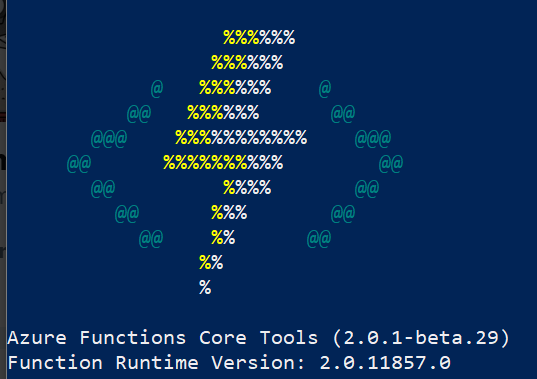
My Functions csproj:
<Project Sdk="Microsoft.NET.Sdk">
  <PropertyGroup>
    <TargetFramework>netstandard2.0</TargetFramework>
    <AzureFunctionsVersion>v2</AzureFunctionsVersion>
  </PropertyGroup>
  <ItemGroup>
    <PackageReference Include="CommonMark.NET" Version="0.15.1" />
    <PackageReference Include="EFCore.BulkExtensions" Version="2.1.1" />
    <PackageReference Include="Microsoft.Azure.WebJobs.Extensions.DurableTask" Version="1.4.1" />
    <PackageReference Include="Microsoft.NET.Sdk.Functions" Version="1.0.13" />
    <PackageReference Include="Octokit" Version="0.30.0" />
  </ItemGroup>
  <ItemGroup>
    <ProjectReference Include="..\AzureSDKCompliance.Data\AzureSDKCompliance.Data.csproj" />
  </ItemGroup>
  <ItemGroup>
    <None Update="host.json">
      <CopyToOutputDirectory>PreserveNewest</CopyToOutputDirectory>
    </None>
    <None Update="local.settings.json">
      <CopyToOutputDirectory>PreserveNewest</CopyToOutputDirectory>
      <CopyToPublishDirectory>Never</CopyToPublishDirectory>
    </None>
  </ItemGroup>
</Project>
This project references a "Data" project where EF is referenced. Here is its dependencies:
<Project Sdk="Microsoft.NET.Sdk">

  <PropertyGroup>
    <TargetFramework>netstandard2.0</TargetFramework>
    <ApplicationIcon />
    <StartupObject />
  </PropertyGroup>

  <ItemGroup>
    <PackageReference Include="Microsoft.EntityFrameworkCore.Design" Version="2.1.1" />
    <PackageReference Include="Microsoft.EntityFrameworkCore.SqlServer" Version="2.1.1" />
  </ItemGroup>

</Project>
Instantiating a DbContext object from any Functions will generate the following exception:
System.IO.FileNotFoundException: Could not load file or assembly 'Microsoft.Extensions.DependencyInjection.Abstractions, Version=2.1.1.0, Culture=neutral, PublicKeyToken=adb9793829ddae60'. The system cannot find the file specified.
File name: 'Microsoft.Extensions.DependencyInjection.Abstractions, Version=2.1.1.0, Culture=neutral, PublicKeyToken=adb9793829ddae60' ---> System.IO.FileNotFoundException: Could not load the specified file.
File name: 'Microsoft.Extensions.DependencyInjection.Abstractions'
   at System.Runtime.Loader.AssemblyLoadContext.ResolveUsingEvent(AssemblyName assemblyName)
   at System.Runtime.Loader.AssemblyLoadContext.ResolveUsingResolvingEvent(IntPtr gchManagedAssemblyLoadContext, AssemblyName assemblyName)
   at Microsoft.EntityFrameworkCore.DbContext..ctor(DbContextOptions options)
   at AzureSDKCompliance.Data.Context.azsdkcomplianceContext..ctor(String connectionString) in C:\vsts_ws\AzureSDKCompliance\AzureSDKCompliance.Data\Context\azsdkcomplianceContext.cs:line 11
   at AzureSDKCompliance.Spider.DownloadSamplesOrchestration.<SaveAllPublicRepositories>d__5.MoveNext() in C:\vsts_ws\AzureSDKCompliance\AzureSDKCompliance.Spider\DownloadSamplesOrchestration.cs:line 71
Things I've tried:
- Using a preview version of the
funcruntime (beta26 to be exact) - Using EF 2.0.0 (no result)
If you need copy/paste of code, I can provide. There's nothing secret in what I'm doing. Please let me know.
 MaximRouiller
on 20 Jun 2018
MaximRouiller
on 20 Jun 2018
Also tried on Azure with FUNCTIONS_EXTENSION_VERSION set to 2.0.11776-alpha based on https://github.com/Azure/azure-functions-durable-extension/issues/342 and it didn't work. Same error.
My next step at that point would be to run this whole process in a container unless there's something I can do to fix this.
MaximRouiller
on 20 Jun 2018
@MaximRouiller, @joseclament not sure if this helps:
When I did my tests on my project I was able to run locally .NET Core 2.1 (haven't tested 2.1.1) with https://github.com/Azure/azure-functions-core-tools/releases/tag/2.0.1-beta.29
Note: That 2.0.1-beta.29 is not part of Visual Studio 2017 yet (if I am right), I had to manually move things/parts around so when I run functions 2.0.1-beta.29 from command line I somehow pointed them to my .NET Core 2.1 Azure Function project and all was working. I haven't published yet to Azure.
VaclavElias
on 20 Jun 2018
@MaximRouiller and @VaclavElias ,
I was able to run the EF with 2.0.1 locally, but getting the below error when running on azure
System.TypeLoadException: Could not load type 'Microsoft.EntityFrameworkCore.Infrastructure.Internal.SqlServerOptionsExtension' from assembly
'Microsoft.EntityFrameworkCore.SqlServer, Version=2.1.0.0, Culture=neutral, PublicKeyToken=adb9793829ddae60'.
Upgraded to EF 2.1.1 and getting the below error:
System.Private.CoreLib: Exception while executing function: MyFunction, Could not load file or assembly 'Microsoft.Extensions.Logging.Abstractions, Version=2.1.1.0, Culture=neutral, PublicKeyToken=adb9793829ddae60'. The system cannot find the file specified. System.Private.CoreLib: Could not load the specified file.
Spending 5 times more time to fix these kind of issues, should have gone with some other tech option.
@VaclavElias could you please let me know if your function can run on azure after your work around.
joseclament
on 20 Jun 2018
@MaximRouiller and @VaclavElias .
I've used this beta version( https://github.com/Azure/azure-functions-core-tools/releases/tag/2.0.1-beta.29) on my project and was able to debug locally. Needs to test this on azure now.
joseclament
on 20 Jun 2018
Update:
After talking with @cgillum, this issue was solved AFTER 2.0.11776-alpha which means that I would need to resolve to beta to solve the issue of assembly loading. However, due to a bug in Durable Extensions, Orchestrator functions are stuck in a pending state with no hope of recovering.
The resolution to this is to wait for 1.5.0 which from the logs in the repository (https://github.com/Azure/azure-functions-durable-extension/pull/349) looks like is coming soon-ish(?).
MaximRouiller
on 21 Jun 2018
I have also an update with my tests. Finally made it all working.
My stars alignment :)
- Visual Studio -> Azure Functions and Web Job Tools 15.0.40617.0 (installed today)
- Function Runtime Version: 2.0.11857.0
- Azure Functions Core Tools (2.0.1-beta.29) installed with
npm i -g azure-functions-core-tools@core --unsafe-perm true - When I run it from Visual Studio I got some errors so I used this Manual Update and I can run it without any errors
- I have published it to Azure (Runtime version: 2.0.11857.0 (beta)) and all is working
@joseclament all is working. .NET Core 2.1, using also Entity Framework 2.1.
VaclavElias
on 21 Jun 2018
@VaclavElias , Yes all working fine for me too. Installed the visual studio update for the function and as well as visual studio. Published it locally and was working. Pushed to azure and its working. Finally a big Hurray. Got my ILogger working thru all the way from function entry point to Db layer using dependency injection and DI working for everything. A great way to finish off a frustrated week.
joseclament
on 22 Jun 2018
@joseclament what DI did you use in Azure Functions?
VaclavElias
on 22 Jun 2018
@VaclavElias ServiceCollection:Microsoft.Extensions.DependencyInjection:
See how I did:
public static class Startup
 {
     static Startup()
     {
         try
         {
             Build();
         }
         catch (Exception exception)
         {
             Debug.Write(exception.ToString());
             throw;
         }
     }
public static IServiceProvider Instance { get; private set; }

public static IConfiguration Configuration { get; private set; } // You can use this if you wanna inject some configuration value to any other classes

 private static void Build()
    {
        var configurationBuilder = new ConfigurationBuilder()
          .AddEnvironmentVariables();

        var tokenProvider = new AzureServiceTokenProvider();
        var authenticationCallback = new KeyVaultClient.AuthenticationCallback(tokenProvider.KeyVaultTokenCallback);
        var keyVaultClient = new KeyVaultClient(authenticationCallback);
        var configRoot = configurationBuilder.Build();
        Configuration = configRoot;
        var configuration = configurationBuilder.AddAzureKeyVault(Environment.GetEnvironmentVariable("KeyVaultBaseUrl"), keyVaultClient, new DefaultKeyVaultSecretManager()).Build();

        var seriLogger = Log.Logger;

        seriLogger = new LoggerConfiguration()
            .MinimumLevel.Information()
            .MinimumLevel.Override("Microsoft", LogEventLevel.Warning)
            .MinimumLevel.Override("System", LogEventLevel.Warning)
            .Enrich.FromLogContext()
            .Enrich.WithProperty("my Function", "Functions")
            .WriteTo.ApplicationInsightsEvents(Environment.GetEnvironmentVariable("AppInsights_InstrumentationKey"))
            .CreateLogger();

        var services = new ServiceCollection();
        ILoggerFactory loggerFactory = new LoggerFactory();
        loggerFactory.AddSerilog(seriLogger);
        services.AddSingleton(loggerFactory);
        services.AddSingleton(typeof(ILogger<>), typeof(Logger<>));
        seriLogger.Information("Functions Logger started");

        var connectionString = configuration.GetConnectionString("mydb");
        services.AddSingleton(Configuration);
        services.AddAutoMapper(typeof(Startup));
        services.AddTransient<IMessageComposer, MessageComposer>();
        services.AddTransient<IMessagePublisher, MessagePublisher>();
        services.AddTransient(s => new MyDbContext(connectionString));
        services.AddTransient<IMyDbService, myDbService>();

        Instance = services.BuildServiceProvider();
    }
}
On your function:
public static class AddProduct
{
    private static readonly ILogger Logger;
    private static readonly IServiceProvider ServiceProvider;
    static AddProduct()
    {
        ServiceProvider = Startup.Instance;
        Logger = ServiceProvider.GetRequiredService<ILogger<MessageComposer>>();
    }
[ServiceBusAccount("ServiceBusConnectionString")]
    [FunctionName("AddProduct")]
    public static void Run(
        [ServiceBusTrigger("%EventsTopicName%", "%AddProductSubscriptionName%")]Message message)
    {
        Logger.LogInformation($"AddProductfunction starting for Label:{message.Label}; CorrelatonId:{message.CorrelationId};");

        try
        {
            var messageComposer = ServiceProvider.GetService<IMessageComposer>();
            messageComposer.ProcessAddMessagesAsync(message).GetAwaiter().GetResult();
            Logger.LogInformation($"AddProduct function ended for Label:{message.Label}; CorrelatonId:{message.CorrelationId};");
        }
        catch (Exception exception)
        {
         var errorDetails = $"Exception occured at AddProduct function for Label:{message.Label}; CorrelatonId:{message.CorrelationId};";

                Logger.LogError(LoggingEvents.AddProductFunctionException, errorDetails + "/n" + exception);
            throw;
        }
    }
}
On your classes:
public class MessageComposer : IMessageComposer
{
    private readonly IMessagePublisher _messagePublisher;
    private readonly ILogger<MessageComposer> _logger;
    private const string ContentTypeJson = "application/json";

    public MessageComposer(IMessagePublisher messagePublisher, ILogger<MessageComposer> logger)
    {
        _messagePublisher = messagePublisher;
        _logger = logger;
    }
public asyncTask ProcessAddMessagesAsync(Message message)
{
    _logger.LogInformation("Staring processing ProcessAddMessage")
    //Code
   //_messagePublisher.PublishMessage()
_logger.LogInformation("End of processing ProcessAddMessage")
    }
    }
@joseclament thanks, I have used this one https://github.com/BorisWilhelms/azure-function-dependency-injection but will look also to your option :) Thanks for sharing!
VaclavElias
on 22 Jun 2018
We are developing a framework, it is almost done but still not battle tested in production. You have dependency injection for message handlers and support for sagas.
Hope you like it:
https://github.com/organization-quintasenergy/Azure-Functions-Bus
pablocastillaquintas
on 22 Jun 2018
So 1.5.0 is out. Did that solve problems from everyone?
MaximRouiller
on 22 Jun 2018
@MaximRouiller are you still experiencing issues?
fabiocav
on 22 Jun 2018
For more context, this should have been fully resolved in 2.0.11857, which shipped with the Core Tools beta.29. That version was NOT pushed to Visual Studio automatically, so you'd need to follow the steps to update it: https://github.com/Azure/azure-functions-vs-build-sdk/wiki/How-to-manually-update-the-Azure-Functions-Core-Tools
The latest release, deployed with beta.30, will be pushed to Visual Studio soon.
I'm closing this as resolved as it has been validated and confirmed by many, but please let us know if the original issue comes up.
fabiocav
on 22 Jun 2018
No more issues on my end.
MaximRouiller
on 4 Jul 2018
I still have the same issue even following https://github.com/Azure/azure-functions-vs-build-sdk/wiki/How-to-manually-update-the-Azure-Functions-Core-Tools
 yaroslav-rudchenko
on 20 Jul 2018
yaroslav-rudchenko
on 20 Jul 2018
Related issues
 MattHoneycutt
·
4Comments
MattHoneycutt
·
4Comments
 SteveALee
·
4Comments
SteveALee
·
4Comments
 anaelcarvalho
·
3Comments
anaelcarvalho
·
3Comments
 rhummelmose
·
5Comments
rhummelmose
·
5Comments
 sonic1981
·
4Comments
sonic1981
·
4Comments
Most helpful comment
I have also an update with my tests. Finally made it all working.
My stars alignment :)
npm i -g azure-functions-core-tools@core --unsafe-perm true@joseclament all is working. .NET Core 2.1, using also Entity Framework 2.1.