Azure-functions-core-tools: System.Private.CoreLib: Could not load file or assembly 'Microsoft.AspNetCore.Http.Abstractions'
C:\Users\erics\AppData\Roaming\npm
-- [email protected]
  +-- [email protected]
  |
-- [email protected]
| -- [email protected]
-- [email protected]
`-- [email protected]

 espray
All 20 comments
I am also seeing this when trying to debug a new Functions project from a new install of VS2017 15.5.2.
 kulibali
on 15 Dec 2017
kulibali
on 15 Dec 2017
also seeing it now, when trying to debug new function in VS2017 15.5.2
using SDK.Functions 1.0.7
on SDK.Functions 1.0.6 it is working. after upgrading start to fail
you test it using the default sample function that is created by VS2017
 baget
on 16 Dec 2017
baget
on 16 Dec 2017
I am getting the same error in VS2017 15.5.2 It seems related to the fact that the cli loads a certain version of the dll then you try to reference a different version. I am having a similar issue with WindowsAzure.Storage
Seems related to https://github.com/Azure/azure-functions-cli/issues/335 and https://github.com/Azure/azure-functions-cli/issues/253
 andymac4182
on 17 Dec 2017
andymac4182
on 17 Dec 2017
Same issue for me. Pre-conditions:
C# function,
.Net Standard 2.0,
WindowsAzure.Storage 8.7.0
Could not load assembly WindowsAzure.Storage (or similar). Nothing worked, until I downgraded WindowsAzure.Storage to 8.6.0. This is a version I've seen when NPM was restoring dependencies for Functions SDK. Downgraded, cleaned, re-compiled - voila!
 evgeny-n
on 30 Jan 2018
evgeny-n
on 30 Jan 2018
Also had same issue with WindowsAzure.Storage 9.0 and 8.7. Had to downgrade to 8.6. Thanks for the workaround evgeny-n !
Did not have this issue with Azure functions V1 (.Net Framework). Occurred when I ported to V2 (.Net Standard 2.0)
 corsjune
on 16 Feb 2018
corsjune
on 16 Feb 2018
Thanks @evgeny-n for your workaround. Updating the Azure Functions and Web Jobs Tools to the latest version might also help.
 jrebagliatti
on 8 Mar 2018
jrebagliatti
on 8 Mar 2018
Am getting same error message when running azure functions project locally. Targetting .net standard 2.0.
Using .net sdk functions 1.0.6 and it worked ok initially for the "Function1" freebie function. Then added reference to Microsoft.AspNetCore.Authentication.JwtBearer and immediately get this error.
I also tried installing System.IdentityModel.Tokens.Jwt package [i just want to parse a jwt]. this works in local debugging but fails when I publish it to azure.
Is it just me or is version hell back with a massive vengeance in .net core space - possibly worse than ever before?
 jg11jg
on 16 Mar 2018
jg11jg
on 16 Mar 2018
Just for fun, I get it on the actual Azure portal. The code is merely from the Azure samples.

 SoulFireMage
on 27 Apr 2018
SoulFireMage
on 27 Apr 2018
I've uploaded the correct file to the folder in question, I'm certain it's in the right place as all the other dlls reside in the webRoot. However, it's blatantly giving the same message?
"The function runtime is unable to start. System.Private.CoreLib: Could not load file or assembly 'Microsoft.AspNetCore.Mvc.Abstractions, Version=2.0.3.0"
Is this still my inexperience with the platform (quite plausible, I know) ?

SoulFireMage
on 27 Apr 2018
I am getting something similar, but for cosmosdb trigger functions.
System.Private.CoreLib: One or more errors occurred. (Unable to load DLL 'Microsoft.Azure.Documents.ServiceInterop.dll': The specified module could not be found. (Exception from HRESULT: 0x8007007E)). Microsoft.Azure.DocumentDB.Core: Unable to load DLL 'Microsoft.Azure.Documents.ServiceInterop.dll': The specified module could not be found. (Exception from HRESULT: 0x8007007E)
 reddy6ue
on 28 Apr 2018
reddy6ue
on 28 Apr 2018
The similar issue for the prerelease version of Azure.KeyVault
Could not load file or assembly 'Microsoft.Azure.KeyVault, Version=3.0.0.0, Culture=neutral, PublicKeyToken=31bf3856ad364e35'. Could not find or load a specific file. (Exception from HRESULT: 0x80131621)
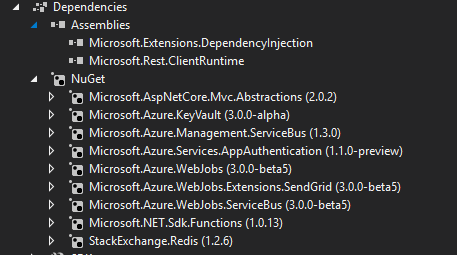
 Bubeee
on 8 May 2018
Bubeee
on 8 May 2018
Getting the same thing, after adding Microsoft.AspNetCore.Authentication.JwtBearer. VS 2017 15.7.1. Azure Functions and Web Jobs Tools 15.0.40502.0.
 johnkwaters
on 9 May 2018
johnkwaters
on 9 May 2018
Same issue with <PackageReference Include="Microsoft.Extensions.Options" Version="2.0.1" /> down graded to <PackageReference Include="Microsoft.Extensions.Options" Version="2.0.0" /> to resolve the issue
`
              %%%%%%
             %%%%%%
        @   %%%%%%    @
      @@   %%%%%%      @@
   @@@    %%%%%%%%%%%    @@@
 @@      %%%%%%%%%%        @@
   @@         %%%%       @@
     @@      %%%       @@
       @@    %%      @@
            %%
            %
Hosting environment: Production
Content root path: C:\Users*\netstandard2.0
Now listening on: http://localhost:7071
Application started. Press Ctrl+C to shut down.
[5/14/2018 2:13:05 PM] Reading host configuration file 'C:\Users*\bin\Debug\netstandard2.0\host.json'
[5/14/2018 2:13:05 PM] Host configuration file read:
[5/14/2018 2:13:05 PM] {}
[5/14/2018 2:13:05 PM] Starting Host (HostId=bngdsktp029-1966213432, InstanceId=77f4eb63-255e-4169-83f9-388d1d60fce0, Version=2.0.11651.0, ProcessId=16084, AppDomainId=1, Debug=False, ConsecutiveErrors=0, StartupCount=1, FunctionsExtensionVersion=)
[5/14/2018 2:13:05 PM] Generating 1 job function(s)
[5/14/2018 2:13:06 PM] Found the following functions:
[5/14/2018 2:13:06 PM] ConnectBooster.Host.Synchronization.Functions.GraphQLFunction.RunGraphQL
[5/14/2018 2:13:06 PM]
[5/14/2018 2:13:06 PM] Host initialized (533ms)
[5/14/2018 2:13:06 PM] Host started (731ms)
[5/14/2018 2:13:06 PM] Job host started
[5/14/2018 2:13:06 PM] Host lock lease acquired by instance ID '0000000000000000000000003E437901'.
Listening on http://localhost:7071/
Hit CTRL-C to exit...
Http Functions:
graphql: http://localhost:7071/api/graphql
[5/14/2018 2:13:09 PM] Executing 'graphql' (Reason='This function was programmatically called via the host APIs.', Id=8a3feaea-8fea-4140-b833-df8c7cac1a43)
[5/14/2018 2:13:09 PM] Executed 'graphql' (Failed, Id=8a3feaea-8fea-4140-b833-df8c7cac1a43)
[5/14/2018 2:13:09 PM] System.Private.CoreLib: Exception while executing function: graphql. graphql-dotnet-builder: Could not load file or assembly 'Microsoft.Extensions.Options, Version=2.0.1.0, Culture=neutral, PublicKeyToken=adb9793829ddae60'. Could not find or load a specific file. (Exception from HRESULT: 0x80131621). System.Private.CoreLib: Could not load file or assembly 'Microsoft.Extensions.Options, Version=2.0.1.0, Culture=neutral, PublicKeyToken=adb9793829ddae60'.
`
espray
on 14 May 2018
Updating "Azure Functions and Web Jobs Tools" extension fixed the issue for me, although I am only trying to get it to run locally.
Steps:
In Visual Studio
Go to Tools > Extensions and Updates
In Extensions and Updates dialog, expand Updates > Visual Studio Marketplace
Choose Azure Functions and Web Jobs Tools
Select Update
Restart VS
 apostrophe
on 14 May 2018
apostrophe
on 14 May 2018
@apostrophe , fixed what exactly? I have the latest and greatest of what's in the "Extensions and Updates" and I still see this when trying to use anything above EF Core 2.0
I have 15.0.40502.0 installed of "Azure Functions and Web Jobs Tools"
 johnwc
on 15 May 2018
johnwc
on 15 May 2018
I have 15.0.40502.0 installed of "Azure Functions and Web Jobs Tools"
That's the same version I am have, but I'm not using EF Core.
apostrophe
on 15 May 2018
I was able to get further by downgrading some of the nuget references to be the same as used by the tools, but only got so far down that path. Not able to reference EF Core without getting similar errors.
johnkwaters
on 15 May 2018
Had this issue, got the updates (VS extension then Nuget then CLI tool then Storage emulator), issue stopped and function was working. Re-opened the project later in the evening, issue is back. No further update possible this time. Puzzling...
 daviburg
on 6 Sep 2018
daviburg
on 6 Sep 2018
I have not had this issue for some time now. Currently running on v36 all nugets on latested(EF, AzStorage and AzEventHub).
Using VS 2017 as well.
@daviburg
Double check the host version. Maybe the AzHost is npm installed global????
espray
on 7 Sep 2018
A significant number of changes relating to Functions V2 GA have happened since this issue was originally opened and the underlying issue has been addressed. Anyone who is still experiencing issues should feel free to open separate issues.
 maiqbal11
on 30 Oct 2018
maiqbal11
on 30 Oct 2018
Related issues
 Kaushik27
·
5Comments
Kaushik27
·
5Comments
 lastcoolnameleft
·
4Comments
lastcoolnameleft
·
4Comments
 cgillum
·
4Comments
cgillum
·
4Comments
 dstaley
·
3Comments
dstaley
·
3Comments
 rhummelmose
·
5Comments
rhummelmose
·
5Comments
Most helpful comment
Same issue for me. Pre-conditions:
C# function,
.Net Standard 2.0,
WindowsAzure.Storage 8.7.0
Could not load assembly WindowsAzure.Storage (or similar). Nothing worked, until I downgraded WindowsAzure.Storage to 8.6.0. This is a version I've seen when NPM was restoring dependencies for Functions SDK. Downgraded, cleaned, re-compiled - voila!