Azure-functions-core-tools: CLI 2.0 Preview doesn't seem to work with EFCore 2.0
I'm trying to build a function app that leverages EF Core 2.0. Since EF Core 2.0 target's .NET Standard 2.0, I'm testing this out using the CLI 2.0 Preview.
First, I installed this:
npm i -g [email protected]
Then when I try to run my function app (via func host start --port 7071 --pause-on-error in the bin\Debug\net47 directory) I see this:
Starting Host (HostId=<removed>, Version=2.0.11280.0, ProcessId=656, Debug=False, Attempt=0)
I assume that the 2.0.11280.0 confirms that I'm running CLI 2.0
The function is recognized by the host and the host awaits a GET to https://localhost:7071/api/Applications
When I navigate my browser to https://localhost:7071/api/Applications, I get the following error:
[9/25/2017 6:01:32 PM] A ScriptHost error has occurred
[9/25/2017 6:01:32 PM] Exception while executing function: Applications. Service: Could not load file or assembly 'System.Net.Http.Formatting, Version=5.2.3.0, Culture=neutral, PublicKeyToken=31bf3856ad364e35'. Could not find or load a specific file. (Exception from HRESULT: 0x80131621). System.Private.CoreLib: Could not load file or assembly 'System.Net.Http.Formatting, Version=5.2.3.0, Culture=neutral, PublicKeyToken=31bf3856ad364e35'.
[9/25/2017 6:01:32 PM] Exception while executing function: Applications
[9/25/2017 6:01:32 PM] Exception while executing function: Applications. Service: Could not load file or assembly 'System.Net.Http.Formatting, Version=5.2.3.0, Culture=neutral, PublicKeyToken=31bf3856ad364e35'. Could not find or load a specific file. (Exception from HRESULT: 0x80131621). System.Private.CoreLib: Could not load file or assembly 'System.Net.Http.Formatting, Version=5.2.3.0, Culture=neutral, PublicKeyToken=31bf3856ad364e35'.
[9/25/2017 6:01:32 PM] Function completed (Failure, Id=2c2432cc-462b-4826-a86a-0df85bda2542, Duration=231ms)
[9/25/2017 6:01:32 PM]
[9/25/2017 6:01:32 PM] Executed 'Applications' (Failed, Id=2c2432cc-462b-4826-a86a-0df85bda2542)
[9/25/2017 6:01:32 PM] System.Private.CoreLib: Exception while executing function: Applications. Service: Could not load file or assembly 'System.Net.Http.Formatting, Version=5.2.3.0, Culture=neutral, PublicKeyToken=31bf3856ad364e35'. Could not find or load a specific file. (Exception from HRESULT: 0x80131621). System.Private.CoreLib: Could not load file or assembly 'System.Net.Http.Formatting, Version=5.2.3.0, Culture=neutral, PublicKeyToken=31bf3856ad364e35'.
[9/25/2017 6:01:32 PM]   Function had errors. See Azure WebJobs SDK dashboard for details. Instance ID is '2c2432cc-462b-4826-a86a-0df85bda2542'
[9/25/2017 6:01:32 PM] System.Private.CoreLib: Exception while executing function: Applications. Service: Could not load file or assembly 'System.Net.Http.Formatting, Version=5.2.3.0, Culture=neutral, PublicKeyToken=31bf3856ad364e35'. Could not find or load a specific file. (Exception from HRESULT: 0x80131621). System.Private.CoreLib: Could not load file or assembly 'System.Net.Http.Formatting, Version=5.2.3.0, Culture=neutral, PublicKeyToken=31bf3856ad364e35'.
I've attached a small sample solution that repros this issue. The solution consists of three projects: the function app, and two class libraries that contain "data access" logic. In each project I updated:
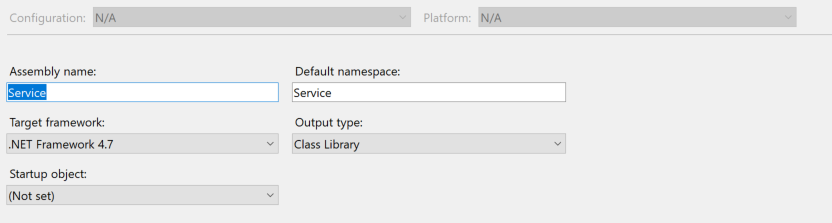
- the target framework to 4.7
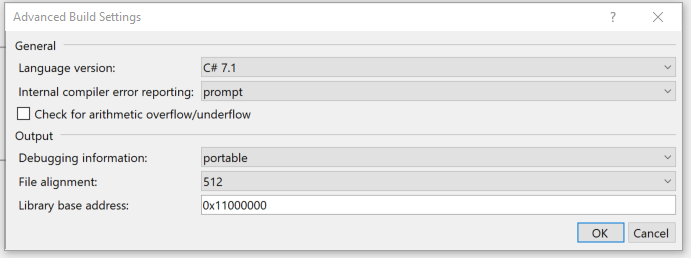
- the language version to C# 7.1
Am I doing something wrong here? Is this another example of the issue described here:
dotnet/standard#481?
 pauldalyii
All 14 comments
Was System.Net.Http.Formatting deployed with your function (in bin) ?
With the new runtime, one easy thing to do here is eliminate that dependency altogether and use a model that relies on new abstractions like:
#r "Newtonsoft.Json"

using System.Net;
using Microsoft.AspNetCore.Mvc;
using Microsoft.Extensions.Primitives;
using Newtonsoft.Json;

public static IActionResult Run(HttpRequest req, TraceWriter log)
{
    log.Info("C# HTTP trigger function processed a request.");

    string name = req.Query["name"];

    string requestBody = new StreamReader(req.Body).ReadToEnd();
    dynamic data = JsonConvert.DeserializeObject(requestBody);
    name = name ?? data?.name;

    return name != null
        ? (ActionResult)new OkObjectResult($"Hello, {name}")
        : new BadRequestObjectResult("Please pass a name on the query string or in the request body");
}
Will try to repro with the code you've provided, but if you can confirm the assembly was present, that would help.
 fabiocav
on 26 Sep 2017
fabiocav
on 26 Sep 2017
Thanks @fabiocav,
System.Net.Http.Formatting was deployed in the the bin\Debug\net47\bin folder.
When you suggest eliminating that dependency altogether, are you suggesting that I remove Microsoft.NET.Sdk.Functions, because that is what is transitively referring to System.Net.Http.Formatting?
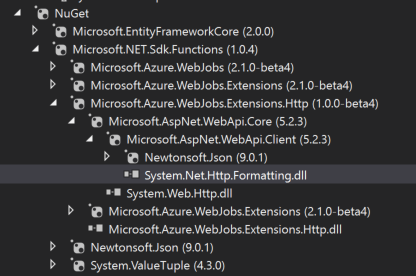
I attempted to remove Microsoft.NET.Sdk.Functions, but found that I'd need to remove the FunctionName and HttpTrigger attributes:
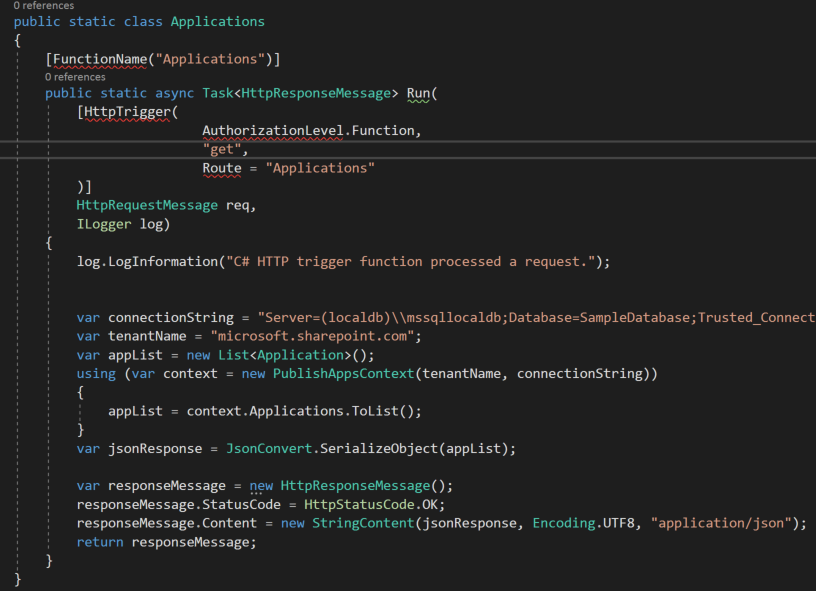
I'm assuming this means I need to go back down the path of manually creating a function.json for each function within my function app? I liked being able to use the attributes for project structure reasons. Let's say I want to implement a get and a post for a route Applications. My folder structure currently looks like this:
Applications\Get.cs
Applications\Post.cs
AFAIK, I can't do that if I need to have a function.json file relative to each of those. I think that now I'd need to do something like this:
Applications\Get\Get.cs
Applications\Get\function.json
Applications\Post\Post.cs
Applications\Post\function.json
Actually, I just came across an article posted yesterday that talks about this. It sounds like you are already aware of the issue.
Is there an existing GitHub issue I can follow, so that I can convert back once this is available?
Thanks again!
pauldalyii
on 26 Sep 2017
I can confirm that EF Core 2.0 works after removing reference to Microsoft.NET.Sdk.Functions and manually generating the function.json files for each function.
pauldalyii
on 26 Sep 2017
@pauldalyii did you continue to see a problem if you kept the reference but updated the code to remove the dependency on the extension methods I mentioned? (e.g. by changing to HttpRequest/IActionResult)?
fabiocav
on 26 Sep 2017
Ahh, yes. If I reference Microsoft.NET.Sdk.Functions, but change the signature of the function to leverage HttpRequest and IActionResult, then it generates the function.json file. I also do not get the runtime exception regarding System.Net.Http.Formatting.
Thanks again @fabiocav
pauldalyii
on 26 Sep 2017
@fabiocav, although this has been working works fine using my local emulator since Sept 26th, it doesn't yet work when my function is deployed to Azure even with the beta switch flipped in the port.
Here's what I see that when I deploy my Function app to Azure:
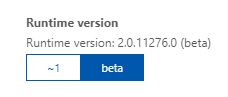
I assume that's the version of the CLI running in Azure.
However, when I run locally after installing [email protected], I see this:
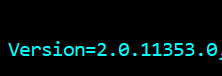
I assume that these two versions both represent the CLI runtime version.
I have tried to explicitly define the 2.0.11353.0 version like this, but that still doesn't seem to work:

I guess my question is: When will newer versions of the CLI be deployed to Azure even if only to those customers willing to toggle the Beta runtime version switch?
pauldalyii
on 3 Nov 2017
We are due for a 2.0 deployment as there have been several bug fixes and enhancements. This will likely happen at the end of the current sprint (in about a week and a half), but we'll try to do it sooner.
fabiocav
on 3 Nov 2017
Thanks @fabiocav! Looking forward to it!
pauldalyii
on 3 Nov 2017
@fabiocav, I see a newer version of the runtime in the portal (2.0.11370.0). Thanks!
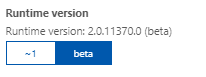
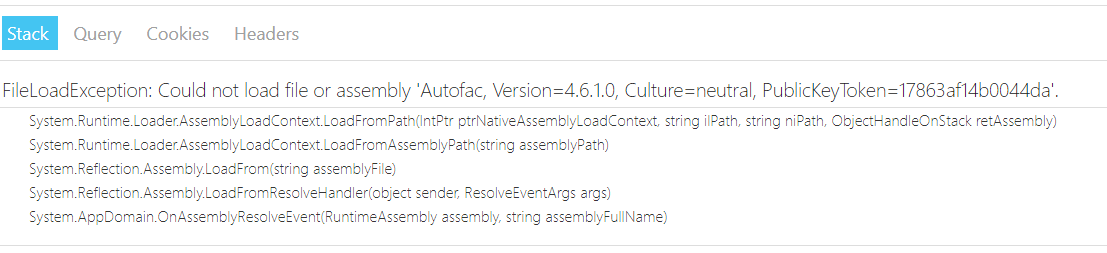
After seeing the updated version, I attempted to see if I could get my FunctionApp running with this newer version, however I get FileLoadExceptions when running in Azure that I don't see when running locally...
I checked into the runtime version and it looks like I'm running an older version of the runtime. I'm at 2.0.11353.0, but the Azure portal is at 2.0.11370.0.
I got 2.0.11353.0 by running npm i -g [email protected] I assume that I'll need to upgrade to a newer version of azure-functions-core-tools, resolve those FileLoadExceptions and redeploy, but I don't see a newer npm package atm.
I'm assuming you're still probably rolling this out - just wanted to call this out in case.
This makes me think I should probably lock my functionapp into a specific runtime version...
Anyway... thanks again @fabiocav!
pauldalyii
on 8 Nov 2017
@fabiocav, I saw that [email protected] was released this morning.
After installing and running the function app locally, I got a similar FileLoadException wrt Autofac above.

Thinking I've run into some sort of binding redirect issue, I tried downgrading my project's reference to Autofac from 4.6.2 to 4.6.1. The function app started working locally again.
I deployed the functionapp to Azure to see if it would work there. However, I still get the same FileLoadException after executing a function (see screenshot from my last post). I verified that the Azure environment has been toggled to the beta runtime and is @ 2.0.11370.0.
I'm not sure what to try next...
pauldalyii
on 10 Nov 2017
I am experiencing the same issue when attempting to use Visual Studio to run a Microsoft.NET.Sdk.Functions 1.0.7 app and referencing EntityFrameworkCore 2.0.1.
 mweinand
on 11 Dec 2017
mweinand
on 11 Dec 2017
@mweinand I am also experiencing the same error in Visual Studio 2017 15.5.1 using the same versions (Microsoft.NET.Sdk.Functions 1.0.7 app and referencing EntityFrameworkCore 2.0.1)
I get: Could not load file or assembly 'Microsoft.EntityFrameworkCore, Version=2.0.1.0, Culture=neutral, PublicKeyToken=adb9793829ddae60'. Could not find or load a specific file. (Exception from HRESULT: 0x80131621)
 DOMZE
on 13 Dec 2017
DOMZE
on 13 Dec 2017
closing this as stale, please reopen if you still have the issue persisting
 ahmedelnably
on 13 Nov 2019
ahmedelnably
on 13 Nov 2019
This thread has been automatically locked since there has not been any recent activity after it was closed. Please open a new issue for related bugs.
![lock[bot] picture](https://avatars.githubusercontent.com/in/6672?v=4&s=40) lock[bot]
on 18 Dec 2019
lock[bot]
on 18 Dec 2019
Related issues
 rhummelmose
·
5Comments
rhummelmose
·
5Comments
 buragc
·
6Comments
buragc
·
6Comments
 Mikey032
·
3Comments
Mikey032
·
3Comments
 MattHoneycutt
·
4Comments
MattHoneycutt
·
4Comments
 cgillum
·
4Comments
cgillum
·
4Comments
Most helpful comment
I am experiencing the same issue when attempting to use Visual Studio to run a Microsoft.NET.Sdk.Functions 1.0.7 app and referencing EntityFrameworkCore 2.0.1.