Azure-docs: Blocked locations policy - Policy configuration not supported. Review the assignments and controls.

Hello, I followed the guide as written and getting an error when creating a CA blocking specific countries for all apps and all users.
Works if I select specific apps.
[Enter feedback here]
Document Details
⚠ Do not edit this section. It is required for docs.microsoft.com ➟ GitHub issue linking.
- ID: 5815957c-cc37-2982-7a50-16e96c0378b8
- Version Independent ID: 33f22bdb-1675-96b0-27ad-8d1ba7cc5a75
- Content: Conditional Access - Block access by location - Azure Active Directory
- Content Source: articles/active-directory/conditional-access/howto-conditional-access-policy-location.md
- Service: active-directory
- Sub-service: conditional-access
- GitHub Login: @MicrosoftGuyJFlo
- Microsoft Alias: joflore
 marikb
All 4 comments
@marikb
Thanks for your feedback! We will investigate and update as appropriate.
 JamesTran-MSFT
on 2 Dec 2020
JamesTran-MSFT
on 2 Dec 2020
@marikb
Thank you for pointing this out! I followed the documentation and was able to reproduce your issue.
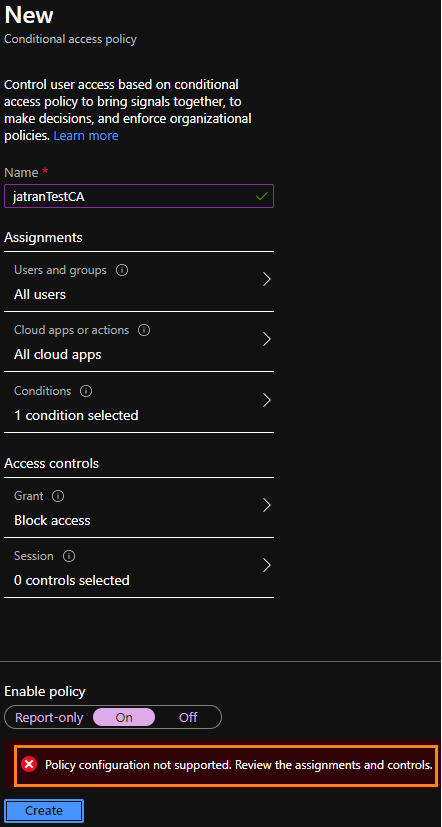
In order to resolve this, I added my own group of users who would be excluded from this policy, and was able to enable/save the policy.
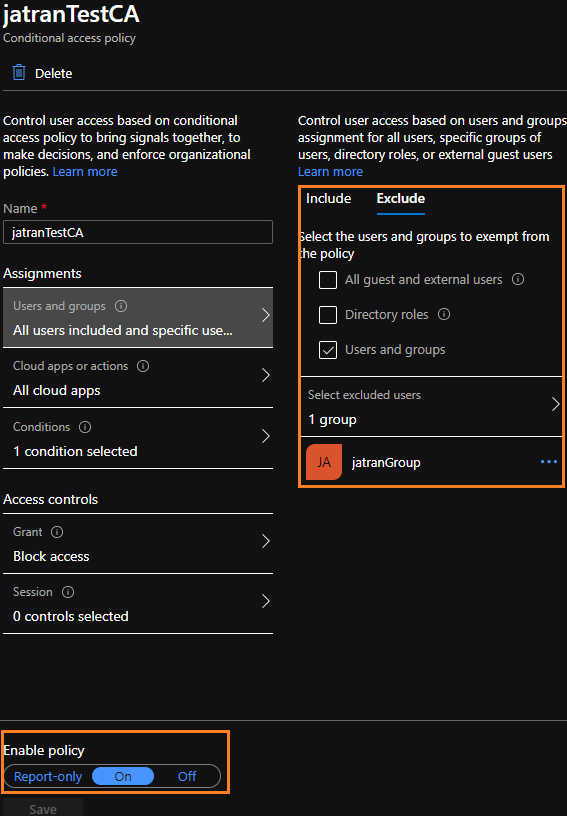
I'll go ahead and assign this issue to the author to investigate and update the documentation as needed.
Thank you for your time and patience throughout this issue.
JamesTran-MSFT
on 2 Dec 2020
Resolved for now by the provided workaround, would be glad to be notified here when the bug is fixed (to not leave a scope that can be abused by users adding to that group).
Thanks for your help. I will be waiting.
marikb
on 3 Dec 2020
I just hit this issue. Blocking Android/iOS for all client/cloud apps, and all users, excluding Hybrid Azure AD Joined and Devices marked as compliant. WOn't save, same pink error box which takes you over to this page that has zero helpful insight, not to mention the "What you should avoid doing" section isn't even there on that page anymore. (it's basically a failed attempt by the product team telling you you're not using it correctly).
The solution was to exclude at least one account. Meanwhile, I already saw the big warning box telling me to not lock myself out, to which I chose not to exclude myself. So really it's a broken product piece. I shouldn't have to exclude any accounts if I don't want to. In this case, I'm only targeting certain device platforms, so there are exclusions already in place just by that.
 JeremyTBradshaw
on 11 Dec 2020
JeremyTBradshaw
on 11 Dec 2020
Related issues
 bityob
·
3Comments
bityob
·
3Comments
 JamesDLD
·
3Comments
JamesDLD
·
3Comments
 spottedmahn
·
3Comments
spottedmahn
·
3Comments
 DeepPuddles
·
3Comments
DeepPuddles
·
3Comments
 mrdfuse
·
3Comments
mrdfuse
·
3Comments
Most helpful comment
Resolved for now by the provided workaround, would be glad to be notified here when the bug is fixed (to not leave a scope that can be abused by users adding to that group).
Thanks for your help. I will be waiting.