Azure-docs: Unable to access files in Shared storage for Windows Container
Hello Team,
First, a side note:
- Please specify that Windows Containers, unlike App Service on Linux, is limited to Azure Files. And it does not support Azure Blob.
- We're having an issue, although we're using Azure Files, we are unable to access (read/write) files after the path mapping, we see the directory but we can't cd into it.
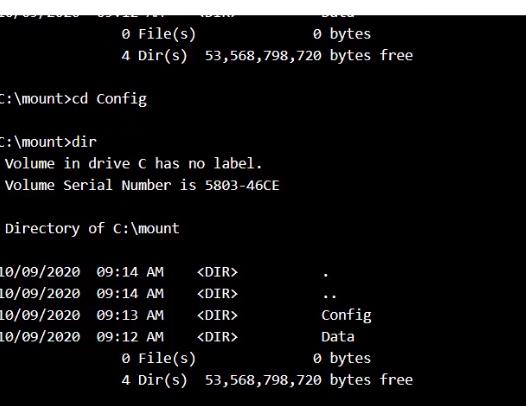
Can we please get some information in regards to this issue?
And when would we be expecting a fix.
Thanks,
Document Details
⚠ Do not edit this section. It is required for docs.microsoft.com ➟ GitHub issue linking.
- ID: bd52d297-e2d9-9a51-3ed6-05c33f521672
- Version Independent ID: b9f21bef-4944-fbc1-c39c-7c2a0c939ce3
- Content: Quickstart: Run a custom container on App Service - Azure App Service
- Content Source: articles/app-service/quickstart-custom-container.md
- Service: app-service
- GitHub Login: @msangapu-msft
- Microsoft Alias: msangapu
 saifbadran9
All 4 comments
Hi @saifbadran9 , thank you for the detailed question. We are currently investigating and will update you when we have accurate information to provide.
 Grace-MacJones-MSFT
on 1 Dec 2020
Grace-MacJones-MSFT
on 1 Dec 2020
Hello @saifbadran9, did you see any errors when you tried to cd into the files? You can try running the AzFileDiagnostics script for Windows to detect what might be the issue. Also, could you please check if you have access to the storage account?
Grace-MacJones-MSFT
on 3 Dec 2020
Hi @Grace, thanks a lot for following-up on this, and apologies for the delay in response.
Actually, no errors were seen, it just does not cd into the directory (stays on the same directory).
Anyways, we have been informed that this is a known platform issue related to Windows containers and shared storage, and it is fixed and being deployed globally (ETA: late December).
Thanks a lot for taking the time to look into this!
Only one thing related to the document, is to specify that Windows Containers, unlike App Service on Linux, is limited to Azure Files, and does not support Azure Blob.
saifbadran9
on 4 Dec 2020
Thanks for the update @saifbadran9! I have submitted a PR to update the doc, the change will soon be merged internally and should go-live in the public docs shortly.
Grace-MacJones-MSFT
on 5 Dec 2020
Related issues
 JeffLoo-ong
·
3Comments
JeffLoo-ong
·
3Comments
 mrdfuse
·
3Comments
mrdfuse
·
3Comments
 monteledwards
·
3Comments
monteledwards
·
3Comments
 jebeld17
·
3Comments
jebeld17
·
3Comments
 JamesDLD
·
3Comments
JamesDLD
·
3Comments