Azure-docs: Not possible to deploy latest edge hub schema using az cli or portal
When deploying via the portal, it is not possible to define TTL or priority per route, it's just a single line for route:

When deploying a template using az iot edge deployment create, it also fails with an error that seems consistent with what the portal shows:
az iot edge deployment create --hub-name cnc-dev --deployment-id locker-edge-deployment-$BITBUCKET_BUILD_NUMBER --content locker-deployment-manifest.json --priority 0 --target-condition "$TARGET_CONDITION" --subscription $CNC_AZURE_SUBSCRIPTION_ID
{
  "validationErrors":[
    {
      "description":"{'route': 'FROM /messages/* INTO $upstream', 'priority': 0, 'timeToLiveSecs': 1200} is not of type 'string'",
      "contentPath":"modulesContent.$edgeHub.properties.desired.routes.upstream",
      "schemaPath":"properties.modulesContent.properties.$edgeHub.properties.properties.desired.properties.routes.patternProperties.^[^\\.\\$# ]+$.type"
    }
  ]
}
The above error is generated from a build pipeline that runs within container mcr.microsoft.com/azure-cli and az cli version within that is 2.1.0 with azure iot extension 0.10.3
The part within our manifest that fails looks like this:
"$edgeHub": {
  "properties.desired": {
    "schemaVersion": "1.1",
    "routes": {
      "upstream": {
        "route": "FROM /messages/* INTO $upstream",
        "priority": 0,
        "timeToLiveSecs": 1200
      },
      ....
Document Details
⚠ Do not edit this section. It is required for docs.microsoft.com ➟ GitHub issue linking.
- ID: ad3731a8-f0df-f1a1-d1a1-e89a769a0908
- Version Independent ID: 50a5190e-eafa-7dde-c18f-be9505b00a0a
- Content: Deploy module & routes with deployment manifests - Azure IoT Edge
- Content Source: articles/iot-edge/module-composition.md
- Service: iot-edge
- GitHub Login: @kgremban
- Microsoft Alias: kgremban
 jokarl
All 8 comments
@jokarl
Thanks for the feedback! We are currently investigating and will update you shortly.
 SatishBoddu-MSFT
on 23 Oct 2020
SatishBoddu-MSFT
on 23 Oct 2020
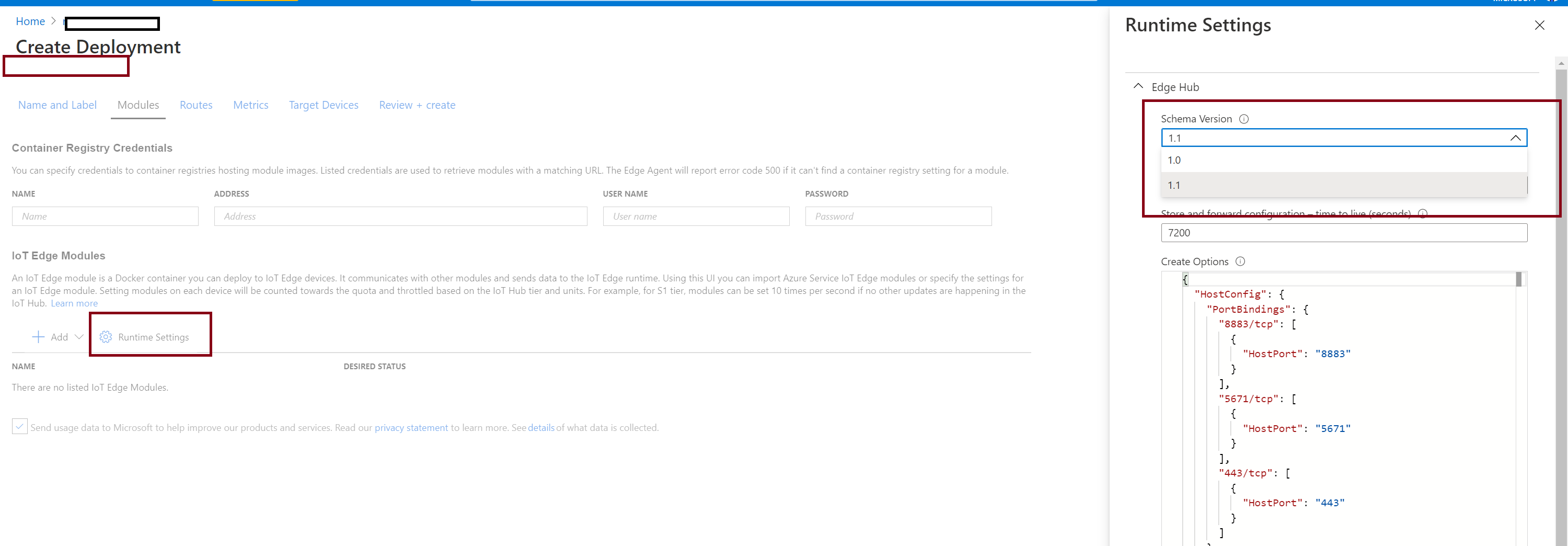
@jokarl - thank you for raising the issue. We are investigating the CLI issue you raised. In the meantime, the portal does allow the Edge Hub 1.1 settings to be applied to both devices and deployments. These fields are available by default on new deployments and devices. If you'd like to set a device or cloned deployment to use the new schema:
1.) from the Create Deployment or Set Modules view, click Modules
2.) click runtime settings
3.) select the target schema version from the Schema Version under Edge Hub
4.) click save.
5.) the expanded options should now be available on the Routes tab for each route.
 chieftn
on 24 Oct 2020
chieftn
on 24 Oct 2020
@jokarl Until there is a fix for the CLI, as a short-term workaround you can try using the --layered switch for the az iot edge deployment create command.
 digimaun
on 24 Oct 2020
digimaun
on 24 Oct 2020
@jokarl - thank you for raising the issue. We are investigating the CLI issue you raised. In the meantime, the portal does allow the Edge Hub 1.1 settings to be applied to both devices and deployments. These fields are available by default on new deployments and devices. If you'd like to set a device or cloned deployment to use the new schema:
1.) from the Create Deployment or Set Modules view, click Modules
2.) click runtime settings
3.) select the target schema version from the Schema Version under Edge Hub
4.) click save.
5.) the expanded options should now be available on the Routes tab for each route.
Completely missed this, we'll use this until our pipeline works with the new schema. Will also give the - -layered switch a try.
Thanks for the quick responses!
jokarl
on 24 Oct 2020
Small follow up, we released v0.10.4 of the IoT extension today which among other things should resolve this issue you are running into.
digimaun
on 27 Oct 2020
Small follow up, we released
v0.10.4of the IoT extension today which among other things should resolve this issue you are running into.
Confirmed that this is working in our pipeline. Thanks for the quick help
jokarl
on 27 Oct 2020
Totally off topic, but this feature is great and it solved a lot of issues for us. We can now throw away events that we don't want ghosting around in our device if we fail to ack them on the edgeHub. It also allowed us to to remain offline for long periods of time and still recover from it and having all telemetry arrive at our endpoints.
Big up!
jokarl
on 28 Oct 2020
Hello @jokarl , Thanks for sharing your experience on this product document.
Please let us know if we are good at this point and may be able to close this issue?
SatishBoddu-MSFT
on 28 Oct 2020
Related issues
 mrdfuse
·
3Comments
mrdfuse
·
3Comments
 bdcoder2
·
3Comments
bdcoder2
·
3Comments
 jharbieh
·
3Comments
jharbieh
·
3Comments
 AronT-TLV
·
3Comments
AronT-TLV
·
3Comments
 jebeld17
·
3Comments
jebeld17
·
3Comments
Most helpful comment
Totally off topic, but this feature is great and it solved a lot of issues for us. We can now throw away events that we don't want ghosting around in our device if we fail to ack them on the edgeHub. It also allowed us to to remain offline for long periods of time and still recover from it and having all telemetry arrive at our endpoints.
Big up!