Azure-docs: For -Each Activity iteration is failing, but pipeline succeeded ?
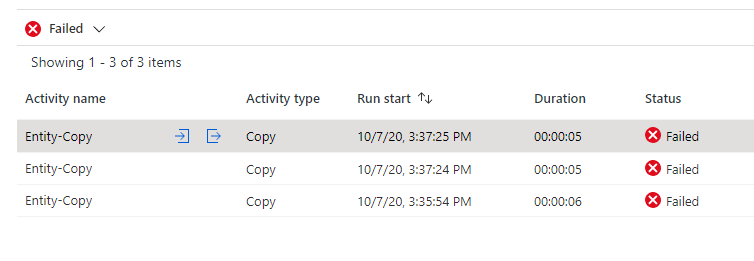
I have one For-Each Activity, which iterates 4 times. Out of those 4 runs, one of the run failed, but still the pipeline is shown as succeeded ?
Document Details
⚠ Do not edit this section. It is required for docs.microsoft.com ➟ GitHub issue linking.
- ID: 633f2967-1c61-51de-5787-a6ca7ac5bdae
- Version Independent ID: d2862926-36d8-4e84-0c93-afdef9e373e2
- Content: ForEach activity in Azure Data Factory - Azure Data Factory
- Content Source: articles/data-factory/control-flow-for-each-activity.md
- Service: data-factory
- GitHub Login: @djpmsft
- Microsoft Alias: daperlov
 vikramdadwal
All 7 comments
Do you have an 'on-failure' condition coming from the foreach? Was the foreach activity shown as a failure?
 djpmsft
on 7 Oct 2020
djpmsft
on 7 Oct 2020
@djpmsft
- No I do not have any onfailure condition on For-Each
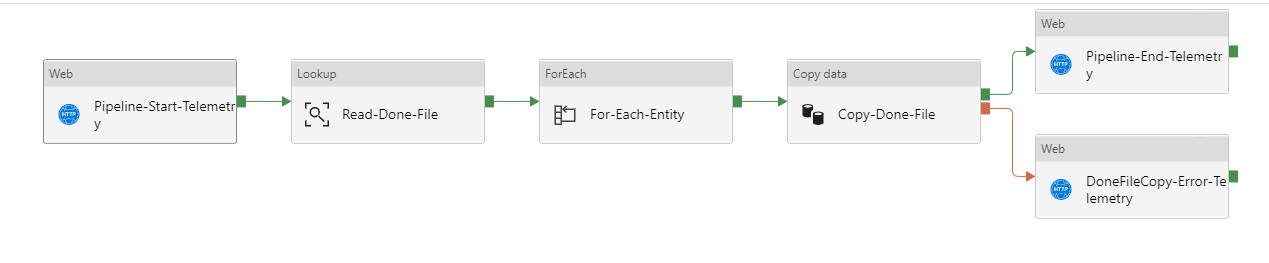
Inside For each I have 2 activities:
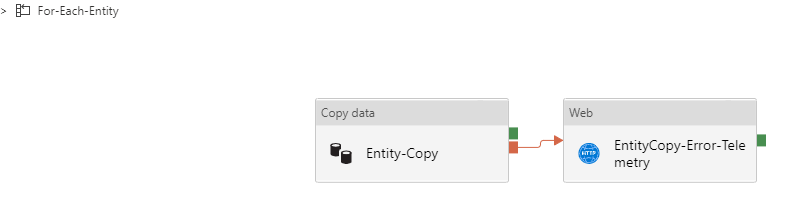
- No, For-Each was not shown failure (That's what I am wondering, it should have failed)
vikramdadwal
on 8 Oct 2020
@chez-charlie can confirm, but because you have the web activity within the foreach on a failure condition, the iteration will likely show as 'success'.
Here is a blog Charlie wrote about error handling in ADF: https://techcommunity.microsoft.com/t5/azure-data-factory/understanding-pipeline-failures-and-error-handling/ba-p/1630459
djpmsft
on 8 Oct 2020
Thanks @djpmsft . It worked. But its confusing for the end user and also now we need to put a activity in place which is actually not required. Just my 2 cents :) thanks.
vikramdadwal
on 8 Oct 2020
Thanks much @djpmsft for sharing the article.
Hi @vikramdadwal , As called out in the blog, your ForEach implementation falls under TRY-CATCH block.
TRY-CATCH block:
- when previous activity succeeds: the node activity, Upon Failure, is skipped and its parent node succeeds, so overall pipeline succeeds
- when previous activity fails: the node activity, Upon Failure, enacted and overall pipeline succeeds if Upon Failure path succeeds

If you expecting your pipeline to fail when any of the iteration fails, then you can chain a success path to your Entity-Copy activity with a 'Wait activity' of 1second or a dummy set variable activity as shown below. In that case when there is a failure in your Entity-Copy the activity flow follows to failure path and trigger EntityCopy-Error-Telemetry with pipeline final status as Failed.
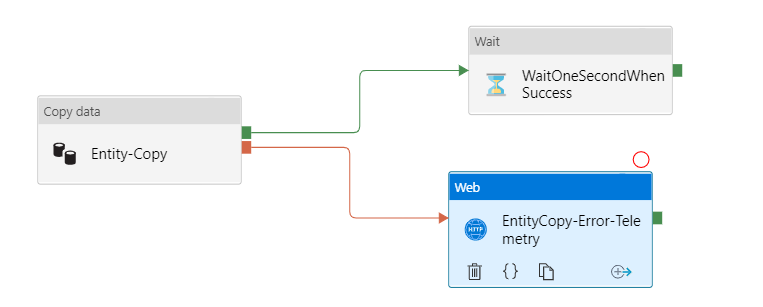
Hope this clarifies.
Please note that Azure Doc feedback channel is for driving improvements towards MS Docs and we didn't determine any changes for this documentation upon reviewing this feedback.
If you have further queries regarding this issue, we request you to please reach out in other forums like Microsoft Q&A. We have our engineers and other community members who will be happy to assist.
If you have a document which you are following and if you think it needs an update, please let us know about that here.
Thank you.
 KranthiPakala-MSFT
on 8 Oct 2020
KranthiPakala-MSFT
on 8 Oct 2020
@vikramdadwal : Thanks for your inputs/feedback. I would request you to please share your thoughts/feedback in ADF user voice channel: https://feedback.azure.com/forums/270578-data-factory.
All the feedback shared in this forum are actively monitored and reviewed by ADF engineering team. Please do share the link once it is created, so that other users can up-vote and comment on your idea/suggesiton.
Also you could share the feedback directly from ADF UI as shown below.
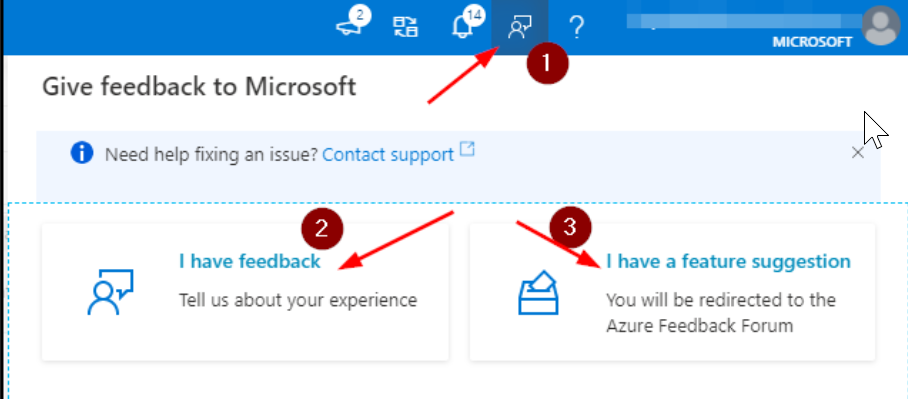
Thank you.
We will now proceed to close this thread. Please feel free to comment if you have further queries. :)
KranthiPakala-MSFT
on 8 Oct 2020
@vikramdadwal I agree, just the messenger here :)
djpmsft
on 8 Oct 2020
Related issues
 Agazoth
·
3Comments
Agazoth
·
3Comments
 Favna
·
3Comments
Favna
·
3Comments
 spottedmahn
·
3Comments
spottedmahn
·
3Comments
 jamesgallagher-ie
·
3Comments
jamesgallagher-ie
·
3Comments
 jharbieh
·
3Comments
jharbieh
·
3Comments
Most helpful comment
Thanks @djpmsft . It worked. But its confusing for the end user and also now we need to put a activity in place which is actually not required. Just my 2 cents :) thanks.