Azure-docs: "--set westus2" is invalid; missing @file, name, or value
The documentation could be outdated.
Repro step:
spx-netcore30-win-x64> ./spx config @region --set westus2
Output:
SPX - Azure Speech Service Command Console, Version 1.13

Copyright (c) 2020 Microsoft Corporation. All Rights Reserved.


  "--set westus2" is invalid; missing @file, name, or value
Document details
⚠ Do not edit this section. It is required for docs.microsoft.com ➟ GitHub issue linking.
- ID: a421fddc-eebd-2ff2-6216-b2a00bbd3fdf
- Version Independent ID: 7d902f9e-4f56-30c9-4a39-7d800f92e088
- Content: Quickstart: Recognize speech from an audio file - Speech service - Azure Cognitive Services
- Content Source: articles/cognitive-services/Speech-Service/quickstarts/speech-to-text-from-file.md
- Service: cognitive-services
- Sub-service: speech-service
- GitHub Login: @trevorbye
- Microsoft Alias: trbye
 imWildCat
All 6 comments
@imWildCat
Thanks for the feedback! We are currently investigating and will update you shortly.
 YutongTie-MSFT
on 25 Aug 2020
YutongTie-MSFT
on 25 Aug 2020
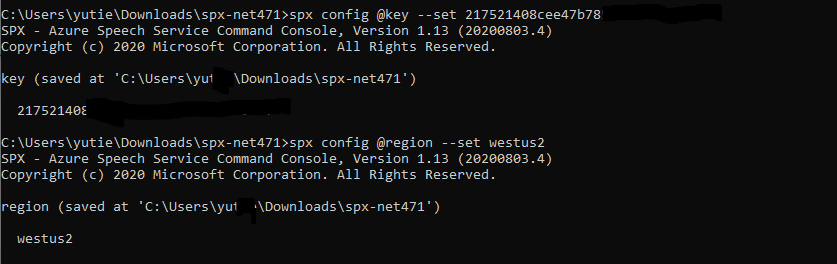
@imWildCat Hi, I can not reproduce your error with westus2 region, it works fine for me. Please let me know more details. Since this is no error with the document, I am closing this ticket.
We will now proceed to close this thread. If there are further questions regarding this matter, please respond here and @YutongTie-MSFT and we will gladly continue the discussion.
YutongTie-MSFT
on 31 Aug 2020
@YutongTie-MSFT will check this tonight.
imWildCat
on 1 Sep 2020
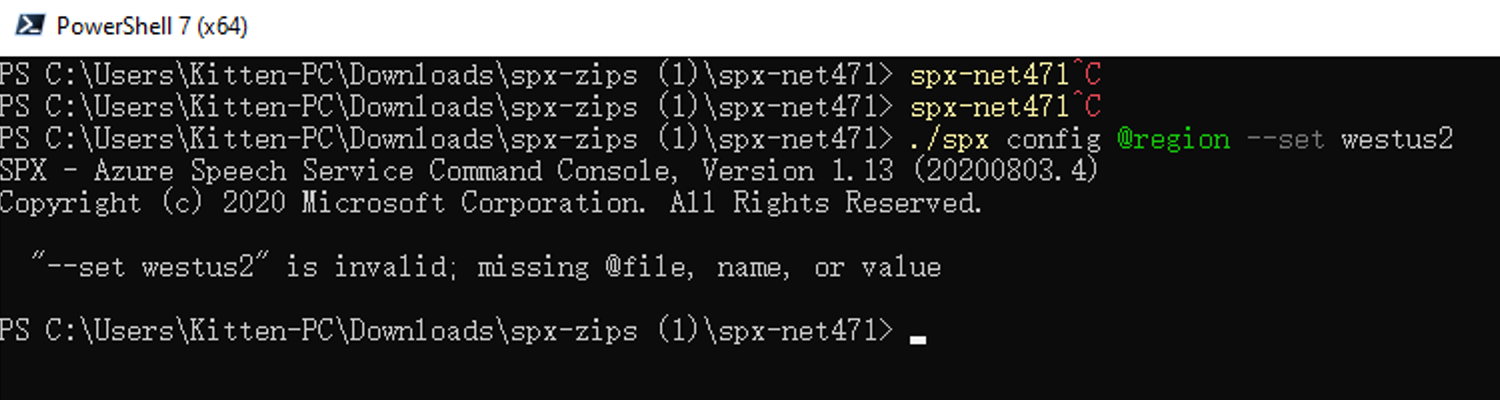
@YutongTie-MSFT I can still reproduce this issue:
- Download the latest zip file (https://aka.ms/speech/spx-zips.zip) from https://docs.microsoft.com/en-us/azure/cognitive-services/speech-service/spx-basics?tabs=windowsinstall
- Unzip this file
- Go into the
spx-net471 - Run the command
Screenshot:
imWildCat
on 1 Sep 2020
Hi @imWildCat , try to run the command in a CMD, not in a PowerShell.
 Raijin56
on 3 Oct 2020
Raijin56
on 3 Oct 2020
@Raijin56 Oh, I see. Thanks!
imWildCat
on 5 Oct 2020
Related issues
 mrdfuse
·
3Comments
mrdfuse
·
3Comments
 behnam89
·
3Comments
behnam89
·
3Comments
 spottedmahn
·
3Comments
spottedmahn
·
3Comments
 JamesDLD
·
3Comments
JamesDLD
·
3Comments
 AronT-TLV
·
3Comments
AronT-TLV
·
3Comments