Azure-docs: `Use a certificate in local keystore to sign into Azure AD` not working on MacOS
In the section Use a certificate in local keystore to sign into Azure AD it suggests that by following the three steps you can use the az ad sp create-for-rbac --create-cert command in the Azure CLI to create a service principal with a self-signed certificate which can then be deployed into a local certificate store, which can then be used via passing a connection string into the AzureServiceTokenProvider class.
Replace {AppId}, {TenantId}, and {Thumbprint} with values generated in Step 1. Replace {CertificateStore} with either LocalMachine or CurrentUser, based on your deployment plan.
Having tested this, it does not appear to work on MacOS using dotnetcore. After adding the certificate to my local keychain, the AzureServiceTokenProvider always reports that the certificate cannot be found.
Having looked into the implementation of the Microsoft.Azure.Services.AppAuthentication package, in the CertificateHelper class I can see the following remark ...
// Only return certs where we have the private key, since we need to use it for authentication.
if (cert != null && cert.HasPrivateKey)
As the certificate generated by the Azure CLI command is a .pem file and the private key is contained within the file itself, it never passes the if statement resulting in no certificate being found.
Is this the expected behaviour? Or am I missing something?
Document Details
⚠ Do not edit this section. It is required for docs.microsoft.com ➟ GitHub issue linking.
- ID: 17824597-7e9b-4ca5-12f7-310b0ce4bdf4
- Version Independent ID: 49e1c9ee-fabf-df55-5bd9-1019abda22f1
- Content: Service-to-service authentication to Azure Key Vault using .NET
- Content Source: articles/key-vault/general/service-to-service-authentication.md
- Service: key-vault
- Sub-service: general
- GitHub Login: @msmbaldwin
- Microsoft Alias: mbaldwin
 garrytrinder
All 14 comments
Thank you for reaching out. At this time we are reviewing the ask and will provide an update as appropriate
 KranthiPakala-MSFT
on 23 Aug 2020
KranthiPakala-MSFT
on 23 Aug 2020
@garrytrinder We are waiting on the backend team for authoritative information on this and will update once we have more info.
 shashishailaj
on 28 Aug 2020
shashishailaj
on 28 Aug 2020
Thanks for the update @shashishailaj much appreciated.
garrytrinder
on 28 Aug 2020
@garrytrinder , request you to please tell me what steps you followed to import the .pem certificate to the local keychain? Thanks!
 varunsh-msft
on 8 Sep 2020
varunsh-msft
on 8 Sep 2020
I followed the instructions in the Apple support documentation https://support.apple.com/en-gb/guide/keychain-access/kyca2431/mac
garrytrinder
on 8 Sep 2020
Thanks @garrytrinder ! App auth library needs the private key of the cert to be able to call Azure AD. App auth library reads the cert either from current user or local machine stores. These stores correspond to login keychain and system key chain respectively (link). When you imported the .pem, did you import into login or system keychain, and then use the right store name in the connection string?
If so, did the import of the .pem only import the public key into the keychain? For app auth to work with cert, the private key will also need to be imported, so it is available when app auth reads the cert from the current user or local machine stores.
varunsh-msft
on 10 Sep 2020
@garrytrinder Please let us know your scenario as per the questions/details provided by @varunsh-msft so that we can continue to help you further on this.
Thank you.
shashishailaj
on 11 Sep 2020
The import of the .pem file appears to have only imported the public key, no private key was imported.
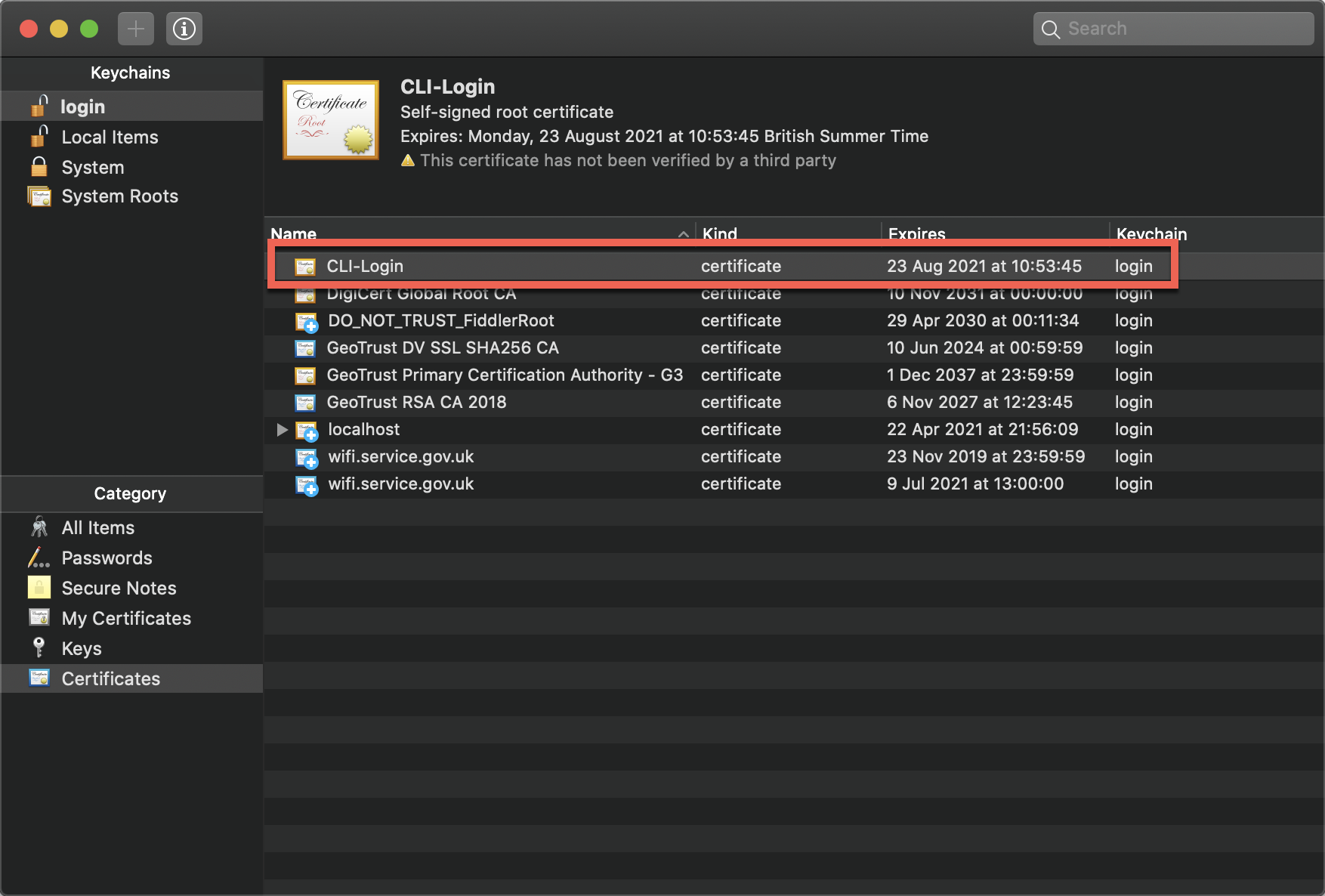
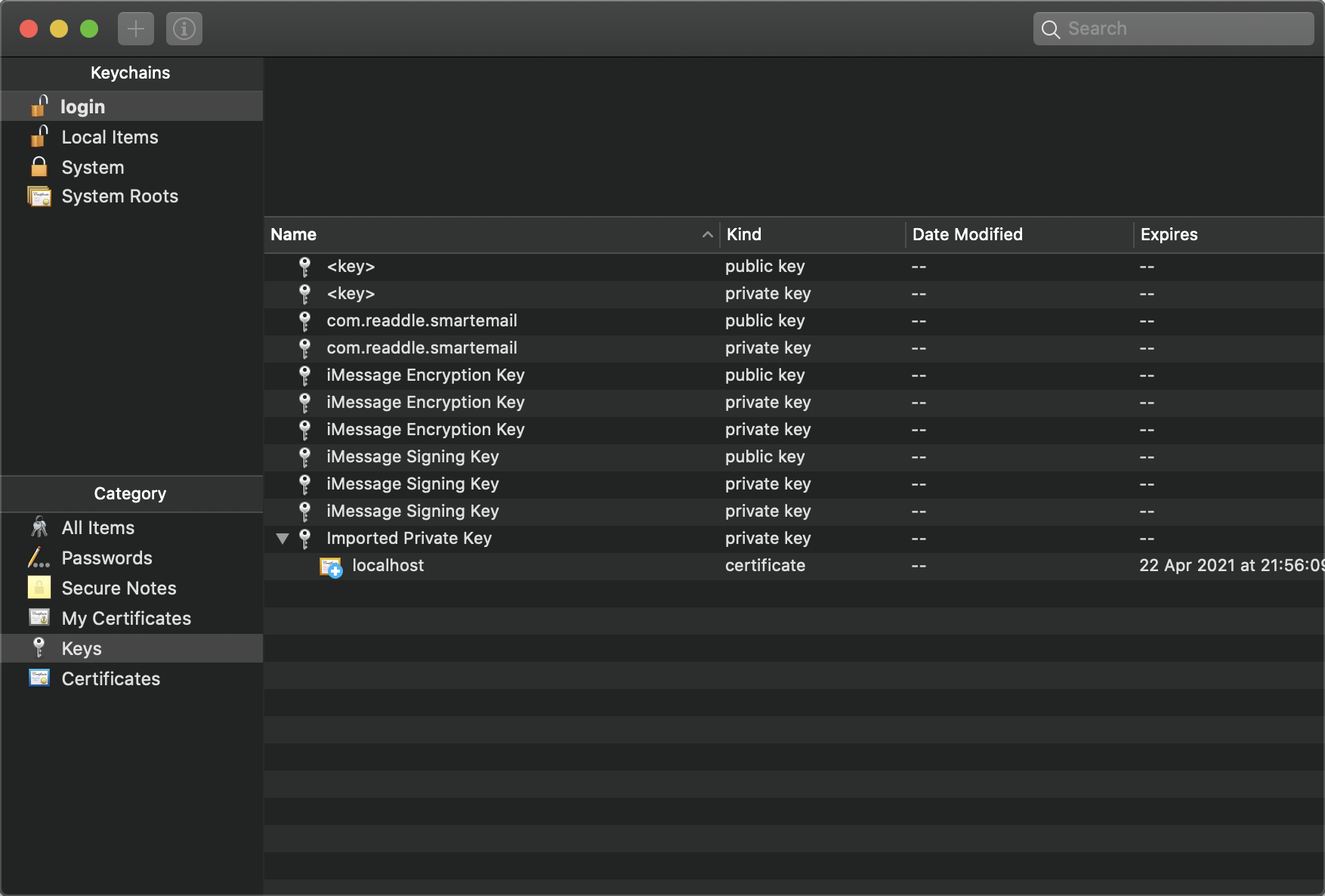
I have created the gist below to mimic the CertificateHelper class against my keychain.
namespace CertStore
{
    using System;
    using System.Security.Cryptography.X509Certificates;

    class Program
    {
        static void Main(string[] args)
        {
            var store = new X509Store(StoreName.My, StoreLocation.CurrentUser);

            store.Open(OpenFlags.ReadOnly);

            foreach (var cert in store.Certificates)
            {
                Console.WriteLine(
                    string.Format(
                        "CertName:{0}|HasPrivateKey:{1}",
                        cert.SubjectName.Name,
                        cert.HasPrivateKey
                    )
                );
            }

            store.Close();
        }
    }
}
Returns
CertName:CN=CLI-Login|HasPrivateKey:False
Are you able to advise on what the correct process is after generating the certificate for this to work?
garrytrinder
on 12 Sep 2020
I am looking into it.
varunsh-msft
on 15 Sep 2020
Thank you @varunsh-msft 👍🏻
garrytrinder
on 15 Sep 2020
@garrytrinder , can you please try this command to convert the .pem file to a .pfx file? It should ask you for an export password. You can then import the .pfx file into the key chain, by providing the password you chose.
openssl pkcs12 -export -out test.pfx -in test.pem
varunsh-msft
on 15 Sep 2020
Great, thank you @varunsh-msft, that worked 🎉
I think it would be good to provide some more detail in the docs as currently it suggests that you can deploy the .pem file directly to the keychain.
garrytrinder
on 15 Sep 2020
Glad to know it worked! I will work on improving the documentation for this scenario.
varunsh-msft
on 15 Sep 2020
Thank you @varunsh-msft for chipping in .
@garrytrinder We will now close this issue and the document update will be done by Varun and tracked internally. Thank you for your patience with us till now. We will now close this issue.
shashishailaj
on 16 Sep 2020
Related issues
 AronT-TLV
·
3Comments
AronT-TLV
·
3Comments
 paulmarshall
·
3Comments
paulmarshall
·
3Comments
 mrdfuse
·
3Comments
mrdfuse
·
3Comments
 bityob
·
3Comments
bityob
·
3Comments
 Favna
·
3Comments
Favna
·
3Comments