Azure-docs: Help Troubleshooting: Azure.Identity.AuthenticationFailedException
Could do with help troubleshooting the following error:
The application opened the login page in the browser and the correct credentials were used.
The browser returned authentication complete message:
"Authentication complete. You can return to the application. Feel free to close this browser tab."
But the application throws an exception:
"Exception thrown: 'Azure.Identity.AuthenticationFailedException' in Azure.DigitalTwins.Core.dll
The program '[25760] SampleClientApp.exe' has exited with code 0 (0x0)."
The application output was as follows:
"Authentication or client creation error: InteractiveBrowserCredential authentication failed."
"Have you checked that the configuration in serviceConfig.json is correct?"
Document Details
⚠ Do not edit this section. It is required for docs.microsoft.com ➟ GitHub issue linking.
- ID: b409d40a-b6e3-d795-1683-72619ff20ab5
- Version Independent ID: f367299b-233c-2642-5649-7b30a7ed7263
- Content: Explore the basics with a sample client app - Azure Digital Twins
- Content Source: articles/digital-twins/tutorial-command-line-app.md
- Service: digital-twins
- GitHub Login: @baanders
- Microsoft Alias: baanders
 tommmc
All 27 comments
Hello @tommmc Thanks for reaching out to us!
Have you tried with a different browser?
Clearing the browser cache also helps.
Please let us know if the issue is still persistent!
 SatishBoddu-MSFT
on 13 Aug 2020
SatishBoddu-MSFT
on 13 Aug 2020
I hit this too when trying https://docs.microsoft.com/en-us/azure/digital-twins/tutorial-code
And there is an very similar issue: https://github.com/Azure/azure-sdk-for-net/issues/13940
 JadeCoding
on 13 Aug 2020
JadeCoding
on 13 Aug 2020
Hello @tommmc Just checking back, could you please let us know if you need further help in this matter.
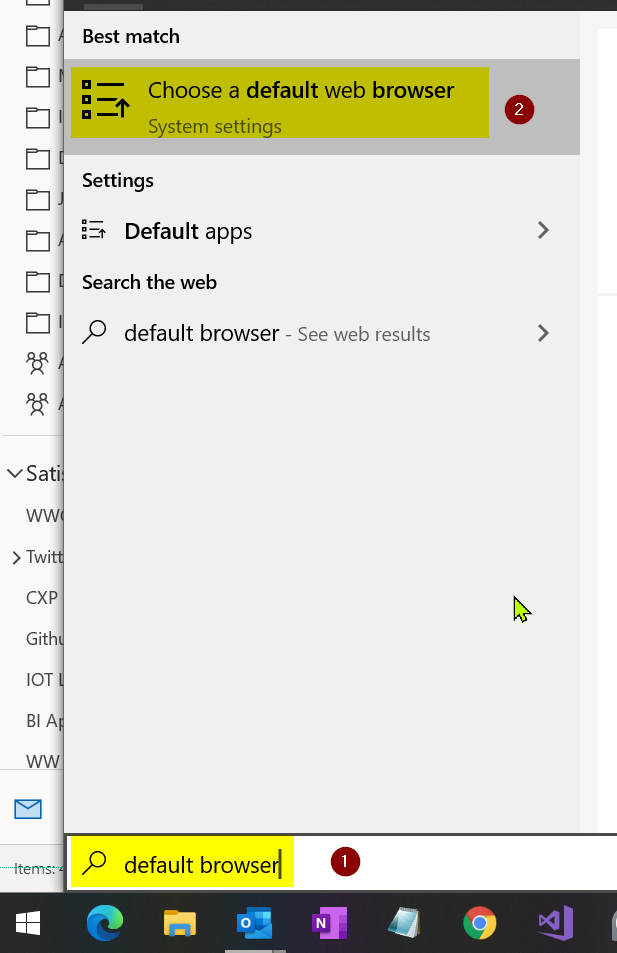
Change default browser on Windows:

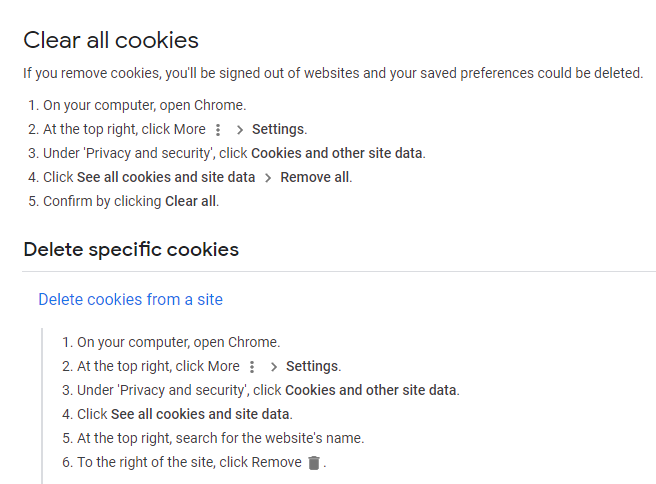
Clear Browser Cookies in Chrome: Link
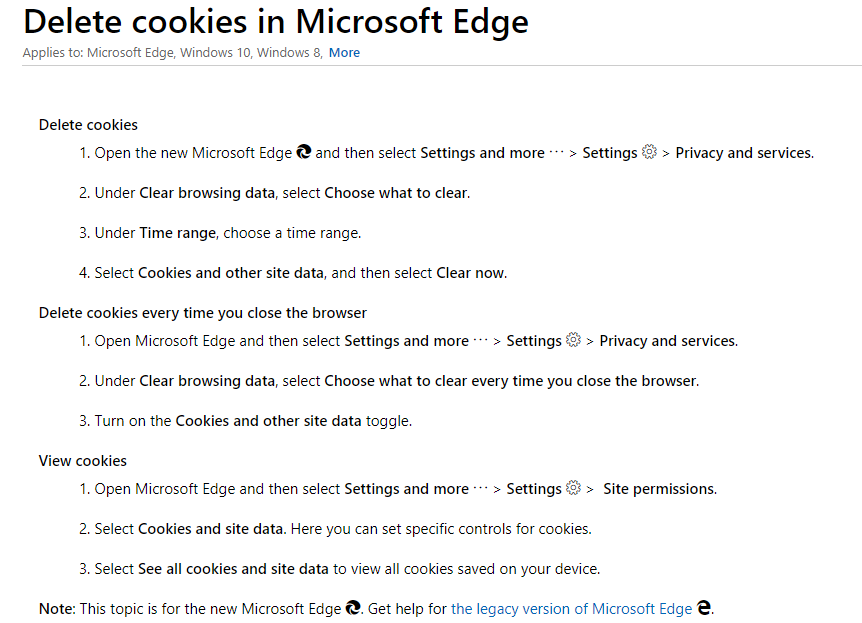
Clear Browser Cookies in Microsoft Edge: Link
SatishBoddu-MSFT
on 13 Aug 2020
I met the same problem with this issue, and had tried to change browsers(chrome and edge) and clean all the cookies like above.
However, I still stuck on following problem.
The browser returned authentication complete message:
"Authentication complete. You can return to the application. Feel free to close this browser tab."
Output in Visual Studio 2019 Console:
"Exception thrown: 'Azure.Identity.AuthenticationFailedException' in Azure.DigitalTwins.Core.dll
The program '[9094] SampleClientApp.exe' has exited with code 0 (0x0)."
The application output was as follows:
"Authentication or client creation error: InteractiveBrowserCredential authentication failed."
"Have you checked that the configuration in serviceConfig.json is correct?"
Is there any other solutions except changing browser and cleaning cookies? thanks
 jer71146
on 14 Aug 2020
jer71146
on 14 Aug 2020
@jer71146 @tommmc We are validating the latest sample.
SatishBoddu-MSFT
on 14 Aug 2020
Hello @tommmc @jer71146 @JadeCoding
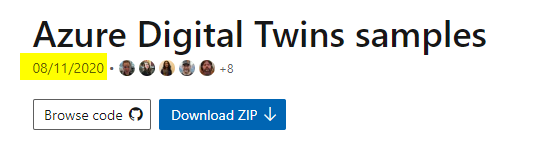
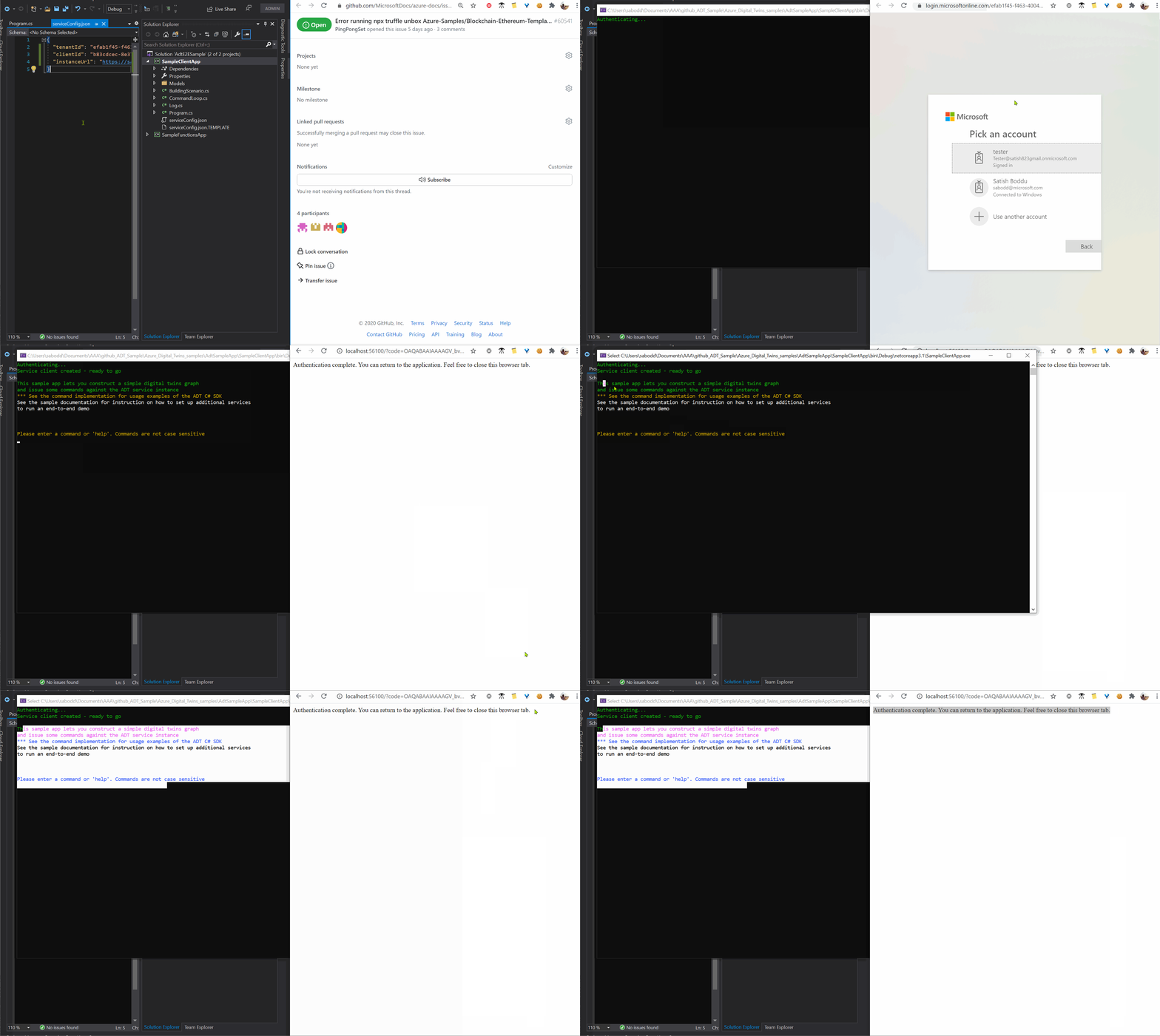
- We have downloaded the Sample ADT app from this link dated: 08/11/2020
- Created a new ADT in West US 2
- Created an AAD app and provided all necessary permissions as per the tutorial.
Below is the recording: recorded a few minutes back
Troubleshooting:
Apart from the instructions on here
Please check AAD app permissions once again and the account which you are using to log in.
Further help/support options:
Please send an email to [email protected] with the below details, we will work closely on this matter.
Thread URL: https://github.com/MicrosoftDocs/azure-docs/issues/60633
Your Subscription ID:
Email Subject: Attn Satish Boddu
Please let me know once you have done the same
Further Technical help on Microsoft Q&A:
Please feel free to open a new technical thread for further discussion on Microsoft Q&A with service tag azure-digital-twins tag.
SatishBoddu-MSFT
on 14 Aug 2020
Hello @SatishBoddu-MSFT
Changed default browser to Edge, cleared cookies and same issue.
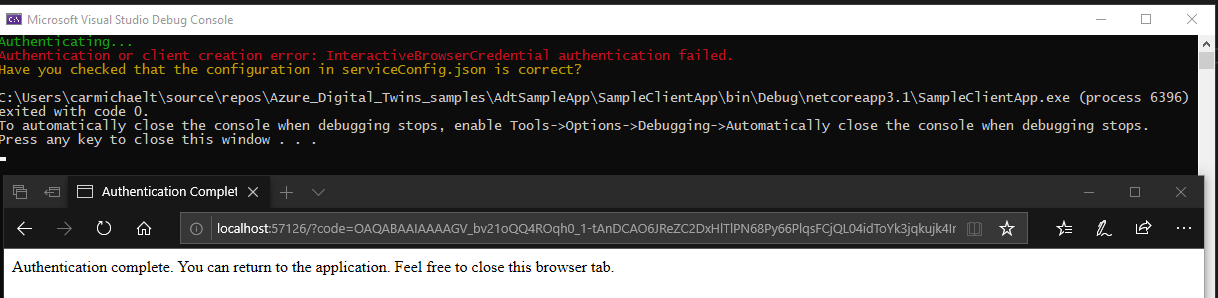
Will try the latest code 08-11-2020 when I get chance.
tommmc
on 14 Aug 2020
Hello @SatishBoddu-MSFT
I had checked following things that you mentioned above
- Change default browser(Edge & Chrome) and clean all cookies.
- Use the Sample ADT app which updated on 08/11/2020
- Follow the document to set all the permissions and check AAD app permissions were setting correctly.
document: https://docs.microsoft.com/en-us/azure/digital-twins/how-to-set-up-instance-portal
By the way, in this document, should I also set up the settings in section "Other possible steps for your organization"? - Login with the correct account
Following screenshot is my result, it stills cannot work.

On the other hand, I had also tried following document to build up Azure Digital Twin on VS Code.
document: https://docs.microsoft.com/en-us/azure/digital-twins/tutorial-code
Identically, it doesn't work and it doesn't even launch browser to ask for login my account.
I also confirm my ids and adtInstanceUrl were correct.
Following screenshot is my result.

If someone can provides any possible solutions, it will help me a lot.
jer71146
on 14 Aug 2020
Hello @tommmc @JadeCoding @jer71146
We are working on this issue with our team to verify all steps in the sample code, please stay tuned.
If you need immediate attention/help on this issue please do as mentioned below:
Further help/support options:
Please send an email to [email protected] with the below details, we will work closely on this matter.
Thread URL: #60633
Your Subscription ID:
Email Subject: Attn Satish Boddu
Please let me know once you have done the same
SatishBoddu-MSFT
on 14 Aug 2020
Hello @tommmc @JadeCoding @jer71146
We are working on this issue with our team to verify all steps in the sample code, please stay tuned.
If you need immediate attention/help on this issue please do as mentioned below:
Further help/support options:
Please send an email to [email protected] with the below details, we will work closely on this matter.
Thread URL: #60633
Your Subscription ID:
Email Subject: Attn Satish BodduPlease let me know once you have done the same
Thanks Satish, the code sample you provided works for me but the other one here doesn't work: https://docs.microsoft.com/en-us/azure/digital-twins/tutorial-code
Still get the same exception as other folks pointed out. Will wait for your further investigation feedback.
JadeCoding
on 14 Aug 2020
Hello @JadeCoding We are verifying that as well.
SatishBoddu-MSFT
on 14 Aug 2020
@SatishBoddu-MSFT , I found the high-level root cause. I noticed when following https://docs.microsoft.com/en-us/azure/digital-twins/tutorial-code, the dependency package of Azure.Identity is the latest v 1.2.0 , while downloading the complete solution from here: https://docs.microsoft.com/en-us/samples/azure-samples/digital-twins-samples/digital-twins-samples/
The dependency package of Azure.Identity is an older version v 1.1.1 .
I cross checked both:
When using Azure.Identity v1.1.1, both samples would work
When using Azure.Identity v1.2.0, both samples repro the issue:
Authenticating...
Authentication or client creation error: InteractiveBrowserCredential authentication failed: Only loopback redirect uri is supported, but urn:ietf:wg:oauth:2.0:oob was found. Configure http://localhost or http://localhost:port both during app registration and when you create the PublicClientApplication object. See https://aka.ms/msal-net-os-browser for details
Please check if this is helpful for reporting the issue and find the root cause under lower-level.
JadeCoding
on 17 Aug 2020
@JadeCoding Thanks for the confirmation, we have already escalated this to PG team on 08/14/2020, they are actively working on this issue. We will see updates soon. sorry for any inconvenience caused.
SatishBoddu-MSFT
on 17 Aug 2020
Hello @tommmc @JadeCoding @jer71146 Thanks for reporting this issue.
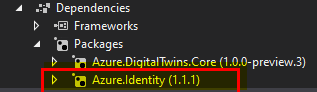
Could you please try using the Azure.Identity v1.1.1 instead of the latest version "Azure.Identity v1.2.0" to get unblocked on this issue as a workaround! Please let us know if that works for you.
Sorry for the inconvenience caused!
We are actively working on this issue and will come up with a resolution as soon as possible.
SatishBoddu-MSFT
on 18 Aug 2020
Update:
Microsoft team is working on the issue with Azure.identity 1.2.0 package, please stay tuned for further updates.
SatishBoddu-MSFT
on 20 Aug 2020
Adding a documentation note as well:
In the meantime, we have documented this as a known issue with Azure.identity version 1.2.0, citing the workaround to use version 1.1.1 instead.
We will remove the known issue when the issue with the package is resolved.
 baanders
on 20 Aug 2020
baanders
on 20 Aug 2020
I have been using 1.1.1 and get the same error. Can you please provide specific instructions on the workaround? Thank you for your help.
 warpdriv
on 21 Aug 2020
warpdriv
on 21 Aug 2020
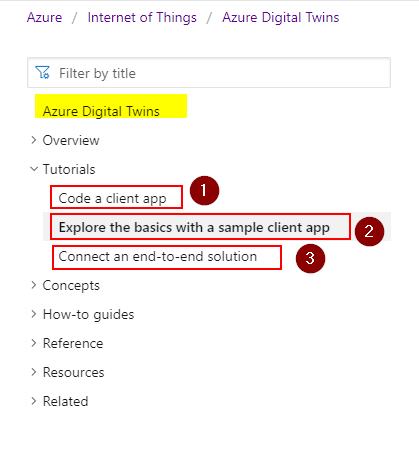
Hello @warpdriv Please let us know the exact documentation link which you are facing this issue ?
SatishBoddu-MSFT
on 21 Aug 2020
Hello @SatishBoddu-MSFT
I have been using on Azure.identity version 1.1.1 and get some error on document 1(Code a client app) and document 2(Explore the basics with a sample client app)
Following screenshot is the error of using document 1

Following screenshot is the error of using document 2

Follwing screenshot is my package on Visual Studio
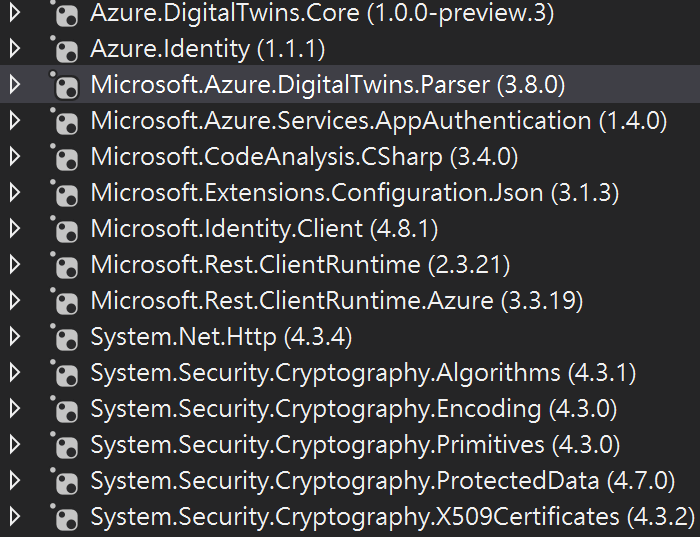
I also want to ask whether other packages would be incompatible so that my authentication of ADT will fail.
Thanks for your help!
jer71146
on 24 Aug 2020
Hi @SatishBoddu-MSFT, Number 2.
warpdriv
on 24 Aug 2020
Hello ALL, @JadeCoding @warpdriv @jer71146 @tommmc
We have now the latest Azure.Identity 1.2.2 release.
So please try the latest NuGet package Azure.Identity 1.2.2 version.
Please rebuild your sample applications with the latest NuGet version and let us know if you see any further issues.
SatishBoddu-MSFT
on 25 Aug 2020
Installed 1.2.2 and updated all other packages. I now get the below error. I went to the link and my configuration in the authentication blade shows the app is set to public.
Please advise...
Authenticating...
Authentication or client creation error: InteractiveBrowserCredential authentication failed: A configuration issue is preventing authentication - check the error message from the server for details.You can modify the configuration in the application registration portal. See https://aka.ms/msal-net-invalid-client for details. Original exception: AADSTS7000218: The request body must contain the following parameter: 'client_assertion' or 'client_secret'.
Trace ID: 13a11b75-ded6-4c74-95e4-0ee5936a2b00
Correlation ID: b63916d7-78fe-4368-a944-18ad206219d6
Timestamp: 2020-08-25 18:24:43Z
Have you checked that the configuration in serviceConfig.json is correct?
warpdriv
on 25 Aug 2020
@warpdriv I am able to repro the issue,

Reason: I am not using the right Authentication Platform for my AAD application.

Troubleshooting:
Below is the corrective action you may need to consider, On your AAD app's Athentication option -->Add platform-->choose the 'Mobile and Desktop application' this time and configure the 'Redirect URL' also as shown in the below images.


SatishBoddu-MSFT
on 25 Aug 2020
Hi Satish,
Following the instructions, I get this error:
[image: image.png]
Regards,
Jeff
On Tue, Aug 25, 2020 at 1:55 PM SatishBoddu notifications@github.com
wrote:
@warpdriv https://github.com/warpdriv I am able to repro the issue,
[image: image]
https://user-images.githubusercontent.com/62923178/91214893-95d78a80-e6c8-11ea-9be4-a217e0479205.png
Reason: I am not using the right Authentication Platform for my AAD
application.
[image: image]
https://user-images.githubusercontent.com/62923178/91215165-ff579900-e6c8-11ea-932c-a6f2e4384940.pngTroubleshooting:
Below is the corrective action you may need to consider, On your AAD app's
Athentication option -->Add platform-->choose the 'Mobile and Desktop
application' this time and configure the 'Redirect URL' also as shown in
the below images.[image: image]
https://user-images.githubusercontent.com/62923178/91215479-6bd29800-e6c9-11ea-9f8f-eace600ef1ee.png[image: image]
https://user-images.githubusercontent.com/62923178/91215492-712fe280-e6c9-11ea-815d-ea3261c74c27.png—
You are receiving this because you were mentioned.
Reply to this email directly, view it on GitHub
https://github.com/MicrosoftDocs/azure-docs/issues/60633#issuecomment-680209708,
or unsubscribe
https://github.com/notifications/unsubscribe-auth/AFR52UVJMFTFTQRRAK4JBOLSCQCJJANCNFSM4P3AJCLA
.
warpdriv
on 26 Aug 2020
@warpdriv Sorry, the image is not uploaded correctly. Please try again.
SatishBoddu-MSFT
on 27 Aug 2020
@SatishBoddu-MSFT
As you mention on above, I finally pass authentication on these two tutorials that I posted above. (tutorial_1 on VS code, tutorial_2 on Visual Studio 2019)
There are three things that I had changed:
- Use sample-code which updated on August 19, 2020.
- Use AAD app's authentication on localhost with "Mobile and Desktop applications"
- Update Azure.Identity to version 1.2.2 (In the solution of sample-code, before I update Azure.Identity, I need to update other packages first.)
Thanks for your help in these days.
jer71146
on 27 Aug 2020
Dear all,
We will now proceed to close this thread. If there are further questions regarding this matter, please tag me in your reply. We will gladly continue the discussion and we will reopen the issue.
Further Technical support options:
Please also do visit Microsoft Q&A the home for technical questions and answers at Microsoft. Please make use of this forum to post any further Technical Questions.
SatishBoddu-MSFT
on 28 Aug 2020
Related issues
 Agazoth
·
3Comments
Agazoth
·
3Comments
 JeffLoo-ong
·
3Comments
JeffLoo-ong
·
3Comments
 varma31
·
3Comments
varma31
·
3Comments
 monteledwards
·
3Comments
monteledwards
·
3Comments
 spottedmahn
·
3Comments
spottedmahn
·
3Comments