Azure-docs: Adding a pre-defined VNet requires undocumented permissions
Adding a pre-existing virtual network to a DevTest Lab seems to require permissions over the target virtual network which isn't documented on this page. I'm working with an enterprise customer to provision DevTest Labs, and the service principal I have been supplied with only has Reader rights over the target enterprise VNet.
When attempting to add the VNet/subnet to the DTL instance, I get the following error (redacted for privacy):
"The client <CLIENT_ID> with object id <OBJECT_ID> has permission to perform action 'Microsoft.DevTestLab/labs/virtualNetworks/write' on scope '/subscriptions/<SUB_ID>/resourcegroups/<RG_NAME>/providers/Microsoft.DevTestLab/labs/<LAB_NAME>/virtualNetworks/<VNET_NAME>'; however, it does not have permission to perform action 'write' on the linked scope(s) '/subscriptions/<SUB_ID>/resourceGroups/<VNET_RG_NAME>//providers/Microsoft.Network/virtualNetworks/<VNET_NAME> or the linked scope(s) are invalid.
Why are write permissions required over the target VNet? What changes are being made to the target VNet by adding to a DTL instance?
Document details
⚠ Do not edit this section. It is required for docs.microsoft.com ➟ GitHub issue linking.
- ID: d5db49fe-a387-e99d-c556-b123396dae71
- Version Independent ID: f43c8905-c3c7-f401-fcbe-524da377254c
- Content: Configure a virtual network in Azure DevTest Labs - Azure DevTest Labs
- Content Source: articles/devtest-labs/devtest-lab-configure-vnet.md
- Service: devtest-lab
- GitHub Login: @spelluru
- Microsoft Alias: spelluru
 jamesbannan
All 11 comments
@jamesbannan Thanks for the question! We're investigating this and will get back to you shortly.
 BhargaviAnnadevara-MSFT
on 5 Aug 2020
BhargaviAnnadevara-MSFT
on 5 Aug 2020
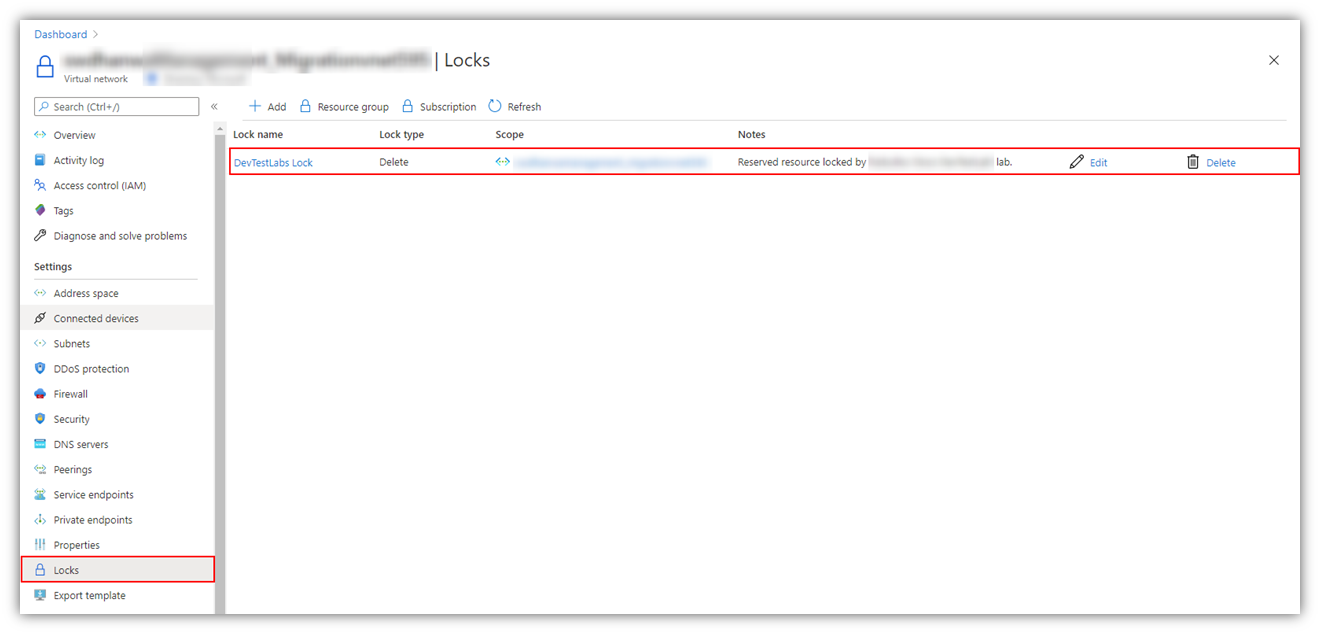
@jamesbannan So, when a pre-existing Virtual Network is added to a DTL, write permissions on the VNet are required to be able to add management locks over the VNet to prevent its accidental deletion, as shown below:

Target VNet:
Looping in @spelluru to look into potential doc enhancements.
BhargaviAnnadevara-MSFT
on 6 Aug 2020
Hi @BhargaviAnnadevara-MSFT - thank you for the clarification. That makes sense. In the case that the target virtual network already has a resource lock of the type delete, are write permissions still required? In the case of the customer environment, the target virtual network doesn't have a resource lock, but it would be easier to request a resource lock than write permissions.
jamesbannan
on 6 Aug 2020
@jamesbannan I think they'd still be needed but let me check and get back to you. Meanwhile, could you please let me know how you're trying to add the VNet to the DTL?
BhargaviAnnadevara-MSFT
on 6 Aug 2020
@BhargaviAnnadevara-MSFT Using an Azure Resource Manager template deployment from Azure Pipelines
jamesbannan
on 6 Aug 2020
@BhargaviAnnadevara-MSFT It's probably also worth mentioning that in order to create a resource lock you need more than just write permissions on the target scope. You also need Microsoft.Authorization/* or Microsoft.Authorization/locks/* which require either Owner or User Access Administrator permissions or a custom RBAC role assignment.
Given that in my case, the target VNet is centrally managed by an enterprise cloud services team, I'm not likely to get those permissions. If having a resource lock already in place would satisfy the requirement, that would help very significantly.
Or, if there was an option of creating the resource lock by default, but being able to control the behaviour - basically assuming that the lock exists. A bit like adding a service endpoint-enabled subnet to a resource firewall without enforcing the check on whether service endpoints have been enabled on the subnet first.
jamesbannan
on 6 Aug 2020
@jamesbannan Yes, these indeed are valid asks to think about. I'm checking with our Product group internally and shall keep you posted as I hear more.
Thanks for the feedback!
BhargaviAnnadevara-MSFT
on 10 Aug 2020
@jamesbannan So it turns out from our internal discussion that write permissions over the VNet are a must-have requirement for the identity that's adding the VNet to the DTL, regardless of a pre-existing lock even. This, however, is not limited to just adding management locks, but also keeping in view the possible operations that might be performed afterwards. For example: When VMs/Environments are later deployed into the VNET, a NIC will be created in that VNET (which requires write access again). Therefore, the permission is always required.
I will work with our Team to get this information added to the doc in question. Please let me know if there are any additional questions. Thank you very much for your patience.
BhargaviAnnadevara-MSFT
on 15 Aug 2020
@jamesbannan We're tracking this issue internally and will now proceed to close this thread, but if there are any further questions regarding the documentation, please tag me in your reply and we will be happy to continue the conversation.
Thank you very much for your understanding and feedback.
BhargaviAnnadevara-MSFT
on 18 Aug 2020
Thanks @BhargaviAnnadevara-MSFT for the update. The question of permissions doesn't really match up with my experience so far.
For example, for the customer I am working with, I deployed a DevTest Lab instance and a dedicated VNet into a sandbox subscription and successfully linked the VNet to the DTL. My permissions in this subscription are Contributor - so while I have permissions to create resources I can't modify RBAC or create, delete or modify Resource Locks. However, the VNet was successfully attached to the DTL and a resource lock created.
As you can see from the screenshot taken from the VNet, I don't have permissions to create resource locks but it was still done. So how is this possible? It makes requesting sufficient permissions difficult when it's unclear what to ask for :-)

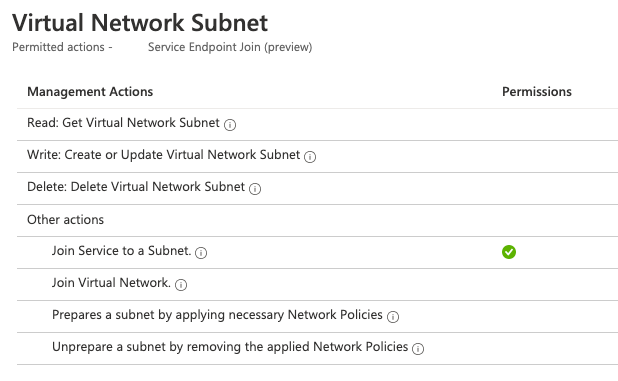
Also, I'd like to confirm the statement that write permissions over a VNet resource are required to create a VM with a network interface within that VNet. According to the documentation, the only permissions required are actions over the Microsoft.Network/networkInterfaces resource. I have successfully deployed VMs in a VNet using a service principal which has no write permissions within that VNet and can only join services to a subnet:
jamesbannan
on 19 Aug 2020
Hi James,
some clarification regarding this thread.
First, a user does not need permission to add a lock on the virtual network. User only needs write permission on that virtual network (as the error message points out).
Resource locking (and a bunch of other operations) is executed by the Azure Lab Services identity. That identity has the correct permissions to complete the operation.
Now, why does a lab owner needs write permission on the virtual network to link it to a lab?
During the lifetime of the DTL lab, the Azure Lab Services identity will be creating resources in the linked virtual network (on behalf of DTL users). To prevent elevation of privileges, we ensure the lab owner brings a virtual network he has control over. In other words, by adding a virtual network to a lab, the lab owner approves that going forward, the Azure Lab Services identity is able to create resources within the virtual network.
Hope this clarify things, let me know if you have more questions.
Jonathan
 joerage
on 31 Aug 2020
joerage
on 31 Aug 2020
Related issues
 Favna
·
3Comments
Favna
·
3Comments
 jamesgallagher-ie
·
3Comments
jamesgallagher-ie
·
3Comments
 paulmarshall
·
3Comments
paulmarshall
·
3Comments
 spottedmahn
·
3Comments
spottedmahn
·
3Comments
 AronT-TLV
·
3Comments
AronT-TLV
·
3Comments