Azure-docs: Is there an API to know all the meters associated with a Virtual Machine?
After I create a new VM, is there an API to get all the meters(Contains the meter guid) for this VM?
- Not through Usage Details
For example, the following JSON content is my Virtual machine details, obtained through the API (Virtual Machines - Get).
From the vmSize field, you can know the specifications of my virtual machine. I want to know the meter GUID of this virtual machine.
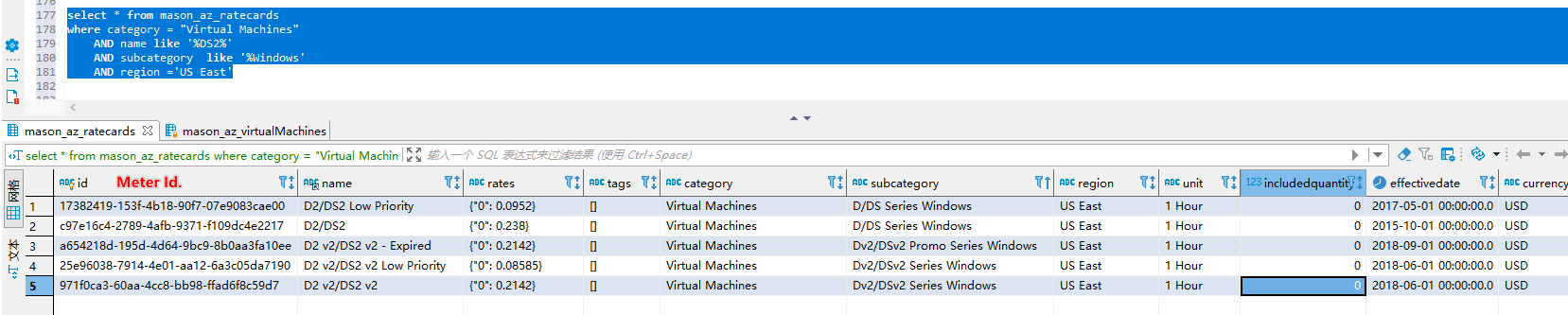
Microsoft also provides an API that get Azure rate card resources. To facilitate the query, I store this data locally in MySQL.
I tried to query the Meter Id through the VM info, such as, location, vmSize, osType. I can't find exactly.
So, Is there an API to get all the meters associated with a Virtual Machine?
Or, how do I get meter GUID via vmId or vmSize?
{
  "name": "KFEAUS00NESS-01",
  "id": "/subscriptions/********/resourceGroups/RG3/providers/Microsoft.Compute/virtualMachines/KFEAUS00NESS-01",
  "type": "Microsoft.Compute/virtualMachines",
  "location": "eastus",
  "properties": {
    "vmId": "00f3f81c-26f0-****-****-d7156d92db9e",
    "hardwareProfile": {
      "vmSize": "Standard_DS2_v2"
    },
    "storageProfile": {
      "imageReference": {
        "publisher": "MicrosoftWindowsServer",
        "offer": "WindowsServer",
        "sku": "2016-Datacenter",
        "version": "latest",
        "exactVersion": "14393.3326.1911120150"
      },
      "osDisk": {
        "osType": "Windows",
        "name": "KFEAUS00NESS-01_OsDisk_1_54c823ff72cd424db0a8aaf386bbbfb2",
        "createOption": "FromImage",
        "caching": "ReadWrite",
        "managedDisk": {
          "storageAccountType": "Premium_LRS",
          "id": "/subscriptions/********/resourceGroups/RG3/providers/Microsoft.Compute/disks/KFEAUS00NESS-01_OsDisk_1_54c823ff72cd424db0a8aaf386bbbfb2"
        },
        "diskSizeGB": 127
      },
      "dataDisks": []
    },
    "osProfile": {
      "computerName": "KFEAUS00NESS-01",
      "adminUsername": "kfadmin",
      "windowsConfiguration": {
        "provisionVMAgent": true,
        "enableAutomaticUpdates": true
      },
      "secrets": [],
      "allowExtensionOperations": true,
      "requireGuestProvisionSignal": true
    },
    "networkProfile": {
      "networkInterfaces": [
        {
          "id": "/subscriptions/********/resourceGroups/RG3/providers/Microsoft.Network/networkInterfaces/kfeaus00ness-01924"
        }
      ]
    },
    "diagnosticsProfile": {
      "bootDiagnostics": {
        "enabled": true,
        "storageUri": "https://***.blob.core.windows.net/"
      }
    },
    "provisioningState": "Succeeded"
  },
  "resources": [
    {
      "id": "/subscriptions/********/resourceGroups/RG3/providers/Microsoft.Compute/virtualMachines/KFEAUS00NESS-01/extensions/IaaSAntimalware"
    },
    {
      "id": "/subscriptions/********/resourceGroups/RG3/providers/Microsoft.Compute/virtualMachines/KFEAUS00NESS-01/extensions/Microsoft.Insights.VMDiagnosticsSettings"
    },
    {
      "id": "/subscriptions/********/resourceGroups/RG3/providers/Microsoft.Compute/virtualMachines/KFEAUS00NESS-01/extensions/MicrosoftMonitoringAgent"
    }
  ]
}
````
select * from az_ratecards
where category = "Virtual Machines"
AND name like '%DS2%'
AND subcategory like '%Windows'
AND region ='US East'
```
Document Details
⚠ Do not edit this section. It is required for docs.microsoft.com ➟ GitHub issue linking.
- ID: 59f6d32e-df7a-ac7a-6bf2-7f29ad16824b
- Version Independent ID: ad65a6c5-0e83-d171-275f-c779b0fcae91
- Content: Review your individual Azure bill
- Content Source: articles/cost-management-billing/understand/review-individual-bill.md
- Service: cost-management-billing
- GitHub Login: @bandersmsft
- Microsoft Alias: banders
 xdmushui
All 13 comments
@xdmushui Thanks for the comment. Appreciate if you could elaborate your ask with more details.
 SadiqhAhmed-MSFT
on 29 Jul 2020
SadiqhAhmed-MSFT
on 29 Jul 2020
@xdmushui Thanks for the comment. Appreciate if you could elaborate your ask with more details.
Updated.
xdmushui
on 29 Jul 2020
@xdmushui Please send mail to AzCommunity [at] microsoft dot com with subject: ATTN: Sadiqh Ahmed include a link to this GitHub thread (for context) and I will share with you MeterID list.
SadiqhAhmed-MSFT
on 29 Jul 2020
@SadiqhAhmed-MSFT Thank you. The mail was sent.
xdmushui
on 29 Jul 2020
@xdmushui Thanks for describing in detail. Will check with the concerned team and get back to you soon.
SadiqhAhmed-MSFT
on 29 Jul 2020
 bandersmsft
on 29 Jul 2020
bandersmsft
on 29 Jul 2020
prkumarms-zz is not a valid GitHub ID, or is not a collaborator on this repo.
 PRMerger14
on 29 Jul 2020
PRMerger14
on 29 Jul 2020
@xdmushui Here is the retail rate card API that will give you the desired results with the right filters
https://prices.azure.com/api/retail/prices?$filter=serviceFamily eq 'Compute'
Please note this is in preview mode.
 mumami
on 30 Jul 2020
mumami
on 30 Jul 2020
@mumami Thank you for the information, it has helped me a lot.
Can I get more information about this API?
For example, is there documentation for the API?
The one drawback of this API is that it doesn't have a field for the type of operating system of VM.
Only the productName field, if it value contains 'Windows' it means the meter is for Windows, if it doesn't contain 'Windows' it means the meter is for Linux. It's a bit of a bad feeling if it's automatically recognized by the program and there are no clear field markers.
xdmushui
on 31 Jul 2020
@mumami Hi,
I found a lot of the data on the API (https://prices.azure.com/api/retail/prices) to be erroneous or ambiguous.
I save the data for this API locally. I found problems with all units that recorded Reservation, and I couldn't know which one was 1 year and which one was 3 years.

Therefore, I want to know what the API documentation links to.
I'd like to submit some feedback and some questions.
xdmushui
on 3 Aug 2020
@xdmushui Thanks for reaching out. In the API response, you have "reservationTerm" to determine whether its for 1 year or 3 years. Let me know if you don't see this in the response.
{
"currencyCode": "USD",
"tierMinimumUnits": 0.0,
"reservationTerm": "1 Year",
"retailPrice": 6595.0,
"unitPrice": 6595.0,
"armRegionName": "westeurope",
"location": "EU West",
"effectiveStartDate": "2017-07-17T00:00:00Z",
"meterId": "003e1713-c374-4003-9a73-27b3ccc80c38",
"meterName": "E16 v3/E16s v3",
"productId": "DZH318Z0BQ4L",
"skuId": "DZH318Z0BQ4L/003V",
"productName": "Virtual Machines Ev3 Series",
"skuName": "E16 v3",
"serviceName": "Virtual Machines",
"serviceId": "DZH313Z7MMC8",
"serviceFamily": "Compute",
"unitOfMeasure": "1 Hour",
"type": "Reservation",
"isPrimaryMeterRegion": true,
"armSkuName": "Standard_E16_v3"
},
{
"currencyCode": "USD",
"tierMinimumUnits": 0.0,
"reservationTerm": "3 Years",
"retailPrice": 12652.0,
"unitPrice": 12652.0,
"armRegionName": "westeurope",
"location": "EU West",
"effectiveStartDate": "2017-07-17T00:00:00Z",
"meterId": "003e1713-c374-4003-9a73-27b3ccc80c38",
"meterName": "E16 v3/E16s v3",
"productId": "DZH318Z0BQ4L",
"skuId": "DZH318Z0BQ4L/003W",
"productName": "Virtual Machines Ev3 Series",
"skuName": "E16 v3",
"serviceName": "Virtual Machines",
"serviceId": "DZH313Z7MMC8",
"serviceFamily": "Compute",
"unitOfMeasure": "1 Hour",
"type": "Reservation",
"isPrimaryMeterRegion": true,
"armSkuName": "Standard_E16_v3"
}
mumami
on 3 Aug 2020
@xdmushui Do you have all the information needed to close this issue?
bandersmsft
on 3 Aug 2020
Yes. This issue can be closed.
Thank you all.
xdmushui
on 4 Aug 2020
Related issues
 spottedmahn
·
3Comments
spottedmahn
·
3Comments
 ianpowell2017
·
3Comments
ianpowell2017
·
3Comments
 Favna
·
3Comments
Favna
·
3Comments
 Ponant
·
3Comments
Ponant
·
3Comments
 paulmarshall
·
3Comments
paulmarshall
·
3Comments
Most helpful comment
@xdmushui Thanks for reaching out. In the API response, you have "reservationTerm" to determine whether its for 1 year or 3 years. Let me know if you don't see this in the response.
{
"currencyCode": "USD",
"tierMinimumUnits": 0.0,
"reservationTerm": "1 Year",
"retailPrice": 6595.0,
"unitPrice": 6595.0,
"armRegionName": "westeurope",
"location": "EU West",
"effectiveStartDate": "2017-07-17T00:00:00Z",
"meterId": "003e1713-c374-4003-9a73-27b3ccc80c38",
"meterName": "E16 v3/E16s v3",
"productId": "DZH318Z0BQ4L",
"skuId": "DZH318Z0BQ4L/003V",
"productName": "Virtual Machines Ev3 Series",
"skuName": "E16 v3",
"serviceName": "Virtual Machines",
"serviceId": "DZH313Z7MMC8",
"serviceFamily": "Compute",
"unitOfMeasure": "1 Hour",
"type": "Reservation",
"isPrimaryMeterRegion": true,
"armSkuName": "Standard_E16_v3"
},
{
"currencyCode": "USD",
"tierMinimumUnits": 0.0,
"reservationTerm": "3 Years",
"retailPrice": 12652.0,
"unitPrice": 12652.0,
"armRegionName": "westeurope",
"location": "EU West",
"effectiveStartDate": "2017-07-17T00:00:00Z",
"meterId": "003e1713-c374-4003-9a73-27b3ccc80c38",
"meterName": "E16 v3/E16s v3",
"productId": "DZH318Z0BQ4L",
"skuId": "DZH318Z0BQ4L/003W",
"productName": "Virtual Machines Ev3 Series",
"skuName": "E16 v3",
"serviceName": "Virtual Machines",
"serviceId": "DZH313Z7MMC8",
"serviceFamily": "Compute",
"unitOfMeasure": "1 Hour",
"type": "Reservation",
"isPrimaryMeterRegion": true,
"armSkuName": "Standard_E16_v3"
}