Azure-docs: Durability level upgrade process is very unclear
This documentation is quite unclear. I do not follow how to upgrade from a bronze durability level to silver.. if i upgrade with the following PowerShell command against my service fabric cluster:
Update-AzServiceFabricReliability -ResourceGroupName 'sf-rg-name' -Name 'sf-name' -ReliabilityLevel 'Silver' -AutoAddNode
Update-AzServiceFabricDurability -ResourceGroupName 'sf-rg-name' -Name 'sf-name' -NodeType 'node01' -DurabilityLevel 'Silver'
Everything seems to have worked, the first command increases my nodes to the minimum required of silver reliability (5), and after a _very_ long wait looks good - no errors on the cluster explorer.
Second command upgrades durability of the cluster, and also makes an amendment to the Vm Scale Set extension resulting in as follows:
{
  "clusterEndpoint": "https://westeurope.servicefabric.azure.com/runtime/clusters/8c6d0688-2fb8-425e-b792-4a3bcd4ed010",
  "nodeTypeRef": "node01",
  "dataPath": "D:\\\\SvcFab",
  "durabilityLevel": "Silver",
  "enableParallelJobs": true,
  "nicPrefixOverride": "10.0.0.0/24",
  "certificate": {
    "thumbprint": "1D717DD9B85411D13826B7B5B1F597A0BBD3DE84",
    "x509StoreName": "My"
  }
}
However, my explorer shows the following error:
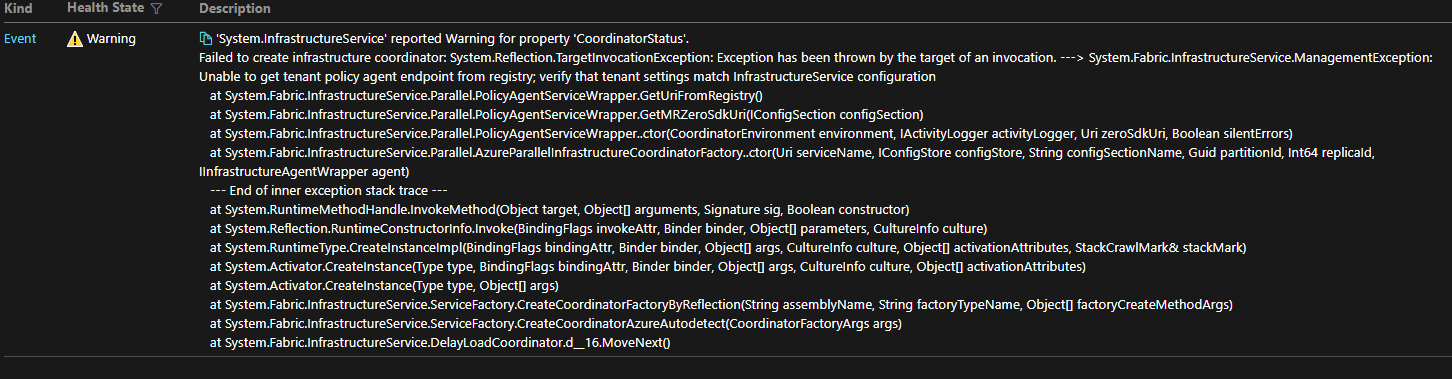
I don't understand how i am meant to change the VM Scale Set definiton? Should i re-deploy it from ARM?
Regards.
Document Details
⚠ Do not edit this section. It is required for docs.microsoft.com ➟ GitHub issue linking.
- ID: 13bc1fbb-3fec-21ed-693e-1a24a76a41b2
- Version Independent ID: ff3662bb-eb98-6b4a-b941-861361580ffb
- Content: Capacity planning and scaling for Azure Service Fabric - Azure Service Fabric
- Content Source: articles/service-fabric/service-fabric-best-practices-capacity-scaling.md
- Service: service-fabric
- GitHub Login: @peterpogorski
- Microsoft Alias: pepogors
 m1nkeh
All 6 comments
@m1nkeh We are checking this and we will get back to you.
 NavtejSaini-MSFT
on 24 Jul 2020
NavtejSaini-MSFT
on 24 Jul 2020
Thanks for the feedback! I have assigned the issue to the content author to investigate further and update the document as appropriate.
 Karishma-Tiwari-MSFT
on 29 Jul 2020
Karishma-Tiwari-MSFT
on 29 Jul 2020
did anyone ever look in to this?
@Karishma-Tiwari-MSFT can you chase please?
m1nkeh
on 23 Sep 2020
@m1nkeh, If you've confirmed that the definitions for Durability Level for all node types in the Cluster and the VMSS extension match, try re-deploying from ARM templates and see if that mitigates the issue.
If you continue to experience the error, it's possible that it's related to this open issue: https://github.com/microsoft/service-fabric/issues/959
Looks like there is a problem on the CRP/VMAgent side of things, which I'm not very familiar with. I'll try and get more info on the status of this issue and update you when I can.
 Nickomang
on 16 Oct 2020
Nickomang
on 16 Oct 2020
Closing for lack of activity and lack of artifacts represented in docs. If the issue persists, I'd recommend opening a ticket with Azure Support, who will be more equipped to provide info on the CRP issue, and feed us a docs change if necessary.
please-close
Nickomang
on 10 Nov 2020
@Nickomang apols for the lack of reply, this is on my to-do list but not very high priority right now due to current workload.. which essentially has deemed this issue not a priority.
at some point, when i get time to breathe, i'll check back in to this & re-open if necessary 👍🏼
didn't realise it had been 26 days already! Yikes 😲
m1nkeh
on 11 Nov 2020
Related issues
 Agazoth
·
3Comments
Agazoth
·
3Comments
 JamesDLD
·
3Comments
JamesDLD
·
3Comments
 monteledwards
·
3Comments
monteledwards
·
3Comments
 AronT-TLV
·
3Comments
AronT-TLV
·
3Comments
 jharbieh
·
3Comments
jharbieh
·
3Comments