Hello:
For this step:
Load the Azure Maps Web SDK source code locally using the azure-maps-control NPM package and host it with your app. This package also includes TypeScript definitions.
npm install azure-maps-control
What directory do I run that from? I want to add the Maps control to my ASP.NET Core web project, do I open a command prompt, cd to the root of my project, and run the NPM command from there?
Document Details
⚠ Do not edit this section. It is required for docs.microsoft.com ➟ GitHub issue linking.
- ID: ea11ca51-2d51-8328-09d7-2ee9944e5751
- Version Independent ID: 2077160d-3c5f-33d1-4d14-43a758071a76
- Content: Getting started with web map control
- Content Source: articles/azure-maps/how-to-use-map-control.md
- Service: azure-maps
- GitHub Login: @philmea
- Microsoft Alias: philmea
 JohnStraumann66
All 21 comments
I also tried to change the line:
center: [-122.33, 47.6],
to
center: [35.696496, -101.366837],
and all I get in the Browser is a blank screen?
JohnStraumann66
on 16 Jul 2020
@JohnStraumann66 Your understanding is correct, you can go to your project root folder and then run the command to embed the Azure Maps Web Control source code into your app.
Did you follow all the steps? Have you specified the correct authentication 'Maps Key'?
 AshokPeddakotla-MSFT
on 16 Jul 2020
AshokPeddakotla-MSFT
on 16 Jul 2020
@JohnStraumann66 Did you get a chance to look at the above response? Which browser are you using?
The Azure Maps Web SDK supports the following desktop browsers:
Microsoft Edge (current and previous version)
Google Chrome (current and previous version)
Mozilla Firefox (current and previous version)
Apple Safari (Mac OS X) (current and previous version)
See also Target legacy browsers if you are trying this in legacy browsers.
AshokPeddakotla-MSFT
on 20 Jul 2020
HI:
I tested in Google Chrome, Firefox, and the latest Edge Browsers. Blank screen every time. Note, is there a way to specify a Satellite View vs. a Road Map view?
JohnStraumann66
on 20 Jul 2020
Hello @JohnStraumann66 Could you please confirm if the issue is still persistent?
 SatishBoddu-MSFT
on 22 Jul 2020
SatishBoddu-MSFT
on 22 Jul 2020
Hello @JohnStraumann66 Could you please confirm if the issue is still persistent?
Yes, all I get is a blank screen when I change the Center Co-ordinates from
center: [-122.33, 47.6],
to
center: [35.696496, -101.366837],
JohnStraumann66
on 22 Jul 2020
@JohnStraumann66 We are looking into it, sorry for the inconvenience caused.
SatishBoddu-MSFT
on 22 Jul 2020
Hello @JohnStraumann66 I was able to repro the issue with coordinates[35.696496, -101.366837] ,
Please confirm , are you trying to render an address ? or trying to render an area ?
SatishBoddu-MSFT
on 22 Jul 2020
Hello @JohnStraumann66 I was able to repro the issue with coordinates[35.696496, -101.366837] ,
Please confirm , are you trying to render an address ? or trying to render an area ?
It's an area, an Oil refinery to be exact. That's why I asked if it is possible to set the Map to show a satellite picture as opposed to roads, I think we might be getting a blank because there are no roads but not sure that is the issue as there are roads around the refinery....
JohnStraumann66
on 22 Jul 2020
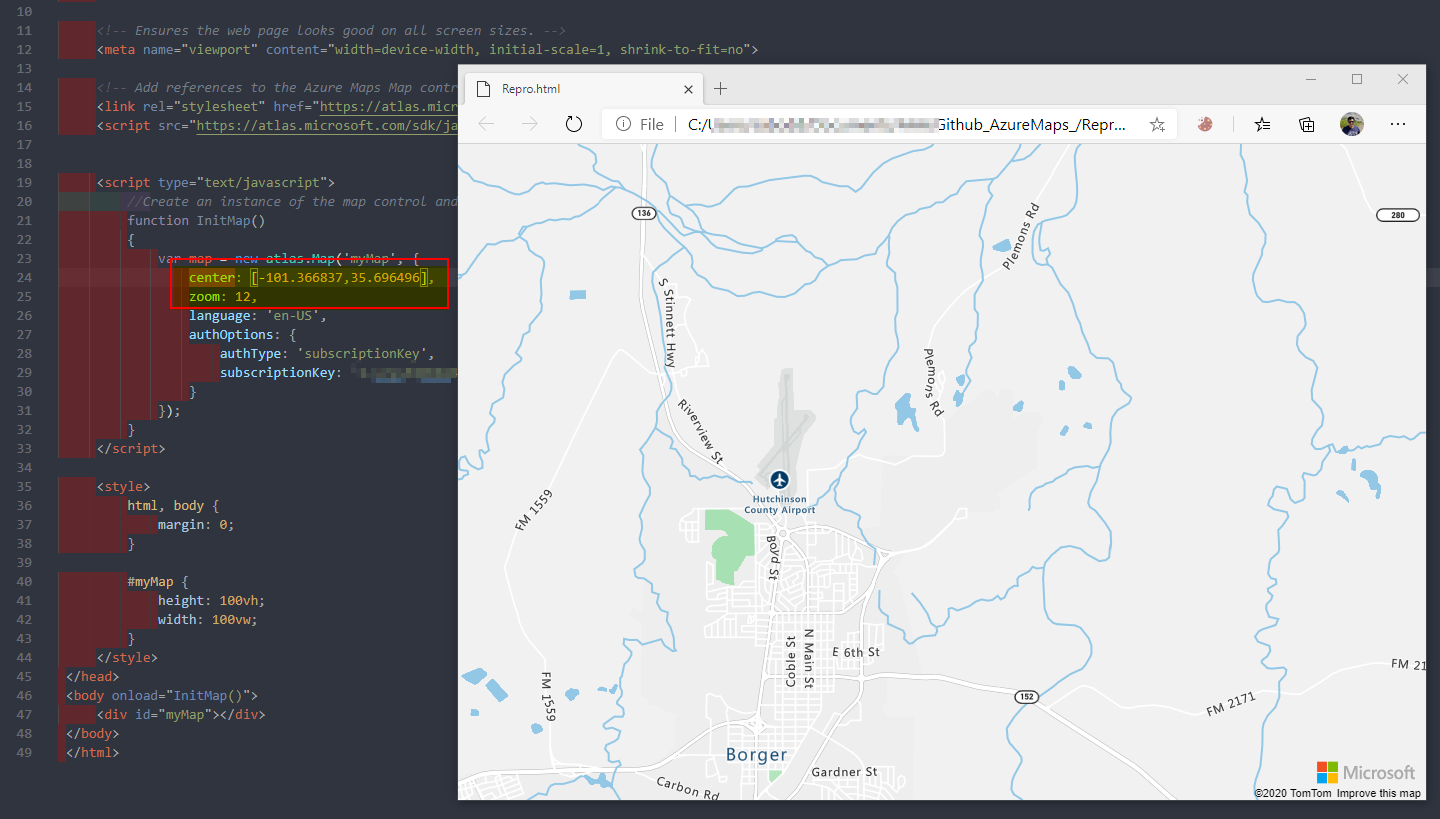
@JohnStraumann66 Could you please flip the coordinates like this [-101.366837,35.696496] and try again. Please confirm if that is the right location, and wanted to check on your input pattern ? [lat,long] or [long,lat] used?
SatishBoddu-MSFT
on 22 Jul 2020
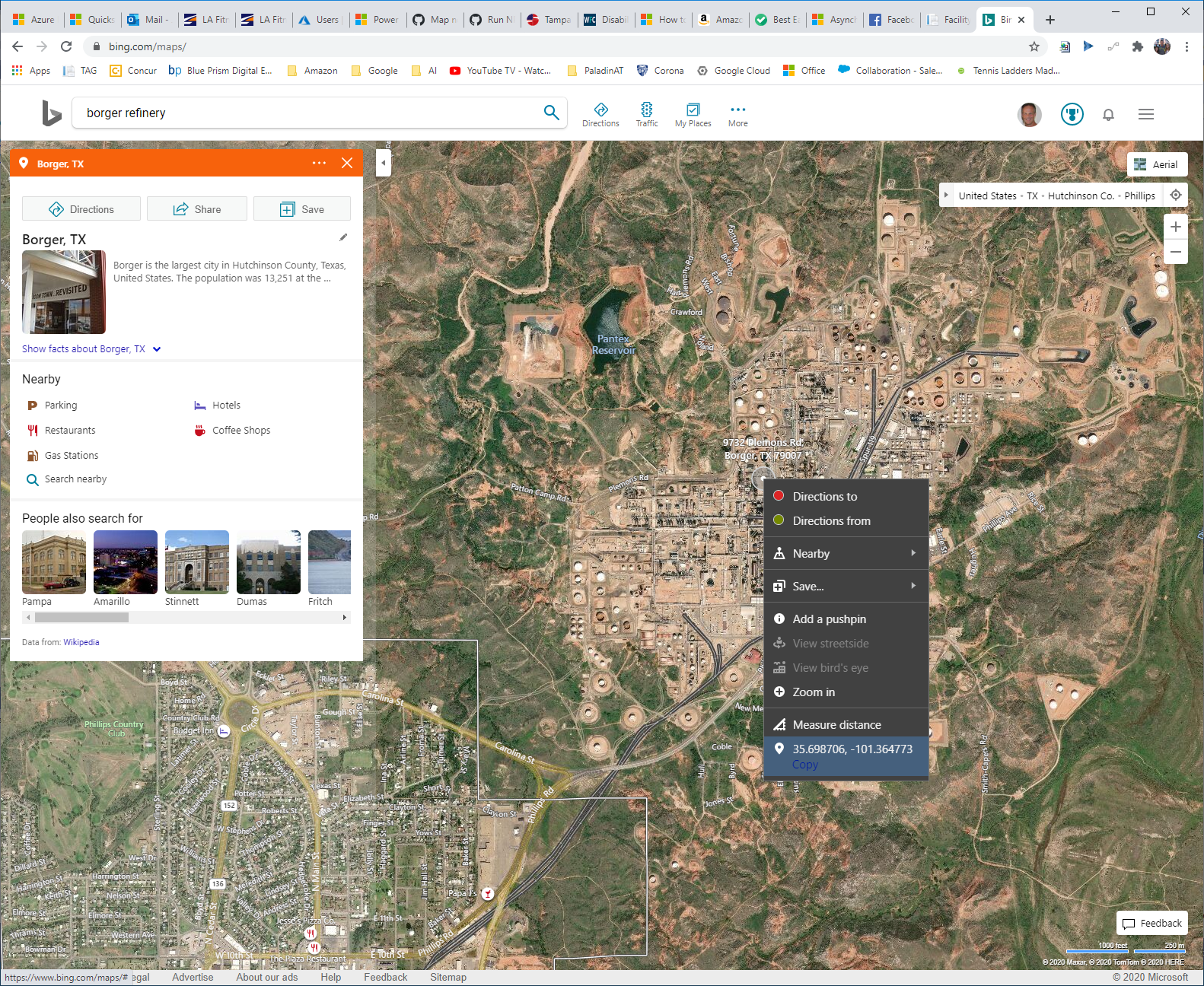
Hey very cool, that worked and yes it looks like the right location. I pulled those co-ordinates off Bing maps and just used what showed (see attachment). Any idea how I can switch to Aerial view and/or display the tool bar to select that?
JohnStraumann66
on 22 Jul 2020
Hello @JohnStraumann66 The pattern we have to use is [Longitude,Latitude] pair.
Ok so , let me show how i captured the area coordinates via any browser.
From the browser of *Chrome:* But be careful with what we need to apply in our Azure maps html sample , ref.
and convert them to [Longitude,Latitude] pair.
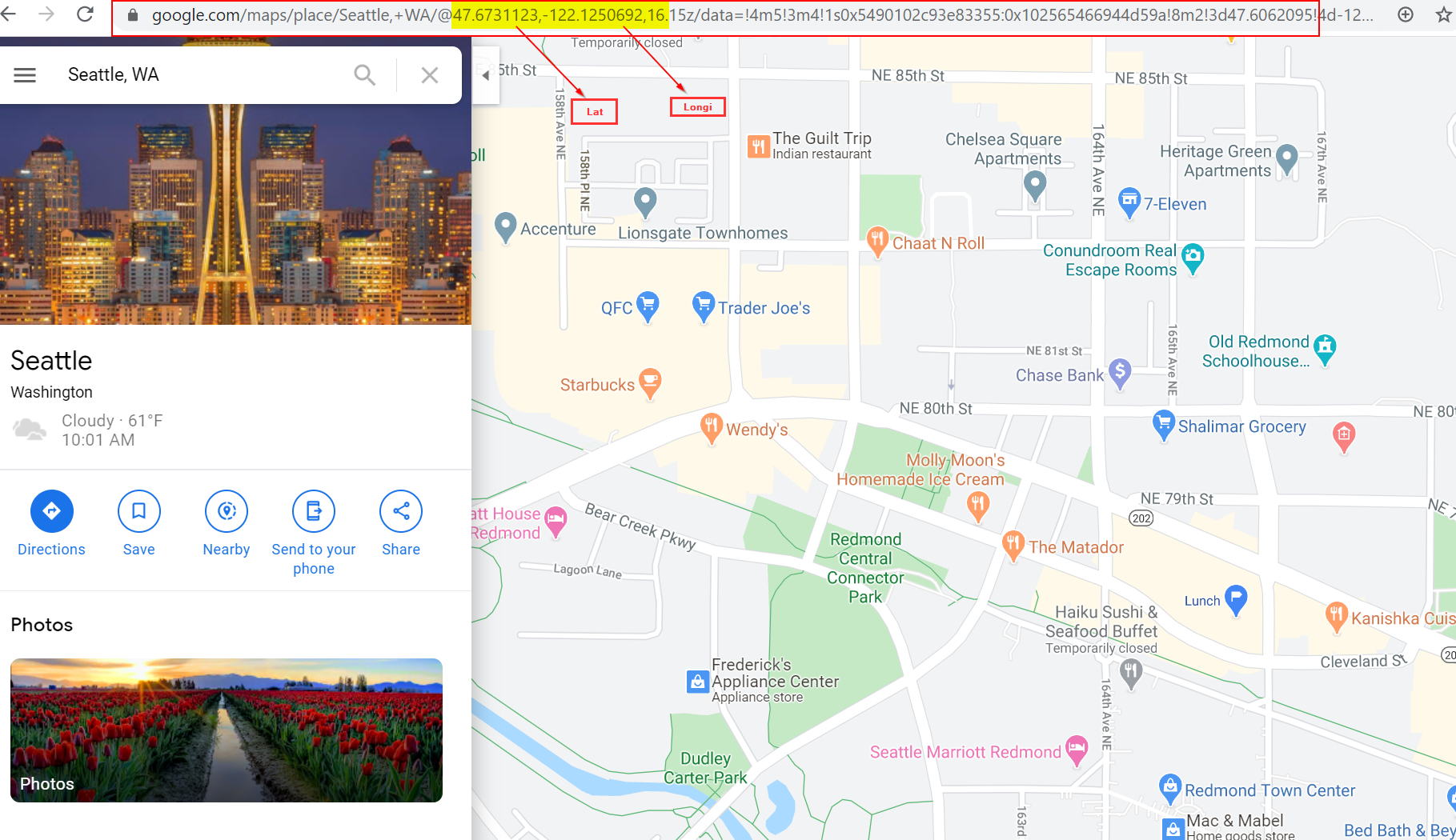
On bing maps, right click to copy and get the coordinates: and convert them to [Longitude,Latitude] pair.

SatishBoddu-MSFT
on 22 Jul 2020
That's great, thanks! Hey I am trying to add the Style toolbar and drawing toolbar. The Style toolbar works fine, but I cannot get the drawing toolbar to work. The
`
JohnStraumann66
on 22 Jul 2020
Ah found it, had to add:
JohnStraumann66
on 22 Jul 2020
Hello @JohnStraumann66 Could you please let us know if you need further help in this matter.
SatishBoddu-MSFT
on 22 Jul 2020
Hello @JohnStraumann66 Could you please let us know if you need further help in this matter.
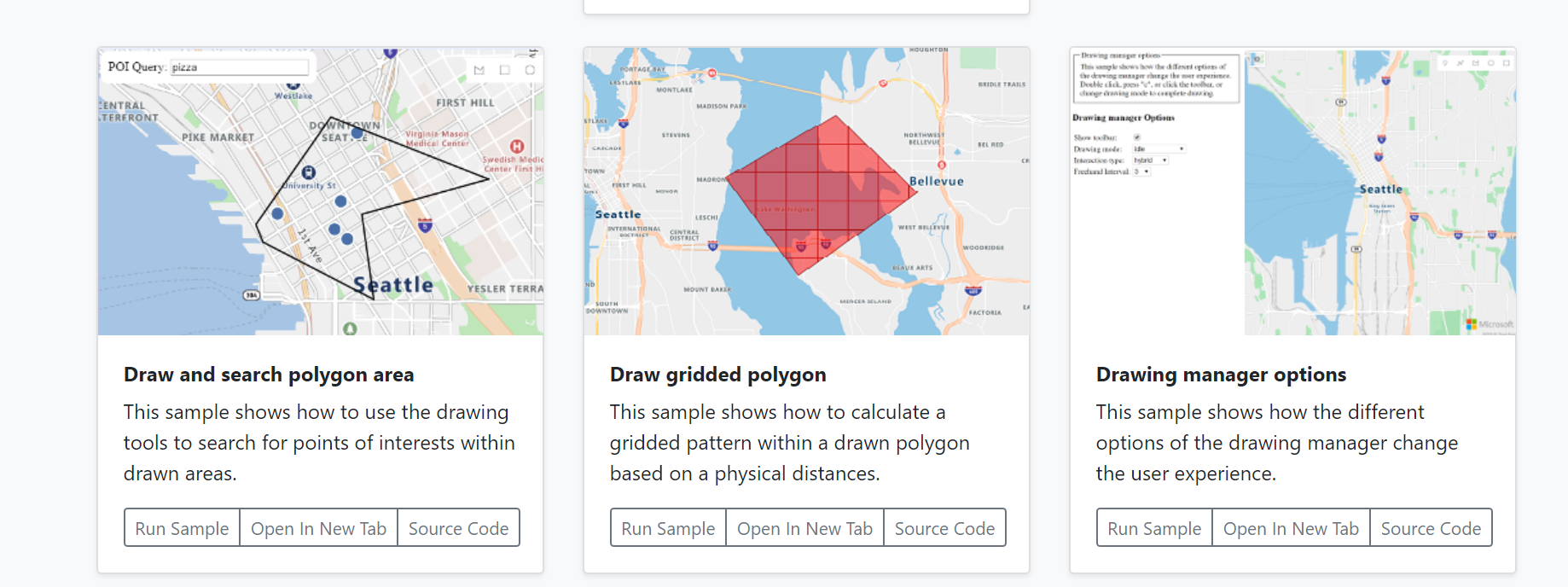
Well, if you're able to point me at an example of drawing multiple polygons on a map, like this sample:
and then saving the drawing, that would be great.
JohnStraumann66
on 22 Jul 2020
@JohnStraumann66 Were you able to look at the HTML code for the sample website you have mentioned?
Please check this Azure Maps Web SDK Samples for all source code samples, your can leverage your idea based on these samples. I dont think we can save maps or export.
SatishBoddu-MSFT
on 22 Jul 2020
Hello @JohnStraumann66 Please let us know if we are good with this thread as of here.
SatishBoddu-MSFT
on 22 Jul 2020
Hi:
Yes i have been going through that site, but the samples show only single drawings, I need to draw multiple shapes.
Do you happen to know if the SDK can get the Lat/Long and/or GPS for the points used to draw the Polygon? That would be a possible way to save a drawing...
JohnStraumann66
on 22 Jul 2020
@JohnStraumann66 You can ask your Product Implementation Questions under those particular Sample Github repos.
SatishBoddu-MSFT
on 22 Jul 2020
We will now proceed to close this particular thread. If there are further questions regarding this particular documentation, please tag me in your reply. We will gladly continue the discussion and we will reopen the issue.
SatishBoddu-MSFT
on 22 Jul 2020
Related issues
 behnam89
·
3Comments
behnam89
·
3Comments
 monteledwards
·
3Comments
monteledwards
·
3Comments
 bdcoder2
·
3Comments
bdcoder2
·
3Comments
 jebeld17
·
3Comments
jebeld17
·
3Comments
 spottedmahn
·
3Comments
spottedmahn
·
3Comments