Azure-docs: Increase clarity of compiled version of sdk and make copy/paste sections work without modification
[Enter feedback here]
If there is a copy and paste then that command should probably "work"
C:\gitrepo\vcpkg>.\vcpkg.exe integrate install
Applied user-wide integration for this vcpkg root.
All MSBuild C++ projects can now #include any installed libraries.
Linking will be handled automatically.
Installing new libraries will make them instantly available.
CMake projects should use: "-DCMAKE_TOOLCHAIN_FILE=C:/gitrepo/vcpkg/scripts/buildsystems/vcpkg.cmake"
C:\gitrepo\vcpkg>.\vcpkg.exe install azure-iot-sdk-c[public-preview,use_prov_client]
Error:
on expression: azure-iot-sdk-c[public-preview,use_prov_client]
^
Example:
vcpkg install zlib zlib:x64-windows curl boost
If you are trying to follow along, a bunch of combinations here dont actually work.
C:\gitrepo\vcpkg>.\vcpkg.exe install azure-iot-sdk-c public-preview
Computing installation plan...
Error: Cannot find definition for package public-preview.
This is the command that worked but I didnt see any qualifiers to help build a version of this. I'd like to see code that doesn't work outside of a code section while commands that do work in a copy and paste section accordingly.
C:\gitrepo\vcpkg>.\vcpkg.exe install azure-iot-sdk-c
Computing installation plan...
The following packages will be built and installed:
- azure-c-shared-utility[core]:x86-windows
azure-iot-sdk-c[core]:x86-windows - azure-macro-utils-c[core]:x86-windows
- azure-uamqp-c[core]:x86-windows
- azure-uhttp-c[core]:x86-windows
- azure-umqtt-c[core]:x86-windows
- parson[core]:x86-windows
- umock-c[core]:x86-windows
Those changes would improve the page imho.
Document Details
⚠ Do not edit this section. It is required for docs.microsoft.com ➟ GitHub issue linking.
- ID: 46c545b4-928a-b738-ca81-05cce50bd82d
- Version Independent ID: 3f4c6de1-840e-17a0-8d22-a1da83977849
- Content: Create an IoT Plug and Play Preview device (Windows)
- Content Source: articles/iot-pnp/quickstart-create-pnp-device-windows.md
- Service: iot-pnp
- GitHub Login: @miagdp
- Microsoft Alias: miag
 dc995
dc995
All 5 comments
@dc995 Thanks for your feedback! We will investigate and update as appropriate.
 SaurabhSharma-MSFT
on 5 Jul 2020
SaurabhSharma-MSFT
on 5 Jul 2020
@dc995 Thanks for the feedback! We have already fixed the feature name and the document is also updated 3 days ago.
Related to Update quickstart-create-pnp-device-windows.md #121121
https://github.com/microsoft/vcpkg/issues/12180
C:\gitrepo\vcpkg>.\vcpkg.exe install azure-iot-sdk-c[public-preview,use_prov_client]
Error: :1:47: invalid character in feature name (must be lowercase, digits, '-')
on expression: azure-iot-sdk-c[public-preview,use_prov_client]
Please make use of the latest command as shown in the updated document :
.\vcpkg.exe install azure-iot-sdk-c[public-preview,use-prov-client]

If you run the command : vcpkg search
You may see the list which shows the right feature name.
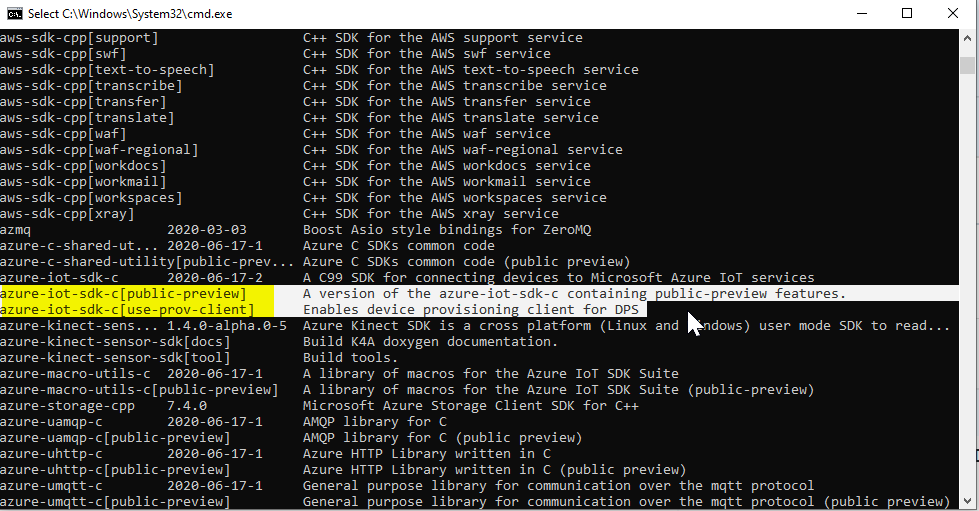
Please let us know if you need further help.
 SatishBoddu-MSFT
on 6 Jul 2020
SatishBoddu-MSFT
on 6 Jul 2020
@dc995 Just checking back! Please let us know if you need further help.
SatishBoddu-MSFT
on 6 Jul 2020
@dc995 Just checking back! Please let us know if you need further help.
I'm good. Thanks!
dc995
on 7 Jul 2020
@dc995
We will now proceed to close this thread. If there are further questions regarding this matter, please tag me in your reply. We will gladly continue the discussion and we will reopen the issue.
SatishBoddu-MSFT
on 7 Jul 2020
Related issues
 ianpowell2017
·
3Comments
ianpowell2017
·
3Comments
 jebeld17
·
3Comments
jebeld17
·
3Comments
 behnam89
·
3Comments
behnam89
·
3Comments
 Ponant
·
3Comments
Ponant
·
3Comments
 varma31
·
3Comments
varma31
·
3Comments