Azure-docs: Issue with json string response is beeing truncated
I am trying to send a response from an http listener, C#, to the listener which is hosted code in Azure, specifically the default Bot Framework project.
when sending a simple response such as "{\"hits\":[],\"query\":\"blah\"}" the content I receive on the bot side is an empty string

and went sending a larger response ( 3494 characters) the JSON is truncated to 3072 characters.

This is causing the JSON to be invalid which causes an error when serializing.
I do not think this is related to the bot framework since the this is specifically at the transport between the listener and sender.
Listener code (just has listen permissions on the relay)
```c#
listener.RequestHandler = (context) =>
{
var q = context.Request.Headers["X-Panorama-Query"].Replace("_", " ");
context.Response.StatusCode = HttpStatusCode.OK;
context.Response.StatusDescription = "OK, Here's what I could find";
// context.Response.Headers.Add("content-type", "application/json");
using var sw = new StreamWriter(context.Response.OutputStream);
var j =
"{"hits":[],"query":"blah"}";
            // Search() just returns a JSON string
            var queryResult = Search(q).GetAwaiter().GetResult();
            Console.WriteLine(j);
            Console.WriteLine(j.Length);
            Console.WriteLine(queryResult.Length);
            // sw.WriteLine(j);
            sw.WriteLine(queryResult);


            // The context MUST be closed here
            context.Response.Close();
        };
Sender (just has send permissions on the relay)
```c#
public async Task<string> Send(string q)
        {
            var tokenProvider = TokenProvider.CreateSharedAccessSignatureTokenProvider(
                KeyName, Key);
            var uri = new Uri($"https://{RelayNamespace}/{ConnectionName}");
            var token = (await tokenProvider.GetTokenAsync(uri.AbsoluteUri, TimeSpan.FromHours(1))).TokenString;
            var client = new HttpClient();

            client.DefaultRequestHeaders.Add("ServiceBusAuthorization", token);
            client.DefaultRequestHeaders.Add("X-Panorama-Query", q);
            var res = await client.GetAsync(uri);
            res.EnsureSuccessStatusCode();
            var body = await res.Content.ReadAsStringAsync();
            return body;
        }
Some initial search lead me to think that the response was being chunked, but reading the Azure docs. an error would be thrown if a response is set to chunked or over 64KB, which quick napkin math doesn't look like that JSON will be over 64KB so I don't think that's it either.
Am I just miss using what the context.Response.OutputStream is supposed to be used for? should I not be trying to send the data to the Response? If so what would be the best way to communicate the json payload back the other side?
Thank you for your time.
Edit:
- Added repo for reproducing issue https://github.com/barbados-clemens/azure-hybrid-relay-repoducable
Document Details
⚠ Do not edit this section. It is required for docs.microsoft.com ➟ GitHub issue linking.
- ID: 1c572de5-e8b5-ba72-af99-4e7b05bf115b
- Version Independent ID: 85644b7d-15b3-fba3-6332-bfb0d53a2450
- Content: Azure Relay Hybrid Connections - HTTP requests in .NET - Azure Relay
- Content Source: articles/azure-relay/relay-hybrid-connections-http-requests-dotnet-get-started.md
- Service: service-bus-relay
- GitHub Login: @spelluru
- Microsoft Alias: spelluru
 barbados-clemens
All 5 comments
@barbados-clemens Thank you for your feedback! We will review and update as appropriate.
 MayankBargali-MSFT
on 3 Jul 2020
MayankBargali-MSFT
on 3 Jul 2020
Thanks for taking a look. I've created a minimum reproducible repo for you to look over in more depth or hand off for anyone who might need to test.
https://github.com/barbados-clemens/azure-hybrid-relay-repoducable
Let me know if there's anything else you need from me to reproduce.
barbados-clemens
on 4 Jul 2020
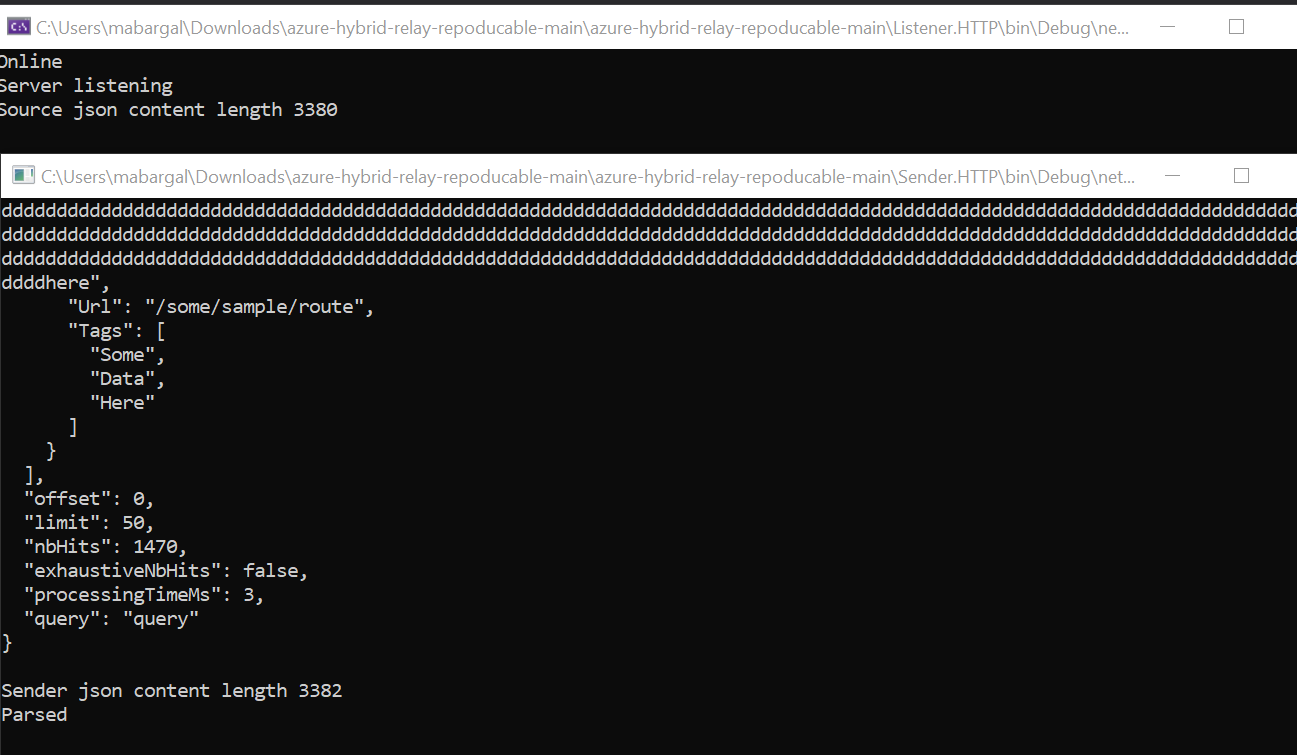
@barbados-clemens I have tested the repro at my end and I don't see any issue with the azure relay and I am able to send content length more than 3072 as per below screenshot. Whatever content I am sending I am receiving the same. If your search functionality is not working as expected you need to look into your business logic.
Update the code Listener Program.cs:
        using (var sw = new StreamWriter(context.Response.OutputStream))
            {
                var queryResult = Search(q).GetAwaiter().GetResult();
                Console.WriteLine("Source json content length {0}", queryResult.Length);
                // sw.WriteLine(j);
                sw.WriteLine("{0}", queryResult);
            }
``
MayankBargali-MSFT
on 7 Jul 2020
it looks to be related to using the C# 8.0 inline using statements like the code you showed you changed.
https://docs.microsoft.com/en-us/dotnet/csharp/whats-new/csharp-8#using-declarations
is this a bug with the Azure SDK then? or does it not support this? or am I using the using feature wrong?
either way this solved my issue.
Thank you for taking a look at this for me. 😄
barbados-clemens
on 7 Jul 2020
@barbados-clemens The latest SDK for the azure relay is 2.0.1 and dependencies on .NETStandard 2.0: https://www.nuget.org/packages/Microsoft.Azure.Relay/
Thanks for your confirmation. I will go ahead and close this issue.
MayankBargali-MSFT
on 8 Jul 2020
Related issues
 bdcoder2
·
3Comments
bdcoder2
·
3Comments
 jamesgallagher-ie
·
3Comments
jamesgallagher-ie
·
3Comments
 varma31
·
3Comments
varma31
·
3Comments
 jharbieh
·
3Comments
jharbieh
·
3Comments
 JamesDLD
·
3Comments
JamesDLD
·
3Comments