Azure-docs: Does section on managed identity need updating to include storage blobs and queues?
[Enter feedback here]
The section on managed identity doesn't show blob
https://docs.microsoft.com/en-us/azure/logic-apps/logic-apps-securing-a-logic-app#add-authentication-to-outbound-calls
But https://docs.microsoft.com/en-gb/azure/active-directory/managed-identities-azure-resources/services-support-managed-identities says blob does support it ?
Document Details
⚠ Do not edit this section. It is required for docs.microsoft.com ➟ GitHub issue linking.
- ID: 95b48753-cabe-fe92-42de-21775f4f99c3
- Version Independent ID: 45a1fa90-c4f8-6d0b-e1a8-ed996de671eb
- Content: Secure access and data - Azure Logic Apps
- Content Source: articles/logic-apps/logic-apps-securing-a-logic-app.md
- Service: logic-apps
- GitHub Login: @ecfan
- Microsoft Alias: estfan
 steveculshaw
All 3 comments
Hi @steveculshaw,
The table in the Add authentication to outbound calls section section doesn't include Storage blobs or queues because the Storage connector doesn't have the option for you to select an authentication type, for example:

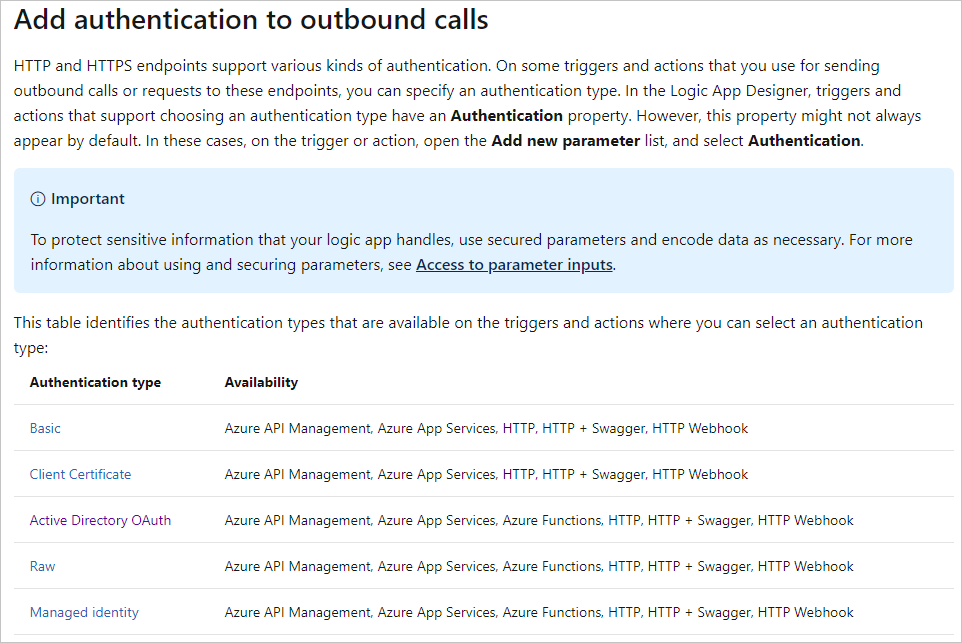
Instead, the table lists those triggers and actions where you can select an authentication type, such as Managed Identity:

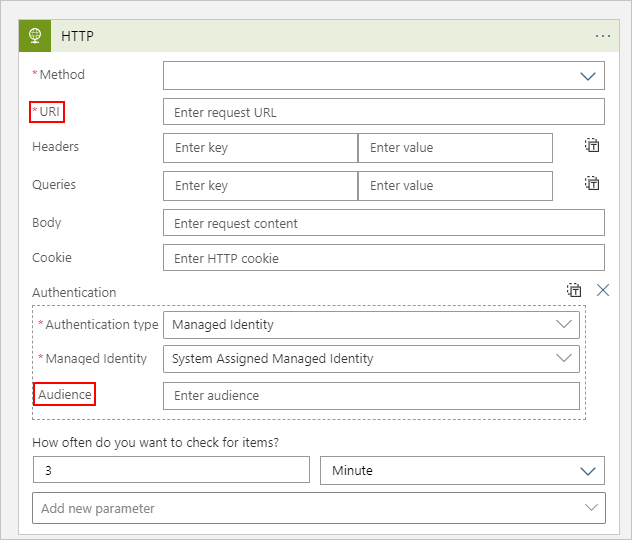
Currently, managed identity support in Logic Apps is available only for the listed built-in triggers and actions, not managed connectors such as Azure Storage. If you want to use a managed identity when connecting from a logic app to a Storage blob or queue, you need to use one of the listed triggers or actions. You also need to specify the URI and Audience properties with the values for the Storage blob or queue:
I'm clarifying the text in this section about what the table describes:
I hope this explanation helps answer your question.
 ecfan
on 23 Jun 2020
ecfan
on 23 Jun 2020
@mike-urnun-msft: #please-close
ecfan
on 23 Jun 2020
@ecfan Ah ha ... got ya. Many thanks for the excellent explanation
steveculshaw
on 23 Jun 2020
Related issues
 monteledwards
·
3Comments
monteledwards
·
3Comments
 DeepPuddles
·
3Comments
DeepPuddles
·
3Comments
 paulmarshall
·
3Comments
paulmarshall
·
3Comments
 Favna
·
3Comments
Favna
·
3Comments
 JeffLoo-ong
·
3Comments
JeffLoo-ong
·
3Comments
Most helpful comment
Hi @steveculshaw,
The table in the Add authentication to outbound calls section section doesn't include Storage blobs or queues because the Storage connector doesn't have the option for you to select an authentication type, for example:
Instead, the table lists those triggers and actions where you can select an authentication type, such as Managed Identity:
Currently, managed identity support in Logic Apps is available only for the listed built-in triggers and actions, not managed connectors such as Azure Storage. If you want to use a managed identity when connecting from a logic app to a Storage blob or queue, you need to use one of the listed triggers or actions. You also need to specify the URI and Audience properties with the values for the Storage blob or queue:
I'm clarifying the text in this section about what the table describes:
I hope this explanation helps answer your question.