Azure-docs: App Service auto-scale - Service Bus queue active messages definition
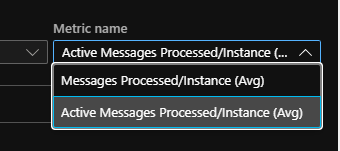
When auto-scaling based on a Service Bus queue I can't find a definition for:
- Messages processed
- Active messages processed
What does "active" mean and what in contrast is "not active". Does active means messages waiting to be processed in the queue ("unprocessed"), and messages processed means messages that were removed from the queue? Would be easier to remove the "processed" from the seconds, like:
- Processed messages (Tooltip: messages that were processed and are no longer in the queue)
- Active/Unprocessed messages (Tooltip: messages present in the queue and ready to be processed)
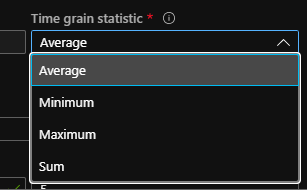
Also what is the outcome when using SUM vs Average in this situation.
Is SUM the total per instances, while Average is the average of the division per instances?
BTW I'm opening this because I couldn't find it anywhere else.
Document Details
⚠ Do not edit this section. It is required for docs.microsoft.com ➟ GitHub issue linking.
- ID: d2dc1ab9-8002-cf0f-d147-f493f3e0ac28
- Version Independent ID: 53d9f4d3-efc2-7b1c-7d64-67557a125799
- Content: Autoscale common metrics - Azure Monitor
- Content Source: articles/azure-monitor/platform/autoscale-common-metrics.md
- Service: azure-monitor
- Sub-service: autoscale
- GitHub Login: @rboucher
- Microsoft Alias: robb
 epomatti
All 6 comments
@shilpasharmaAM . Can you provide some help here?
 rboucher
on 22 Jun 2020
rboucher
on 22 Jun 2020
Based of the https://docs.microsoft.com/en-us/rest/api/servicebus/queues/get
Messages processed: The number of messages in the queue
Active messages processed: Number of the active messages in the queue, topic or subscription
Documentation will be updated to reflect the above, thanks for calling it out.
In terms of the time grain statistics, "Average" indicates that the metrics obtained during the preset or set timegrain will be aggregated by taking the average per instance. Whereas "Sum" indicates that the metrics obtained during the preset or set timegrain would be added per instance.
 shilpasharmaAM
on 30 Jun 2020
shilpasharmaAM
on 30 Jun 2020
@shilpasharmaAM thanks for the response
Still not clear to me, I don't understand what "active" means, and if a message is "processed", why is it still in the queue?
Can we get more clarification?
epomatti
on 30 Jun 2020
Hi @epomatti . The concept of "Active messages" is discussed in the Service Bus documentation. @spelluru Can you provide a specific piece of documentation that explains the difference? I went looking and couldn't find it myself. It would also be helpful to update this documentation to mention what the term active means. https://docs.microsoft.com/en-us/azure/service-bus-messaging/service-bus-metrics-azure-monitor given the question from epomatti and my difficulty.
rboucher
on 1 Jul 2020
Including Ashish @axisc for any follow up questions.
https://docs.microsoft.com/en-us/azure/service-bus-messaging/message-counters#message-count-details
Messages in the queue or subscription that are in the active state and ready for delivery. The messages are available to be received.
Messages can be in deferred state (https://docs.microsoft.com/en-us/azure/service-bus-messaging/message-deferral) or scheduled state (https://docs.microsoft.com/en-us/azure/service-bus-messaging/message-sequencing#scheduled-messages) - They are not active and not ready for delivery.
 spelluru
on 6 Jul 2020
spelluru
on 6 Jul 2020
@spelluru thanks for the active messages definition.
However, I still don't understand the difference in the auto-scaling options:
- Messages processed
- Active messages processed
From the consumer perspective it is clear to me what "active" means, but how about the auto-scaling rule?
epomatti
on 6 Jul 2020
Related issues
 ianpowell2017
·
3Comments
ianpowell2017
·
3Comments
 behnam89
·
3Comments
behnam89
·
3Comments
 jharbieh
·
3Comments
jharbieh
·
3Comments
 Favna
·
3Comments
Favna
·
3Comments
 spottedmahn
·
3Comments
spottedmahn
·
3Comments
Most helpful comment
@spelluru thanks for the active messages definition.
However, I still don't understand the difference in the auto-scaling options:
From the consumer perspective it is clear to me what "active" means, but how about the auto-scaling rule?