Azure-docs: Authenticate with Azure Active Directory - Error " New-Object: Cannot find type [Microsoft.IdentityModel.Clients.ActiveDirectory.SecureClientSecret]: verify that the assembly containing this type is loaded."
Hello,
I'm following the steps in the link below to perform authentication by AAD, but I received the error message "New-Object: Cannot find type [Microsoft.IdentityModel.Clients.ActiveDirectory.SecureClientSecret]: verify that the assembly containing this type is loaded".
Does anyone know how to solve this issue?
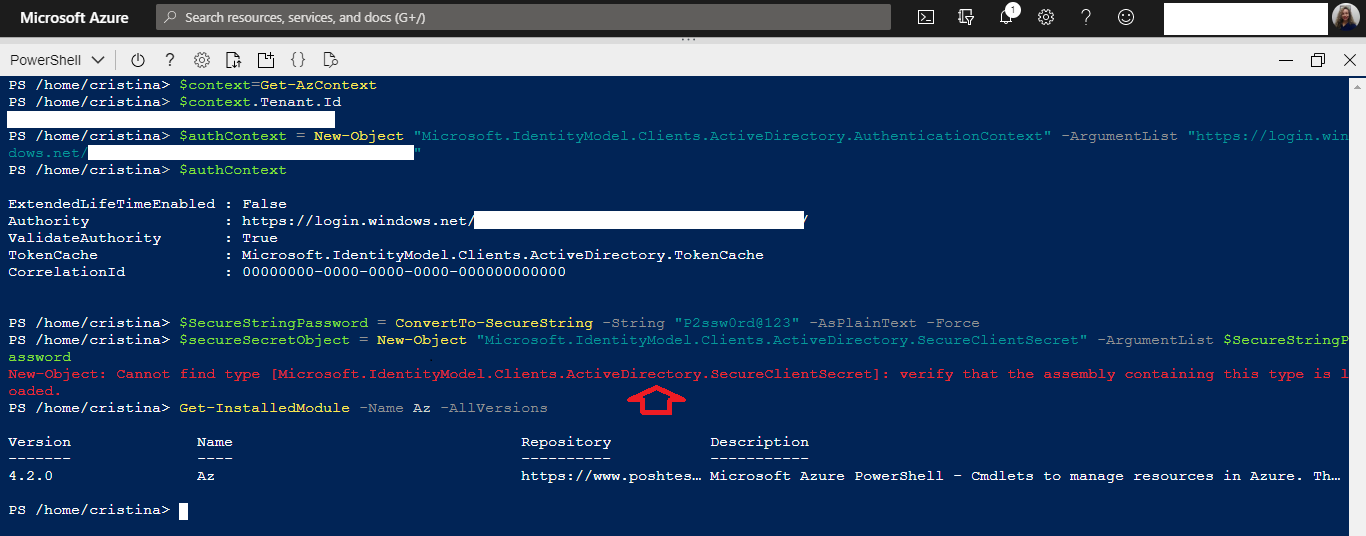
Reference: https://docs.microsoft.com/en-us/azure/cognitive-services/authentication#authenticate-with-azure-active-directory
Best regards,
Cristina
Document Details
⚠ Do not edit this section. It is required for docs.microsoft.com ➟ GitHub issue linking.
- ID: 1218be14-5001-1458-f5e9-821e38730e20
- Version Independent ID: 45f58de5-cd30-0455-907f-ef1820615d7e
- Content: Authentication - Azure Cognitive Services
- Content Source: articles/cognitive-services/authentication.md
- Service: cognitive-services
- GitHub Login: @erhopf
- Microsoft Alias: erhopf
 crisansou
All 6 comments
@crisansou we will review your feedback and get back to you shortly. Thanks.
 GiftA-MSFT
on 19 Jun 2020
GiftA-MSFT
on 19 Jun 2020
@erhopf I was able to reproduce this error when trying to get a token. Can you please review documentation? Thanks.

GiftA-MSFT
on 22 Jun 2020
@crisansou - We're looking into this for you now and will get back to you as soon as we have an answer.
 erhopf
on 23 Jun 2020
erhopf
on 23 Jun 2020
@crisansou, if you are using CloudShell from Azure Portal, the SecureClientSecret class is not available. You can, however, pass in the secret as a string. So you can do: $clientCredential = New-Object "Microsoft.IdentityModel.Clients.ActiveDirectory.ClientCredential" -ArgumentList $app.ApplicationId,
More info on ClientCredential can be found here:
https://docs.microsoft.com/en-us/dotnet/api/microsoft.identitymodel.clients.activedirectory.clientcredential.-ctor?view=azure-dotnet-preview#Microsoft_IdentityModel_Clients_ActiveDirectory_ClientCredential__ctor_System_String_System_String_
We'll update the doc accordingly so other folks don't run into the same issue. Thanks for bringing this to our attention!
 DavidLiCIG
on 28 Jun 2020
DavidLiCIG
on 28 Jun 2020
$clientCredential = New-Object "Microsoft.IdentityModel.Clients.ActiveDirectory.ClientCredential" -ArgumentList $app.ApplicationId,
Ok, it worked, thank you!
Best regards,
Cristina
crisansou
on 29 Jun 2020
We're in the process of updating docs and @crisansou is unblocked - #please-close
erhopf
on 29 Jun 2020
Related issues
 AronT-TLV
·
3Comments
AronT-TLV
·
3Comments
 varma31
·
3Comments
varma31
·
3Comments
 monteledwards
·
3Comments
monteledwards
·
3Comments
 JamesDLD
·
3Comments
JamesDLD
·
3Comments
 bdcoder2
·
3Comments
bdcoder2
·
3Comments