Azure-docs: wrong documentation
I tried to refresh a token but alway I've got an invalid_grant error. After some timme of investigation I found out (with help of an stack overflow post) that I have to put the policy as query parameter into the request. That means:
this URL is wrong https://<tenant-name>.b2clogin.com/<tenant-name>.onmicrosoft.com/B2C_1_ROPC_Auth/oauth2/v2.0/token
this URL ist fine and works https://login.microsoftonline.com/<tenant-name>.onmicrosoft.com/oauth2/v2.0/token?p=B2C_1_ROPC_Auth
It would be great to change it in every documentation regarding this topic to save time for next developers. Every documentation means, I found a lot of samples and tutorials with this wrong type of URL.
Document Details
⚠ Do not edit this section. It is required for docs.microsoft.com ➟ GitHub issue linking.
- ID: c54680bb-ff67-a9e2-4272-1710fe6eb863
- Version Independent ID: 6d15d340-f556-6bb0-8b4c-f4535537189b
- Content: Configure the resource owner password credentials flow - Azure AD B2C
- Content Source: articles/active-directory-b2c/configure-ropc.md
- Service: active-directory
- Sub-service: b2c
- GitHub Login: @msmimart
- Microsoft Alias: mimart
 jfellien
All 9 comments
@jfellien Thank you for your query. We will investigate and make sure the documentation is rectified.
 shashishailaj
on 10 Jun 2020
shashishailaj
on 10 Jun 2020
maybe the Stack Overflow post may help to understand what I tried to do.
jfellien
on 10 Jun 2020
Thank you for the link @jfellien . We will update the thread after review.
shashishailaj
on 10 Jun 2020
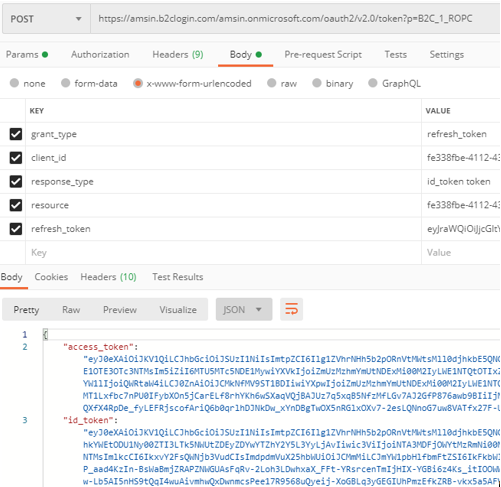
@jfellien The url mentioned in the document is correct. In fact, the support for login.microsoftonline.com in Azure AD B2C is planned for retirement on 04 December 2020. Refer to https://docs.microsoft.com/en-us/azure/active-directory-b2c/b2clogin for more details.
Redeeming the refresh token to get new token is supported with b2clogin.com. Please refer to the screenshot below:
 amanmcse
on 10 Jun 2020
amanmcse
on 10 Jun 2020
Thank you for your investigation.
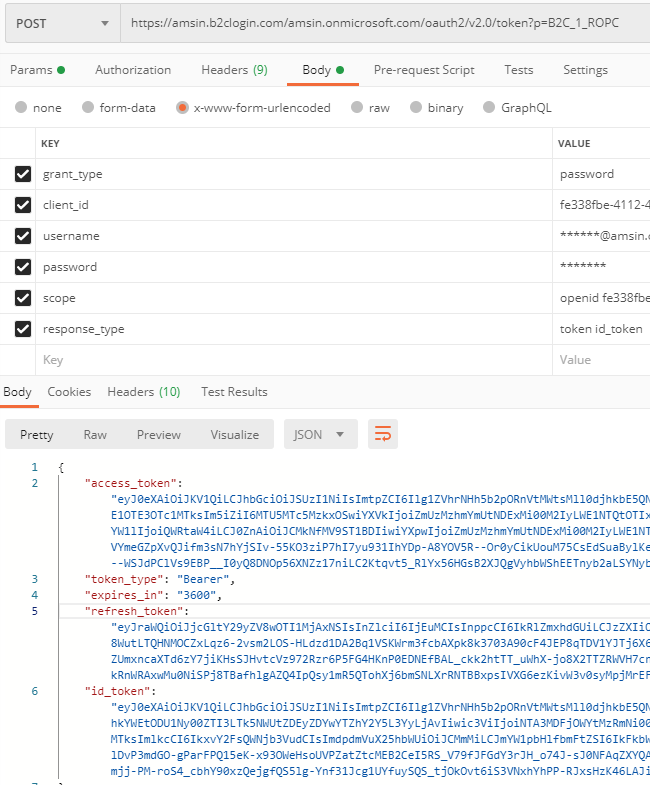
Bad for me, because then I have to find out how to use "grant_type=password" in my app without login.microsoftonline.com
jfellien
on 10 Jun 2020
@jfellien You can refer to below screenshot where I have requested the tokens with grant_type=password.
amanmcse
on 10 Jun 2020
Great, you are my hero
jfellien
on 10 Jun 2020
Is works like a charm.
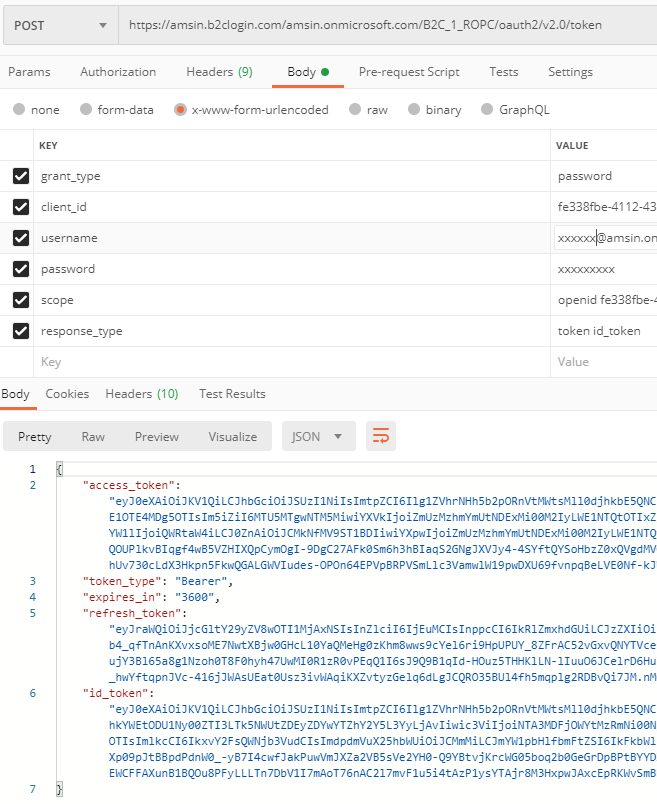
But you've added the policy as query too. Here https://docs.microsoft.com/en-us/azure/active-directory-b2c/signin-appauth-ios?tabs=app-reg-ga the policy ist documented as part of URL. Does it matter?
jfellien
on 10 Jun 2020
@jfellIien It works the same way if we pass the policy name as part of the URL or as a parameter. Below is the screenshot where policy name is not passed as parameter but as part of the URL:
amanmcse
on 11 Jun 2020
Related issues
 Agazoth
·
3Comments
Agazoth
·
3Comments
 paulmarshall
·
3Comments
paulmarshall
·
3Comments
 AronT-TLV
·
3Comments
AronT-TLV
·
3Comments
 varma31
·
3Comments
varma31
·
3Comments
 JeffLoo-ong
·
3Comments
JeffLoo-ong
·
3Comments