Azure-docs: B2C Custom Policy: Invalid child elements 'SingleSignOn', 'SessionExpiryType'
From the RelyingParty document I tried to follow everything with an additional set of elements that customize our login session time.
Here is my sample policy code I added:
```
```
Unfortunately this is throwing me the below exception:
Validation failed: 1 validation error(s) found in policy "B2C_1A_SIGNUP_SIGNIN_SAML" of tenant "stgb2crexaad.onmicrosoft.com".Schema validation error found at line 10 col 8 in policy "B2C_1A_SIGNUP_SIGNIN_SAML" of tenant "stgb2crexaad.onmicrosoft.com": The element 'UserJourneyBehaviors' in namespace 'http://schemas.microsoft.com/online/cpim/schemas/2013/06' has invalid child element 'SingleSignOn' in namespace 'http://schemas.microsoft.com/online/cpim/schemas/2013/06'. List of possible elements expected: 'ContentDefinitionParameters, JourneyFraming, ScriptExecution, OnError' in namespace 'http://schemas.microsoft.com/online/cpim/schemas/2013/06'.Schema validation error found at line 10 col 8 in policy "B2C_1A_SIGNUP_SIGNIN_SAML" of tenant "stgb2crexaad.onmicrosoft.com": The element 'UserJourneyBehaviors' in namespace 'http://schemas.microsoft.com/online/cpim/schemas/2013/06' has invalid child element 'SingleSignOn' in namespace 'http://schemas.microsoft.com/online/cpim/schemas/2013/06'. List of possible elements expected: 'ContentDefinitionParameters, JourneyFraming, ScriptExecution, OnError' in namespace 'http://schemas.microsoft.com/online/cpim/schemas/2013/06'.
Are these really available for usage?
Document Details
⚠ Do not edit this section. It is required for docs.microsoft.com ➟ GitHub issue linking.
- ID: 1e3ce49f-746e-9326-9846-32d569558b65
- Version Independent ID: 4978d164-555d-b3cc-2989-5246b0f44313
- Content: RelyingParty - Azure Active Directory B2C
- Content Source: articles/active-directory-b2c/relyingparty.md
- Service: active-directory
- Sub-service: b2c
- GitHub Login: @msmimart
- Microsoft Alias: mimart
 nkumars
All 9 comments
@nkumars Thanks for your feedback! We will investigate and update as appropriate.
 SaurabhSharma-MSFT
on 4 Jun 2020
SaurabhSharma-MSFT
on 4 Jun 2020
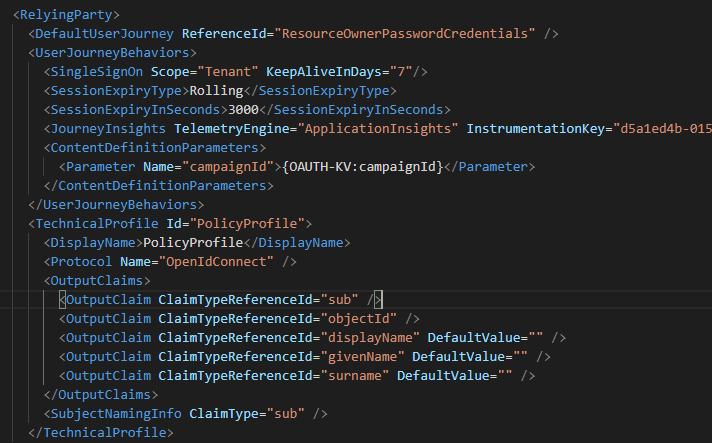
@nkumars I am able to follow the document and load the policy file with out any issues.
SaurabhSharma-MSFT
on 4 Jun 2020
@nkumars We will now proceed to close this thread. If there are further questions regarding this matter, please reopen it and we will gladly continue the discussion.
SaurabhSharma-MSFT
on 5 Jun 2020
@SaurabhSharma-MSFT , I still get the same error. Please find my complete RelyingParty code:
<?xml version="1.0" encoding="UTF-8" standalone="yes"?>
<TrustFrameworkPolicy xmlns:xsi="http://www.w3.org/2001/XMLSchema-instance"
xmlns:xsd="http://www.w3.org/2001/XMLSchema"
xmlns="http://schemas.microsoft.com/online/cpim/schemas/2013/06" PolicySchemaVersion="0.3.0.0" TenantId="stgb2crexaad.onmicrosoft.com" PolicyId="B2C_1A_signup_signin_saml" PublicPolicyUri="http://stgb2crexaad.onmicrosoft.com/B2C_1A_signup_signin_saml" DeploymentMode="Development" UserJourneyRecorderEndpoint="urn:journeyrecorder:applicationinsights">
<BasePolicy>
<TenantId>stgb2crexaad.onmicrosoft.com</TenantId>
<PolicyId>B2C_1A_TrustFrameworkExtensions</PolicyId>
</BasePolicy>
<RelyingParty>
<DefaultUserJourney ReferenceId="SignUpOrSignInPingID" />
<UserJourneyBehaviors>
<JourneyInsights TelemetryEngine="ApplicationInsights" InstrumentationKey="7e0f8cf6-e05c-4179-9e84-e8938cde42e8" DeveloperMode="true" ClientEnabled="true" ServerEnabled="true" TelemetryVersion="1.0.0" />
<SingleSignOn Scope="Policy" KeepAliveInDays="7" EnforceIdTokenHintOnLogout="false" />
<SessionExpiryType>Rolling</SessionExpiryType>
</UserJourneyBehaviors>
<TechnicalProfile Id="PolicyProfile">
<DisplayName>PolicyProfile</DisplayName>
<Protocol Name="SAML2"/>
<OutputClaims>
<OutputClaim ClaimTypeReferenceId="displayName" />
<OutputClaim ClaimTypeReferenceId="givenName" />
<OutputClaim ClaimTypeReferenceId="surname" />
<OutputClaim ClaimTypeReferenceId="email" DefaultValue="" />
<OutputClaim ClaimTypeReferenceId="identityProvider" DefaultValue="" />
<OutputClaim ClaimTypeReferenceId="objectId" PartnerClaimType="objectId"/>
<OutputClaim ClaimTypeReferenceId="identityProviderAccessToken" PartnerClaimType="idp_access_token" />
<!-- <OutputClaim ClaimTypeReferenceId="custom_claim" /> -->
<OutputClaim ClaimTypeReferenceId="shop_id" />
<OutputClaim ClaimTypeReferenceId="role_id" />
</OutputClaims>
<SubjectNamingInfo ClaimType="objectId" ExcludeAsClaim="true"/>
</TechnicalProfile>
</RelyingParty>
</TrustFrameworkPolicy>
Do you say I'm missing anything here?
It seems I'm not authorized to reopen the issue, kindly do so and we can discuss more
nkumars
on 6 Jun 2020
@SaurabhSharma-MSFT, Any update on this?
nkumars
on 25 Jun 2020
@SaurabhSharma-MSFT, this doesn't seem working to me
Validation failed: 1 validation error(s) found in policy "B2C_1A_SIGNUP_SIGNIN_SAML" of tenant "stgb2crexaad.onmicrosoft.com".Schema validation error found at line 11 col 8 in policy "B2C_1A_SIGNUP_SIGNIN_SAML" of tenant "stgb2crexaad.onmicrosoft.com": The element 'UserJourneyBehaviors' in namespace 'http://schemas.microsoft.com/online/cpim/schemas/2013/06' has invalid child element 'SessionExpiryType' in namespace 'http://schemas.microsoft.com/online/cpim/schemas/2013/06'.Schema validation error found at line 11 col 8 in policy "B2C_1A_SIGNUP_SIGNIN_SAML" of tenant "stgb2crexaad.onmicrosoft.com": The element 'UserJourneyBehaviors' in namespace 'http://schemas.microsoft.com/online/cpim/schemas/2013/06' has invalid child element 'SessionExpiryType' in namespace 'http://schemas.microsoft.com/online/cpim/schemas/2013/06'.
@nkumars order of elements matter. In my case, I got same error as you, when I had it like:
      <ScriptExecution>Allow</ScriptExecution>
      <SessionExpiryType>Rolling</SessionExpiryType>
      <SessionExpiryInSeconds>900</SessionExpiryInSeconds>
but when I moved ScriptExecution element down in the list, it started to work (see below)
      <SessionExpiryType>Rolling</SessionExpiryType>
      <SessionExpiryInSeconds>900</SessionExpiryInSeconds>
      <ScriptExecution>Allow</ScriptExecution>
Try to put JourneyInsights after other elements
 jarekkoziol
on 22 Jul 2020
jarekkoziol
on 22 Jul 2020
I have the same problem :
Validation failed: 1 validation error(s) found in policy "B2C_1A_QI_SIGNUP_SIGNIN" of tenant "sandboxQNB2C.onmicrosoft.com".Schema validation error found at line 12 col 8 in policy "B2C_1A_QI_SIGNUP_SIGNIN" of tenant "sandboxQNB2C.onmicrosoft.com": The element 'UserJourneyBehaviors' in namespace 'http://schemas.microsoft.com/online/cpim/schemas/2013/06' has invalid child element 'JourneyInsights' in namespace 'http://schemas.microsoft.com/online/cpim/schemas/2013/06'. List of possible elements expected: 'OnError' in namespace 'http://schemas.microsoft.com/online/cpim/schemas/2013/06'.Schema validation error found at line 12 col 8 in policy "B2C_1A_QI_SIGNUP_SIGNIN" of tenant "sandboxQNB2C.onmicrosoft.com": The element 'UserJourneyBehaviors' in namespace 'http://schemas.microsoft.com/online/cpim/schemas/2013/06' has invalid child element 'JourneyInsights' in namespace 'http://schemas.microsoft.com/online/cpim/schemas/2013/06'. List of possible elements expected: 'OnError' in namespace 'http://schemas.microsoft.com/online/cpim/schemas/2013/06'.
xmlns:xsd="http://www.w3.org/2001/XMLSchema"
xmlns="http://schemas.microsoft.com/online/cpim/schemas/2013/06"
PolicySchemaVersion="0.3.0.0"
TenantId="sandboxQNB2C.onmicrosoft.com"
PolicyId="B2C_1A_QI_signup_signin"
DeploymentMode="Development"
UserJourneyRecorderEndpoint="urn:journeyrecorder:applicationinsights"
PublicPolicyUri="http://sandboxQNB2C.onmicrosoft.com/B2C_1A_signup_signin">
<?xml version="1.0" encoding="UTF-8" standalone="yes"?>
<TrustFrameworkPolicy
xmlns:xsi="http://www.w3.org/2001/XMLSchema-instance"
xmlns:xsd="http://www.w3.org/2001/XMLSchema"
xmlns="http://schemas.microsoft.com/online/cpim/schemas/2013/06"
PolicySchemaVersion="0.3.0.0"
TenantId="sandboxQNB2C.onmicrosoft.com"
PolicyId="B2C_1A_QI_signup_signin"
DeploymentMode="Development"
UserJourneyRecorderEndpoint="urn:journeyrecorder:applicationinsights"
PublicPolicyUri="http://sandboxQNB2C.onmicrosoft.com/B2C_1A_signup_signin">
<BasePolicy>
<TenantId>sandboxQNB2C.onmicrosoft.com</TenantId>
<PolicyId>B2C_1A_QI_TrustFrameworkExtensions</PolicyId>
</BasePolicy>
<RelyingParty>
<DefaultUserJourney ReferenceId="SignUpOrSignIn" />
<UserJourneyBehaviors>
      <SessionExpiryType>Rolling</SessionExpiryType>
      <SessionExpiryInSeconds>900</SessionExpiryInSeconds>
      <ScriptExecution>Allow</ScriptExecution>
<JourneyInsights TelemetryEngine="ApplicationInsights" InstrumentationKey="7c70f544-6214-40f5-8546-cd5836fed950" DeveloperMode="true" ClientEnabled="false" ServerEnabled="true" TelemetryVersion="1.0.0" />
<ContentDefinitionParameters>
<Parameter Name="ui_locales">{Culture:RFC5646}</Parameter>
</ContentDefinitionParameters>
</UserJourneyBehaviors>
<TechnicalProfile Id="PolicyProfile">
<DisplayName>PolicyProfile</DisplayName>
<Protocol Name="OpenIdConnect" />
<OutputClaims>
<OutputClaim ClaimTypeReferenceId="city" />
<OutputClaim ClaimTypeReferenceId="country" />
<OutputClaim ClaimTypeReferenceId="displayName" />
<OutputClaim ClaimTypeReferenceId="givenName" />
<OutputClaim ClaimTypeReferenceId="extension_irID" />
<OutputClaim ClaimTypeReferenceId="identityProviderAccessToken" />
<OutputClaim ClaimTypeReferenceId="jobTitle" />
<OutputClaim ClaimTypeReferenceId="postalCode" />
<OutputClaim ClaimTypeReferenceId="state" />
<OutputClaim ClaimTypeReferenceId="streetAddress" />
<OutputClaim ClaimTypeReferenceId="surname" />
<OutputClaim ClaimTypeReferenceId="objectId" />
<OutputClaim ClaimTypeReferenceId="objectId" PartnerClaimType="sub" />
<OutputClaim ClaimTypeReferenceId="trustFrameworkPolicy" Required="true" DefaultValue="{policy}" />
</OutputClaims>
<SubjectNamingInfo ClaimType="sub" />
</TechnicalProfile>
</RelyingParty>
</TrustFrameworkPolicy>
 seebosmile
on 14 Aug 2020
seebosmile
on 14 Aug 2020
I was able to resolve by moving ScriptExecution below ContentDefinitionParameters, based on what others have said it looks like its expecting this order to be preserved:
https://docs.microsoft.com/en-us/azure/active-directory-b2c/relyingparty#userjourneybehaviors
 erikanderson
on 12 Oct 2020
erikanderson
on 12 Oct 2020
Related issues
 JamesDLD
·
3Comments
JamesDLD
·
3Comments
 Ponant
·
3Comments
Ponant
·
3Comments
 jamesgallagher-ie
·
3Comments
jamesgallagher-ie
·
3Comments
 Favna
·
3Comments
Favna
·
3Comments
 monteledwards
·
3Comments
monteledwards
·
3Comments
Most helpful comment
@nkumars order of elements matter. In my case, I got same error as you, when I had it like:
but when I moved ScriptExecution element down in the list, it started to work (see below)
Try to put JourneyInsights after other elements