Azure-docs: Documentation Update
[Enter feedback here]
This doc instructs you to sign out after activating a PIM role, which is supported by the screenshot on the page. In our tenant, we see a message after activating a PIM role that says "When the final stage completes your browser will automatically refresh. You do not have to sign-out and back in again." I'm assuming this is a new feature and the documentation needs to be updated to reflect this change?
Also - we are seeing a 10-20 minute delay after activating a role before actually getting the rights. Is this expected or should I open a support ticket?
Document Details
⚠ Do not edit this section. It is required for docs.microsoft.com ➟ GitHub issue linking.
- ID: 43125fc1-f1fb-fa8c-69a6-7866a1b3a1fe
- Version Independent ID: 174dbe2c-7469-a63a-ffd6-757272ce5c50
- Content: Activate my Azure AD roles in PIM - Azure Active Directory
- Content Source: articles/active-directory/privileged-identity-management/pim-how-to-activate-role.md
- Service: active-directory
- Sub-service: pim
- GitHub Login: @curtand
- Microsoft Alias: curtand
 BrettNoake
All 5 comments
@BrettNoake
Thanks for your feedback! We will investigate and update as appropriate.
 JamesTran-MSFT
on 2 Jun 2020
JamesTran-MSFT
on 2 Jun 2020
Thanks James. Here’s what I see when I activate a role via PIM. The message at the bottom is what has changed.
[cid:[email protected]]
Brett Noake
Digital Workplace Administrator
Chevron Phillips Chemical Company
832-458-3560
From: James Tran - MSFT notifications@github.com
Sent: Tuesday, June 2, 2020 12:55 PM
To: MicrosoftDocs/azure-docs azure-docs@noreply.github.com
Cc: Noake, Brett R NOAKEB@cpchem.com; Mention mention@noreply.github.com
Subject: Re: [MicrosoftDocs/azure-docs] Documentation Update (#56199) [EXTERNAL]
* WARNING: This email originated outside of the CPChem network. Use caution opening attachments, clicking web links, or replying. *
-
@BrettNoake [github.com]https://urldefense.com/v3/__https:/github.com/BrettNoake__;!!PZLOGLA!VFbI0noLSGsL-948Yb4FS1T-Bmq05n_Piu650WWih73ztgj9z_bFAcdZAJa_2A$
Thanks for your feedback! We will investigate and update as appropriate.
—
You are receiving this because you were mentioned.
Reply to this email directly, view it on GitHub [github.com]https://urldefense.com/v3/__https:/github.com/MicrosoftDocs/azure-docs/issues/56199*issuecomment-637709396__;Iw!!PZLOGLA!VFbI0noLSGsL-948Yb4FS1T-Bmq05n_Piu650WWih73ztgj9z_bFAccfu4zh9Q$, or unsubscribe [github.com]https://urldefense.com/v3/__https:/github.com/notifications/unsubscribe-auth/ANJXCKCFMNRQPQY7VSLZP4TRUU4ITANCNFSM4NQ2QPEQ__;!!PZLOGLA!VFbI0noLSGsL-948Yb4FS1T-Bmq05n_Piu650WWih73ztgj9z_bFAce6klt9dA$.
BrettNoake
on 2 Jun 2020
@BrettNoake
I was able to look into your issue and will post my findings below.
Findings:
- When activating the PIM role, you're correct. The "status" screen is different from what the current documentation presents.
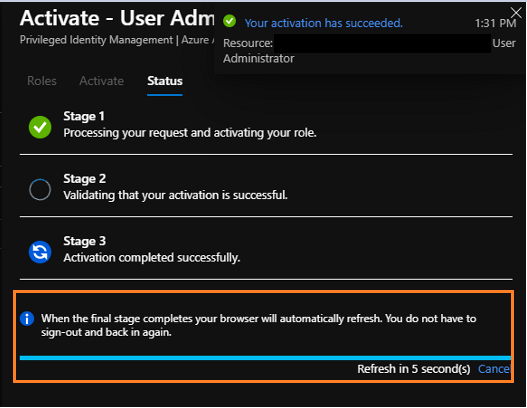
- After activation completed my browser did automatically refresh and I saw the role assignment was activated/assigned. I was also able to deactivate the role and see that reflected almost right away.
- For permissions not being granted right after activating a role, you can follow this link for some mitigation steps. Troubleshooting Permissions
Next Steps:
-I'll go ahead and assign this thread to the author to get the updated screenshots uploaded to the documentation.
If you continue to see a performance issue where the role is taking 10-20minutes to assign, then I would definitely create a support request so we can take a deeper look into this issue.
Thank you for your time and patience throughout this issue.
JamesTran-MSFT
on 2 Jun 2020
Thanks James,
Regarding the activation, my browser did refresh and show the role was activated. In this case, I activated SP Admin role for myself however when I went to the SP Admin center I still only had my global reader rights and could not make any changes. I went ahead and opened a ticket for that. Thank you for the fast response and taking care of the documentation.
Brett Noake
Digital Workplace Administrator
Chevron Phillips Chemical Company
832-458-3560
From: James Tran - MSFT notifications@github.com
Sent: Tuesday, June 2, 2020 4:00 PM
To: MicrosoftDocs/azure-docs azure-docs@noreply.github.com
Cc: Noake, Brett R NOAKEB@cpchem.com; Mention mention@noreply.github.com
Subject: Re: [MicrosoftDocs/azure-docs] Documentation Update (#56199) [EXTERNAL]
* WARNING: This email originated outside of the CPChem network. Use caution opening attachments, clicking web links, or replying. *
-
@BrettNoake [github.com]https://urldefense.com/v3/__https:/github.com/BrettNoake__;!!PZLOGLA!QgogoUueJ1luHdJDdmcFzPqav4an_3QR3uecMastDwjkHC8MdHrlIrvNbSmk7A$
I was able to look into your issue and will post my findings below.
Findings:
- When activating the PIM role, you're correct. The "status" screen is different from what the current documentation presents.
[image][user-images.githubusercontent.com]https://urldefense.com/v3/__https:/user-images.githubusercontent.com/36619112/83567905-33ab2700-a4d7-11ea-8380-f74405a6d13a.png__;!!PZLOGLA!QgogoUueJ1luHdJDdmcFzPqav4an_3QR3uecMastDwjkHC8MdHrlIruCpGqyWg$ After activation completed my browser did automatically refresh and I saw the role assignment was activated/assigned. I was also able to deactivate the role and see that reflected almost right away.
For permissions not being granted right after activating a role, you can follow this link for some mitigation steps. Troubleshooting Permissionshttps://docs.microsoft.com/en-us/azure/active-directory/privileged-identity-management/pim-how-to-activate-role?tabs=new#troubleshoot
Next Steps:
-I'll go ahead and assign this thread to the author to get the updated screenshots uploaded to the documentation.
If you continue to see a performance issue where the role is taking 10-20minutes to assign, then I would definitely create a support request so we can take a deeper look into this issue.
Thank you for your time and patience throughout this issue.
—
You are receiving this because you were mentioned.
Reply to this email directly, view it on GitHub [github.com]https://urldefense.com/v3/__https:/github.com/MicrosoftDocs/azure-docs/issues/56199*issuecomment-637803448__;Iw!!PZLOGLA!QgogoUueJ1luHdJDdmcFzPqav4an_3QR3uecMastDwjkHC8MdHrlIrsoYjzPuA$, or unsubscribe [github.com]https://urldefense.com/v3/__https:/github.com/notifications/unsubscribe-auth/ANJXCKBQKBQOWVWPWQTGHBDRUVR5TANCNFSM4NQ2QPEQ__;!!PZLOGLA!QgogoUueJ1luHdJDdmcFzPqav4an_3QR3uecMastDwjkHC8MdHrlIrvWiMe49g$.
BrettNoake
on 2 Jun 2020
Assigned issue to author to update screenshot.
New "Status" page:
JamesTran-MSFT
on 2 Jun 2020
Related issues
 varma31
·
3Comments
varma31
·
3Comments
 Favna
·
3Comments
Favna
·
3Comments
 bdcoder2
·
3Comments
bdcoder2
·
3Comments
 bityob
·
3Comments
bityob
·
3Comments
 paulmarshall
·
3Comments
paulmarshall
·
3Comments