Azure-docs: Connect-SFCluster not recognized. Installed Microsoft.ServiceFabric.Powershell.Http
I tried running Connect-SFCluster for Powershell 5.1.18362.752 Desktop and Powershell 7.0.1 CORE and doesn't recognize the command. see errors below. There is little documentatgion about the Microsoft.ServiceFabric.Powershell.Http Module. Is this solution for backuping up Stafeful data intended for production environments?
PowerShell 7.0.1 Information.
PS C:\Users\star\ Install-Module -Name Microsoft.ServiceFabric.Powershell.Http -AllowPrerelease
PS C:\Users\star\ Connect-SFCluster
Connect-SFCluster: The term 'Connect-SFCluster' is not recognized as the name of a cmdlet, function, script file, or operable program.
Check the spelling of the name, or if a path was included, verify that the path is correct and try again.
PS C:\Users\starf> 1.4.1-preview1 Microsoft.ServiceFabric.Powershell… PSGallery Powershell cmdlets to manage a Service Fabric Cluster.
Document Details
⚠ Do not edit this section. It is required for docs.microsoft.com ➟ GitHub issue linking.
- ID: 3f2bc356-6903-4a75-4c60-2888595afead
- Version Independent ID: f993726e-375d-3f34-6423-957fa9273aa5
- Content: Periodic backup and restore in Azure Service Fabric - Azure Service Fabric
- Content Source: articles/service-fabric/service-fabric-backuprestoreservice-quickstart-azurecluster.md
- Service: service-fabric
- GitHub Login: @hrushib
- Microsoft Alias: hrushib
 starforce
All 20 comments
@starforce
Thanks for your feedback! We will investigate and update as appropriate.
 MarileeTurscak-MSFT
on 2 Jun 2020
MarileeTurscak-MSFT
on 2 Jun 2020
Please use this command instead: Connect-ServiceFabricCluster
https://docs.microsoft.com/en-us/powershell/module/servicefabric/connect-servicefabriccluster?view=azureservicefabricps
Let me know if you still see an error.
 Karishma-Tiwari-MSFT
on 9 Jun 2020
Karishma-Tiwari-MSFT
on 9 Jun 2020
Yes i can use that. May I ask what procedure are used to test new features to service fabric before documentation is published? This has caused me so many problems. even after getting the backup service running on my cluster, i still cant get it to save data to a blob based on these instructions. Is there a development group I can voice my concerns at Microsoft directly
starforce
on 9 Jun 2020
@starforce I am sorry for your experience with the docs. Can you please share the details, like what problems are you seeing and at which step are you stuck.
I can include a product team member here or I can enable support request for you where a support engineer would be able to work with you over call and look into the backend details to help resolve the issues. Please let me know.
Karishma-Tiwari-MSFT
on 9 Jun 2020
Ok. Please give me 2 days to write up the details. I will provide screen shots of everything.. I have followed the instruction as noted and I am getting an HRESULT error when trying to set the frequency for back ups.
starforce
on 9 Jun 2020
Hello @Karishma-Tiwari-MSFT . As promised, I have attached screen shots, documentation, and the error that I get when trying to periodically restore and backup data partitions based on the Microsoft documentation . Any help or assistance would be appreciated.
Thank you,
Starforce
IntegratedDigitalLogisticsServiceFabricClusterBackupandRestoreError.docx
starforce
on 10 Jun 2020
@hrushib Can you please share your insights on the issue customer is seeing.
The error is shared below and other details are provided by the customer in word doc.
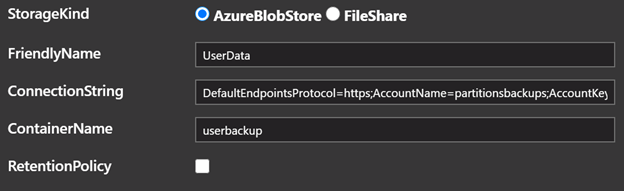
Enabling periodic backup for Reliable Stateful service and Reliable Actors
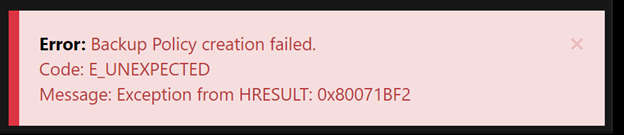
When I create a backup policy through Service Fabric explorer, I get an error. See below.
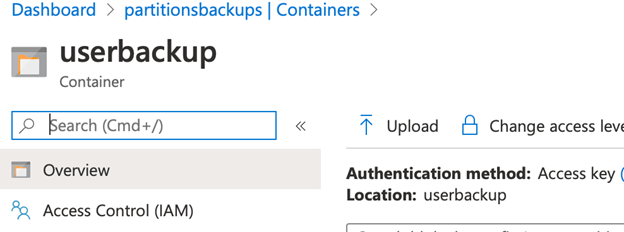
Here is screen shot of container name. It is set as a private container.

Karishma-Tiwari-MSFT
on 11 Jun 2020
@khandelwalbrijesh, can you have look at it?
 hrushib
on 11 Jun 2020
hrushib
on 11 Jun 2020
@khandelwalbrijesh Did you get a chance to look into this issue the customer is facing? Thanks :)
Karishma-Tiwari-MSFT
on 17 Jun 2020
@starforce, Thanks for trying out Backup restore!!
From the error code you see on SFX, it seems that it is failing because certificate, that you are using to encrypt secrets with, is invalid. Please share the Service fabric logs of time window when you tried creating the backup policy.
Could you also see if certificate is not expired and valid to be used?
 khandelwalbrijesh
on 23 Jun 2020
khandelwalbrijesh
on 23 Jun 2020
Where would I find the service fabric logs? Also, the cert that I currently use to view my Cluster from service fabric explorer which is also installed on each node, is that not the same certificate to encrypt secrets? I have it on my local computer. It doesnt expire until 7/24/2020
Sent from Outlook Mobilehttps://aka.ms/blhgte
From: Brijesh Khandelwal notifications@github.com
Sent: Tuesday, June 23, 2020 12:36:41 AM
To: MicrosoftDocs/azure-docs azure-docs@noreply.github.com
Cc: starforce starforce@hotmail.com; Mention mention@noreply.github.com
Subject: Re: [MicrosoftDocs/azure-docs] Connect-SFCluster not recognized. Installed Microsoft.ServiceFabric.Powershell.Http (#56132)
@starforcehttps://github.com/starforce, Thanks for trying out Backup restore!!
From the error code you see on SFX, it seems that it is failing because certificate, that you are using to encrypt secrets with, is invalid. Please share the Service fabric logs of time window when you tried creating the backup policy.
Could you also see if certificate is not expired and valid to be used?
—
You are receiving this because you were mentioned.
Reply to this email directly, view it on GitHubhttps://github.com/MicrosoftDocs/azure-docs/issues/56132#issuecomment-647902026, or unsubscribehttps://github.com/notifications/unsubscribe-auth/ABAM6OKYAVS5SPTM2JDIZQ3RYAWNTANCNFSM4NQGQ3UA.
starforce
on 23 Jun 2020
Also, I use this same cert to publish code to the nodes of my cluster from Visual Studio.. It is located on my laptop. Is this not the same cert needed to encrypt secrets?
starforce
on 23 Jun 2020
The certificate that you used at the step while enabling backup policy using Cluster manifest or arm templates
"name": "BackupRestoreService",
"parameters": [{
"name": "SecretEncryptionCertThumbprint",
"value": "[Thumbprint]"
}]
}
If you have used the same then, it would be the same.
khandelwalbrijesh
on 24 Jun 2020
@khandelwalbrijesh
Where would I find the service fabric logs? I assume they are somewhere on the nodes.
starforce
on 24 Jun 2020
@starforce
I was just finding the procedure for you to be able to collect and share the logs with us. This is usually done through standalone log collector tool which can be downloaded from here
So, for using the above tool you would need a azure storage SAS key that could only be given by microsoft support team and to engage support team, you would need to file a support issue on azure. Mention all these details in that support issue and then, support team will contact you with the details of azure storage.
@Karishma-Tiwari-MSFT , please help out if this doesnt seem to be correct.
khandelwalbrijesh
on 24 Jun 2020
Thanks @khandelwalbrijesh
@starforce Thanks for providing all the details. Since this requires help of support engineer, we would need to open a support request for you. A support engineer will work with you over call/email as needed and collect the logs to further troubleshoot this issue.
Can you please send me an email to '[email protected]' with Subject 'Attn: Karishma'. Please include your subscription Id as well as link to this GitHub issue. I will enable a support ticket for you and share details on how to open a support request once enabled.
Karishma-Tiwari-MSFT
on 24 Jun 2020
@khandelwalbrijesh
Thank you for the help. I just emailed the information you requested.
starforce
on 24 Jun 2020
Thanks @starforce for sharing the support ticket # offline.
Once the issue is resolved, we can share the resolution here for others to refer.
We will close this issue. If there are further questions regarding this matter, please tag me in a comment. I will reopen it and we will gladly continue the discussion.
Karishma-Tiwari-MSFT
on 26 Jun 2020
Just fyi... We put in the actual Thumbprint value for my cert and I could then backup data. See below.
"name": "BackupRestoreService",
"parameters": [{
"name": "SecretEncryptionCertThumbprint",
"value": "[F999999999999ff]"
}]
}
starforce
on 27 Jun 2020
@starforce, This means that your issue is resolved. Let us know if you are facing any more issues with Backup Restore service.
khandelwalbrijesh
on 30 Jun 2020
Related issues
 mrdfuse
·
3Comments
mrdfuse
·
3Comments
 spottedmahn
·
3Comments
spottedmahn
·
3Comments
 JeffLoo-ong
·
3Comments
JeffLoo-ong
·
3Comments
 jamesgallagher-ie
·
3Comments
jamesgallagher-ie
·
3Comments
 AronT-TLV
·
3Comments
AronT-TLV
·
3Comments