Azure-docs: Python Runtime, Consumption Plan Deployment Examples NEEDED
I must be the first person ever to deploy an Azure Function with python runtime.
- When attempting to deploy using the VS Code Azure Functions extension, I get the errors:
Linux consumption plans only support .zip deploy

Malformed SCM_RUN_FROM_PACKAGE when uploading built contentsee here- When attempting to deploy a remote build using
functoolsI get the error
Your function app azureblobtoawss3 does not support remote build as it was created before August 1st, 2019.
Even though I literally built it TODAY.
- When reading through the docs I feel like I'm getting the runaround:
- I see that Linux Consumption plan (aka python runtime using on-demand resources) can only be deployed using
External package URLand.zip deploy. The Remote builds section here is contradictory:
Azure Functions can automatically perform builds on the code it receives after zip deployments.Remote builds are not performed when an app has previously been set to run in Run From Package mode.To learn how to use remote build, navigate to zip deploy.By default, both Azure Functions Core Tools and the Azure Functions Extension for Visual Studio Code perform remote builds when deploying to Linux. Not with python runtime.When apps are built remotely on Linux, they run from the deployment package.I can't run a remote build due to all the errors I'm receiving.A function app includes all of the files and folders in the wwwroot directory.There is nowwwrootdirectory in my local Azure Function.
When attempting to zip deploy using az cli, I get yet another error:
- From reading the Zip deployment for Azure Functions page, it appears that I need to deploy a compressed folder (.zip) of my azure function project using
az functionapp deployment source config-zip -g <resource_group> -n \<app_name> --src <zip_file_path>
- When attempting this, it get the error:
user@system:~/Documents/azureBlobToS3$ az functionapp deployment source config-zip -g rgazurefunc -n aztoaws --src azureBlobToS3.zip
This request is not authorized to perform this operation. ErrorCode: AuthorizationFailure
<?xml version="1.0" encoding="utf-8"?><Error><Code>AuthorizationFailure</Code><Message>This request is not authorized to perform this operation.
RequestId:455e402c-a01e-0035-66f6-347034000000
Time:2020-05-28T13:45:56.9302232Z</Message></Error>
- Yet I have complete access to the resource group holding the function!
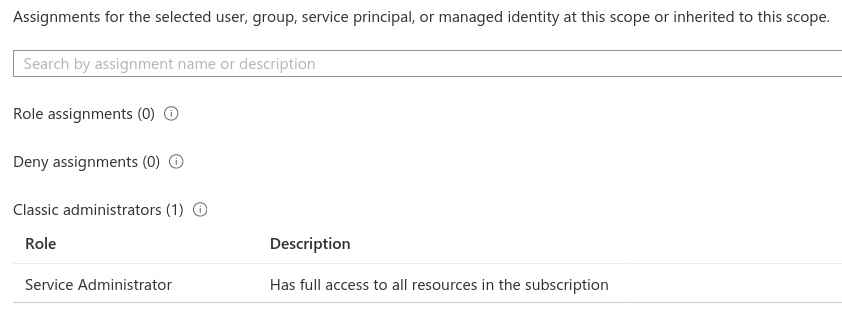
I notice these docs are all from 4/19, 9/19, etc (some over a year old). The docs also seem to be aimed at non-python Azure Functions. Please revisit these docs and provide a SIMPLE, end-to-end deployment examples of PYTHON-RUNTIME Azure Functions. For a power user such as myself, this really shouldn't be so difficult.
I'm quite frustrated at this point so please excuse any shortness. Trying to recap all the doc instructions I've followed is a work in itself.
Thank you
Document Details
⚠ Do not edit this section. It is required for docs.microsoft.com ➟ GitHub issue linking.
- ID: cbd2779f-df70-05e1-0589-8220f850a44f
- Version Independent ID: c1118090-18b5-f630-d4b0-c588328a4b5a
- Content: Run your Azure Functions from a package
- Content Source: articles/azure-functions/run-functions-from-deployment-package.md
- Service: azure-functions
- GitHub Login: @ggailey777
- Microsoft Alias: glenga
 SeaDude
All 9 comments
@SeaDude Thank you for your feedback, and sorry for the inconvenience. I will review, validate each steps, and share my findings with you here.
 mike-urnun-msft
on 29 May 2020
mike-urnun-msft
on 29 May 2020
I really appreciate it @mike-urnun-msft, thank you.
SeaDude
on 29 May 2020
I must be the first person ever to deploy an Azure Function with python runtime.
Exactly this!
@mike-urnun-msft, the only way I find python 3.8 work (linux) is via func azure functionapp publish <APP_NAME> --build-native-deps. But it works only once per new function app... second and each following deployment end up with Error calling sync triggers (BadRequest). Request ID = '<ID>'
@SeaDude thanks for doing all the leg work and explaining it in this GitHub thicket. It really speed up my struggle! To fix AuthorizationFailure I had to disable firewall on storage account. While it says Authorization it might mean "cannot reach". Another option would be to go for premium functions and private links but it reduces functions technology to gimmick which is not worth its price if you move bytes around. Unfortunately (I recommend --debug enabled) sync of triggers will fail as bad request (due to Bad Gateway) as next step.
I've started to wonder if documentation I read is up to date...
 rbudzko
on 1 Jun 2020
rbudzko
on 1 Jun 2020
@rbudzko , thank you for the validation. I thought I was the only one facing issues.
When you say: "the only way I find python 3.8 work (linux) is via func azure functionapp publish <APP_NAME> --build-native-deps"
- Are you talking about working from a linux machine or deploying to a linux instance?
- I ask because I'm actually working from a linux OS (my laptop) and wondering if that is part of the issue
- After you build
native-deps, do you still need to deploy the Function App to Azure or does the Function push up to Azure as part of the build?
Will you elaborate on: "I had to disable firewall on storage account."
- Assuming you are talking about the storage account _trigger_ and not the storage account that is deployed with, and used by, the Azure Function
- Is this a correct assumption or do you actually need to disable the firewall on the storage account that is deployed with the Azure Function?
Thanks for the clarity. Hope this isn't too long winded!
SeaDude
on 2 Jun 2020
Hey @SeaDude!
Are you talking about working from a linux machine or deploying to a linux instance?
I ask because I'm actually working from a linux OS (my laptop) and wondering if that is part of the issue
It is OS X to Linux, but logging indicates it uses docker to prepare natives correctly for linux.
After you build native-deps, do you still need to deploy the Function App to Azure or does the Function push up to Azure as part of the build?
Application appeared published via all mediums (VSC, Azure Portal, Az CLI) and it worked for limited time. After next redeploy (same code, same docker layers binary wise) it started to return Service Unavailable.
Assuming you are talking about the storage account trigger and not the storage account that is deployed with, and used by, the Azure Function
I'm talking about storage account it is deployed with actually. When Firewall is up you have no way (with consumption plan) to whitelist unless you deploy storage acc in one region and functions in another (skipping details for now). This is a hack, known to internet community, to workaround lack of Azure Functions being a Trusted Azure Service. Premium plan helps the way I've described in previous comment, but the price increases significantly for light and infrequently used applications.
Is this a correct assumption or do you actually need to disable the firewall on the storage account that is deployed with the Azure Function?
Please see above :-). I do not know if what I've explained a moment ago is 100% correct. I'm still learning this piece of azure stack. I hope it is not to be honest, but documentation lacks explicit explanation about it and there are feature requests by some people to add functions as trusted service or develop other capability of whitelisting it in same region.
I'll continue experiments today, because I've discovered (with storage account available to internet) it is possible to deploy python apps just fine as I've created some dummy and sometimes they work and sometimes they do not. I'm in the process of pinpointing the diff...
It is very bugging that storage account must be open to internet unless we hack with two regions IP range whitelisting.
rbudzko
on 2 Jun 2020
I was able to isolate repeatable problem.
The most important information (at least for me) is an "obligation" of using storage account which is public during creation of function app. When I follow this solo rule then I can make account private and receive sensible errors about lack of authorization. I can also bring account back to the public and repeatably deploy without any issues.
In contradiction, if selected (during function app creation) storage account is private (or has any other configuration limiting access via key) then things go south. In my case common errors are "Malformed SCM_RUN_FROM_PACKAGE" or "Encountered an error (InternalServerError) from host runtime" during "Syncing triggers". Second problem occurs if storage account is reconfigured (via function app settings) to public one.
It seems state of storage account linked to function app being created is crucial here. I think information why exactly it is is not available to self service user. Provided I'm right, it would be nice to either fix this limitation in azure functions implementation or improve documentation to warn users about this limitation.
Hope it helps community save few hours of accidental issues.
rbudzko
on 3 Jun 2020
Thanks @rbudzko for looking into the issue. You assumption is exactly correct. We do require AzureWebJobsStorage point to an existing storage account to generate the SCM_RUN_FROM_PACKAGE placeholder.
 Hazhzeng
on 4 Jun 2020
Hazhzeng
on 4 Jun 2020
Hi @SeaDude, are you still seeing the issue, in our first party support tools (e.g. Portal, Azure CLI), they should create a function app with AzureWebJobsStorage app setting in it. If you don't mind, please share the tools you use for creating the function app. Thanks.
Hazhzeng
on 4 Jun 2020
@SeaDude Since this channel is for driving improvements towards MS Docs and we didn't determine any changes for this documentation upon reviewing this feedback, we will now proceed to close this thread. If there are further questions regarding this matter, please reopen it and we will gladly continue the discussion.
mike-urnun-msft
on 4 Jun 2020
Related issues
 DeepPuddles
·
3Comments
DeepPuddles
·
3Comments
 bdcoder2
·
3Comments
bdcoder2
·
3Comments
 jebeld17
·
3Comments
jebeld17
·
3Comments
 AronT-TLV
·
3Comments
AronT-TLV
·
3Comments
 spottedmahn
·
3Comments
spottedmahn
·
3Comments