Azure-docs: The script does not generate the SAS Uri anymore and the SAS Uri steps are different
The script does not automatically generate the SAS URI at the end anymore.
Then the manual steps to create one are different as shown in this screenshot. The Azure Portal context menu is different and has more options in the dialog.
https://docs.microsoft.com/en-us/azure/remote-rendering/quickstarts/convert-model#optional-re-creating-a-sas-uri
Document Details
⚠ Do not edit this section. It is required for docs.microsoft.com ➟ GitHub issue linking.
- ID: dc7693bc-840f-4744-bc28-884ed562b29f
- Version Independent ID: 39dbf49c-cd15-2e63-a625-e5a40d0b6eb9
- Content: Convert a model - Azure Remote Rendering
- Content Source: articles/remote-rendering/quickstarts/convert-model.md
- Service: azure-remote-rendering
- GitHub Login: @FlorianBorn71
- Microsoft Alias: flborn
 reneschulte
All 10 comments
@reneschulte Thanks for the feedback. We are investigating the issue and will update you shortly.
 RohitMungi-MSFT
on 11 Apr 2020
RohitMungi-MSFT
on 11 Apr 2020
Thanks for the feedback! I have assigned the issue to the content author to evaluate and update as appropriate.
 asergaz
on 13 Apr 2020
asergaz
on 13 Apr 2020
@reneschulte
Thanks for the feedback!
FYI the script only generates the SAS URI when using the -UseContainerSas parameter as described in https://docs.microsoft.com/en-us/azure/remote-rendering/quickstarts/convert-model#run-the-conversion
If you use a connected storage account we do not emit the SAS URI, since in this case the user could use the connected storage account to load a model as well. No SAS URI will be needed in this case. If you need a SAS URI you can uncomment the if($UseContainerSAS) at the end of Conversion.ps1
At the moment I don't remember how to activate the non-SAS path in the examples and will get back to you as soon as i find out
 rikogeln
on 13 Apr 2020
rikogeln
on 13 Apr 2020
@reneschulte two questions to speed up my inquiry:
in which example app would you like to enter the SAS output by Conversion.ps1? I am trying to figure out if the samples have the option to work with connected storage accounts.
when you say "The Azure Portal context menu is different and has more options in the dialog." what exactly do you mean? We tried to see if the context menu looks different now but it looks the same with the exception that we cut some options from the bottom of the screenshot. Is this what you mean - should we show the full context menu with all options in your opinion?
Thanks again for the feedback!
rikogeln
on 14 Apr 2020
I missed the -UseContainerSas script param. It works as expected with it. My fault.
For the outdated screenshot. The context menu looks like this for me in the Azure Portal:
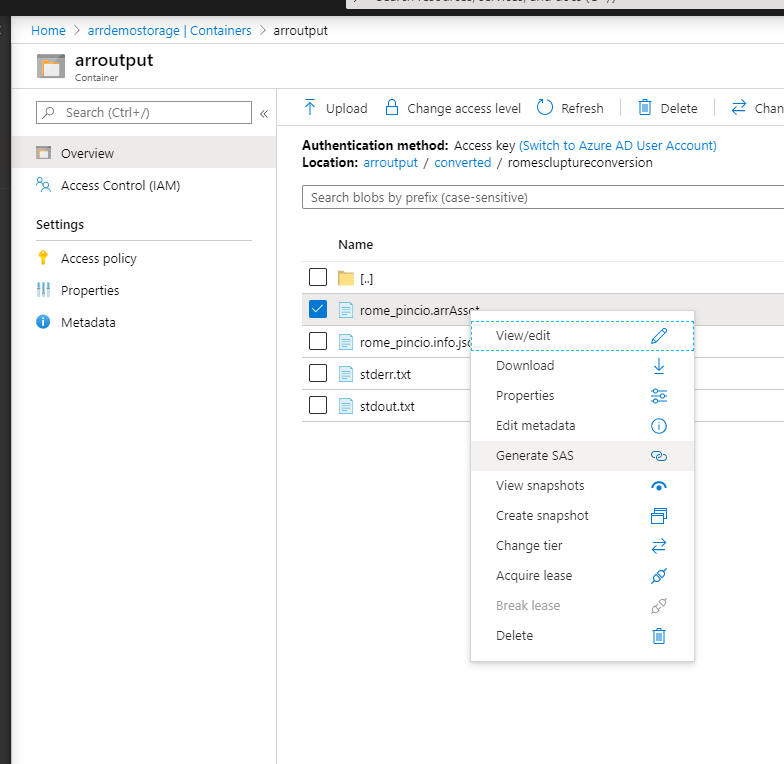
Compare that with the one you have in the docs which seems outdated:

reneschulte
on 14 Apr 2020
@reneschulte the context menu looks different for you since in the documentation we describe how to use the "Storage Explorer (preview)" and you are navigating into your storage container via "containers" - i can confirm that you will get two different looks for the context menu. but you will get the one we show when using the "Storage Explorer (preview)" as shown in the screenshot.
rikogeln
on 14 Apr 2020
Ahhh! My fault again. Should read better. 😁
Vielen Dank.
reneschulte
on 14 Apr 2020
thanks to your continued feedback we could resolve this issue. (and i think i spotted some other issue - so win win!)
Kein Ding.
rikogeln
on 14 Apr 2020
Weird the UseContainerSas option doesn't appear to be working for me. I get the "Session is Ready" message and the id's and all that but not the "generated model SAS URI" message. Also message:null for some reason.
Also after exiting and trying to stop the session with the command (which I have done a few times before) i suddenly get a 401 unauthorized.
 efsjouw
on 15 Apr 2020
efsjouw
on 15 Apr 2020
@efsjouw Can you please verify that you use the -UseContainerSas option with the Conversion.ps1 script and not with RenderingSession.ps1
please open a separate issue for the 401 and if you can provide use with the MS-CV correlation vector http response header which makes debugging easier for us
rikogeln
on 15 Apr 2020
Related issues
 bdcoder2
·
3Comments
bdcoder2
·
3Comments
 paulmarshall
·
3Comments
paulmarshall
·
3Comments
 jebeld17
·
3Comments
jebeld17
·
3Comments
 DeepPuddles
·
3Comments
DeepPuddles
·
3Comments
 JamesDLD
·
3Comments
JamesDLD
·
3Comments