Azure-docs: Exposed API permissions are not displayed in user consent
I have configured exposed api for my application (with delegated permissions act_as_user). When I am trying to authorize user to the application using OAuth 2.0 authorization code flow (or by testing connection for OAuth Connection Settings with Azure Active Directory v2 service provider), I cannot find my api permissions in list of requested permissions by the application. As a result the user is not receiving required application permissions.
User consent contains just default permissions:
- Maintain access to data you have given it access to
- View your basic profile
The api permission act_as_user is missed.
When I am trying to get admin consent for the application - https://login.microsoftonline.com/{tenantId}/adminconsent?client_id={application_id}&redirect_uri={redirect_uri}, the exposed api permission is displayed.
Why exposed api permissions are not displayed for requesting individual user consent?
Document Details
⚠ Do not edit this section. It is required for docs.microsoft.com ➟ GitHub issue linking.
- ID: 0ac43307-75d4-cb6f-e561-0dd9008f28c6
- Version Independent ID: 8fc47e76-5ee1-6aeb-73e2-c64c44e3e4ed
- Content: Microsoft identity platform scopes, permissions, and consent
- Content Source: articles/active-directory/develop/v2-permissions-and-consent.md
- Service: active-directory
- Sub-service: develop
- GitHub Login: @rwike77
- Microsoft Alias: ryanwi
 vbatr
vbatr
All 9 comments
@vbatr Thanks for your feedback! We will investigate and update as appropriate.
 SaurabhSharma-MSFT
on 10 Apr 2020
SaurabhSharma-MSFT
on 10 Apr 2020
@vbatr Users get consent request form when they are trying to access a resource and try to use a permission that admin has not consented for. For example, if the request contains Directory.ReadWrite.All permission and if admin has not consented for that permission already, user will get consent request form.
Is this API your custom API and who all can basically consent to "act_as_user" scope in the defined API permissions.
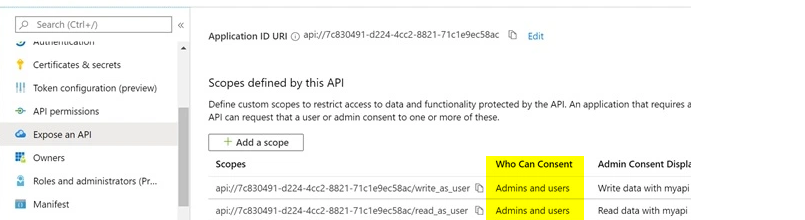
SaurabhSharma-MSFT
on 13 Apr 2020
Hi @SaurabhSharma-MSFT ,
thanks for your answer.
I've configured the exposed api to be consented by admin an users:
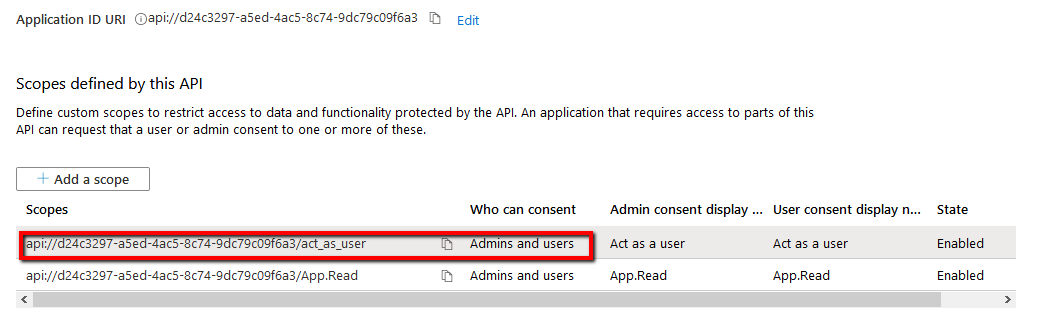
Also this api was added to API permission on the resource:
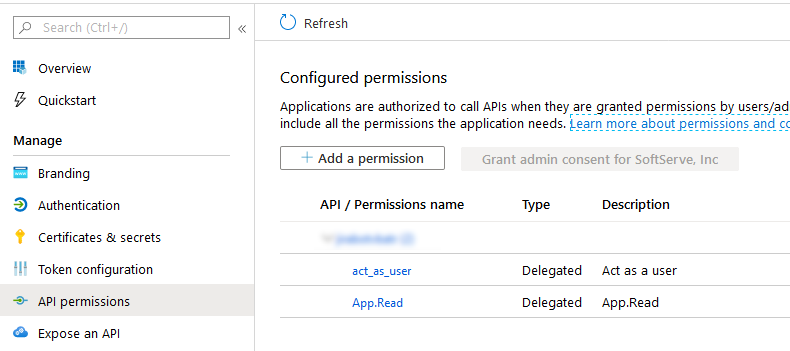
While login to the resource I can see the exposed api in scopes, but not in list of resourcess that need to be consented:
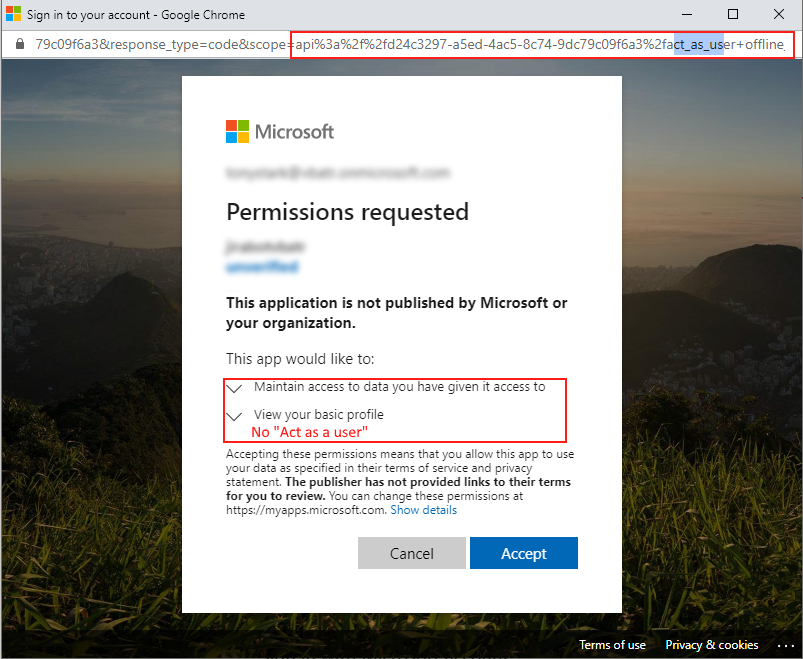
As a result user accepted just "offline_access" scope:
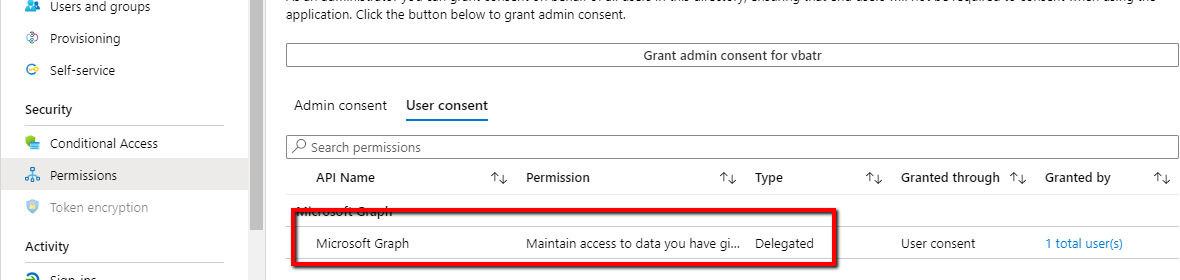
But when I try to accept admin consent "act_as_user" consent is displayed and it will be consented for the whole organization:
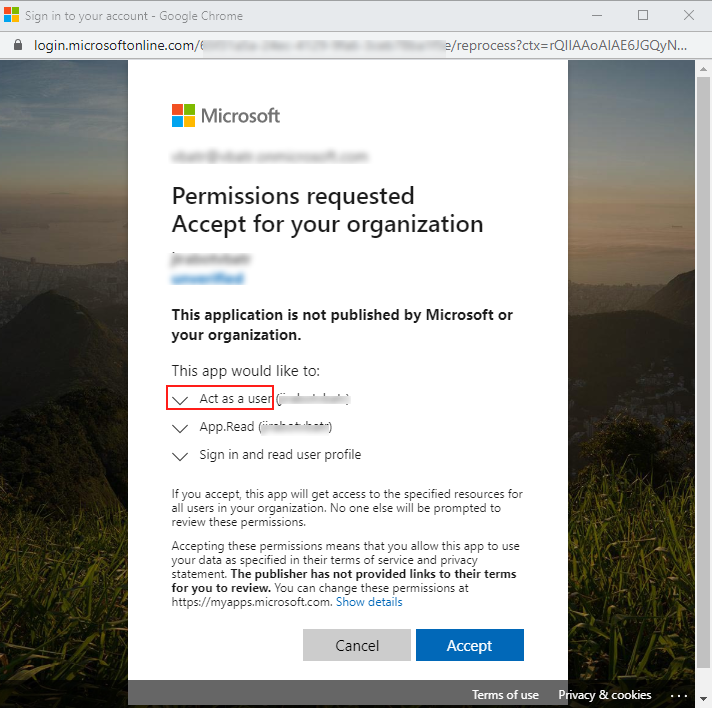
How I can accept "act_as_user" permissions on user login flow? And why it is not displayed in the list?
vbatr
on 14 Apr 2020
@vbatr I am looking into this and update you with my findings.
SaurabhSharma-MSFT
on 15 Apr 2020
Hi @SaurabhSharma-MSFT ,
Do you have any updates on the issue?
vbatr
on 28 Apr 2020
@vbatr sorry for the delay on this. I have tried it in my tenant and it worked fine and I can see the
required permissions on user consent page.
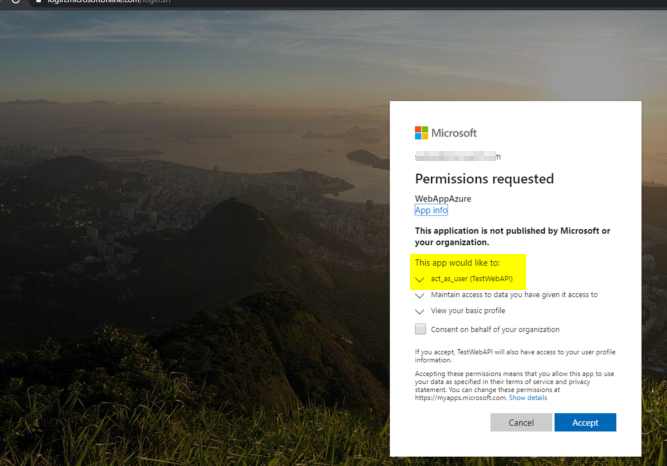
Can you please share the below information along with this thread link on azcommunity[dot]microsoft[dot]com so we can investigate it further.
• Tenant ID:
• Application ID:
• Subscription ID:
SaurabhSharma-MSFT
on 28 Apr 2020
Hi @SubhashVasarapu-MSFT,
I've tried to configure the exposed api on two different application in two different azure subscriptions. Result is always the same - the required permission is not appearing on user consent page.
Some additional configuration I am using:
I have:
- Azure AD application with configured exposed api
- Azure Bot Channel Registration with configured OAuth Connection setting with AAD v2 service provider. Scopes of the setting are pointing to Azure AD exposed api for the application above:
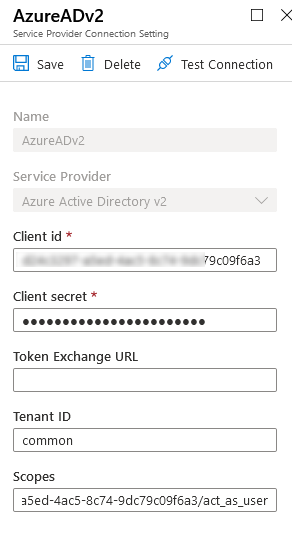
When I hit Test Connection next login url is generated:
And when I am trying to login with any user I cannot see (act_as_user) permission in the list even if it is in the list of the scopes in the url.
Probably the issue is related to OAuth v2 only
@SubhashVasarapu-MSFT , how does login URL looks like in your case?
vbatr
on 29 Apr 2020
@vbatr My url is like below and it is v2 only. only difference is I am not using the common endpoint and passing the tenantname instead.
https://login.microsoftonline.com/tenant.onmicrosoft.com/oauth2/v2.0/authorize?client_id=xxxxxxxx-xxxx-xxxx-xxxx-6d0b6eabf543&response_type=code&scope=api://testwebapi/act_as_user+offline_access&redirect_uri=https%3a%2f%2flocalhost:44326/%2f.auth%2fweb%2fredirect&state=6f7dea317cb547ffbbda0b914c44d37e
Can you please share the below information along with this thread link on azcommunity[dot]microsoft[dot]com so we can investigate it further.
• Tenant ID:
• Application ID:
• Subscription ID:
SaurabhSharma-MSFT
on 1 May 2020
@vbatr We are closing this thread as already discussed over email and it requires a support ticket for an identity engineer to look into. If there are further questions regarding this matter, please reopen it and we will gladly continue the discussion.
SaurabhSharma-MSFT
on 13 May 2020
Related issues
 varma31
·
3Comments
varma31
·
3Comments
 jamesgallagher-ie
·
3Comments
jamesgallagher-ie
·
3Comments
 spottedmahn
·
3Comments
spottedmahn
·
3Comments
 Favna
·
3Comments
Favna
·
3Comments
 monteledwards
·
3Comments
monteledwards
·
3Comments