Azure-docs: Unable to find `AlwaysUseGateway` for AAS server
Greetings,
I am currently on a project which uses AAS to read from an Azure Virtual Machine (Windows 10), to be transformed and later visualized using Power BI.
I could successfully install the on-premise data gateway on the virtual machine and create a gateway resource and connect it to my AAS server. However, I'm unsure how to read the data using AAS from the virtual machine via the gateway.
From my thorough research on web, I found this guide to use gateway for data sources on VNet. I tried to change my server configuration from SSMS but could not find the attribute AsPaaS \ AlwaysUseGateway. Please check the screenshot below:
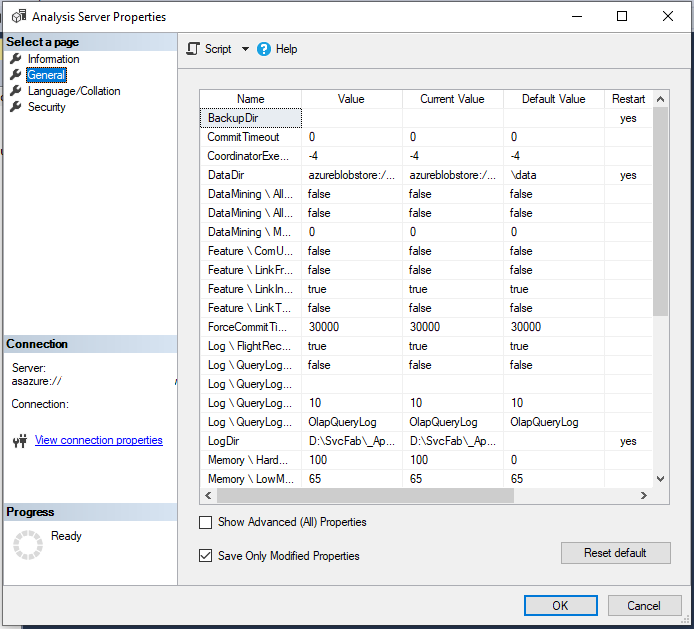
Could you assist me on this please?
Many thanks,
Sam
Document Details
⚠ Do not edit this section. It is required for docs.microsoft.com ➟ GitHub issue linking.
- ID: 1673d07b-f059-d487-7b87-6913823b2929
- Version Independent ID: 99185574-6031-d7b2-907d-caacdd74a36c
- Content: Configure Azure Analysis Services for VNet data sources
- Content Source: articles/analysis-services/analysis-services-vnet-gateway.md
- Service: azure-analysis-services
- GitHub Login: @Minewiskan
- Microsoft Alias: owend
 sameh-sharaf
All 5 comments
@sameh-sharaf Click on the "Show Advanced (All) Properties", you will see the second option in the table.
 Ratomir
on 26 Feb 2020
Ratomir
on 26 Feb 2020
@sameh-sharaf As mentioned in the document:
In SSMS > server > Properties > General, select Show Advanced (All) Properties.
In the ASPaaS\AlwaysUseGateway, select true.
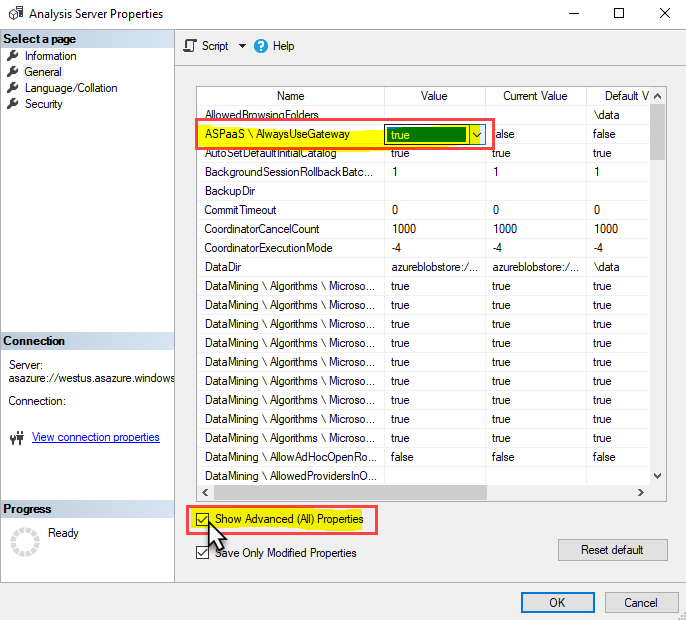
Hope this helps.
 CHEEKATLAPRADEEP-MSFT
on 26 Feb 2020
CHEEKATLAPRADEEP-MSFT
on 26 Feb 2020
@sameh-sharaf
We will now proceed to close this thread. If there are further questions regarding this matter, please comment and we will gladly continue the discussion.
CHEEKATLAPRADEEP-MSFT
on 2 Mar 2020
I want to have an option in the ARM deployment for that or some decent PowerShell based automation. All I can do at the moment is to execute an XMLA script against it
 bergmeister
on 23 Mar 2020
bergmeister
on 23 Mar 2020
Does the value of AlwaysUseGateway go back to its default value (false) when AAS is restarted?
 K-Dela-R
on 15 Sep 2020
K-Dela-R
on 15 Sep 2020
Related issues
 bdcoder2
·
3Comments
bdcoder2
·
3Comments
 behnam89
·
3Comments
behnam89
·
3Comments
 JeffLoo-ong
·
3Comments
JeffLoo-ong
·
3Comments
 jamesgallagher-ie
·
3Comments
jamesgallagher-ie
·
3Comments
 bityob
·
3Comments
bityob
·
3Comments