Azure-docs: Using sample labeling tool for table labeling
How to label a table with multiple rows using sample labeling tool?
Document Details
⚠ Do not edit this section. It is required for docs.microsoft.com ➟ GitHub issue linking.
- ID: 5280e532-d025-0755-8a06-a2dcb0a969cd
- Version Independent ID: 0a9e0c1f-96fb-9968-218f-4f8372608699
- Content: Quickstart: Train with labels using the REST API and Python - Form Recognizer - Azure Cognitive Services
- Content Source: articles/cognitive-services/form-recognizer/quickstarts/python-labeled-data.md
- Service: cognitive-services
- Sub-service: forms-recognizer
- GitHub Login: @PatrickFarley
- Microsoft Alias: pafarley
 AleynovSergey
All 11 comments
@AleynovSergey
Thanks for the question! We are investigating and will update you shortly.
 jakaruna-MSFT
on 23 Feb 2020
jakaruna-MSFT
on 23 Feb 2020
@AleynovSergey I have used the labeling tool to train a document with tables with two tags for headers and rows by creating the tags and selecting the text after OCR is complete for the document

Using the predict option the tool recognized a row and returned the fieldNames of these labels and text.
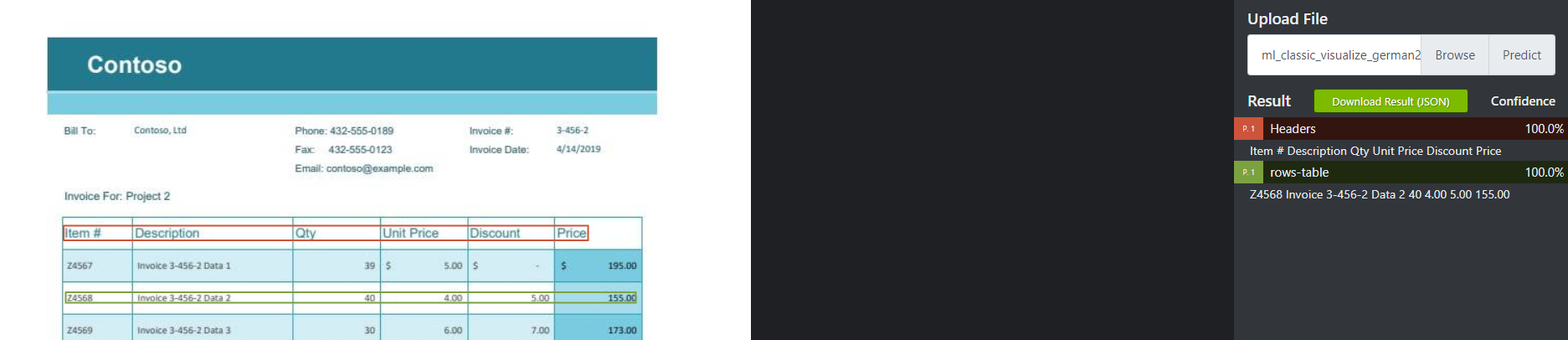
You can also download the JSON and lookup the values returned with predict from this model to build your application.
 RohitMungi-MSFT
on 25 Feb 2020
RohitMungi-MSFT
on 25 Feb 2020
@RohitMungi-MSFT as you can see in images attached to your reply, only headers row and a second row were returned. How can I use a Labeling tool to train and predict all rows and headers from a specific table on the page?
AleynovSergey
on 26 Feb 2020
@NHaiby @PatrickFarley Could you please let us know if we can follow any additional training steps from the tool to increase the prediction accuracy to recognize all rows in a table?
RohitMungi-MSFT
on 26 Feb 2020
Hi, we are currently working on updating the docs with specific information on tagging tables. I'll get back to you very soon.
 PatrickFarley
on 27 Feb 2020
PatrickFarley
on 27 Feb 2020
Thanks @PatrickFarley.
RohitMungi-MSFT
on 27 Feb 2020
@AleynovSergey We've since updated the doc with table-labeling instructions. Please see the Sample labeling tool guide.
please-close
PatrickFarley
on 7 Apr 2020
Have the same query. Not sure if it was resolved for @AleynovSergey.
In the documentation link above, the only thing i see as guidance for tables with multiple rows is: "Table data should be detected automatically and will be available in the final output JSON file. However, if the model fails to detect all of your table data, you can manually tag these fields as well. Tag each cell in the table with a different label. If your forms have tables with varying numbers of rows, make sure you tag at least one form with the largest possible table."
This is not clear. The images above shared by @RohitMungi-MSFT indicate that the entire header row of the table should be tagged as one tag "Headers" and then all the cells of data rows as one tag "rows". The above statement from the documentation says "Tag each cell in the table with a different label". In either case, how will we get a simple json result that contains each row with the column header and the corresponding value?
If possible can you share a sample model - that processes invoices with multiple rows in the table.
Please note - this is the same question as #53750 - however the response there too wasn't helpful.
If currently the form analyzer can't process forms with multiple rows in the table - it's fine. Just confirm it to us - so we can look at other alternative ways.
 NephorLabs
on 22 May 2020
NephorLabs
on 22 May 2020
We have the same issue, we need to extract table with multiple records from invoice form.
Seems Form Recognizer currently can't process it properly, the auto detected table can't be used in the most of our cases.
@NephorLabs Do you have any alternative way to do it? Really appreciate for any suggestion.
Thanks,
 tuandunguit
on 24 Aug 2020
tuandunguit
on 24 Aug 2020
Any update on this?
 ilkeSylmz
on 25 Nov 2020
ilkeSylmz
on 25 Nov 2020
Hi! I have the same query that my tables have variable number of rows in various documents even conforming to the same overall template.
If the table itself is not recognized - which is something happening most of the time - then there's no way to extract all rows. Or is there that I am unaware of?
 tanveerbadar
on 9 Dec 2020
tanveerbadar
on 9 Dec 2020
Related issues
 Favna
·
3Comments
Favna
·
3Comments
 JeffLoo-ong
·
3Comments
JeffLoo-ong
·
3Comments
 bityob
·
3Comments
bityob
·
3Comments
 spottedmahn
·
3Comments
spottedmahn
·
3Comments
 AronT-TLV
·
3Comments
AronT-TLV
·
3Comments
Most helpful comment
Hi, we are currently working on updating the docs with specific information on tagging tables. I'll get back to you very soon.