Azure-docs: Unable to execute the commands successfully
Hi, I have been trying to follow the steps to enable me to upload a Microsoft VHD Image to azure and use it to create a VM however, I have not been able to.
So
- $vhdSizeBytes = (Get-Item "<fullFilePathHere>").length - (this worked)
$diskconfig = New-AzDiskConfig -SkuName 'Standard_LRS' -OsType 'Windows' -UploadSizeInBytes $vhdSizeBytes -Location 'West US' -CreateOption 'Upload' (This also worked)
New-AzDisk -ResourceGroupName 'myResourceGroup' -DiskName 'myDiskName' -Disk $diskconfig - (This did not work).
I get the error:
New-AzDisk : The upload size in bytes 112074530816 - 512 bytes for the VHD footer (112074530304 in this case) must be
a multiple of MiB.
When I run the below command to resize the Vhd to a multiple of 1024MB and a size of 127GB (136365211648 in bytes)
Resize-VHD -Path C:UsersPublicDocumentsHyper-VVirtual hard disksFinandOpsV10.vhd -SizeBytes 136365211648
I get the error below
Resize-VHD : Failed to resize the virtual disk.
The system failed to resize 'C:UsersPublicDocumentsHyper-VVirtualHardDisksFinandOpsV10.vhd'.
The requested operation cannot be performed as resize operation to new size that is smaller than or equal to the
current size is supported only on virtual hard disks that are of VHDX format.
Failed to resize the virtual disk.
The system failed to resize 'C:UsersPublicDocumentsHyper-VVirtualHardDisksFinandOpsV10.vhd': One or more
arguments are invalid (0x80070057).
The requested operation cannot be performed as resize operation to new size that is smaller than or equal to the
current size is supported only on virtual hard disks that are of VHDX format.
At line:1 char:1
- Resize-VHD –Path C:UsersPublicDocumentsHyper-VVirtualHardDisksF ...
~~~~~~~~~~~~~~~~~
- CategoryInfo : InvalidArgument: (:) [Resize-VHD], VirtualizationException
- FullyQualifiedErrorId : InvalidParameter,Microsoft.Vhd.PowerShell.Cmdlets.ResizeVhd
Document Details
⚠ Do not edit this section. It is required for docs.microsoft.com ➟ GitHub issue linking.
- ID: 912457e0-26de-cb94-fa50-075f986ce595
- Version Independent ID: 0d50c9b3-7d08-79ba-3a8f-b6319b19b435
- Content: Upload a vhd to Azure using Azure PowerShell - Azure Windows Virtual Machines
- Content Source: articles/virtual-machines/windows/disks-upload-vhd-to-managed-disk-powershell.md
- Service: virtual-machines-linux
- Sub-service: disks
- GitHub Login: @roygara
- Microsoft Alias: rogarana
 gyne
gyne
All 5 comments
@gyne Thanks for the feedback! We are currently investigating and will get back on this.
 VikasPullagura-MSFT
on 19 Feb 2020
VikasPullagura-MSFT
on 19 Feb 2020
Thanks @VikasPullagura-MSFT
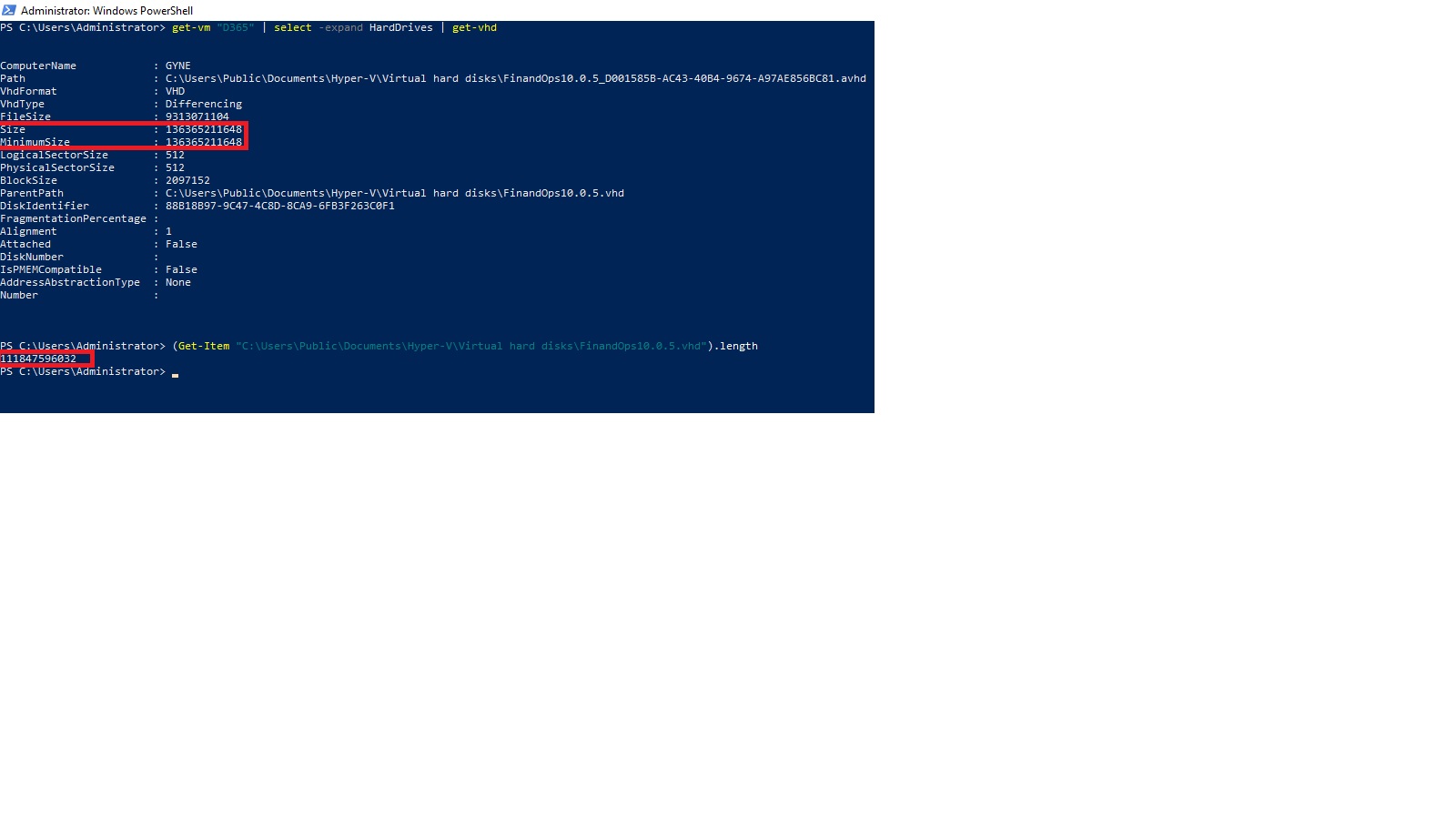
Just an update. I noticed that when I run this command
_get-vm "D365" | select -expand HardDrives | get-vhd_
as shown in the image, I get a different file size which is exactly a multiple of 1024 but when I run another command as shown in the image
_(Get-Item "C:\Users\Public\Documents\Hyper-V\Virtual hard disks\FinandOps10.0.5.vhd").length_
I get a different size which is not a multiple of 1024
NB: the FinandOps10.0.5.vhd is the vhd disk attached to the D365 VM in the first command
gyne
on 22 Feb 2020
@gyne
Thank you for your question! Since this channel is for driving improvements towards MS Docs, and your issue need deep investigation and live troubleshooting.
I would request you to open a support ticket so that this issue can be handled by a support engineer.
If you don't have the ability to open a technical support ticket, you can email me at [email protected] and provide me with your SubscriptionID and link to this thread. I can then enable your subscription for one time free support.
VikasPullagura-MSFT
on 27 Feb 2020
I came across this issue with the VHD for 365FO as well. The thing is that MS provides this VHD with Dynamic Type and Azure requires FixSize'd VHD. You can convert the type using Hyper-V Manager or Powershell
https://docs.microsoft.com/en-us/azure/virtual-machines/windows/prepare-for-upload-vhd-image
 nikosmsk
on 18 May 2020
nikosmsk
on 18 May 2020
The values in the column below is what you should set your sizeBytes parameter to !AFTER Converting the VHD from Dynamic to Fixed
GiB Byte (Valid Values in Azure Multiples of GiB)
128 = 137438953472
256 = 274877906944
512 = 549755813888
1024 = 1099511627776
2048 = 2199023255552
4096 = 4398046511104
Firs install Hyper-V role on the Windows 10 or the Windows Server on-premise (this is the full feature name which will include Microsoft-Hyper-V-Management-PowerShell)
DISM /Online /Enable-Feature /All /FeatureName:Microsoft-Hyper-V
Convert your VHD to Fixed size instead of Dynamic (you must do this) and also convert from VHDX to VHD
Convert-VHD -Path filepathtoyourDynamicVHDorVHDX.VHDX file -DestinationPath destinationfileofnewVHD.VHD -VHDType Fixed
Verify the Size of your FIXED SIZE VHD BEFORE RESIZING (not file size) the filesize will always be equal to Size + 512 Bytes (automatically you do not need to add 512 Bytes)
Get-VHD -Path 'PathtoYourFixedSized.VHD' | Select-Object *
Now the magical Resize Command which requires Hyper-V to be installed
Resize-VHD -Path 'PathtoYourFixedSized.VHD' -SizeBytes '274877906944' #for a 256 GiB Disk
Verify the Size BEFORE RESIZING (not file size) the filesize will always be equal to Size + 512 Bytes (automatically you do not need to add 512 Bytes)
Get-VHD -Path 'PathtoYourFixedSized.VHD' | Select-Object *
 aollivierre
on 2 Dec 2020
aollivierre
on 2 Dec 2020
Related issues
 jebeld17
·
3Comments
jebeld17
·
3Comments
 DeepPuddles
·
3Comments
DeepPuddles
·
3Comments
 monteledwards
·
3Comments
monteledwards
·
3Comments
 bityob
·
3Comments
bityob
·
3Comments
 spottedmahn
·
3Comments
spottedmahn
·
3Comments