Azure-docs: Why is the JSON structure that is supported in TimeSeries Inights GA not supported in TSI preview ?
When looking at the differences between TimeSeries Insights GA and TimeSeries Insights Preview, I've noticed that the GA version supports a JSON model that is not supported by the TSI Preview version.
To be more precise, GA supports this JSON model:
[
    {
        "deviceId": "FXXX",
        "timestamp": "2018-01-17T01:17:00Z",
        "series": [
            {
                "tagId": "pumpRate",
                "value": 1.0172575712203979
            },
            {
                "tagId": "oilPressure",
                "value": 49.2
            },
            {
                "tagId": "pumpRate",
                "value": 2.445906400680542
            },
            {
                "tagId": "oilPressure",
                "value": 34.7
            }
        ]
    },
    {
        "deviceId": "FYYY",
        "timestamp": "2018-01-17T01:18:00Z",
        "series": [
            {
                "tagId": "pumpRate",
                "value": 0.58015072345733643
            },
            {
                "tagId": "oilPressure",
                "value": 22.2
            }
        ]
    }
]
But according to the documentation, this model is no longer supported in the Time Series Insights Preview version, as the documentation states that properties with the same name are being overwritten.
Isn't there a possiblity to make Time Series Insights Preview backwards compatible with Time Series Insights GA in this respect, as this means that existing solutions might have to be modified once TSI Preview goes GA. (As I think once this happens, the existing Time Series Insights GA service will then disappear ? )
Next to that, the model as mentionned is a suitable model when devices sent out a lot of varying values so in fact it would be a pity if that's no longer supported.
Document Details
⚠ Do not edit this section. It is required for docs.microsoft.com ➟ GitHub issue linking.
- ID: ddb074e8-7df6-5b8d-01c1-63ac213a111a
- Version Independent ID: 4c4d5abf-1a29-92db-709a-0d1ebacbfce4
- Content: Shape events - Azure Time Series Insights
- Content Source: articles/time-series-insights/time-series-insights-update-how-to-shape-events.md
- Service: time-series-insights
- GitHub Login: @deepakpalled
- Microsoft Alias: dpalled
 fgheysels
All 20 comments
@fgheysels Thank you for bringing this to our attention. We are currently investigating and will update you when we have additional information to share.
 Mike-Ubezzi-MSFT
on 1 Feb 2020
Mike-Ubezzi-MSFT
on 1 Feb 2020
Hello @fgheysels thank you for opening this issue, please note that the duplicate property issue is per time series ID, and thus even though in the example above the events arrive in the same hub message, they are for two different time series in TSI--FXXX and FYYY, thus they would not present a naming collision. We are making changes to the ingress pipeline that will address the duplicate properties issue due to flattening, and that will be fixed before we GA, although I do not have a time-line at this moment.
 lyrana
on 1 Feb 2020
lyrana
on 1 Feb 2020
@lyrana thanks for the answer.
Does this mean that this kind of messages is also supported for TSI PAYG preview:
[
{
"deviceId": "device2",
"timestamp": "2020-01-31T20:17:00Z",
"telemetry": [
{
"tag": "fuel",
"value": 107
},
{
"tag": "heading",
"value": 172
}
]
},
{
"deviceId": "device3",
"timestamp": "2020-01-31T20:18:00Z",
"telemetry": [
{
"tag": "fuel",
"value": 203
},
{
"tag": "heading",
"value": 52
}
]
}
]
I'm asking this since I do not succeed in visualizing the data when sent in this format in the TSI web view. Also, in the GA version of TSI I'm not able to visualize this kind of data out-of-the-box, whereas I would expect this according to this page.
Edit: Ok, I'm able to visualize the data when sent in the above format in the TSI PAYG Preview version, but I had to define my own _Type._ Documentation might also require some clarification on how to do that, especially when using flattened properties. :)
fgheysels
on 2 Feb 2020
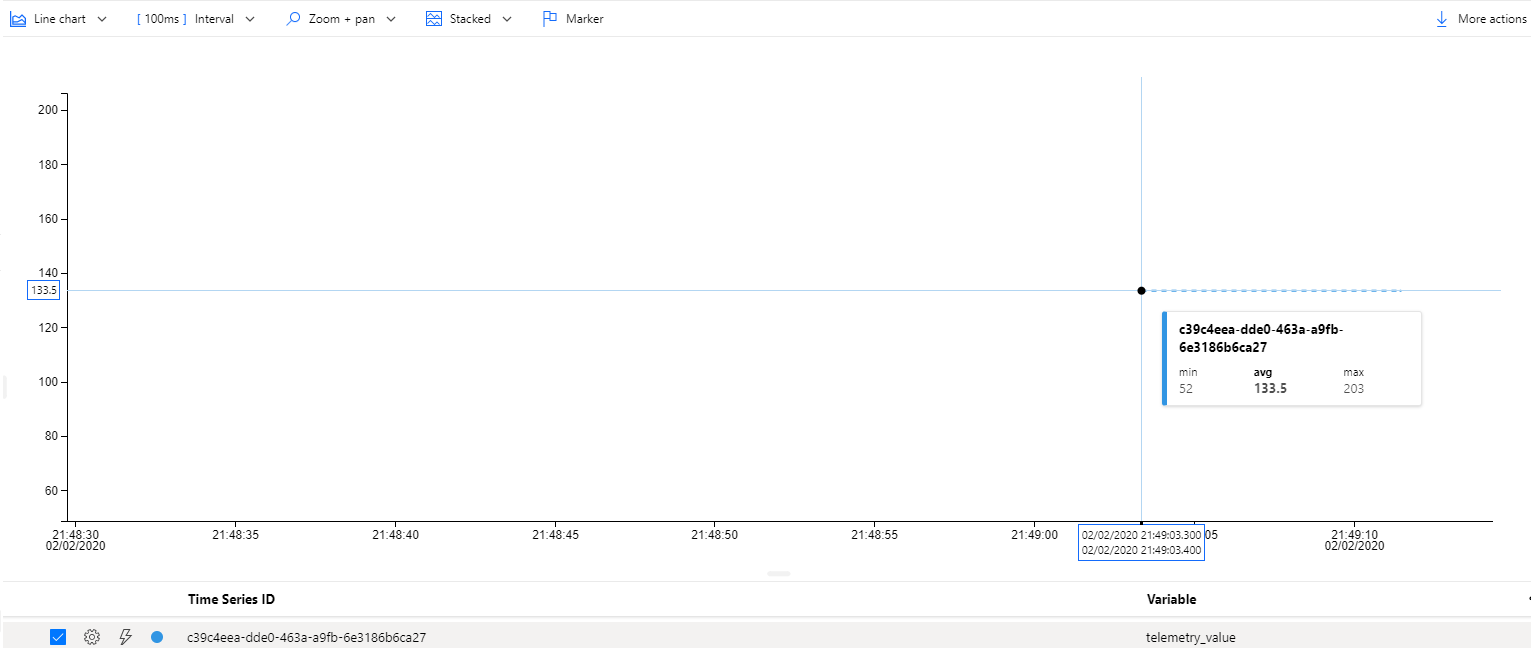
Hi @fgheysels, I created a new TSI PAYG environment and ingested this telemetry, essentially the same as above but with my deviceId, and I was able to see the time series instance in the explorer without having to create a type, I'm definitely curious to know what's going on in your environment...
[
{
"deviceId": "c39c4eea-dde0-463a-a9fb-6e3186b6ca27",
"timestamp": "2020-01-31T20:17:00Z",
"telemetry": [
{
"tag": "fuel",
"value": 107
},
{
"tag": "heading",
"value": 172
}
]
},
{
"deviceId": "c39c4eea-dde0-463a-a9fb-6e3186b6ca27",
"timestamp": "2020-01-31T20:18:00Z",
"telemetry": [
{
"tag": "fuel",
"value": 203
},
{
"tag": "heading",
"value": 52
}
]
}
]
lyrana
on 3 Feb 2020
This is weird. I've created my TSI instance via an ARM template, so maybe I am missing some property or misconfigured something ? I'll soon re-try this with a TSI resource that I create via the portal.
Would it help if I send you the details of my TSI environment ?
fgheysels
on 3 Feb 2020
@fgheysels It is best to submit a support ticket through the Azure portal, and I'll be on the look-out for it, please enter in as much information as you can--the ARM template used, the environment ID, the telemetry sent as well as what you observed etc. Just an FYI that once docs are updated you may see this issue get closed once the original topic for the thread is addressed.
lyrana
on 3 Feb 2020
@lyrana: I will open a ticket shortly.
In the meantime, I've also deployed a TSI PAYG resource via the Azure Portal. I can see the values 'out of the box', just like in your screenshot, but they're limited to telemetry_value and there's no distinction per tag, where this is the case with the GA version of TSI. When I want to distinguish between fuel & heading in my example, I'll need to create a custom type.
fgheysels
on 4 Feb 2020
Hi,
i'm trying to configure the exact same thing as @fgheysels . So I have those events in json (see below).
For property id when creating the TSI PAYG, I have :
- deviceId
- telemetry.sensorId
This is the result in the TSI Explorer :
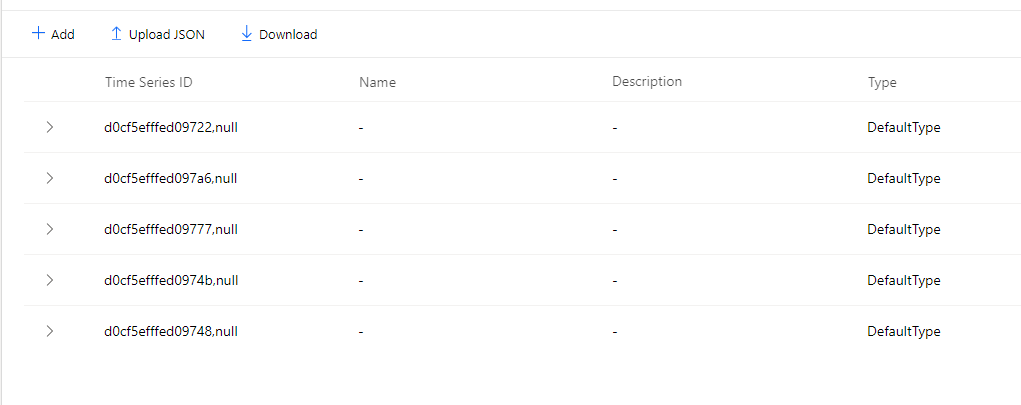
I also tried to create a TSI with those properties, but the explorer was not even working :
- deviceId
- telemetry_sensorId
I am new to TSI, but it look like a great product. I'm not sure how to configure the custom type, there is not a lot of documentation on it.
Thank you all.
```json
[
{
"deviceId": "d0cf5efffed09722",
"timestamp": "2020-02-05T00:13:50.5169829Z",
"telemetry": [
{
"sensorId": "0",
"value": 13
},
{
"sensorId": "1",
"value": 35
},
{
"sensorId": "2",
"value": 77
},
{
"sensorId": "3",
"value": 29
},
{
"sensorId": "4",
"value": 86
}
]
},
{
"deviceId": "d0cf5efffed09748",
"timestamp": "2020-02-05T00:13:50.5173754Z",
"telemetry": [
{
"sensorId": "0",
"value": 63
},
{
"sensorId": "1",
"value": 85
},
{
"sensorId": "2",
"value": 63
},
{
"sensorId": "3",
"value": 32
},
{
"sensorId": "4",
"value": 72
}
]
}
]
 MaxThom
on 5 Feb 2020
MaxThom
on 5 Feb 2020
@MaxThom you can create a custom type via the Model section in the TSI (Preview) explorer. Define a type there, and add some variables there, where the _Value_ for the variable is defined like this for instance:
$event.telemetry_value.Double
Then, you need to define a filter for each variable as well, which looks like this:
$event.telemetry_sensorId.String = '3'
Then, you also need to assign your custom type to the 'time series instance' (is that the correct name :P) and then you should be able to see the values separately.
At least, this is how I've done it. Don't know if there exists a better way.
fgheysels
on 5 Feb 2020
Hi @fgheysels thanks for jumping in to help the community! We've moved Max's issue to a different issue. I reached out to you via the e-mail that you have listed on your GitHub page.
lyrana
on 5 Feb 2020
@lyrana I haven't received any e-maill on that address ?
fgheysels
on 5 Feb 2020
@fgheysels We will now proceed to close this thread. If there are further questions regarding this matter, please comment and we will gladly continue the discussion.
Mike-Ubezzi-MSFT
on 18 Feb 2020
Hi @fgheysels - I wanted to supply a more complete answer. Your question is much appreciated!
FYI, we are presently busy updating some of the documentation surrounding how to shape events, best practices, etc. These improvements incorporate a couple points of clarification and address your and others' suggestions as well!
I've gone ahead and tested this scenario a bit more using four test cases.
- I tested the result of sending the following message written in JavaScript to both GA and Preview environments.
    const message = new Message(JSON.stringify({
        series: [{
            device: "MOCK_A",
            timestamp: "2018-01-17T01:18:00Z",
            volume: 1,
            pressure: 2,
            flowRate: 3,
            flag: "YES"
        },
        {
            device: "MOCK_B",
            timestamp: "2019-05-17T01:18:00Z",
            volume: 4,
            pressure: 5,
            flowRate: 6,
            flag: "NO"
        }],
        test: 'B'
    }))
In this scenario, no "overriding" occurred - the values are not treated as "overloaded" and are considered as completely distinct:
GA:

Preview:

- I sent a message (through JavaScript) to both GA and Preview environments:
const message = new Message(JSON.stringify([{
    device: "MOCK_A",
    timestamp: "2018-01-17T01:18:00Z",
    series: [{
        volume: 1,
        pressure: 2,
        flowRate: 3,
        flag: "YES"
      },
      {
        volume: 7,
        pressure: 8,
        flowRate: 9,
        flag: "YES"
      }
    ]
  },
  {
    device: "MOCK_B",
    timestamp: "2019-05-17T01:18:00Z",
    series: [{
      volume: 4,
      pressure: 5,
      flowRate: 6,
      flag: "NO"
    }]
  }
]));
In this scenario, again, no "overriding" occurred - the values are not treated as "overloaded" and are considered as completely distinct:
GA:

Preview:
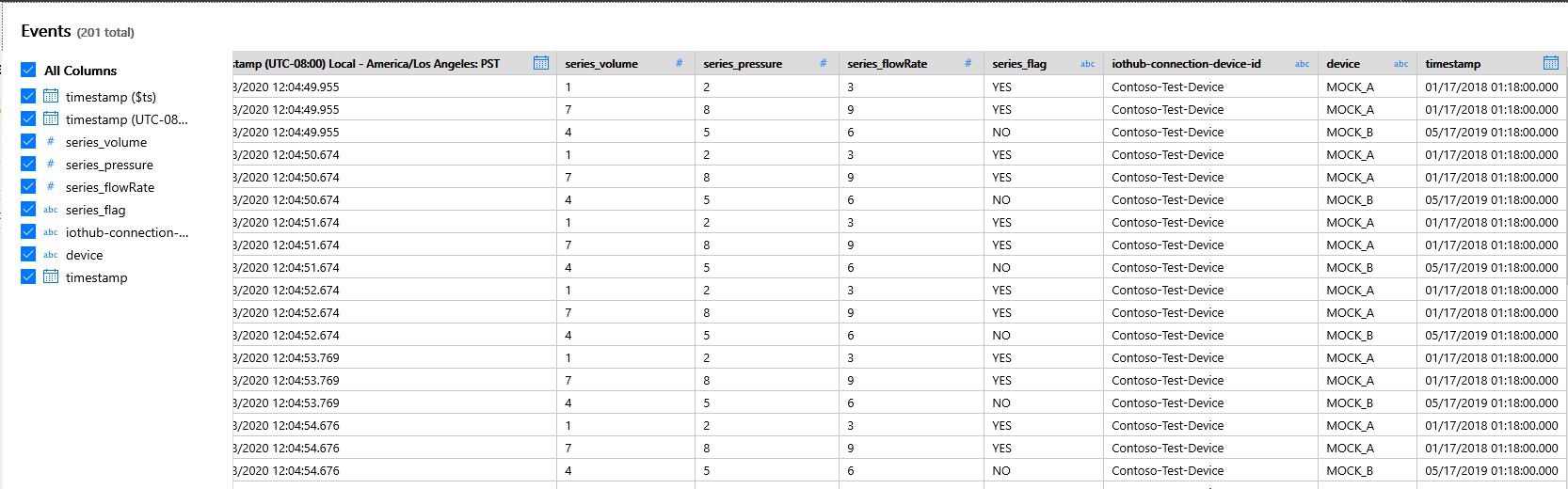
The JSON used above is defined within the parameters specified but may vary slightly from the specific use-scenarios mentioned in the documentation. We will be revising those specific sections to improve clarity and avoid confusion (others have similarly asked this line of question: https://github.com/MicrosoftDocs/azure-docs/issues/48352).
Let me know if there's anything else I can help answer immediately.
Thanks!
 KingdomOfEnds
on 18 Feb 2020
KingdomOfEnds
on 18 Feb 2020
Hi @fgheysels - One point of clarification you may find helpful occurs within single event "series" (the example primarily discussed in the documentation).
The following message sent via JavaScript results in overwritten/overridden values:
    const message = new Message(JSON.stringify({
        device: "MOCK_A",
        timestamp: "2018-01-17T01:18:00Z",
        data: {
            volume: 1,
            pressure: 2,
            flowRate: 3,
            flag: "YES"
        },
        data_volume: 4,
        "data.volume": 5,
        test: 'B'
    }))
In GA the (last) data.volume overrides the data['volume'] value but data_volume doesn't:

In Preview the (last) data_volume overrides the data['volume'] value but data.volume doesn't:

Thanks!
KingdomOfEnds
on 18 Feb 2020
Thanks for the clarification @KingdomOfEnds
For a project, I'm currently looking on how we can optimize the messages that are sent to TSI. We have devices that are constantly collecting data; say once every second.
I was thinking on sending this information as a 'batch' to IoT Hub (and eventually in TSI), and I was thinking on sending the data like this:
[
    {
        "deviceId": "A1",
        "timestamp": "2020-03-27T20:00:00",
        "telemetry": [
              { "key": "sensor1", "value": 45.5 },
             { "key": "sensor2", "value": -88.4 }
        ]
    },
    {
        "deviceId": "A1",
        "timestamp": "2020-03-27T20:00:05",
        "telemetry": [
              { "key": "sensor1", "value": 48.04 },
             { "key": "sensor2", "value": -91.9 }
        ]
    }
]
Will I be faced here with overwriting, in TSI PAYG since one JSON message contains multiple messages for the same device ? (Key in TSI will be a compound key of deviceId and telemetry_key)
fgheysels
on 27 Mar 2020
Hi @fgheysels, this is a really great batching example that seems to be a relatively common practice.
But don't send the above without adding a "," after the timestamp value 🙂
-We see the primary key for a time series event--i.e. row in your warm/cold stores--to be the combination of timestamp + TS ID (single or composite)
-Currently when we receive an array that contains objects there is flattening logic that will produce multiple rows so that users can do this type of batching. The array payload sent above would produce 4 rows, is our design and current thinking hitting the mark in terms of your use-case?
-Note that we are making some changes to support a "dynamic" type such that if an array of objects is received where we do not find either the timestamp or one or more of the TS ID(s) we will store the entire array as-is without flattening. This is to support the scenario where the array objects contains information and was _not_ intended as multiple events.
-In addition to that, we are making some changes to our encoding logic to change from an _ to a . and use brackets to escape--foo.bar would be ['foo.bar']. This will apply to new environments, and I'm happy to share more with you on that. This change is targeted for new environments by or before the end of May, assuming that we're not further affected by the crisis.
lyrana
on 28 Mar 2020
@fgheysels
Result from cold store, my timestamp was missing a digit hence the hub en-queued dateTime was used, but this is an example of the flattening

lyrana
on 28 Mar 2020
Hi @fgheysels, this is a really great batching example that seems to be a relatively common practice.
But don't send the above without adding a "," after the timestamp value 🙂
Yeah, things like that happen when writing without syntax highlighting or stuff like that :)
-Currently when we receive an array that contains objects there is flattening logic that will produce multiple rows so that users can do this type of batching. The array payload sent above would produce 4 rows, is our design and current thinking hitting the mark in terms of your use-case?
Yes, that's exactly what I would expect with this JSON message. Send 4 values, find 4 values back in TSI.
-Note that we are making some changes to support a "dynamic" type such that if an array of objects is received where we do not find either the timestamp or one or more of the TS ID(s) we will store the entire array as-is without flattening. This is to support the scenario where the array objects contains information and was _not_ intended as multiple events.
Thx, nice to know.
-In addition to that, we are making some changes to our encoding logic to change from an _ to a . and use brackets to escape--foo.bar would be ['foo.bar']. This will apply to new environments, and I'm happy to share more with you on that. This change is targeted for new environments by or before the end of May, assuming that we're not further affected by the crisis.
Does this mean that this also affects the way you need to specify your timeSeriesIdProperties ? For the JSON message that I've posted earlier, the timeseries Id Properties are specified like this:
"properties": {
    "timeSeriesIdProperties": [
     {
         "name": "deviceId",
          "type": "String"
     },
     {
          "name": "Telemetry_Key",
          "type": "String"
     }
 ]
I assume that we'll have to specify it like this then:
"properties": {
    "timeSeriesIdProperties": [
     {
         "name": "deviceId",
          "type": "String"
     },
     {
          "name": "Telemetry.Key",
          "type": "String"
     }
 ]
@fgheysels
Result from cold store, now that timestamp was hub en-queued dateTime and not the timestamp passed is a separate conversation, will engage with Engineering
Is this because the timestamp from my message was not in a correct format ? (The seconds issue ? )
fgheysels
on 3 Apr 2020
I assume that we'll have to specify it like this then:
Yes, that's correct, after these changes go into affect they will be applied to new TSI environments, thus you'll need to update your ARM templates. We will be sending out a communication to subscription owners as well as updating the docs.
Is this because the timestamp from my message was not in a correct format ? (The seconds issue ? )
Yes, exactly that. I had copied the exact values above and didn't realize the missing digit, when we are unable to use the configured timestamp property we default to the hub enqueued dateTime.
lyrana
on 3 Apr 2020
Related issues
 Agazoth
·
3Comments
Agazoth
·
3Comments
 varma31
·
3Comments
varma31
·
3Comments
 jebeld17
·
3Comments
jebeld17
·
3Comments
 Favna
·
3Comments
Favna
·
3Comments
 Ponant
·
3Comments
Ponant
·
3Comments
Most helpful comment
Hi @fgheysels - I wanted to supply a more complete answer. Your question is much appreciated!
FYI, we are presently busy updating some of the documentation surrounding how to shape events, best practices, etc. These improvements incorporate a couple points of clarification and address your and others' suggestions as well!
I've gone ahead and tested this scenario a bit more using four test cases.
In this scenario, no "overriding" occurred - the values are not treated as "overloaded" and are considered as completely distinct:
GA:
Preview:
In this scenario, again, no "overriding" occurred - the values are not treated as "overloaded" and are considered as completely distinct:
GA:
Preview:
The JSON used above is defined within the parameters specified but may vary slightly from the specific use-scenarios mentioned in the documentation. We will be revising those specific sections to improve clarity and avoid confusion (others have similarly asked this line of question: https://github.com/MicrosoftDocs/azure-docs/issues/48352).
Let me know if there's anything else I can help answer immediately.
Thanks!