Azure-docs: Missing Reply URL
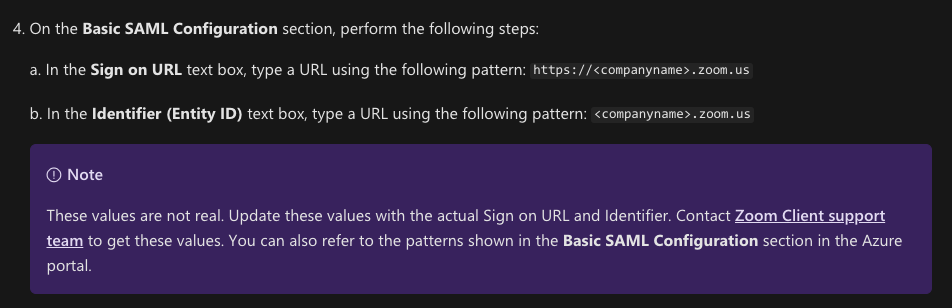
Zoom's document states you must have a Reply Url Set: https://support.zoom.us/hc/en-us/articles/115005887566-Configuring-Zoom-with-Azure#h_04f20f53-96b6-4877-9b14-b1a862fe34c8
For Identifier (Entity ID), enter your vanity URL without https://.
Eg. yourvanityurl.zoom.us
For Reply URL, enter https://*.zoom.us/saml/SSO
For Sign on URL, enter https:// followed by your Vanity URL.
Eg. https://yourvanityurl.zoom.us
Document Details
⚠ Do not edit this section. It is required for docs.microsoft.com ➟ GitHub issue linking.
- ID: 65a972cb-fe26-60cb-b12d-1af9ed8e87eb
- Version Independent ID: ff97a29f-0767-1062-ad5d-b237ecd4b668
- Content: Tutorial: Azure Active Directory single sign-on (SSO) integration with Zoom
- Content Source: articles/active-directory/saas-apps/zoom-tutorial.md
- Service: active-directory
- Sub-service: saas-app-tutorial
- GitHub Login: @jeevansd
- Microsoft Alias: jeedes
 afield1235
All 11 comments
Hello @afield1235 ,
Thank you for your feedback! We will review and provide an update as appropriate.
 MohitVerma-MSFT
on 24 Jan 2020
MohitVerma-MSFT
on 24 Jan 2020
@chetansriv for tracking
 jeevansd
on 12 Feb 2020
jeevansd
on 12 Feb 2020
Wildcards are not supported:
Reply URL (Assertion Consumer Service URL)
The default reply URL will be the destination in the SAML response for IDP-initiated SSO
https://*.zoom.us/saml/SSO
Wild cards * are not supported.
 infra-jl
on 24 Apr 2020
infra-jl
on 24 Apr 2020
Wildcards are not supported:
Reply URL (Assertion Consumer Service URL)
The default reply URL will be the destination in the SAML response for IDP-initiated SSO
https://*.zoom.us/saml/SSO
Wild cards * are not supported.
Seeing the same issue. I have a feeling the "no wild cards" thing is new because I'm pretty sure I've set it that way in the past. Not sure what to do for Zoom setup now as they want a wild card in the Reply URL field.
 lespaulio
on 28 Apr 2020
lespaulio
on 28 Apr 2020
I've also run into this. Commenting to track.
 jnoll21
on 1 May 2020
jnoll21
on 1 May 2020
That setup works and is in production. Not sure what you mean by it's not supported. What should we be using then? There shouldn't be discrepancies between documentation. I don't think I've done ONE Azure AD SSO implementation was 100% accurate in terms of documentation. Very frustrating..
afield1235
on 1 May 2020
It looks like Zoom updated their documentation:
https://support.zoom.us/hc/en-us/articles/115005887566
Reply URL doesn't require a wild card anymore.
lespaulio
on 4 May 2020
I believe my original point still stands, everyone got sidetracked with the discussion on wildcards. The Azure Documentation does not include any mention of Reply URLS, but mentions all other values, while the Zoom documentation states the need for a Reply URL.
Microsoft, please update your documentation to include this.
afield1235
on 5 May 2020
@chetansriv for tracking.
jeevansd
on 4 Aug 2020
Please close this PR, we resolved the issue in another PR which is merged now _https://github.com/MicrosoftDocs/azure-docs-pr/pull/125329_
 v-hagamp
on 17 Aug 2020
v-hagamp
on 17 Aug 2020
please-close
jeevansd
on 17 Aug 2020
Related issues
 paulmarshall
·
3Comments
paulmarshall
·
3Comments
 jebeld17
·
3Comments
jebeld17
·
3Comments
 spottedmahn
·
3Comments
spottedmahn
·
3Comments
 JeffLoo-ong
·
3Comments
JeffLoo-ong
·
3Comments
 jharbieh
·
3Comments
jharbieh
·
3Comments
Most helpful comment
Seeing the same issue. I have a feeling the "no wild cards" thing is new because I'm pretty sure I've set it that way in the past. Not sure what to do for Zoom setup now as they want a wild card in the Reply URL field.