Azure-docs: "Access denied" error in Storage Explorer in portal despite 'correct' permissions
Hi everyone.
I have an ADLS Gen2 account. I have a colleague who needs to have access to that account and be able to view the data within the Azure Portal. I have followed the instructions from the documentation above: https://docs.microsoft.com/en-us/azure/storage/common/storage-auth-aad-rbac-portal#assign-the-reader-role-for-portal-access.
Namely, I have given my colleague "Reader" permission on the storage account, and "Storage Blob Data Reader" at the container level. However, when they attempt to view the data in the "Storage Explorer (preview)" in the Azure Portal, they're presented with this error:
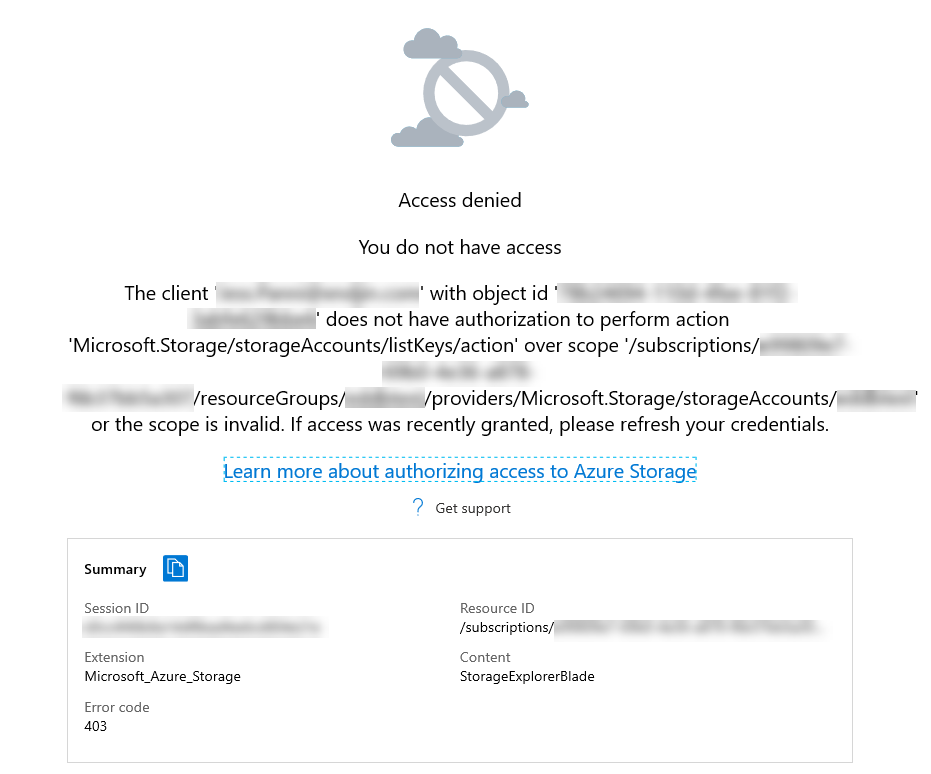
It seems like the Storage Explorer in the portal still requires the user to have Microsoft.Storage/storageAccounts/listKeys/action which suggests that it is trying to use storage account access keys to authenticate the user. I was under the impression that this now used AAD authentication (& associated RBAC roles), but it doesn't seem that's the case. (ref: https://docs.microsoft.com/en-us/azure/storage/common/storage-access-blobs-queues-portal?toc=%2fazure%2fstorage%2fblobs%2ftoc.json#azure-ad-account)
Using the Azure Storage Explorer desktop client, it works fine - my colleague can view the data with no problems.
Is this a known issue? Will this change when the Storage Explorer in the portal becomes GA? Is there a good way to get around this, or will I have to define a custom role which grants access to list the storage account keys?
Thanks,
Ed
Document Details
⚠ Do not edit this section. It is required for docs.microsoft.com ➟ GitHub issue linking.
- ID: 1ca94e03-5f05-6703-1672-8062f31c0780
- Version Independent ID: a6a8d9e9-9aac-c0ed-c474-34cbd0609584
- Content: Use the Azure portal to assign an RBAC role for data access - Azure Storage
- Content Source: articles/storage/common/storage-auth-aad-rbac-portal.md
- Service: storage
- Sub-service: common
- GitHub Login: @tamram
- Microsoft Alias: tamram
 edfreeman
All 8 comments
Hi @edfreeman Thanks for reaching out. We will review and update as appropriate.
 DixitArora-MSFT
on 10 Jan 2020
DixitArora-MSFT
on 10 Jan 2020
reassign: @tamram
 tamram
on 10 Jan 2020
tamram
on 10 Jan 2020
@edfreeman - Thanks for your feedback. The preview Storage Explorer in the portal doesn't support using Azure AD credentials, so your colleague must have the Microsoft.Storage/storageAccounts/listkeys/action. I've updated the article to make this more clear.
tamram
on 10 Jan 2020
@normesta - FYI only
tamram
on 10 Jan 2020
@tamram Thanks for clarifying.
Will the Storage Explorer in the portal support AAD creds once GA? If so, do you know when this will be?
edfreeman
on 13 Jan 2020
Hi @edfreeman, my name is Anand and I am one of the PMs working on Portal. Thanks for reporting this issue. We're meeting internally with teams to see how and when we can resolve issues with Storage Explorer on Portal (today some gaps exist on Portal). Once I have a clearer timeline, I'll follow up back here. Thank you again!
 angurusw
on 14 Jan 2020
angurusw
on 14 Jan 2020
please-close
Closing since the doc issue has been addressed - @angurusw you can still follow up here after the issue is closed.
tamram
on 23 Jan 2020
@edfreeman - Thanks for your feedback. The preview Storage Explorer in the portal doesn't support using Azure AD credentials, so your colleague must have the Microsoft.Storage/storageAccounts/listkeys/action. I've updated the article to make this more clear.
I was able to make a custom role with this privilege, worked like a charm, thank you!
 re4s0n4
on 1 Feb 2020
re4s0n4
on 1 Feb 2020
Related issues
 JamesDLD
·
3Comments
JamesDLD
·
3Comments
 monteledwards
·
3Comments
monteledwards
·
3Comments
 behnam89
·
3Comments
behnam89
·
3Comments
 spottedmahn
·
3Comments
spottedmahn
·
3Comments
 DeepPuddles
·
3Comments
DeepPuddles
·
3Comments