Azure-docs: Key Vault - Problem to set variable using Web Activity
Hello,
I'm trying to follow the documentation steps, but I didn't found the "Integration runtime" parameter and cannot set the value of the variable. Can someone help me?
URL (Web Activity): https://kv-adventure-works-tst.vault.azure.net/secrets/application-insights-key/c1b567890312343he52bdf07cb5fea5b?api-version=7.0
Print: https://imgur.com/KmbALhQ
Document Details
⚠ Do not edit this section. It is required for docs.microsoft.com ➟ GitHub issue linking.
- ID: a82e2777-1cc1-4156-2384-3174f5848b6a
- Version Independent ID: be845133-d2d9-7dc1-26a4-741d873b5c21
- Content: Use Azure Key Vault secrets in pipeline activities - Azure Data Factory
- Content Source: articles/data-factory/how-to-use-azure-key-vault-secrets-pipeline-activities.md
- Service: data-factory
- GitHub Login: @ChrisLound
- Microsoft Alias: chlound
 crisansou
All 8 comments
Thanks for the feedback and bringing this to our notice . At this time we are reviewing the feedback and will update the document as appropriate .
 himanshusinha-msft
on 9 Jan 2020
himanshusinha-msft
on 9 Jan 2020
Thanks for the feedback and bringing this to our notice . At this time we are reviewing the feedback and will update the document as appropriate .
Hi,
In my case I used "Web Activity" directly on "Copy Activity" and it worked by setting "@activity('GetKey').output.value" to the "x-api-Key" parameter: https://imgur.com/eaQUInr
crisansou
on 10 Jan 2020
@crisansou Thanks for sharing the details. Just wanted to confirm if you still need assistance regarding this?
 KranthiPakala-MSFT
on 13 Jan 2020
KranthiPakala-MSFT
on 13 Jan 2020
Hi @KranthiPakala-MSFT,
No, it's ok. I believe only the documentation needs to be updated.
Best regards,
Cristina
crisansou
on 13 Jan 2020
@crisansou Thanks for confirming. We have assigned the issue to the content author to investigate this and update the document as appropriate.
KranthiPakala-MSFT
on 13 Jan 2020
@crisansou The document seems to be correct. I'm see the "Integration Runtime", when I click on settings menu.
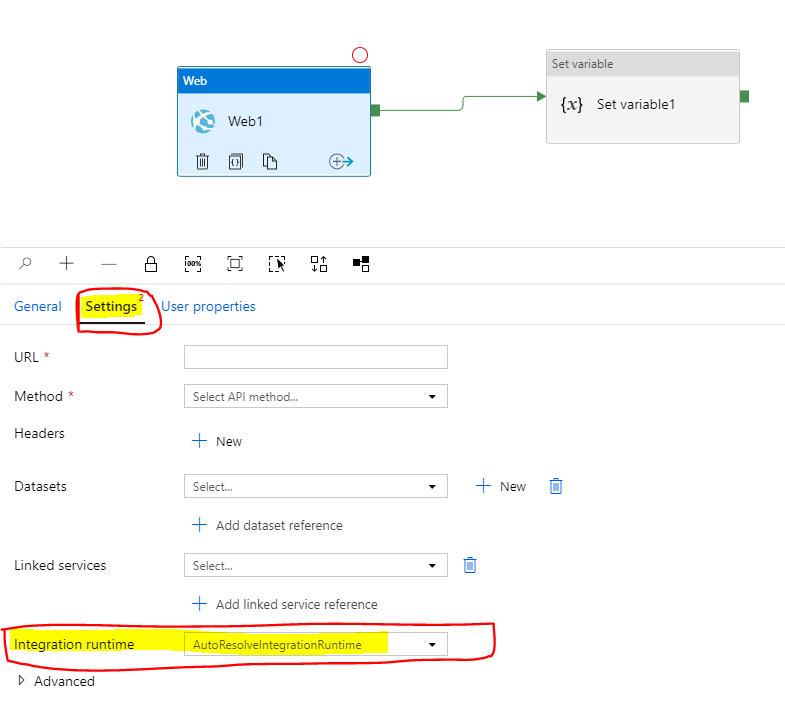
You may try the following steps and let us know.
- Clear “Cookies and Cached data” of your browser.
- Private Mode (New InPrivate Window).
- Try in different browser.
Hope this helps.
 CHEEKATLAPRADEEP-MSFT
on 12 Mar 2020
CHEEKATLAPRADEEP-MSFT
on 12 Mar 2020
@crisansou We will now proceed to close this thread. If there are further questions regarding this matter, please comment and we will gladly continue the discussion.
CHEEKATLAPRADEEP-MSFT
on 13 Mar 2020
@crisansou The document seems to be correct. I'm see the "Integration Runtime", when I click on settings menu.
You may try the following steps and let us know.
- Clear “Cookies and Cached data” of your browser.
- Private Mode (New InPrivate Window).
- Try in different browser.
Hope this helps.
Hi,
Now I can see the field, thanks!
Best regards,
Cristina
crisansou
on 13 Mar 2020
Related issues
 spottedmahn
·
3Comments
spottedmahn
·
3Comments
 jharbieh
·
3Comments
jharbieh
·
3Comments
 DeepPuddles
·
3Comments
DeepPuddles
·
3Comments
 Ponant
·
3Comments
Ponant
·
3Comments
 Favna
·
3Comments
Favna
·
3Comments