Azure-docs: File System ISE connector
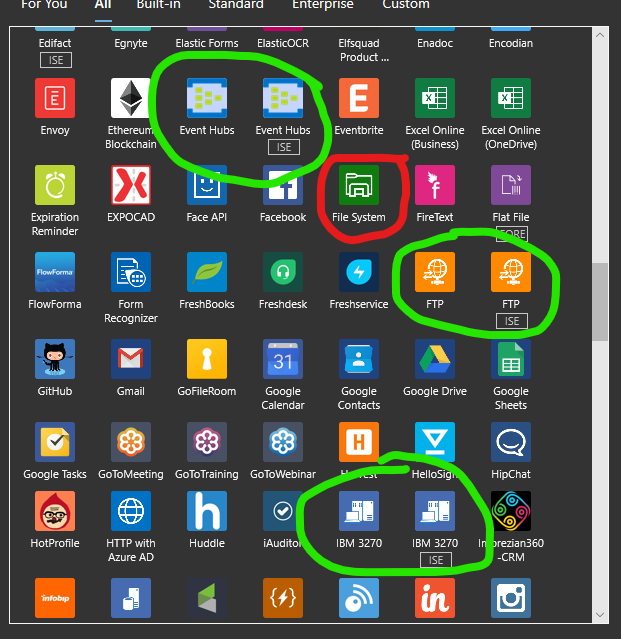
I don't see a File System ISE version connector, only the one that uses the on-prem data gateway. Has this been changed since File System was listed under the "Isolated versus global" section?
Document Details
⚠ Do not edit this section. It is required for docs.microsoft.com ➟ GitHub issue linking.
- ID: 1835ffaf-25d4-f6ea-4e4f-ce62c702b770
- Version Independent ID: f76d8032-e672-d8dd-d35e-a6c762bb61d4
- Content: Access to Azure virtual networks - Azure Logic Apps
- Content Source: articles/logic-apps/connect-virtual-network-vnet-isolated-environment-overview.md
- Service: logic-apps
- GitHub Login: @ecfan
- Microsoft Alias: estfan
 dcbrown16
All 23 comments
I checked all the other listed connectors and found two versions, but as shown here there is only one version of File System showing.
dcbrown16
on 26 Dec 2019
Hi @dcbrown16 Thanks for reaching out. We will review and update as appropriate.
 DixitArora-MSFT
on 26 Dec 2019
DixitArora-MSFT
on 26 Dec 2019
@dcbrown16 PG is working on enabling the ISE variant of the File System connector. For now you have to use the existing connector with the Gateway to access the File share. I agree it is a doc bug . For that PR has been created for this which will address this. Thanks so much for providing the feedback that help us in improving the documentation. For now I will proceed with closure of this and If there are further questions regarding this matter, please tag me in your reply. We will gladly continue the discussion and we will reopen the issue.
DixitArora-MSFT
on 27 Dec 2019
Hi @DixitArora-MSFT, I provided the info you explained to Dillon, thank you. The customer asked us if there is the estimated target date to enable the ISE variant of the file system connector. Do you have any idea or information to share with the cx?
 v-hakob
on 6 Jan 2020
v-hakob
on 6 Jan 2020
@v-hakob There is no ETA as of now. But if there is any update, I will keep that posted.
DixitArora-MSFT
on 6 Jan 2020
Noted, thank you @DixitArora-MSFT
v-hakob
on 6 Jan 2020
Hi @DixitArora-MSFT & @v-hakob,
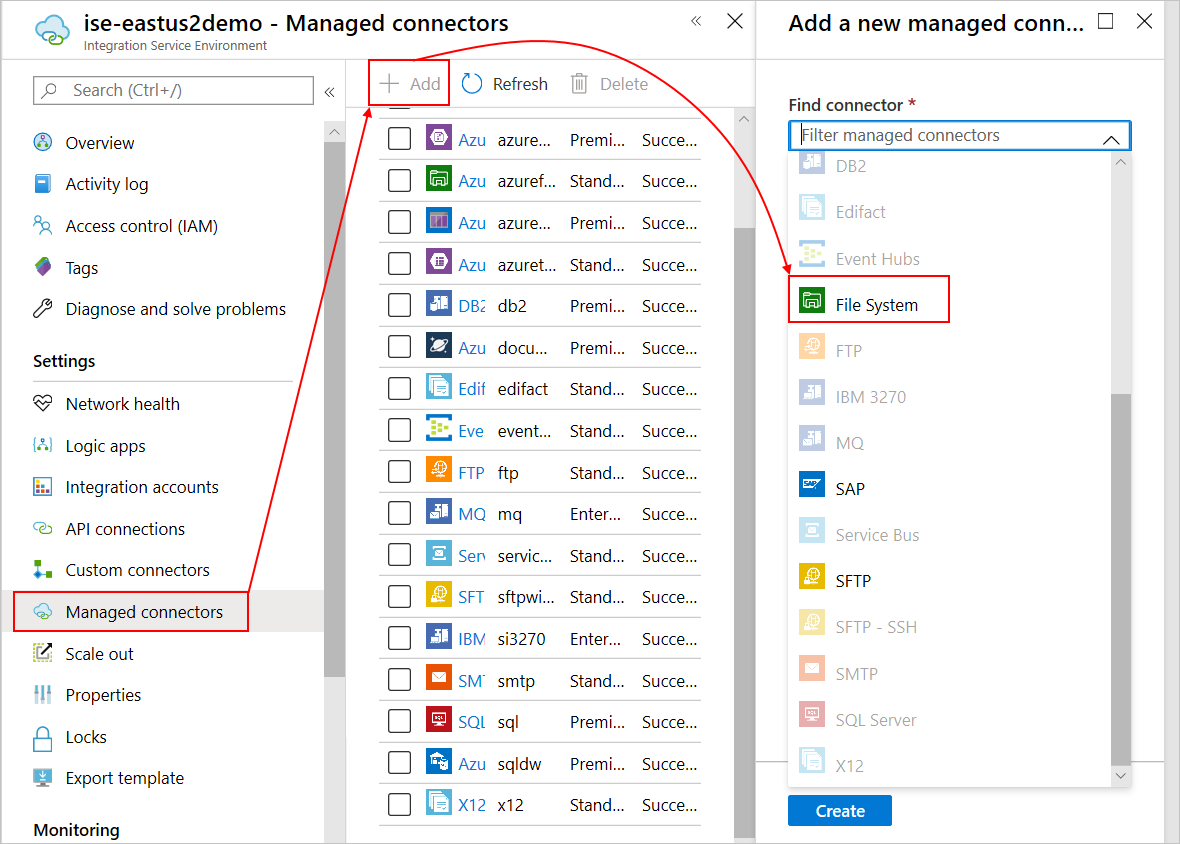
I asked PM about this issue and learned that when you have an existing ISE, any newly available managed connectors that support ISE don't automatically appear in the connector picker on the designer. To make the new ISE connectors available in the picker, you have to manually add them to your ISE. I'll create a work item to make this scenario clearer.
How to add new ISE connectors: https://docs.microsoft.com/azure/logic-apps/add-artifacts-integration-service-environment-ise#add-ise-connectors
 ecfan
on 7 Jan 2020
ecfan
on 7 Jan 2020
Thanks @ecfan ! We'll let the customer know that they will have to do that once the new connector becomes available. Having that documented will be a big help for the future!
dcbrown16
on 7 Jan 2020
@dcbrown16: The connector is available, you just have to add and deploy the connector to your ISE. Thanks!
ecfan
on 7 Jan 2020
@ecfan we were able to add the File System ISE connector via the method you indicated. We have a couple of questions regarding this (feel free to loop us in to emails, v-dibr and v-hakob internally).
- @DixitArora-MSFT said the PG is working on enabling the ISE variant. Should we take that to mean that they are working on making it available without having to go through the steps to add it manually?
- All of the triggers and actions are marked as preview. Is the File System ISE connector not suited for production use currently?
dcbrown16
on 7 Jan 2020
@kevinlam1, could you please help answer the previous questions from @dcbrown16?
Thanks!
ecfan
on 7 Jan 2020
The ISE File System connector is available. When a new ISE is created the ISE File System connector will automatically be added. For pre-existing ISE, you will need to do a one time update, as Esther noted above, to add the connector to your ISE.
The ISE File System connector has been stable so far, we just want it to bake a little longer before we lift the preview tag.
 kevinlam1
on 7 Jan 2020
kevinlam1
on 7 Jan 2020
Thanks @kevinlam1 ! I did create a brand new ISE yesterday and had to manually add the ISE File System connector to get it to show up, but I think the customer has an existing one so we'll make sure they know how to add it manually and advise that they can try to start using it.
dcbrown16
on 8 Jan 2020
Sorry I want to correct a statement I made. The ISE File System connector will not yet be automatically added to new ISE, you will still need to manually add it yourself. Our engineers are working on getting that automatically added with new ISE deployments.
kevinlam1
on 8 Jan 2020
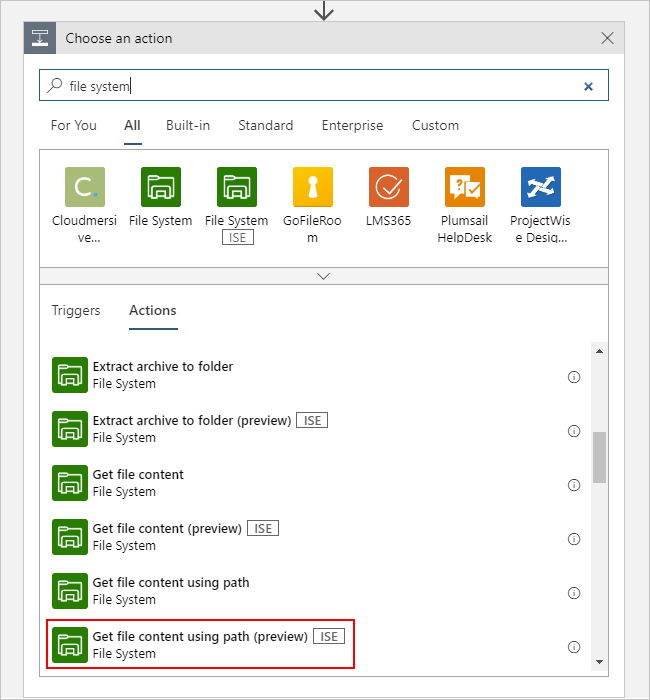
Hi @kevinlam1 and @ecfan, we cannot find the action "Get file content using path" from the ISE File System connector, though it is available as the non-ISE File System connector. Do you know if there is any equivalent action, or if there is any way to get the files with ISE environment?
v-hakob
on 15 Jan 2020
Hi @v-hakob, you can find the ISE version for the Get file content using path action here:
ecfan
on 15 Jan 2020
Thank you @ecfan for responding back so quickly, I confirmed I was able to add the action to Logic Apps. I will tell the cx how to..
v-hakob
on 16 Jan 2020
@ecfan, just for your info, I checked file system connectors with and without ISE in Japanese, and the translation is inconsistent comparing to two file system connectors. For the better user experience, it would be nice if two connector and related actions have the same Japanese names..Thanks!
v-hakob
on 16 Jan 2020
@kevinlam1, how do we provide feedback to the UX localization team about the Japanese translation inconsistency?
ecfan
on 16 Jan 2020
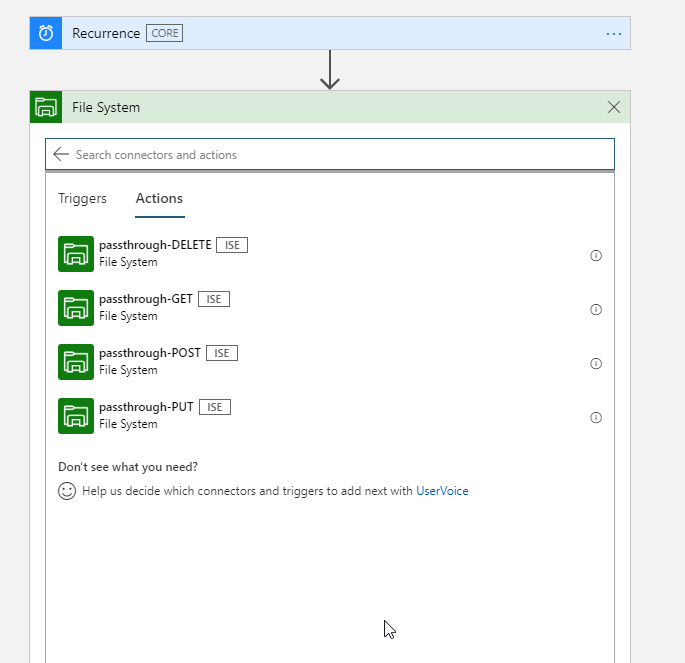
I'm seeing those actions. Any idea how to use them? Or how to get the same as for the File System Conector (Non ISE)
 scleynen
on 18 Feb 2020
scleynen
on 18 Feb 2020
Hi @scleynen,
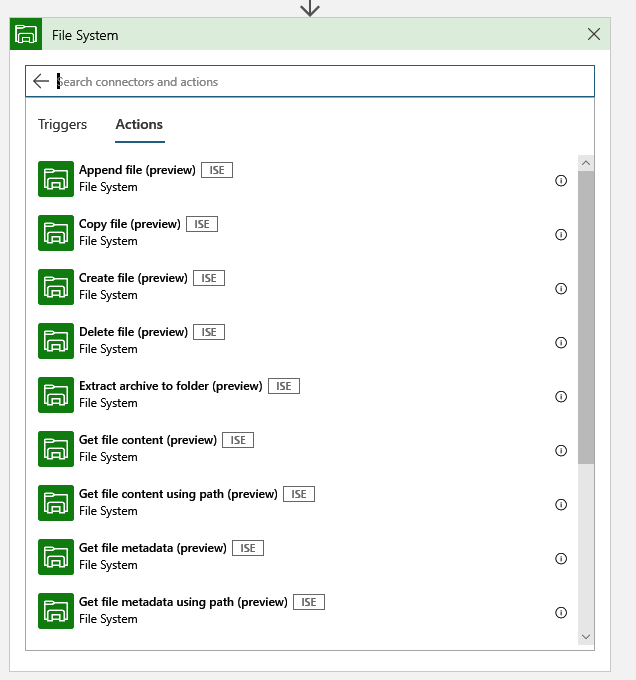
I'm not seeing the actions in your screenshot. Do you still see them? The ISE version should show these actions instead:
ecfan
on 25 Feb 2020
Hi, after removal of the File System ISE connector and reinstalling it, it was fixed and I indeed see those actions also
scleynen
on 26 Feb 2020
Glad to hear this issue resolved for you, @scleynen!
ecfan
on 26 Feb 2020
Related issues
 jebeld17
·
3Comments
jebeld17
·
3Comments
 jharbieh
·
3Comments
jharbieh
·
3Comments
 monteledwards
·
3Comments
monteledwards
·
3Comments
 Agazoth
·
3Comments
Agazoth
·
3Comments
 jamesgallagher-ie
·
3Comments
jamesgallagher-ie
·
3Comments
Most helpful comment
Hi @DixitArora-MSFT & @v-hakob,
I asked PM about this issue and learned that when you have an existing ISE, any newly available managed connectors that support ISE don't automatically appear in the connector picker on the designer. To make the new ISE connectors available in the picker, you have to manually add them to your ISE. I'll create a work item to make this scenario clearer.
How to add new ISE connectors: https://docs.microsoft.com/azure/logic-apps/add-artifacts-integration-service-environment-ise#add-ise-connectors