Azure-docs: ROPC flow error The application associated with client id has no registered redirect URIs
The application associated with client id 09ac92da-a796-4cd9-973b-c97756____ has no registered redirect URIs
Description
I followed the steps described in https://docs.microsoft.com/en-us/azure/active-directory-b2c/configure-ropc?tabs=applications.
When attempting to obtain the token in Postman using ROPC I'm getting
{
    "error": "invalid_request",
    "error_description": "AADB2C90007: The application associated with client id '09ac92da-a796-4cd9-973b-c97756____' has no registered redirect URIs.\r\nCorrelation ID: e85003c3-cfd5-43ad-a74b-efa5c1ea6525\r\nTimestamp: 2019-12-06 19:47:42Z\r\n"
}
I should not be asked for a redirect URIs.
My POST is as follows:
URL: ''https://mytenant.b2clogin.com/mytenant.onmicrosoft.com/oauth2/v2.0/token?p=B2C_1_ROPC_Auth"
username: some_username_of_a_user
password: its-password
grant_type: password
scope: openid offline_access 09ac92da-a796-4cd9-973b-c97756____
client_id: 09ac92da-a796-4cd9-973b-c97756____
response-type: token id_token
Document Details
⚠ Do not edit this section. It is required for docs.microsoft.com ➟ GitHub issue linking.
- ID: c54680bb-ff67-a9e2-4272-1710fe6eb863
- Version Independent ID: 6d15d340-f556-6bb0-8b4c-f4535537189b
- Content: Configure the resource owner password credentials flow in Azure Active Directory B2C
- Content Source: articles/active-directory-b2c/configure-ropc.md
- Service: active-directory
- Sub-service: b2c
- GitHub Login: @mmacy
- Microsoft Alias: marsma
 NachoVazquez
All 16 comments
@NachoVazquez
Thanks for your feedback! We will investigate and update as appropriate.
 MarileeTurscak-MSFT
on 6 Dec 2019
MarileeTurscak-MSFT
on 6 Dec 2019
This error occurs because you still need to configure some application claims in the b2c directory user flow to allow complete access to the application.
You need to make sure that the right versions of the authentication are in the reply url (likely extension v2.0) and that the reply URL is configured in the application and in the code.
Please look to the documentation for the reply URL schema that you would need to follow: https://docs.microsoft.com/en-us/azure/active-directory-b2c/tutorial-register-applications?tabs=applications#register-a-web-application
If you still have this issue, please send me an email at [email protected] and we can troubleshoot together.
MarileeTurscak-MSFT
on 7 Dec 2019
Closing this out because we are tracking on another thread and this is more of a product question than documentation issue, but I will update the thread when we have this resolved.
MarileeTurscak-MSFT
on 7 Dec 2019
Thanks! I also reply in Stack Overflow. If there is a fix via configuration, I'll provide the corresponding PR to update the docs!
Thanks for your time!
NachoVazquez
on 7 Dec 2019
To be clear, I'm using Resource Owner Password Credential. Therefore, no redirect Url should be necessary nor required.
NachoVazquez
on 7 Dec 2019
Hello @MarileeTurscak-MSFT and anyone interested!
I have news related to this issue.
User Tony Ju on Stack Overflow made me notice that if I follow the regular Application registration, everything works as expected.
In my case, I was using the preview registration, and that's what is not working as expected.
I found a workaround for the preview case. The following are the missing steps.
- In the application registration process you have to define a redirect_uri
- In the POST, you have to add a redirect_uri field to the body of the request and use the same value defined in the app registration.
That works, but it has two problems. First, it is not described that way in the docs, which cause a lot of confusion and Second, it is not correct in my opinion, ROPC flow should not have to define a redirect_uri. It is even evident, given that in the regular registration, that is not needed.
Thanks, Marilee, for all your attention, and I hope this gets addressed soon. Let me know if I can be of any assistance.
Best regards!
NachoVazquez
on 9 Dec 2019
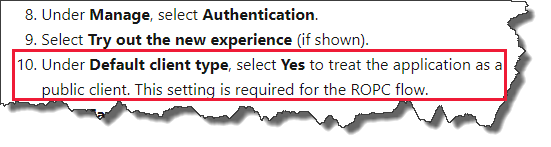
@NachoVazquez We are investigating this on our end. To confirm, when you registered your application using the _App registrations (Preview)_ method, did you perform step 10 as specified here?
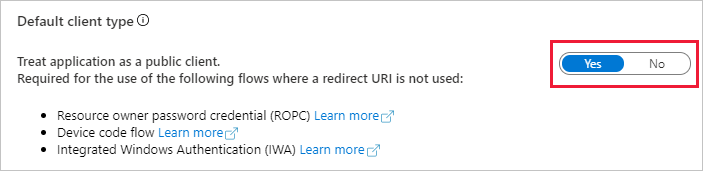
Setting in the Azure portal:
 mmacy
on 12 Dec 2019
mmacy
on 12 Dec 2019
Hello @mmacy,
Yes, I enabled the default client option.
I can later provide an screeshot with all my configurations.
NachoVazquez
on 12 Dec 2019
@NachoVazquez Thanks for the quick response! And no worries on the images, that should be enough. Just wanted to confirm that you'd switched public client to Yes.
Will update here when we have more info.
mmacy
on 12 Dec 2019
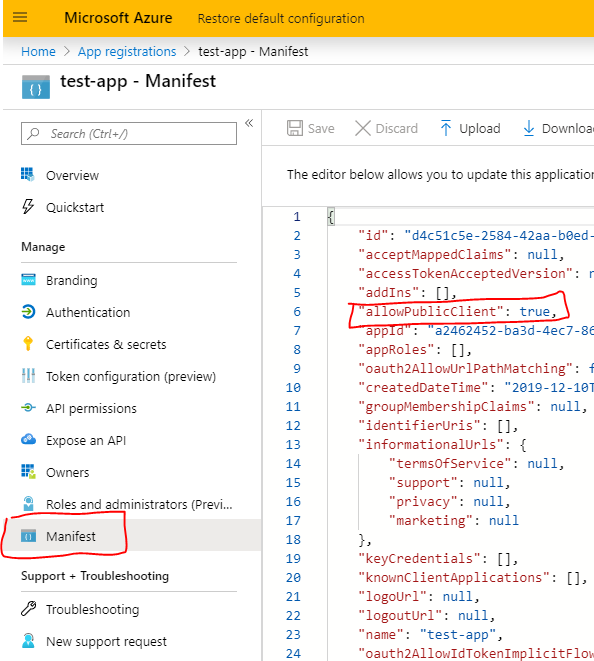
@NachoVazquez could you please also provide a screenshot of the Manifest view, want to see the value of allowPublicClient
 xubinzheng
on 12 Dec 2019
xubinzheng
on 12 Dec 2019
Hi, here it is
{
    "id": "2628a2c1-8092-xxxx-7bc32abd2ce0",
    "acceptMappedClaims": null,
    "accessTokenAcceptedVersion": 2,
    "addIns": [],
    "allowPublicClient": true,
    "appId": "af1e900b-4087-xxxxxxxx-5d8fd1329f89",
    "appRoles": [],
    "oauth2AllowUrlPathMatching": false,
    "createdDateTime": "2019-12-06T20:37:19Z",
    "groupMembershipClaims": null,
    "identifierUris": [],
    "informationalUrls": {
        "termsOfService": null,
        "support": null,
        "privacy": null,
        "marketing": null
    },
    "keyCredentials": [],
    "knownClientApplications": [],
    "logoUrl": null,
    "logoutUrl": null,
    "name": "ROPC_Auth_app",
    "oauth2AllowIdTokenImplicitFlow": false,
    "oauth2AllowImplicitFlow": false,
    "oauth2Permissions": [],
    "oauth2RequirePostResponse": false,
    "optionalClaims": null,
    "orgRestrictions": [],
    "parentalControlSettings": {
        "countriesBlockedForMinors": [],
        "legalAgeGroupRule": "Allow"
    },
    "passwordCredentials": [],
    "preAuthorizedApplications": [],
    "publisherDomain": "mytenant.onmicrosoft.com",
    "replyUrlsWithType": [],
    "requiredResourceAccess": [
        {
            "resourceAppId": "d7fddf64-9136-xxxxx-e02ff88d3e36",
            "resourceAccess": [
                {
                    "id": "38115032-56b3-xxxx-7d15039c073f",
                    "type": "Scope"
                }
            ]
        },
        {
            "resourceAppId": "00000003-0000-0000-c000-000000000000",
            "resourceAccess": [
                {
                    "id": "37f7f235-527c-xxxxxxx-4a02d197296e",
                    "type": "Scope"
                },
                {
                    "id": "7427e0e9-2fba-xxxxxx-848c9e6a8182",
                    "type": "Scope"
                }
            ]
        }
    ],
    "samlMetadataUrl": null,
    "signInUrl": null,
    "signInAudience": "AzureADandPersonalMicrosoftAccount",
    "tags": [
        "NoLiveSdkSupport"
    ],
    "tokenEncryptionKeyId": null
}
Can someone provide the link to the issue? Currently the only W/A is to include a redirect URI if client-app supports it, if it doesn't support it for ROPC flows (e.g. Postman/MSAL) then URI urn:ietf:wg:oauth:2.0:oob needs to be added as a return URI using the old experience from Azure.
 NullQubit
on 17 Dec 2019
NullQubit
on 17 Dec 2019
Yes, can we have a link to this issue? I can confirm that using the application registration preview page presents the error. The only way I fixed it was either by adding the redirect uri or by using the old app registration page.
 Norrch2
on 22 Jan 2020
Norrch2
on 22 Jan 2020
Hi @NachoVazquez , @NullQubit, and @Norrch2;
We've confirmed this as a change in behavior between the current App registration and the App registrations (Preview). We're currently investigating how best to present the workaround and are also looking at syncing the preview registration behavior with that of the current (GA) registration behavior. I don't have an ETA at this time, but will update this article with the proper steps for the workaround once confirmed. Thanks for your patience.
Cc: @nickgmicrosoft
mmacy
on 23 Jan 2020
@NachoVazquez @Norrch2 @NullQubit @xubinzheng This issue has been resolved on the service side and has been deployed to all regions. You should no longer be required to specify a redirect URI for an ROPC application registration when you register new applications using _App registrations (Preview)_. Please let us know if you have further issues.
Cc: @nickgmicrosoft
mmacy
on 12 Feb 2020
@mmacy that's great. Thank you!
NachoVazquez
on 12 Feb 2020
Related issues
 AronT-TLV
·
3Comments
AronT-TLV
·
3Comments
 behnam89
·
3Comments
behnam89
·
3Comments
 bityob
·
3Comments
bityob
·
3Comments
 spottedmahn
·
3Comments
spottedmahn
·
3Comments
 mrdfuse
·
3Comments
mrdfuse
·
3Comments