Azure-docs: How to specify / change Stack settings with PowerShell or ARM template
Hello,
Could you please provide details on how to specify or change Stack settings with PowerShell or ARM template?
Thank you
Detalji dokumenta
⚠ Ne uređujte ovu sekciju. Ona je neophodna za povezivanje problema slijedom docs.microsoft.com ➟ GitHub.
- ID: 1e25899c-1ed8-7cfc-2c37-73bb010a87f0
- Version Independent ID: 8b366c42-43f8-d5eb-b619-b356e75a9916
- Content: Configure apps in the portal - Azure App Service
- Content Source: articles/app-service/configure-common.md
- Service: app-service
- GitHub Login: @cephalin
- Microsoft Alias: cephalin
 bertrandpons
All 7 comments
@bertrandpons Thanks for the question. We will investigate it further and update you shortly.
 MonikaReddy-MSFT
on 3 Dec 2019
MonikaReddy-MSFT
on 3 Dec 2019
Hello @bertrandpons ,
You can change the stack settings by using either PowerShell or ARM Template by following the below steps..
With PowerShell
After the Deployment (without appsettings) has succeeded. Then run this to overwrite the appsettings completely.
$subscriptionID = {...}
Add-AzureRmAccount
Set-AzureRmContext -SubscriptionID $subscriptionID
--List appsettings
$resource = Invoke-AzureRmResourceAction -ResourceGroupName <ResourceGroupName> -ResourceType Microsoft.Web/sites/config -ResourceName <webSiteName>/appsettings -Action list -ApiVersion 2015-08-01 -Force
$resource.Properties
--SET list
$appsettingTest1Value = "testValue1"
$appsettingTest2Value = "testValue2"
$PropertiesObject = @{
appsettingTest1=$appsettingTest1Value,
appsettingTest2=$appsettingTest2Value,
WEBSITE_NODE_DEFAULT_VERSION: "4.4.7"
}
New-AzureRmResource -PropertyObject $PropertiesObject -ResourceGroupName <ResourceGroupName> -ResourceType Microsoft.Web/sites/config -ResourceName <webSiteName>/appsettings -ApiVersion 2015-08-01 -Force
With ARM Deployment JSON
{
"apiVersion": "2015-08-01",
"name": "[variables('webSiteName')]",
"type": "Microsoft.Web/sites",
"location": "[resourceGroup().location]",
"dependsOn": [
"[concat('Microsoft.Web/serverFarms/', parameters('hostingPlanName'))]",
"[concat('Microsoft.Storage/storageAccounts/', variables('storage_account_name'))]",
"[resourceId('Microsoft.Sql/servers', variables('sqlserverName'))]",
"[resourceId('Microsoft.Sql/servers/databases', variables('sqlserverName'), parameters('database_name_auth'))]"
],
"tags": {
"[concat('hidden-related:', resourceGroup().id, '/providers/Microsoft.Web/serverfarms/', parameters('hostingPlanName'))]": "empty",
"displayName": "Website"
},
"properties": {
"name": "[variables('webSiteName')]",
"serverFarmId": "[resourceId('Microsoft.Web/serverfarms', parameters('hostingPlanName'))]"
},
"resources": [
{
"apiVersion": "2015-08-01",
"name": "web",
"type": "config",
"dependsOn": [
"[concat('Microsoft.Web/Sites/', variables('webSiteName'))]"
],
"properties": {
"netFrameworkVersion": "[parameters('dotnet_version')",
"use32BitWorkerProcess": "[parameters('use32bit_worker_process')",
"webSocketsEnabled": false,
"alwaysOn": "[parameters('enable_always_on')]",
"requestTracingEnabled": true,
"httpLoggingEnabled": true,
"logsDirectorySizeLimit": 40,
"detailedErrorLoggingEnabled": true
}
},
{
"apiVersion": "2015-08-01",
"name": "appsettings",
"type": "config",
"dependsOn": [
"[concat('Microsoft.Web/Sites/', variables('webSiteName'))]"
],
"properties": {
"appsettingTest1": "[parameters('appsettingTest1Value')]",
"appsettingTest2": "[parameters('appsettingTest2Value')]"
}
},
{
"apiVersion": "2015-08-01",
"name": "connectionstrings",
"type": "config",
"dependsOn": [
"[concat('Microsoft.Web/Sites/', variables('webSiteName'))]"
],
"properties": {
"dbconnstringTest1": {
"value": "[concat('Data Source=tcp:', reference(concat('Microsoft.Sql/servers/', variables('sqlserverName'))).fullyQualifiedDomainName, ',1433;Initial Catalog=', parameters('database_name_auth'), ';User Id=', parameters('administratorLogin'), '@', variables('sqlserverName'), ';Password=', parameters('administratorLoginPassword'), ';')]",
"type": "SQLServer"
},
"AzureWebJobsConnectionString": {
"value": "[concat('DefaultEndpointsProtocol=https;AccountName=',variables('storage_account_name'),';AccountKey=',listkeys(resourceId('Microsoft.Storage/storageAccounts', variables('storage_account_name')), '2015-05-01-preview').key1,';')]",
"type": "Custom"
}
}
}
]
},
You can also go through this doc for more reference : Configure App Settings using ARM Template
I hope this information helps.
Please feel free to revert back if you have any further questions regarding this matter.
MonikaReddy-MSFT
on 4 Dec 2019
@MonikaReddy-MSFT Thank you for your detailed answer. Assume I want to have a .NET Core stack, how would I specify it in the ARM template?
bertrandpons
on 5 Dec 2019
Hello @bertrandpons ,
This is how you specify it using ARM Template.
While creating the WebApp, Ensure that you select Runtime Stack as .NET Core, select the Download template for Automation to see the stack details as shown below.
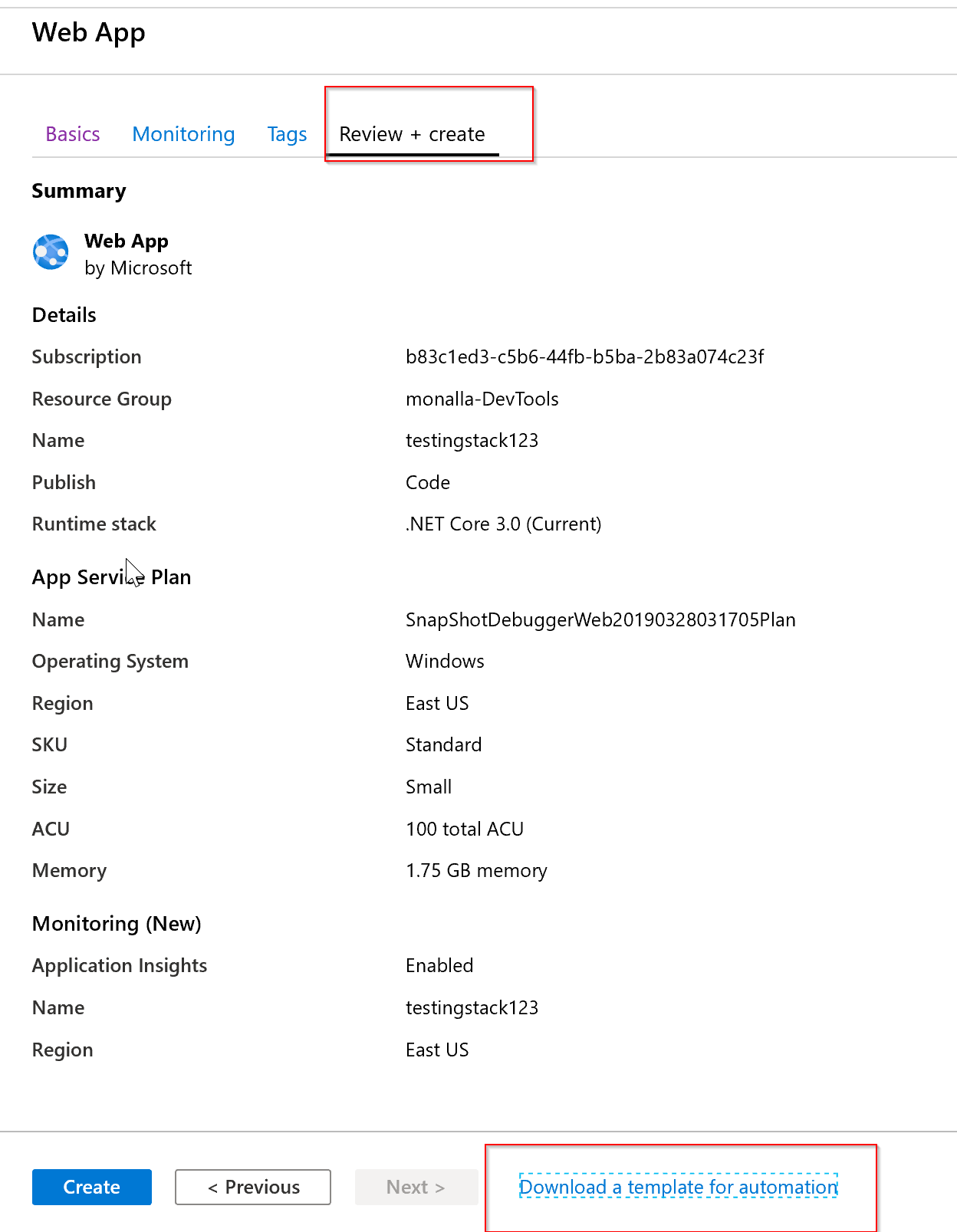
And Here is the sample code for it.
{
    "apiVersion": "2019-12-05",
    "name": "[parameters('name')]",
    "type": "Microsoft.Web/sites",
    "location": "[parameters('location')]",
    "properties": {
        "name": "[parameters('name')]",
        "siteConfig": {
            "appSettings": [],
            "metadata": [
                {
                    "name": "CURRENT_STACK",
                    "value": "[parameters('currentStack')]"
                }
            ]
        },
      }
}
I hope this information helps.
Please feel free to revert back with any issues you may have regarding this matter.
MonikaReddy-MSFT
on 5 Dec 2019
@bertrandpons , clicked on the close by mistake.
Again feel free to reach back out with any questions you might have regarding this matter.
MonikaReddy-MSFT
on 5 Dec 2019
@MonikaReddy-MSFT Ok great thank you for the help !
bertrandpons
on 6 Dec 2019
@bertrandpons , I am glad I was able to help resolve your issue.
If there are further questions regarding this matter, please tag me in your reply. We will gladly continue the discussion and we will reopen the issue.
MonikaReddy-MSFT
on 6 Dec 2019
Related issues
 JeffLoo-ong
·
3Comments
JeffLoo-ong
·
3Comments
 Ponant
·
3Comments
Ponant
·
3Comments
 jebeld17
·
3Comments
jebeld17
·
3Comments
 jamesgallagher-ie
·
3Comments
jamesgallagher-ie
·
3Comments
 monteledwards
·
3Comments
monteledwards
·
3Comments
Most helpful comment
Hello @bertrandpons ,
This is how you specify it using ARM Template.
While creating the WebApp, Ensure that you select Runtime Stack as .NET Core, select the Download template for Automation to see the stack details as shown below.
And Here is the sample code for it.
I hope this information helps.
Please feel free to revert back with any issues you may have regarding this matter.