Azure-docs: Azure CLI scripts do not copy tags properly when tag (or tag's value) contains spaces
Hi team,
I moved this from here: https://github.com/MicrosoftDocs/azure-docs.pl-pl/issues/469
@siudeks commented 2 hours ago — with docs.microsoft.com
Azure CLI scripts on the page are working well for single-word tags and values. For instance, when tag=value is abc=def (abc - tag name, def - tag value) - scripts are working well.
In case when spaces are in tag - like a b c=d e f, tags from resource group to resources are copied partially.
Document Details
⚠ Do not edit this section. It is required for docs.microsoft.com ➟ GitHub issue linking.
- ID: bc003943-8bc8-10ac-e633-5640cff3c397
- Version Independent ID: f8826361-f601-acf9-3e3d-c96579c02093
- Content: Tag resources for logical organization - Azure Resource Manager
- Content Source: articles/azure-resource-manager/resource-group-using-tags.md
- Service: azure-resource-manager
- GitHub Login: @tfitzmac
- Microsoft Alias: tomfitz
 CeciAc
All 8 comments
@siudeks Thank you for your feedback! We will review and update as appropriate.
This also appears to be similar to #43741
 mike-urnun-msft
on 29 Nov 2019
mike-urnun-msft
on 29 Nov 2019
@siudeks Thanks fore reaching out!! Can you please share the resources for which the tags are being applied partially so that we can verify and assist you accordingly?
 SwathiDhanwada-MSFT
on 2 Dec 2019
SwathiDhanwada-MSFT
on 2 Dec 2019
I temporary removed spaces inside my tags (names and values), so my tagging looks well but is impractical. As the result my tagging (right now) does not reflect the problem
My question - how looking to tagging of my resources would help with improving script which does not include spaces? Do you have problem with reproducing the issue?
 siudeks
on 2 Dec 2019
siudeks
on 2 Dec 2019
I tried to reproduce the issue from my end and I could see the resources were being tagged even though if tags has spaces.Except for few resources like Traffic manager, the tags with spaces weren't enforced ( which is known limitation). So as you mentioned that some of the tags were applied partially , I would like to know the resources for which the tags were applied partially so that I can verify from my end and check whether they were supported or not and let you know.
SwathiDhanwada-MSFT
on 3 Dec 2019
Steps to reproduce
Create resource group and add a tag with value (spaces included)
Example: resource group siudeks-lab, tag: "my tag"="my value"
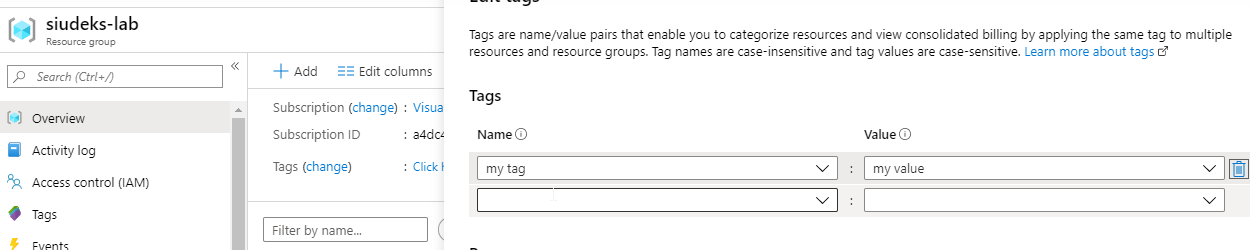
Add a resource (e.g. storage account) into the resource group
- Reuse slightly modified script from docs descrbed as
To apply all tags from a resource group to its resources, and keep existing tags on resources, use the following script: scope of change: first line uses my example resource group instead of all available resource groups
groups=siudeks-lab
for rg in $groups
do
  jsontag=$(az group show -n $rg --query tags -o json)
  t=$(echo $jsontag | tr -d '"{},' | sed 's/: /=/g')
  r=$(az resource list -g $rg --query [].id --output tsv)
  for resid in $r
  do
    jsonrtag=$(az resource show --id $resid --query tags -o json)
    rt=$(echo $jsonrtag | tr -d '"{},' | sed 's/: /=/g')
    az resource tag --tags $t$rt --id $resid
  done
done
Expected:
resource's tag

Actual:

siudeks
on 3 Dec 2019
@siudeks Thanks for the information.
@tfitzmac Can you please review the document and update the example ?
SwathiDhanwada-MSFT
on 4 Dec 2019
Thanks for this feedback. I have added an example that shows how to apply tags that include spaces.
 tfitzmac
on 31 Dec 2019
tfitzmac
on 31 Dec 2019
please-close
tfitzmac
on 31 Dec 2019
Related issues
 varma31
·
3Comments
varma31
·
3Comments
 Favna
·
3Comments
Favna
·
3Comments
 spottedmahn
·
3Comments
spottedmahn
·
3Comments
 ianpowell2017
·
3Comments
ianpowell2017
·
3Comments
 bdcoder2
·
3Comments
bdcoder2
·
3Comments