Azure-docs: Question regarding Azure Functions and SignalR
Hello
I have been following this tutorial: https://docs.microsoft.com/en-us/azure/azure-signalr/signalr-quickstart-azure-functions-csharp. SignalR is working quite well in the cloud, and I am able to host a function locally that lets both Unity apps and Xamarin apps connect to it with no issues whatsoever.
I have managed to deploy the Azure Functions app described by the tutorial to the cloud. However, when I open one of them, I get the following error:
"Function (FunctionApp20191128122819/negotiate) Error: Microsoft.Azure.WebJobs.Host: Error indexing method 'negotiate'. Microsoft.Azure.WebJobs.Host: Cannot bind parameter 'connectionInfo' to type SignalRConnectionInfo. Make sure the parameter Type is supported by the binding. If you're using binding extensions (e.g. Azure Storage, ServiceBus, Timers, etc.) make sure you've called the registration method for the extension(s) in your startup code (e.g. builder.AddAzureStorage(), builder.AddServiceBus(), builder.AddTimers(), etc.)."
Needless to say, I cannot call the functions from anywhere, like I can when I host them locally. Any idea what's wrong? I have tried several versions of Microsoft.NET.Sdk.Functions, except the beta and preview releases.
Document Details
⚠ Do not edit this section. It is required for docs.microsoft.com ➟ GitHub issue linking.
- ID: 589dec51-5df3-c655-f76e-e009bfbfbb07
- Version Independent ID: 03d392c8-cd6c-bd4a-c2e4-653838f81023
- Content: Azure SignalR Service serverless quickstart - C#
- Content Source: articles/azure-signalr/signalr-quickstart-azure-functions-csharp.md
- Service: signalr
- GitHub Login: @sffamily
- Microsoft Alias: zhshang
 olet88
All 8 comments
@olet88 Thank you for your feedback! We will review and update as appropriate.
 mike-urnun-msft
on 28 Nov 2019
mike-urnun-msft
on 28 Nov 2019
@olet88 The SignalR binding requires the Microsoft.Azure.WebJobs.Extensions.SignalRService nuget. Could you try installing that and try again?
Also, you can read more about the SignalR Service binding in the official docs.
 PramodValavala-MSFT
on 29 Nov 2019
PramodValavala-MSFT
on 29 Nov 2019
@PramodValavala-MSFT This is already installed. :) At least in the Visual Studio solution. The problems arise when I try to host it in Azure.
olet88
on 29 Nov 2019
I have managed to solve the problem. To anyone who encounter something similar, here is a possible solution:
Delete all the nuget packages in the project from the folder (C:\users\%username%.nuget\packages). Simply uninstalling them is not enough
Reinstall both the latest stable version of Microsoft.Azure.WebJobs.Extensions.SignalRService and Microsoft.NET.Sdk.Functions
Delete your old App Service, your old App Service Plan and your old Storage account. Recreate them from Visual Studio
Uncheck "Run from package file" when you deploy
Now I can finally connect to it. 😄
olet88
on 29 Nov 2019
@olet88 Thanks for sharing the steps that helped solve your problem!
Also, even with "Run from package file" checked, the exact dependencies defined in your .csproj file should have been bundled. Please feel free to ask your query on StackOverflow or MSDN if you face a similar problem again.
Since there is no doc update required here, we will now proceed to close this thread. If there are further questions regarding this matter, please tag me in your reply. We will gladly continue the discussion and we will reopen the issue.
PramodValavala-MSFT
on 29 Nov 2019
Hey @PramodValavala-MSFT ,
I am getting the exact same error, and cleaning up the resources didn't work for me.
Any other alternate solution to this?
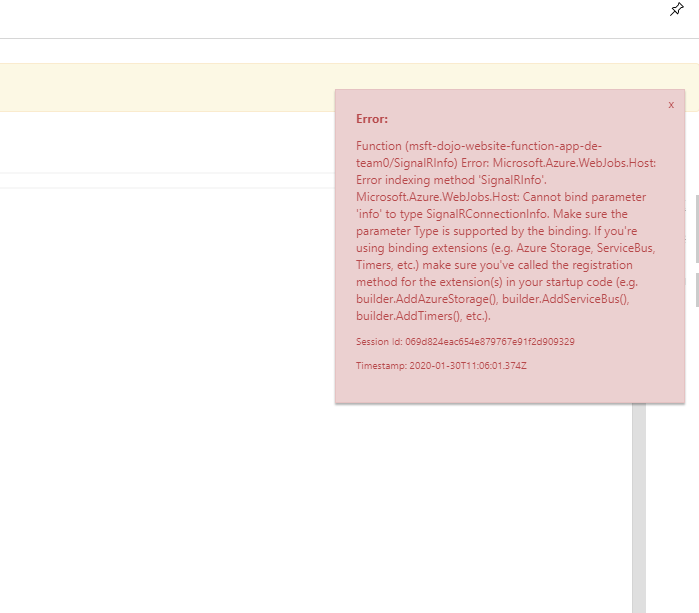
Locally the function runs fine but this only occurs on azure portal
 deep-mm
on 30 Jan 2020
deep-mm
on 30 Jan 2020
I have a similar error and cleaning everything up doesn't help:
Error:

Function (j...functions/Negotiate) Error: Microsoft.Azure.WebJobs.Host: Error indexing method 'Negotiate'. Microsoft.Azure.WebJobs.Host: Cannot bind parameter 'connectionInfo' to type SignalRConnectionInfo. Make sure the parameter Type is supported by the binding. If you're using binding extensions (e.g. Azure Storage, ServiceBus, Timers, etc.) make sure you've called the registration method for the extension(s) in your startup code (e.g. builder.AddAzureStorage(), builder.AddServiceBus(), builder.AddTimers(), etc.).
Session Id: 5e21870963f94956aec9fa9218682513

Timestamp: 2020-04-20T22:29:14.758Z
Anything else I can try?
 jonx
on 21 Apr 2020
jonx
on 21 Apr 2020
I tried @olet88's solution but it didn't do anything.
But thanks to this blog: https://zimmergren.net/after-upgrading-azure-functions-to-v3-and-you-get-cannot-bind-parameter-log-to-type-ilogger-make-sure-the-parameter-type-is-supported-by-the-binding-and-how-you-can-fix-it/
You "just" have to update the Azure Function project from v2 to v3:
<PropertyGroup>
<TargetFramework>netcoreapp3.1</TargetFramework>
<AzureFunctionsVersion>v3</AzureFunctionsVersion>
</PropertyGroup>
That does the trick, re-published the project, works like a charm.
jonx
on 21 Apr 2020
Related issues
 jamesgallagher-ie
·
3Comments
jamesgallagher-ie
·
3Comments
 Favna
·
3Comments
Favna
·
3Comments
 monteledwards
·
3Comments
monteledwards
·
3Comments
 spottedmahn
·
3Comments
spottedmahn
·
3Comments
 behnam89
·
3Comments
behnam89
·
3Comments