Azure-docs: Instructions for "Block legacy authentication" policy are incorrect
Following these instructions results in a policy that cannot be created with the following error:
_Policy configuration not supported. Review the assignments and controls._
I suspect this is due to the combination of All users and All cloud apps as a safeguard against users accidentally blocking themselves from their tenant. The referenced error refers to this page which seems to confirm this theory.
The instructions should be updated so the Conditional Access policy can be successfully created.
Document Details
⚠ Do not edit this section. It is required for docs.microsoft.com ➟ GitHub issue linking.
- ID: 53b567e4-ba41-7042-f978-08fd33c4bb39
- Version Independent ID: 263331ca-358e-420d-4ae7-dde93c69ed84
- Content: Conditional Access - Block legacy authentication - Azure Active Directory
- Content Source: articles/active-directory/conditional-access/howto-conditional-access-policy-block-legacy.md
- Service: active-directory
- Sub-service: conditional-access
- GitHub Login: @MicrosoftGuyJFlo
- Microsoft Alias: joflore
 ralish
All 13 comments
I suspect the correct fix is to change Step 6 to include only the Office 365 Exchange Online app instead of All cloud apps. This allows the Conditional Access policy to be created, but it'd be worthwhile having someone from the security team confirm if this is effectively equivalent to the intended policy functionality, or if other applications should also be included in the scope.
ralish
on 25 Nov 2019
@ralish Thanks for your feedback! We will investigate and update as appropriate.
 FrankHu-MSFT
on 26 Nov 2019
FrankHu-MSFT
on 26 Nov 2019
Hey @ralish I was able to create the conditional access policy successfully, i'm going to engage some more people on this issue to take a look into it further though just in case.
cc : @MicrosoftGuyJFlo
FrankHu-MSFT
on 26 Nov 2019
@FrankHu-MSFT Thanks Frank. I just tried again precisely following the instructions on the referenced page and still see the same issue. I've attached a screenshot.
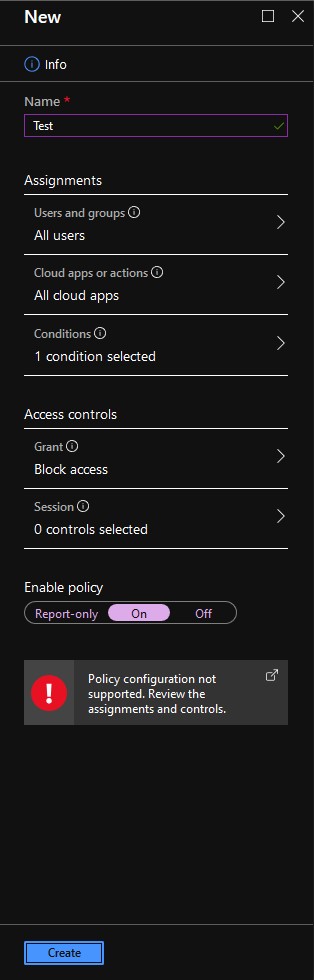
ralish
on 26 Nov 2019
I experience the same as @ralish. If I exclude one user, it goes through.
 tlfzhylj
on 29 Nov 2019
tlfzhylj
on 29 Nov 2019
Fixed in private PR that should publish overnight.
 MicrosoftGuyJFlo
on 4 Dec 2019
MicrosoftGuyJFlo
on 4 Dec 2019
@MicrosoftGuyJFlo I'm assuming the referenced commit is this one: https://github.com/MicrosoftDocs/azure-docs/commit/b8f4c5b8f33579670cf7e114ba3739786bbd7475
The configuration of the _Cloud apps or actions_ section has been removed entirely, and so following this new configuration results in a Conditional Access rule which uses the default of not targeting any cloud apps (UI shows _0 cloud apps selected_). Unless I'm misunderstanding how CA rules work this is an incorrect configuration as it won't apply to any cloud applications (inc. Exchange Online)?
I also note that there's a separate article on blocking legacy authentication which notes the original issue which this issue aims to address:
https://docs.microsoft.com/en-us/azure/active-directory/conditional-access/block-legacy-authentication
It states that at least one user must be excluded from the CA policy, which may well be the supported approach. Regardless, its guidance is inconsistent with the article modified by the above commit. Can this issue please be re-opened and a broader review of both of these articles and their accuracy be performed?
ralish
on 7 Dec 2019
The policy configuration is correct as updated. The policy to block legacy authentication should not target apps but protocols hence Client apps, Mobile apps and desktop clients, Other clients.
The article mentioned needs an update too and I am working on getting that taken care of.
MicrosoftGuyJFlo
on 9 Dec 2019
@MicrosoftGuyJFlo The policy configuration is definitely wrong.
I just created a test user account and configured Outlook to connect using IMAP & SMTP. It authenticates without issue using the user account password:

If I update the CA policy to block _Exchange Online_ instead of no cloud apps the policy is enforced and access is blocked:

This is intuitively what I would expect; if no cloud apps are selected then by definition the policy controls aren't actually being applied to any cloud app logins.
It also matches the Technical Reference documentation under _Cloud apps assignments_:
With Conditional Access policies, you control how your users access your cloud apps. When you configure a Conditional Access policy, you need to select at least one cloud app.
Can you please re-open this issue and ensure it's reviewed and tested? It bothers me that official security guidance by Microsoft is simply wrong and seemingly being published without any testing.
EDIT: To be doubly certain, I also reverted the CA policy change back to applying to no cloud apps, at which point access via IMAP & SMTP is restored, and the CA policy shows as "_Not Applied_" per above.
ralish
on 15 Dec 2019
@MicrosoftGuyJFlo Ping on above. Can we please at least re-open this issue for tracking?
ralish
on 20 Dec 2019
@ralish I got an update yesterday from the devs. They went back through the policy and double checked and yes they agreed that all cloud apps should be selected as well to block legacy protocols from any app. I am sorry that we did not get this sorted out sooner. Putting in another PR to resolve this.
MicrosoftGuyJFlo
on 20 Dec 2019
@MicrosoftGuyJFlo Thanks. This means that the original issue description remains accurate and unresolved, as applying the CA policy to all cloud apps will not work without adding at least one exception. Can you please re-open this issue given this is the case?
ralish
on 21 Dec 2019
Still valid - still not fixed..
 chwilfing
on 7 Feb 2020
chwilfing
on 7 Feb 2020
Related issues
 jamesgallagher-ie
·
3Comments
jamesgallagher-ie
·
3Comments
 spottedmahn
·
3Comments
spottedmahn
·
3Comments
 JeffLoo-ong
·
3Comments
JeffLoo-ong
·
3Comments
 bdcoder2
·
3Comments
spottedmahn
·
3Comments
bdcoder2
·
3Comments
spottedmahn
·
3Comments