Azure-docs: Error when trying to connect TSI with Power BI
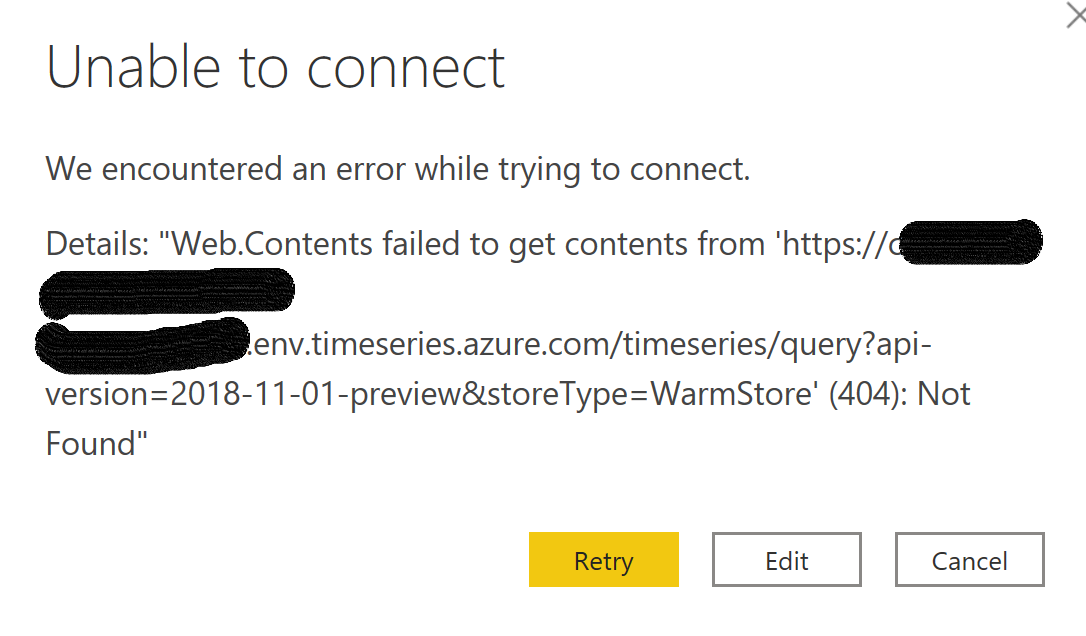
When I try the step 9 above, I get an error on Power BI:
Details: "Web.Contents failed to get contents from 'https://db4282e9-ec95-47db-9d8b-01c31d308e7b.env.timeseries.azure.com/timeseries/query?api-version=2018-11-01-preview&storeType=WarmStore' (404): Not Found".
Document Details
⚠ Do not edit this section. It is required for docs.microsoft.com ➟ GitHub issue linking.
- ID: 83bec0a3-a1b6-2d48-6cc1-4087f5900e7a
- Version Independent ID: 6eef57fd-f177-9dd1-45d7-71f3b227a9c9
- Content: Connect your environment to Power BI - Azure Time Series Insights
- Content Source: articles/time-series-insights/how-to-connect-power-bi.md
- Service: time-series-insights
- GitHub Login: @deepakpalled
- Microsoft Alias: dpalled
 marcelo-onfleeklabs
All 21 comments
@marcelo-onfleeklabs - Thank you for your feedback! I've tested the step and could not repeat the 404. I've reached out to the engineering team to further review this scenario. Any further information you feel is helpful and appropriate to resolving the issue is also appreciated.
@yeskarthik - Added you for verification and resolution. Thanks!
 KingdomOfEnds
on 20 Nov 2019
KingdomOfEnds
on 20 Nov 2019
@marcelo-onfleeklabs @KingdomOfEnds - we had a bug on cross tenant support, we've fixed it and we'll upload temporary fix shortly(within a day or two) to unblock the customers..
 Sandip-Raiyani
on 20 Nov 2019
Sandip-Raiyani
on 20 Nov 2019
@marcelo-onfleeklabs @KingdomOfEnds - Please follow the steps mentioned in the link below and it should work. Please feel free to reach out in case you have any questions.
Sandip-Raiyani
on 21 Nov 2019
@marcelo-onfleeklabs Since we haven't heard back from you, we will now proceed to close this thread. If there are further questions regarding this matter, please tag me in your reply. We will gladly continue the discussion and we will reopen the issue.
 Alberto-Vega
on 4 Dec 2019
Alberto-Vega
on 4 Dec 2019
I'm still receiving this 404 error even after following the fix listed above. I'm using my MSDN account for both Azure and Power BI. Is there any further update or more information you need from me?
 ancibira
on 29 Dec 2019
ancibira
on 29 Dec 2019
@ancibira We can schedule a phone call to understand the issue. It would be helpful for us to debug and resolve the issue over a screen share. Let me know if that works for you. Thanks.
Sandip-Raiyani
on 3 Jan 2020
I'm seeing the same error - "Web.Contents failed to get contents from..." - a 404 Not Found, even with the warm store tiered PAYG TSI instance. Logged into the same account on Power BI Desktop and TSI, so not sure what's happening. Would appreciate assistance, and hope that this issue can be marked as "open" if necessary.
 rjnair
on 4 Feb 2020
rjnair
on 4 Feb 2020
@rjnair If you are still facing the issue, we can schedule a phone call to understand the issue. It would be helpful for us to debug and resolve the issue over a screen share. Let me know if that works for you. Thanks.
Sandip-Raiyani
on 12 Feb 2020
Hi @sandip-raiyani - turns out I needed to place the hotfix into a different location than what was specified in the Github documentation. However, after implementing the hotfix and copying/running the query I get from TSI Preview, I see a delay of exactly 12 hours on Power BI. Changing the "isSearchSpanRelative" field from "true" to "false" gives more recent data, but disables updating for the timeline, so I'll see the data only for the specified period in the "searchSpan" field. Any idea how I can enable live updates without this 12 hour latency?
rjnair
on 19 Feb 2020
Hello @rjnair thank you for raising this issue, two things:
The fix for the 404 error is only needed if you're not the most recent version of Power BI or are unable to update to the latest version due to a dependency/other reason. We will make sure that that is more apparent in the fix README.md
Secondly, thank you for raising that there is indeed a bug in calculating the relative time span. I want to mention that this bug is only presenting itself when the search span of the query is for 24 hours or less--so I'm hoping that expanding your search span with relative time set to true and then narrowing/filtering the events returned from the API in the Power BI chart itself could be a viable work-around for you for now.
We are working on this, but at this time we do not have an ETA, and we are beholden to the PBI connector release cycles. I will ping back here with more information once it becomes available.
 lyrana
on 21 Feb 2020
lyrana
on 21 Feb 2020
Hi lyrana,
Just downloaded the latest version of Power BI desktop and tried to connect to Time series insights and still get the 404 error.
In the above trail I still don't see a working fix and the issuue is closed. Can you please tell me how to fix this or where to find more helpful information about this issue?
Thank you.
 Steve-000
on 22 Feb 2020
Steve-000
on 22 Feb 2020
Hi @Steve-000 I just want to double-check--do you have either reader or contributor access to that TSI environment?
lyrana
on 27 Feb 2020
Hi Lyrana,
The user account connecting to TSI has both reader and contributor data access rights.
Get Outlook for iOShttps://aka.ms/o0ukef
From: lyrana notifications@github.com
Sent: Thursday, February 27, 2020 4:51:42 PM
To: MicrosoftDocs/azure-docs azure-docs@noreply.github.com
Cc: Steve Vande Maele steve@itrium.be; Mention mention@noreply.github.com
Subject: Re: [MicrosoftDocs/azure-docs] Error when trying to connect TSI with Power BI (#43139)
Hi @Steve-000https://github.com/Steve-000 I just want to double-check--do you have either reader or contributor access to that TSI environment?
—
You are receiving this because you were mentioned.
Reply to this email directly, view it on GitHubhttps://github.com/MicrosoftDocs/azure-docs/issues/43139?email_source=notifications&email_token=ANYSKKKSRRCYA2SRFCHMPX3RE7OQ5A5CNFSM4JPHEFFKYY3PNVWWK3TUL52HS4DFVREXG43VMVBW63LNMVXHJKTDN5WW2ZLOORPWSZGOENE22NY#issuecomment-592031031, or unsubscribehttps://github.com/notifications/unsubscribe-auth/ANYSKKJPHWFIZN4OQXT6UZTRE7OQ5ANCNFSM4JPHEFFA.
Steve-000
on 27 Feb 2020
Hi @Steve-000 ,
Currently, we have the connector working for single tenant. If you have access to more than one tenant, then there is a work item in our backlog. Can you confirm if you have one or more tenants? Thanks.
Sandip-Raiyani
on 27 Feb 2020
We use just a single connection with 1 credential set so should be single tenant. When will the multi-tenant support planned to release?
Get Outlook for iOShttps://aka.ms/o0ukef
From: Sandip-Raiyani notifications@github.com
Sent: Thursday, February 27, 2020 5:29:01 PM
To: MicrosoftDocs/azure-docs azure-docs@noreply.github.com
Cc: Steve Vande Maele steve@itrium.be; Mention mention@noreply.github.com
Subject: Re: [MicrosoftDocs/azure-docs] Error when trying to connect TSI with Power BI (#43139)
Hi @Steve-000https://github.com/Steve-000 ,
Currently, we have the connector working for single tenant. If you have access to more than one tenant, then there is a work item in our backlog. Can you confirm if you have one or more tenants? Thanks.
—
You are receiving this because you were mentioned.
Reply to this email directly, view it on GitHubhttps://github.com/MicrosoftDocs/azure-docs/issues/43139?email_source=notifications&email_token=ANYSKKOZBSRVLEAOUBTAYR3RE7S43A5CNFSM4JPHEFFKYY3PNVWWK3TUL52HS4DFVREXG43VMVBW63LNMVXHJKTDN5WW2ZLOORPWSZGOENE7WAQ#issuecomment-592050946, or unsubscribehttps://github.com/notifications/unsubscribe-auth/ANYSKKIWGLBO5K4HXBFSCW3RE7S43ANCNFSM4JPHEFFA.
Steve-000
on 27 Feb 2020
I am also experiencing the same issue. Have Read and Contributor set up, logged in to TSI and PBI as same account. Slight difference is my TSI instance was created as part of an MS Farmbeats install.
Any help greatly appreciated
 KVHEY
on 12 Mar 2020
KVHEY
on 12 Mar 2020
Sorry for the late response.
@rjnair May version of Power BI will have the latency issue fixed.
@Steve-000 We plan to support multi-tenant as it is in our backlog but currently, I don't have the exact ETA for it. Can you also double check the following things?
@KVHEY
If you used our Fix anytime, make sure to download latest version of Power BI and delete "C:\Users
Also, Power BI connector currently supports Warm store queries only.
If you guys are still facing the issue after double checking the above things, let's schedule a phone call. It would be easier to debug the issue through screen share. Thanks
Sandip-Raiyani
on 13 May 2020
Went through all of the above and still run into an issue "Web.Contents failed to get contents..."
Anyone else?
 snapper911T
on 26 May 2020
snapper911T
on 26 May 2020
@snapper911T
Can you confirm whether you have a single tenant or multiple? If you are a guest user for the environment from another tenant, you will face this error(assuming you have Warm queries ON and followed above steps). Feel free to email me at [email protected] with the details like environment ID, error, etc. Thanks.
May Power BI version is out on 19th May with the latency issue is fixed.
Sandip-Raiyani
on 26 May 2020
@Sandip-Raiyani
I have the same problem here. I tried the hot-fix, but without any success.
 bbpaulvanharen
on 21 Aug 2020
bbpaulvanharen
on 21 Aug 2020
@bbpaulvanharen Please ignore the Fix. That is old connector bits. I will delete that Fix repo soon to avoid confusion. I would recommend deleting the folder and the file which you downloaded. By creating that folder, it will use the bits from the file in Custom Connectors folder and not the latest PBI connector bits.
Download the latest PBI August 2020 and try to run the PBI query which you get from our UX explorer.
Also, the 404 error which you are facing could be because of the reasons(most probably 2nd point) mentioned in the "Important" block Prerequisites .
Sandip-Raiyani
on 21 Aug 2020
Related issues
 bdcoder2
·
3Comments
bdcoder2
·
3Comments
 behnam89
·
3Comments
behnam89
·
3Comments
 Agazoth
·
3Comments
Agazoth
·
3Comments
 DeepPuddles
·
3Comments
DeepPuddles
·
3Comments
 varma31
·
3Comments
varma31
·
3Comments
Most helpful comment
@marcelo-onfleeklabs @KingdomOfEnds - Please follow the steps mentioned in the link below and it should work. Please feel free to reach out in case you have any questions.
Fix