Azure-docs: project template not including .net core
I try to follow thos tutorial but the project template i Installed does not contain .net core
- create new project page
- Configure your project page, where the only framework I can choose is .net Framework xx.
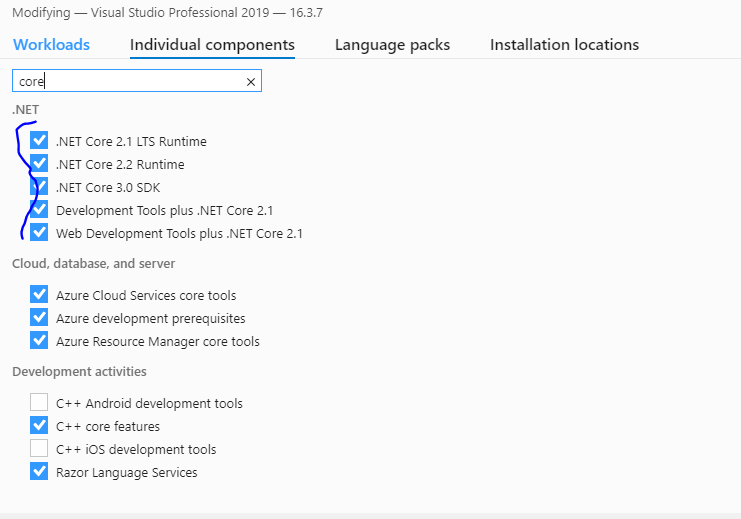
i never come into step 5 of this tutorial, i reintalled to component but that did not make any defference.
I also removed the package from C:\ProgramData\Microsoft\VisualStudio\Packages and reintsalled everything for appfabric whitout any luck.
is there an other tool or package I have to install to complete step 5?
Document Details
⚠ Do not edit this section. It is required for docs.microsoft.com ➟ GitHub issue linking.
- ID: c0d03b4f-4157-0d04-0f48-0a3e2fb966cb
- Version Independent ID: 6b7bed89-eb53-105a-7971-476ddd4cf3b7
- Content: Create a .NET app on Service Fabric in Azure
- Content Source: articles/service-fabric/service-fabric-tutorial-create-dotnet-app.md
- Service: service-fabric
- GitHub Login: @athinanthny
- Microsoft Alias: atsenthi
 peirens-bart
All 9 comments
@peirens-bart Can you check if you have dotnet core installed.
If not, install dotnet-core and check, once it is installed you should be able to select the dotnet core.
Download it from here.
 VikasPullagura-MSFT
on 5 Nov 2019
VikasPullagura-MSFT
on 5 Nov 2019
Hi
I have installed dotnet-core and have running asp.net core apps on azure.
I want to explore the service factory in comparison with aks.
screenshots:
open vs 2019 as administrator
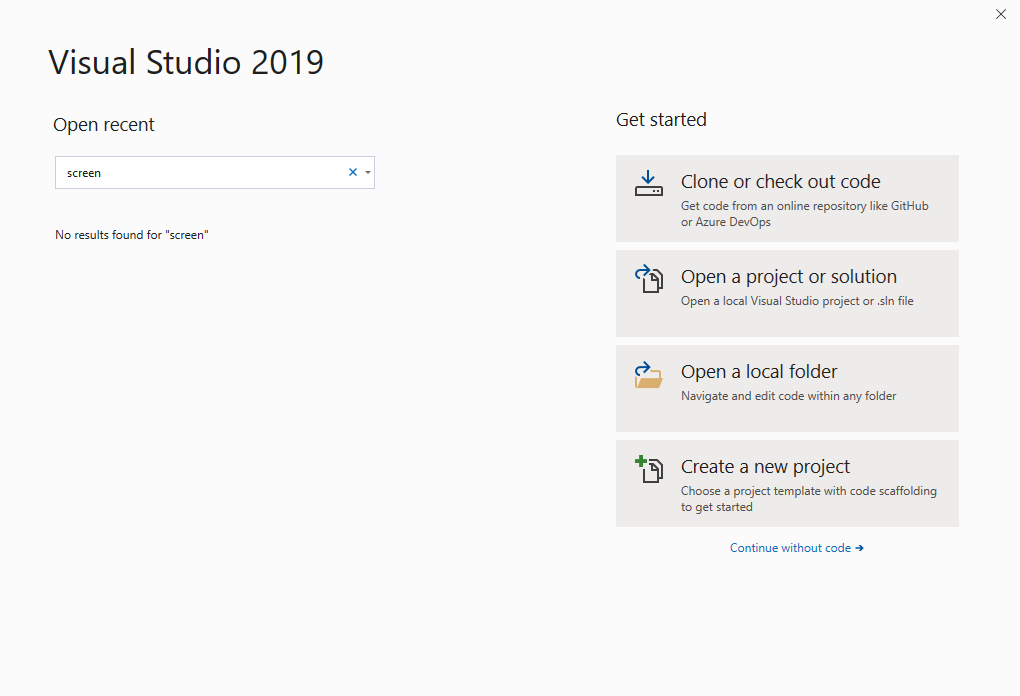
- click create a new project

- click Service Fabric Application
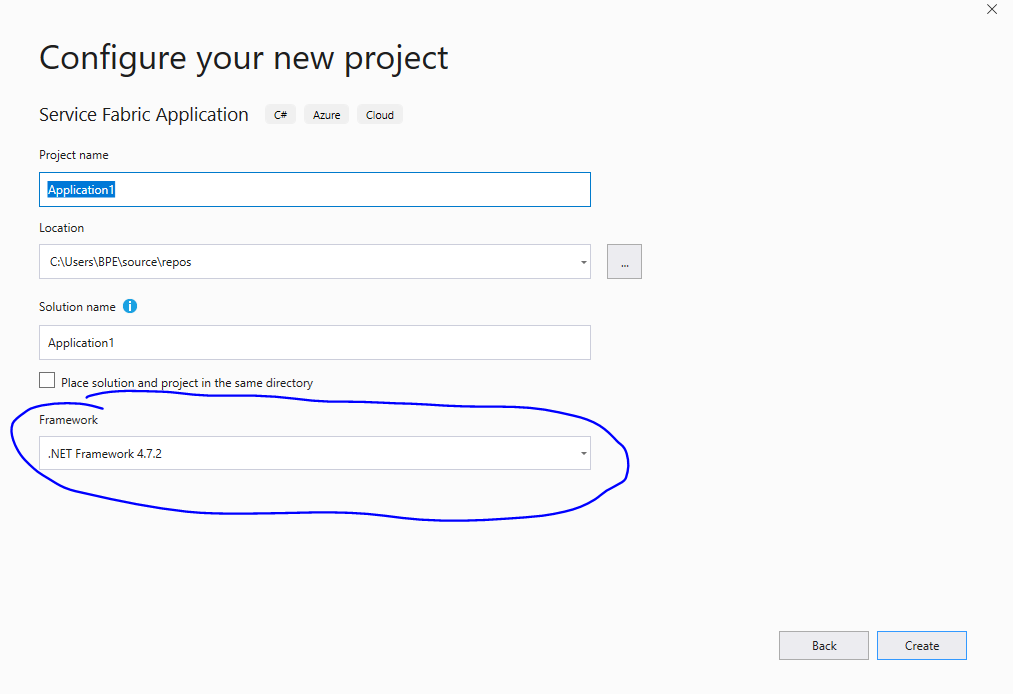
- click create a new project
my Vs 2019 info

Van: VikasPullagura-MSFT notifications@github.com
Verzonden: dinsdag 5 november 2019 13:01
Aan: MicrosoftDocs/azure-docs azure-docs@noreply.github.com
CC: peirens-bart peirens.bart@hotmail.com; Mention mention@noreply.github.com
Onderwerp: Re: [MicrosoftDocs/azure-docs] project template not including .net core (#42109)
@peirens-barthttps://nam12.safelinks.protection.outlook.com/?url=https%3A%2F%2Fgithub.com%2Fpeirens-bart&data=02%7C01%7C%7C332c1ed6c47640cb42d708d761e7dab3%7C84df9e7fe9f640afb435aaaaaaaaaaaa%7C1%7C0%7C637085520739467837&sdata=ENGXrDxFsWE3vhf1PH4PGnXocbBMnxSM%2BYhM1FEUozI%3D&reserved=0 Can you check if you have dotnet core installed.
If not, install dotnet-core and check, once it is installed you should be able to select the dotnet core.
Download it from herehttps://nam12.safelinks.protection.outlook.com/?url=https%3A%2F%2Fdotnet.microsoft.com%2Fdownload%2Fdotnet-core&data=02%7C01%7C%7C332c1ed6c47640cb42d708d761e7dab3%7C84df9e7fe9f640afb435aaaaaaaaaaaa%7C1%7C0%7C637085520739477842&sdata=r3sDiVByoZ%2Bxo60%2FGjVpDsK2GiinNF0FnlN6BsRQZz4%3D&reserved=0.
—
You are receiving this because you were mentioned.
Reply to this email directly, view it on GitHubhttps://nam12.safelinks.protection.outlook.com/?url=https%3A%2F%2Fgithub.com%2FMicrosoftDocs%2Fazure-docs%2Fissues%2F42109%3Femail_source%3Dnotifications%26email_token%3DAEOZJ5WRWRKWP64QNB7RHT3QSFOARA5CNFSM4JJAPX32YY3PNVWWK3TUL52HS4DFVREXG43VMVBW63LNMVXHJKTDN5WW2ZLOORPWSZGOEDCTA3I%23issuecomment-549793901&data=02%7C01%7C%7C332c1ed6c47640cb42d708d761e7dab3%7C84df9e7fe9f640afb435aaaaaaaaaaaa%7C1%7C0%7C637085520739477842&sdata=FoEfrg3FfjuTXr8MoBSTQkqfVALHoqXcUJPpqwF9kTI%3D&reserved=0, or unsubscribehttps://nam12.safelinks.protection.outlook.com/?url=https%3A%2F%2Fgithub.com%2Fnotifications%2Funsubscribe-auth%2FAEOZJ5W2GZD34CJUFYGYYULQSFOARANCNFSM4JJAPX3Q&data=02%7C01%7C%7C332c1ed6c47640cb42d708d761e7dab3%7C84df9e7fe9f640afb435aaaaaaaaaaaa%7C1%7C0%7C637085520739487852&sdata=UP1LSgYMap0afkOEpAObbvaPRopQLHZvEG3YdIynGGs%3D&reserved=0.
peirens-bart
on 5 Nov 2019
@peirens-bart I am not able to view the screenshots that you have shared.
Can you reply directly on GitHub and share the screenshots.
Also, can you confirm if you are able to resolve the dot net core issue for which you have opened this issue?
VikasPullagura-MSFT
on 6 Nov 2019
@VikasPullagura-MSFT i Updated the previous poste with the screens.
I have no problem with dotnet core in general, only with service fabric app in combination with dotnet core. screen3 is not the expected screen and I can't choiose any other framework type other then .Net Framework.
peirens-bart
on 6 Nov 2019
@peirens-bart I just reproduced this in my Lab.
In your screen 3, after you select the dotnet frame work from the drops drown and click create, then you should be able to go to Step 5 as per document.
Please see below screenshots for reference:


Hope this helps.
VikasPullagura-MSFT
on 6 Nov 2019
@VikasPullagura-MSFT After removing all the dotnet core components en reinstalling them I'm able to do teh same thing. now I'm left with 3 quetsions.
- Is it possible to update the documentation, so it will match this behaviour, or is this not the correct behaviour?
- Is the target framework for an sfproj file always .net Framework, and if so what is the minimum and maximum version needed on to create a project that can run in on azure and on prem?
- Since .net Framework will stop in the future what will teh support be for this when deploying to azure?
peirens-bart
on 6 Nov 2019
@peirens-bart Thanks for confirming that the issue is resolved.
I will followup with the doc author on the feedback you provided.
VikasPullagura-MSFT
on 7 Nov 2019
@athinanthny Can you please add your comments for the feedback provided.
VikasPullagura-MSFT
on 7 Nov 2019
Although selecting .NET Framework 4.7.2 works, it's annoying that the .sfproj targets a different framework than all the services. The package.config in the generated application project includes a reference to Microsoft.VisualStudio.Azure.Fabric.MSBuild, which seems to be dependent upon .NET Framework. What's the difference between this MSBuild and the one installed with VS? Is it that it can compile .sfproj files? I find the documentation lacking about how this works under the hood.
 PooSham
on 19 Feb 2020
PooSham
on 19 Feb 2020
Related issues
 Favna
·
3Comments
Favna
·
3Comments
 JamesDLD
·
3Comments
JamesDLD
·
3Comments
 paulmarshall
·
3Comments
paulmarshall
·
3Comments
 jebeld17
·
3Comments
jebeld17
·
3Comments
 behnam89
·
3Comments
behnam89
·
3Comments