Azure-docs: Error - Request body must contain the following parameter: 'client_assertion' or 'client_secret'.
Following the setup and code specified in the document but keep getting the below error. Is there a way i can pass a client secret? I never see this mentioned in the document. Any inputs will be appreciated.
Connection failed with the following exception...
System.AggregateException: One or more errors occurred. ---> System.AggregateException: One or more errors occurred. ---> Microsoft.IdentityModel.Clients.ActiveDirectory.AdalServiceException: AADSTS7000218: The request body must contain the following parameter: 'client_assertion' or 'client_secret'.
Trace ID: a178defa-7056-4460-a18a-c1f653680400
Correlation ID: 8455b083-15b8-4773-be44-edd081d1664e
Timestamp: 2019-10-31 21:05:11Z ---> Microsoft.IdentityModel.Clients.ActiveDirectory.AdalServiceException: Response status code does not indicate success: 401 (Unauthorized).
at Microsoft.Identity.Core.OAuth2.OAuthClient.
--- End of inner exception stack trace ---
Document Details
⚠ Do not edit this section. It is required for docs.microsoft.com ➟ GitHub issue linking.
- ID: 692d8637-4033-767b-aa29-3859f301b7b8
- Version Independent ID: de143a26-3dd6-a513-6854-604e4f68c52f
- Content: ActiveDirectoryInteractive connects to SQL
- Content Source: articles/sql-database/active-directory-interactive-connect-azure-sql-db.md
- Service: sql-database
- Sub-service: security
- GitHub Login: @GithubMirek
- Microsoft Alias: MirekS
 kiranbhaga
All 8 comments
@kiranbhaga Thank you for your interest in Azure. Is it possible to provide a document link related to the topic you are requesting information for? Otherwise, this is best served in the MSDN of Stack Overflow forums. Regards, Mike
 Mike-Ubezzi-MSFT
on 2 Nov 2019
Mike-Ubezzi-MSFT
on 2 Nov 2019
@kiranbhaga We will now proceed to close this thread. If there is a specific issue or recommendation with an article found in the Microsoft Docs repository, please click on the feedback link at the bottom of the page and your detailed feedback will be properly routed. Thank you, ~Mike
Mike-Ubezzi-MSFT
on 5 Nov 2019
@Mike-Ubezzi-MSFT This is the document I'm refering to https://docs.microsoft.com/en-us/azure/sql-database/active-directory-interactive-connect-azure-sql-db
kiranbhaga
on 5 Nov 2019
Hi @GithubMirek, I have an internal project attempting to follow this doc and the sample code does not seem to work. Are you able to assist @kiranbhaga or evaluate the sample in the doc to ensure it is up to date.
Mike-Ubezzi-MSFT
on 5 Nov 2019
The exception is coming from the Adal library saying unauthorized. It's expecting client secret which I can generate for the app but i need to know how to pass that to authenticate using ActiveDirectoryInteractive method
Connection failed with the following exception...
System.AggregateException: One or more errors occurred. ---> System.AggregateException: One or more errors occurred. ---> Microsoft.IdentityModel.Clients.ActiveDirectory.AdalServiceException: AADSTS7000218: The request body must contain the following parameter: 'client_assertion' or 'client_secret'.
Trace ID: 5b2fd12f-4386-4d3f-895e-dbf5204d0000
Correlation ID: 34a7923f-1f11-4cfb-858e-4375220f120a
Timestamp: 2019-11-05 22:46:07Z ---> Microsoft.IdentityModel.Clients.ActiveDirectory.AdalServiceException: Response status code does not indicate success: 401 (Unauthorized).
Mike-Ubezzi-MSFT
on 5 Nov 2019
It seems that the app work as public client but application is not configured as expected on Azure Portal.
I did not confirm but it might work well if "Treat application as public clinet" set Yes.
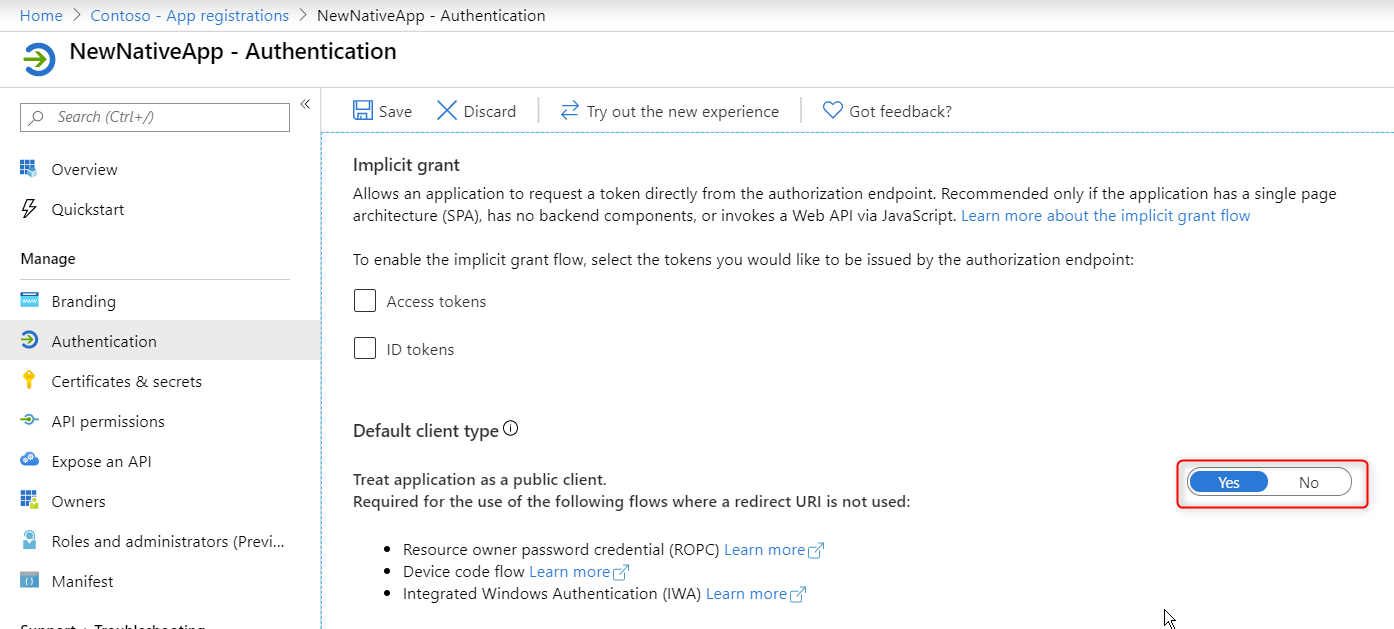
 watahani
on 6 Nov 2019
watahani
on 6 Nov 2019
This article says the redirect uri isn't used. However, when using ActiveDirectoryInteractive in the sample code, the redirect uri is actually used. So we need to configure it for a public client.
see: https://docs.microsoft.com/en-us/azure/active-directory/develop/quickstart-configure-app-access-web-apis#add-redirect-uris-to-your-application
- To choose from suggested Redirect URIs for public clients (mobile, desktop), follow these steps:
a. Locate the Suggested Redirect URIs for public clients (mobile, desktop) section.
b. Select the appropriate Redirect URI(s) for your application using the checkboxes. You can also enter a custom redirect URI. If you're not sure what to use, check out the library documentation.
 tomatsue
on 6 Nov 2019
tomatsue
on 6 Nov 2019
@Mike-Ubezzi-MSFT This is resolved now. When I created the Azure AD app registration, the redirect uri was default set to web. It should be Public client/native instead. After changing it to that it worked fine.
kiranbhaga
on 6 Nov 2019
Related issues
 JeffLoo-ong
·
3Comments
JeffLoo-ong
·
3Comments
 JamesDLD
·
3Comments
JamesDLD
·
3Comments
 bityob
·
3Comments
bityob
·
3Comments
 mrdfuse
·
3Comments
mrdfuse
·
3Comments
 DeepPuddles
·
3Comments
DeepPuddles
·
3Comments