Azure-docs: Problem with automatically purge images from an Azure container registry
I'm trying to run scripts from this article.
I've prepared test repositories, little changed first example and try to run it:
az acr login --name myacrname
$PURGE_CMD="mcr.microsoft.com/acr/acr-cli:0.1 purge \ --registry {{.Run.Registry}} --filter 'hello-world:.*'"
az acr run \ --cmd "$PURGE_CMD" --registry myacrname --debug
The script is executing, it comes to "Packing source code into tar to upload ..." after that freezes and then tells "Access is denied: '\Documents and Settings'". Ok, I'm creating shortcut for "Documents and Settings". Run. Then it tells "Access is denied: '\$Recycle.Bin\S-1-5-21-705238614-490741011-620655208-39416\$RCEIG1Q'". Hmm.. Ok, I'm clearing $Recycle.Bin. Run. Now it tells me "Permission denied: '\hiberfil.sys'"
What am I doing wrong?

Document Details
⚠ Do not edit this section. It is required for docs.microsoft.com ➟ GitHub issue linking.
- ID: 40e52f8e-a63e-3e85-6c84-f881db5d3b6c
- Version Independent ID: 1290c892-ea9d-d12c-be84-7ed75f28fca0
- Content: Automatically remove image resources in Azure Container Registry
- Content Source: articles/container-registry/container-registry-auto-purge.md
- Service: container-registry
- GitHub Login: @dlepow
- Microsoft Alias: danlep
 Boombasteg
All 4 comments
@Boombasteg Thanks for the feedback. We are investigating into the issue and will update you shortly.
 RohitMungi-MSFT
on 3 Oct 2019
RohitMungi-MSFT
on 3 Oct 2019
Tried to run in Azure Cloud Shell:
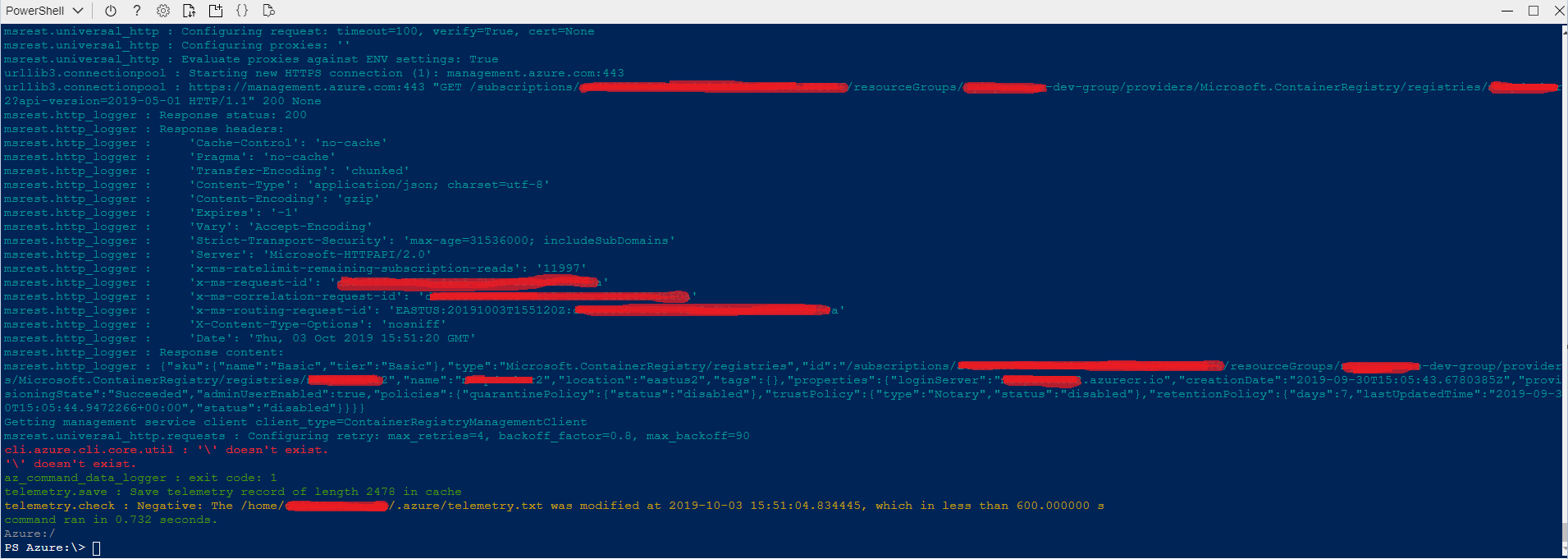
command:
az acr run \ --cmd "mcr.microsoft.com/acr/acr-cli:0.1 purge --registry {{.Run.Registry}} --filter 'hello-world:.*'" --registry myacrname --debug
Boombasteg
on 3 Oct 2019
@Boombasteg - Thanks for your feedback. I notice you are running the command in a PowerShell environment. The examples in the article are formatted for a Bash shell, so need a little adaptation to run in PowerShell. A note should be added to the article.
So in your Cloud Shell example, the error is due to the '\' character which is used as a line break in Bash. This error can be resolved by removing the '\' line break, or substituting the PowerShell backtick '`'.
However, once you fix that, you'll see errors because of missing parameters in the purge command (needs an --ago parameter) and az acr run command (needs a source context). For example, I found the following worked in a PowerShell shell:
az acr run --cmd "mcr.microsoft.com/acr/acr-cli:0.1 purge --registry {{.Run.Registry}} --filter 'hello-world:.*' --ago 1d" --registry myregistry /dev/null
Please let us know if this helps? Thanks
 dlepow
on 4 Oct 2019
dlepow
on 4 Oct 2019
Thank you Dan, your example is work!
Boombasteg
on 4 Oct 2019
Related issues
 JeffLoo-ong
·
3Comments
JeffLoo-ong
·
3Comments
 jebeld17
·
3Comments
jebeld17
·
3Comments
 jamesgallagher-ie
·
3Comments
jamesgallagher-ie
·
3Comments
 JamesDLD
·
3Comments
JamesDLD
·
3Comments
 Agazoth
·
3Comments
Agazoth
·
3Comments