Azure-docs: I am a little confused on the note that you can make the standard LB an internal LB ..
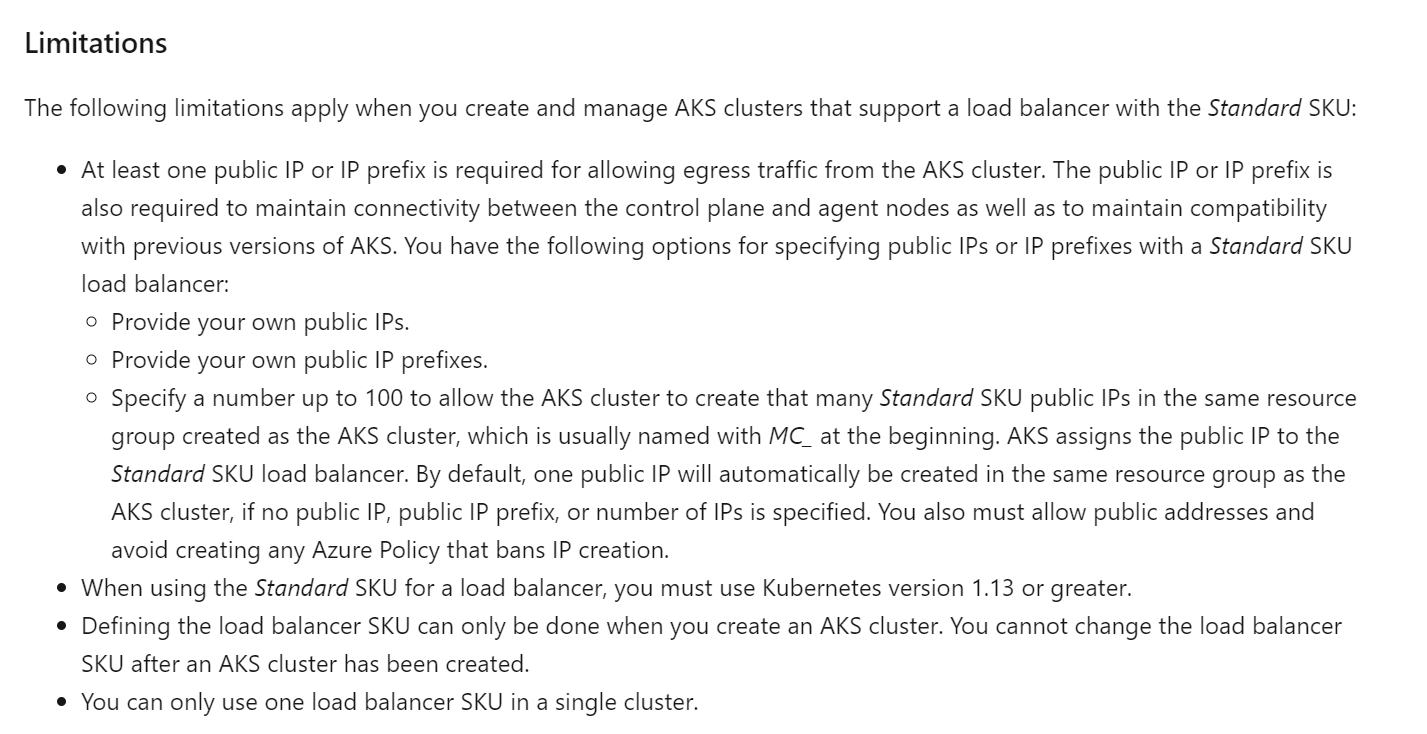
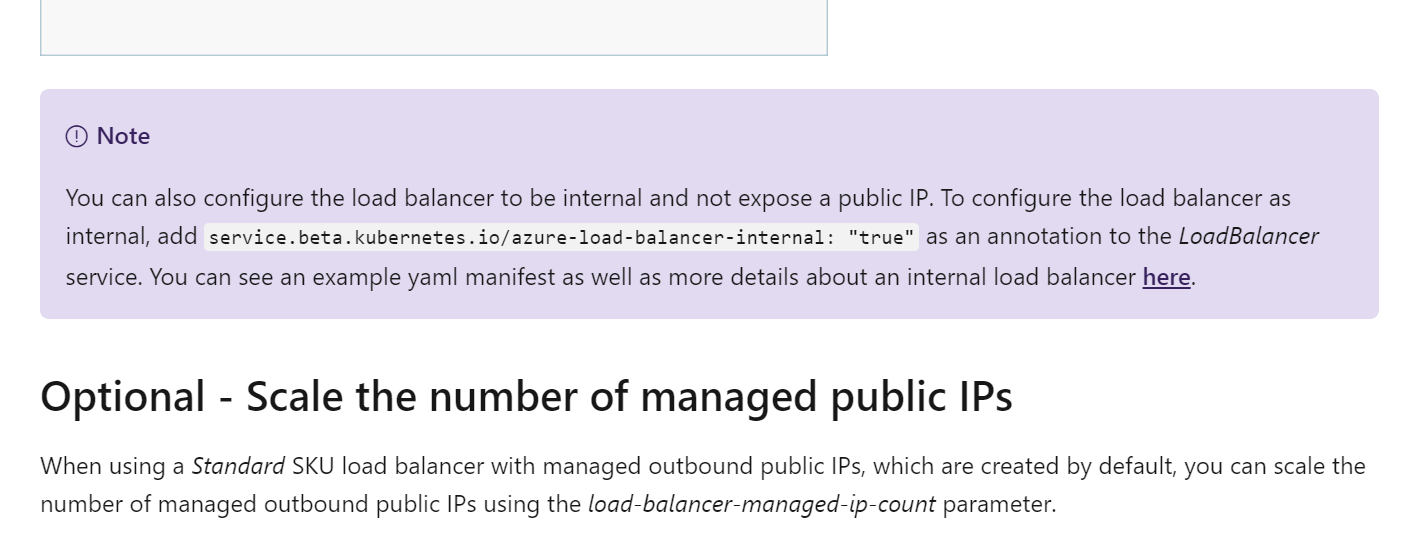
I am a little confused by the note right before the "Optional - Scale the number of managed public IPs" section that you can make the STANDARD load balancer internal... when it's listed in the limitations section that it needs public ip's for egress. Does that mean when you deploy the standard LB as internal, it has BOTH a private IP and a public IP (for egress)? That seems a bit odd to have all egress go out on a public IP, with all ingress on internal (private) IP. How does this work? does it make the Standard LB all internal (like the basic LB one does when you use the internal option).
Document Details
⚠ Do not edit this section. It is required for docs.microsoft.com ➟ GitHub issue linking.
- ID: 60a7a0a8-97e7-0fda-763c-1a9972f4e9bc
- Version Independent ID: 82b46441-43fc-fe48-97e2-0f3fca3d6eab
- Content: Use a Standard SKU load balancer in Azure Kubernetes Service (AKS)
- Content Source: articles/aks/load-balancer-standard.md
- Service: container-service
- GitHub Login: @zr-msft
- Microsoft Alias: zarhoads
 runecalico
All 10 comments
Thanks for the feedback! We are currently investigating and will update you shortly.
 mimckitt
on 2 Oct 2019
mimckitt
on 2 Oct 2019
@runecalico thanks for this find.
@zr-msft @MicrosoftDocs/aks-pm thoughts on this?
It does seem a bit contradictory
mimckitt
on 2 Oct 2019
Standard LB requires explicit egress (public egress) unlike basic which has implicit.
For this reason standard LB today is created with an ingress pool and an egress pool, and with a public IP associated to this egress pool. Otherwise the cluster would not have externel connectivity by default.
You can still expose your applications privately by leveraging the annotation. This annotation, as for Basic LB, controls the IP that is created for Ingress to the application that you see on the kubernetes service.
Hope this helps.
 palma21
on 4 Oct 2019
palma21
on 4 Oct 2019
Thanks @palma21 that helps :)
@runecalico I will go ahead and close this out but let us know if you have further questions and we can always reopen and continue the discussion.
mimckitt
on 4 Oct 2019
@palma21 @MicahMcKittrick-MSFT is it possible to use a private egress IP for the standard load balancer? (So specifying a private ip for the "--load-balancer-outbound-ips")
In this article https://docs.microsoft.com/en-us/azure/firewall/integrate-lb , it says that we can have "the load balancer is deployed with a private frontend IP address".
Our network is currently behind Fortigate firewall and using a private frontend IP address seems like the proper way.
 jemag
on 6 Nov 2019
jemag
on 6 Nov 2019
private IP for egress would not be egress, as in the VM would have no outbound connectivity, which it requires, in order to talk to the API server. https://aka.ms/aks/egress
You can have private frontend IPs for ingress (Internal LB) and use the public IP just for egress (as it is by default), you can also choose to use a FW Public IP to egress from, but you always need a public IP to egress to the internet or it wouldn't work.
palma21
on 6 Nov 2019
@palma21 thank you for this clarification however the situation may be a bit different on our side.
Currently we have a Load balancer that sits atop our whole network, and this Load balancer exposes the 2 public IPs of our 2 Fortigate firewall appliances. This load balancer also exposes a bunch of IPs for various applications.
Currently, since our FW public IPs are already assigned to this load balancer sitting atop our network, I cannot assign them to another load balancer (the standard load balancer created with the cluster). However, if I create the cluster and just use the automatically generated public IP from the MC_* resource group, so far it does seem to work but this new public IP seems to be of no impact. Basically, the firewall stills sees the private IP of the pod making the outgoing request, the AKS standard load balancer outgoing IP seems to not really be used. Also, all outgoing traffic has to go through the fortigate and that external load balancer, Here is an extremely simplified diagram of the situation:
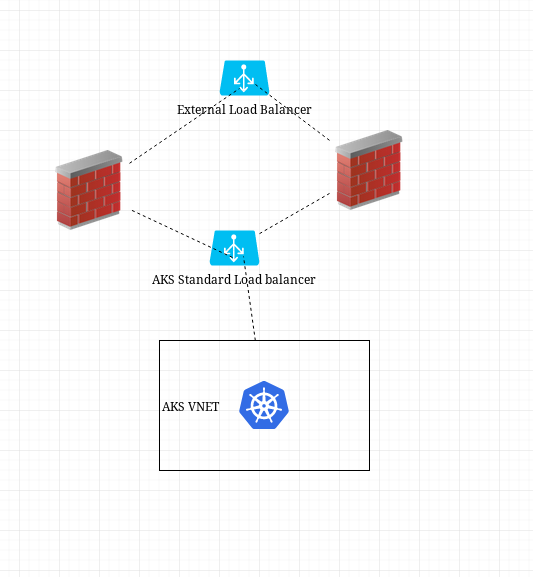
So I guess that, in our situation, the public ip created with the AKS standard load balancer does not matter and that all outbound traffic is controlled anyway by the firewalls and the external load balancer sitting atop. So I guess we would ignore that public ip automatically generated and to control egress, we would have to setup outbound rules on our external load balancer?
Please let me know if I am clearly off the mark here or if there is a better way to go about this...
Any help would be appreciated, please excuse the long reply.
jemag
on 8 Nov 2019
That is correct, I'm guessing you have UDRs from the AKS subnet to your firewall which takes precedence for egress instead of the default SLB PIP egress.
We are planning on releasing a feature to disable the automatic IP creation in cases like yours so that IP doesn't add noise/confusion since it won't be used.
Last note, do make sure to check for potential asymmetric routing:
https://docs.microsoft.com/en-us/azure/firewall/integrate-lb
Other than that you should be good.
palma21
on 11 Nov 2019
^ @palma21 Did this feature ever get implemented? This auto assigned egress IP has been causing major headaches for me as we need to have ingress/egress using the same Public IP address. I have caused our clusters to go into failing states when I manually remove the auto assigned IP from the SLB.
 poochwashere
on 14 May 2020
palma21
on 14 May 2020
poochwashere
on 14 May 2020
palma21
on 14 May 2020
Related issues
 Ponant
·
3Comments
Ponant
·
3Comments
 Agazoth
·
3Comments
Agazoth
·
3Comments
 JamesDLD
·
3Comments
JamesDLD
·
3Comments
 Favna
·
3Comments
Favna
·
3Comments
 spottedmahn
·
3Comments
spottedmahn
·
3Comments
Most helpful comment
That is correct, I'm guessing you have UDRs from the AKS subnet to your firewall which takes precedence for egress instead of the default SLB PIP egress.
We are planning on releasing a feature to disable the automatic IP creation in cases like yours so that IP doesn't add noise/confusion since it won't be used.
Last note, do make sure to check for potential asymmetric routing:
https://docs.microsoft.com/en-us/azure/firewall/integrate-lb
Other than that you should be good.