Azure-docs: Unable to setup code repository for ADF using Github in Azure Government
Hi,
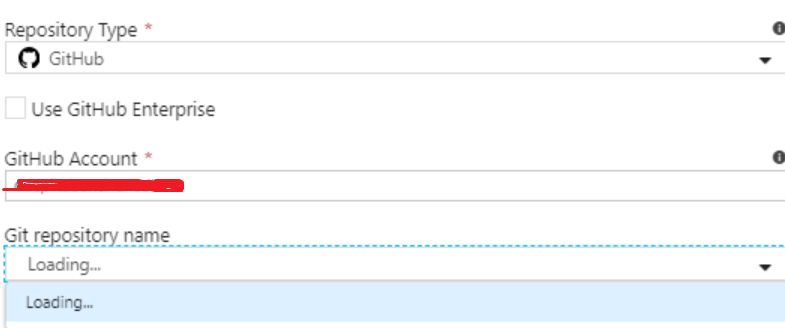
I am using Azure Data Factory in Azure Government. As shown in the below screenshot, I am unable to see my repository (already created) when I select my Github account. It says loading and then it turns blank. This is the same case even if I select Azure DevOps Git. It does not allow me to select my code repo.
Document Details
⚠ Do not edit this section. It is required for docs.microsoft.com ➟ GitHub issue linking.
- ID: 7309c102-934f-e073-823d-684804e38ff9
- Version Independent ID: 2035c3ea-1e64-4f1b-0194-c1b407812e28
- Content: Source control in Azure Data Factory
- Content Source: articles/data-factory/source-control.md
- Service: data-factory
- GitHub Login: @djpmsft
- Microsoft Alias: daperlov
 deepikabandhanadham
All 20 comments
Hey @deepikabandhanadham ,
Where is your Git repository located? Is it in Github or DevOps? Make sure your github username is correct and git repository is public.
Thanks,
Daniel
 djpmsft
on 18 Sep 2019
djpmsft
on 18 Sep 2019
@djpmsft it does not work with GitHub public repo as well
 avbhaskar
on 18 Sep 2019
avbhaskar
on 18 Sep 2019

avbhaskar
on 18 Sep 2019
@djpmsft. My Git repository is located in Github and the username is correct. Same works fine in Azure Commercial but not in the government. Could you please help me understand why it should be public?
deepikabandhanadham
on 18 Sep 2019
@deepikabandhanadham after discussing with the engineering team it looks like Github is not supported in an ADF Gov environment. Apologies for the inconvenience and I will update the docs. We will also make this behavior clear from the UX.
please-close
djpmsft
on 18 Sep 2019
@djpmsft how about Azure DevOps Git. Is this supported for Azure Government? I see the same problem Azure DevOps Git as well
deepikabandhanadham
on 19 Sep 2019
@deepikabandhanadham after discussing with the engineering team it looks like Github is not supported in an ADF Gov environment. Apologies for the inconvenience and I will update the docs. We will also make this behavior clear from the UX.
please-close
When will the Github integration be available in Azure Government?
deepikabandhanadham
on 19 Sep 2019
Azure DevOps Git is not supported either in Azure Government. This is on our roadmap but we currently do not have an ETA for this feature
djpmsft
on 19 Sep 2019
same problem for me as well. we have github enterprise server in azure and i can able to see my repositories in azure devops. while configuring in data factory repository setting it showing git repository not found.
and we tried to do we can able to configure service connection and github connections in azure devops project settings.when we are trying to configure repos in azure data factory repos are not coming and while giving PAT authentication we are getting GitHub Token Validation Failed to fetch error
 nareshynn
on 3 Oct 2019
nareshynn
on 3 Oct 2019
@nareshynn are you in Gov cloud or a different region?
djpmsft
on 3 Oct 2019
@djpmsft: no its public cloud.
nareshynn
on 3 Oct 2019
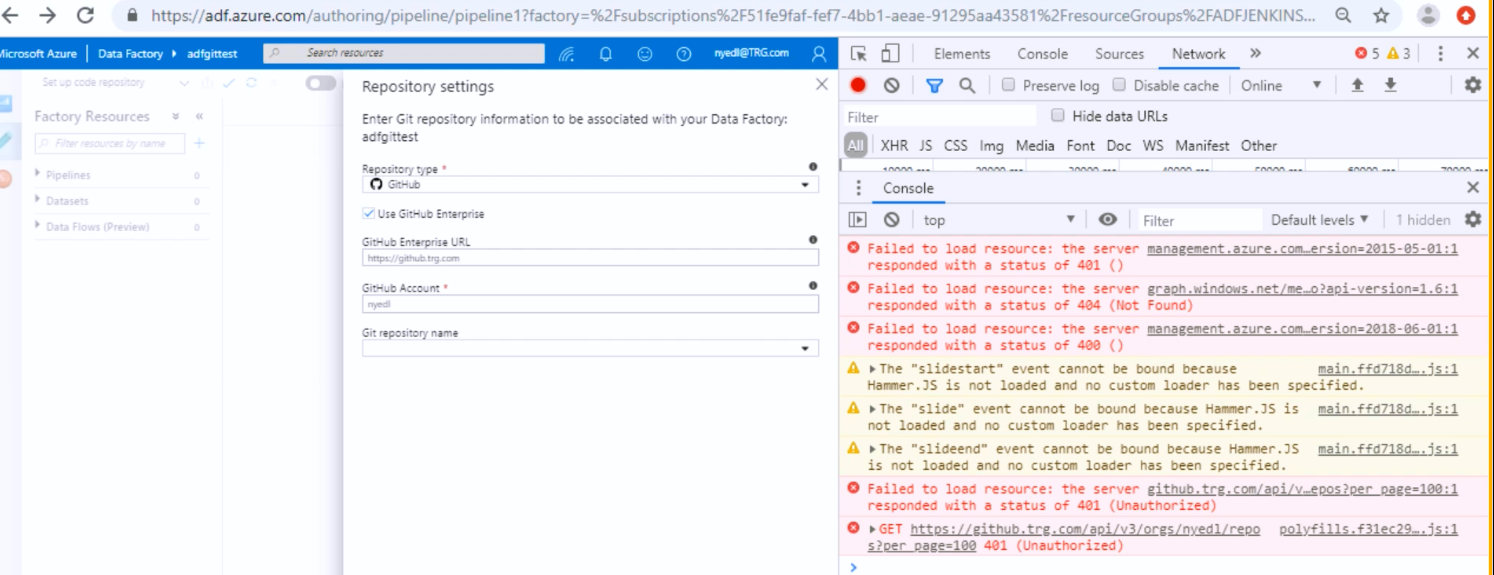
@djpmsft for reference here i am attaching error message screen shot. please check.
nareshynn
on 4 Oct 2019
@nareshynn This looks to be a permissions issue with your GitHub. Make sure you have entered in your URL and account credentials correctly and that you have permission to publicly access your GitHub repo
djpmsft
on 4 Oct 2019
@djpmsft : we are not providing public access to git repositories. do we need to provide complete public access to git enterprice server as well?
nareshynn
on 5 Oct 2019
You do not need to provide public access to git enterprise as long as you gave adf a correct token.
Can you try in an incognito window to see if the wrong token is cached? If you still get a 401, verify the API call to GitHub in the network tab is using the correct token
djpmsft
on 7 Oct 2019
@djpmsft: I tried in different systems as well. but no luck. is API call use any different port than 443. i opened only 443 port to azure cloud services. let me know how we can troubleshoot this issue.
nareshynn
on 8 Oct 2019
Hello, I have the same problem trying to set link ADF with my repo.
I have a public reposito ry https://github.com/bamboox2go/ADF-Devops
That is under the bamboox2go organisation.
I've tried to link my ADF instance to the specified repository however I got this error message:
You don't have permission to import resource to the repository, please resolve the permissions in GitHub
It seems that ADF does not have permissions on repositories under organisations.
is it some where to grant this permission?
 QiangZ
on 30 Sep 2020
QiangZ
on 30 Sep 2020
@QiangZ This error is specifically with saving resources in your git repository. So ADF was able to connect, but then when you tried to import the user, GitHub threw an error on the account you logged in with. Likely, you are trying to save to a branch you don't have merge permissions to
djpmsft
on 30 Sep 2020
@QiangZ,
how are you authenticating enterprise repo? which github authentication mechanism are you using?
 kkankala
on 9 Oct 2020
kkankala
on 9 Oct 2020
@QiangZ,
how are you authenticating enterprise repo? which github authentication mechanism are you using?
Hello @kkankala , I've this fixed after retry to link to Github with a valid organisation admin account
QiangZ
on 9 Oct 2020
Related issues
 DeepPuddles
·
3Comments
DeepPuddles
·
3Comments
 JeffLoo-ong
·
3Comments
JeffLoo-ong
·
3Comments
 spottedmahn
·
3Comments
spottedmahn
·
3Comments
 bdcoder2
·
3Comments
bdcoder2
·
3Comments
 jharbieh
·
3Comments
jharbieh
·
3Comments