Azure-docs: AzureAD powershell module upgrade
Could you please upgrade the sample using AzureAD module instead of MSOnline? MSOnline module documentation page says the module itself is deprecated so AzureAD module should be used instead. Can the permissions described above to "update user pwd" and "delete user" be set using AzureAD?
Document Details
⚠ Do not edit this section. It is required for docs.microsoft.com ➟ GitHub issue linking.
- ID: 4a4b8453-d2bc-9c8d-bb16-26fa7e4c6363
- Version Independent ID: 160642fc-b5a9-1ebe-7daf-105509b6e2f4
- Content: Use the Graph API in Azure Active Directory B2C
- Content Source: articles/active-directory-b2c/active-directory-b2c-devquickstarts-graph-dotnet.md
- Service: active-directory
- Sub-service: b2c
- GitHub Login: @mmacy
- Microsoft Alias: marsma
 crixo
crixo
All 9 comments
@crixo Thanks for the feedback ! I have assigned this issue to content author to investigate and update the document as appropriate.
 SaurabhSharma-MSFT
on 17 Sep 2019
SaurabhSharma-MSFT
on 17 Sep 2019
Hi @crixo, give this a try:
# Connect to your Azure AD B2C tenant
Connect-AzureAD -TenantId "your-b2c-tenant.onmicrosoft.com"

# Get the service principle for the application
$sp = Get-AzureADServicePrincipal -SearchString "your-application-name"

# Get the user admin role
$role = Get-AzureADDirectoryRole | Where-Object {$_.displayName -eq 'User Account Administrator'}

# Add the role to the application
Add-AzureADDirectoryRoleMember -ObjectId $role.ObjectId -RefObjectId $sp.ObjectId
I was able to successfully delete a user with the B2C.exe console app after using those commands to apply the permissions with the Azure AD PowerShell V2 module. I haven't yet tested password update, will give that a try tomorrow. If that works, and my additional testing of the other operations work, I'll update the article.
 mmacy
on 20 Sep 2019
mmacy
on 20 Sep 2019
@crixo I've just confirmed that user update, including password reset, functions after having applied the above role to the application's service principal with the PowerShell commands shown above. I'll now update the article, and once merged, this issue will be closed.
Thanks for the call-out on this!
mmacy
on 20 Sep 2019
@mmacy I confirm everything works as expected using AzureAD module.
Just a note: in order to have your snippet working, I have first to assign through the azure portal interface the role "User Administrator" to an existing user within the tenant (I did it to my Global administrator Account) in order to have a result from the following query
Get-AzureADDirectoryRole | Where-Object {$_.displayName -eq 'User Account Administrator'}
otherwise the Get-AzureADDirectoryRole inquiries does not return the 'User Account Administrator' role
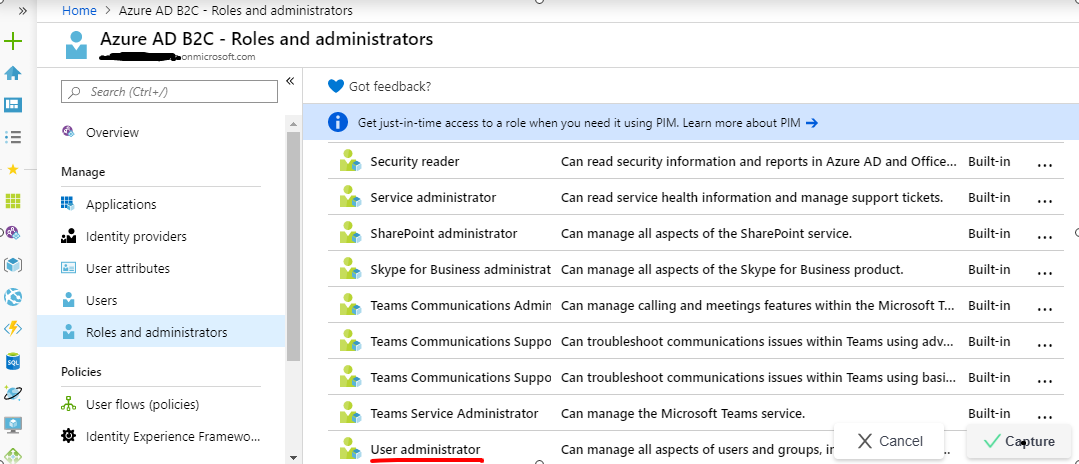
crixo
on 23 Sep 2019
Thanks, @crixo! So I'm clear on this - you assigned User Administrator to the user you signed in with when you executed Connect-AzureAD, and that was the Global Admin account?
mmacy
on 23 Sep 2019
@mmacy. Yes, that's correct: I had to assignthe role "User Administrator" to the user ("Global Admin account" in my azure ad b2c tenat) I used for sign-in w/ Connect-AzureAD in order to have the query Get-AzureADDirectoryRole | Where-Object {$_.displayName -eq 'User Account Administrator'}
returning the expected role
crixo
on 23 Sep 2019
@crixo Got it, thanks. I will add this as a "You might have to assign..." note in the updated version of the article I'm currently working on. I didn't need to perform such an assignment, but I'm also the subscription admin which may be the reason for that. Thanks again for the additional input--super helpful!
mmacy
on 23 Sep 2019
in-progress
mmacy
on 23 Sep 2019
@crixo Your comment about role assignment got me to digging around a bit. It turns out that you can use the Azure portal to grant the "User administrator" role to the application to support user delete/passwd reset. PowerShell is _not_ required.
Steps are as such:
- Sign in to the Azure portal and switch to the directory that contains your Azure AD B2C tenant.
- Select Azure AD B2C in the left menu. Or, select All services and then search for and select Azure AD B2C.
- Under Manage, select Roles and administrators.
- Select the User administrator role.
- Select Add assignment.
- In the Select text box, enter the name of the application you registered earlier, for example, Management App. Select your application when it appears in the search results.
- Select Add. It might take a few minutes to for the permissions to fully propagate.
The key is that you have to _search_ for your app as it doesn't show in the list by default. I'm considering dropping I've dropped PowerShell to conform with the portal-oriented administration tasks shown elsewhere in B2C and its documentation.
mmacy
on 23 Sep 2019
Related issues
 behnam89
·
3Comments
behnam89
·
3Comments
 spottedmahn
·
3Comments
spottedmahn
·
3Comments
 Favna
·
3Comments
Favna
·
3Comments
 DeepPuddles
·
3Comments
DeepPuddles
·
3Comments
 ianpowell2017
·
3Comments
ianpowell2017
·
3Comments