Azure-docs: Conflicts while deploying the VM from the Packer Image
{"code":"DeploymentFailed","message":"At least one resource deployment operation failed. Please list deployment operations for details. Please see https://aka.ms/arm-debug for usage details.","details":[{"code":"Conflict","message":"{\r\n \"status\": \"Failed\",\r\n \"error\": {\r\n \"code\": \"ResourceDeploymentFailure\",\r\n \"message\": \"The resource operation completed with terminal provisioning state 'Failed'.\",\r\n \"details\": [\r\n {\r\n \"code\": \"OSProvisioningTimedOut\",\r\n \"message\": \"OS Provisioning for VM 'test' did not finish in the allotted time. However, the VM guest agent was detected running. This suggests the guest OS has not been properly prepared to be used as a VM image (with CreateOption=FromImage). To resolve this issue, either use the VHD as is with CreateOption=Attach or prepare it properly for use as an image:\r\n * Instructions for Windows: https://azure.microsoft.com/documentation/articles/virtual-machines-windows-upload-image/ \r\n * Instructions for Linux: https://azure.microsoft.com/documentation/articles/virtual-machines-linux-capture-image/ \"\r\n }\r\n ]\r\n }\r\n}"}]}
Document Details
⚠ Do not edit this section. It is required for docs.microsoft.com ➟ GitHub issue linking.
- ID: 1bb18731-b0b4-f92b-7ece-031a84c76d7b
- Version Independent ID: 27047a2a-a07b-cadb-fab5-ecc928b46717
- Content: How to create Windows VM Images with Packer in Azure
- Content Source: articles/virtual-machines/windows/build-image-with-packer.md
- Service: virtual-machines-windows
- GitHub Login: @cynthn
- Microsoft Alias: cynthn
 Jothi3125
All 9 comments
Thanks for the feedback! We are currently investigating and will update you shortly.
 mimckitt
on 10 Sep 2019
mimckitt
on 10 Sep 2019
@Jothi3125 Can you please confirm that you are following this doc step by step, meaning you created a template as a JSON file as described in the doc? If yes, are you seeing the error at this step: Create a VM from the Packer image ?
 Karishma-Tiwari-MSFT
on 12 Sep 2019
Karishma-Tiwari-MSFT
on 12 Sep 2019
Yes, thats the case. I have created the JSON file and followed the document step by step, still facing error. Also, I tried creating a VM from the image via portal. But it seems the error still occurs.
Jothi3125
on 13 Sep 2019
@Jothi3125 Sorry for the delay on this. This error occurs when the image is not being properly Generalized and Sysprep. Did you use your own custom image to create the VM?
Please let me know.
Karishma-Tiwari-MSFT
on 18 Sep 2019
Is there any update? Please let me know.
Karishma-Tiwari-MSFT
on 19 Sep 2019
We will now close this issue. Please come back when you are ready and tag me in a comment. I will reopen it and we will gladly continue the discussion. :)
Karishma-Tiwari-MSFT
on 20 Sep 2019
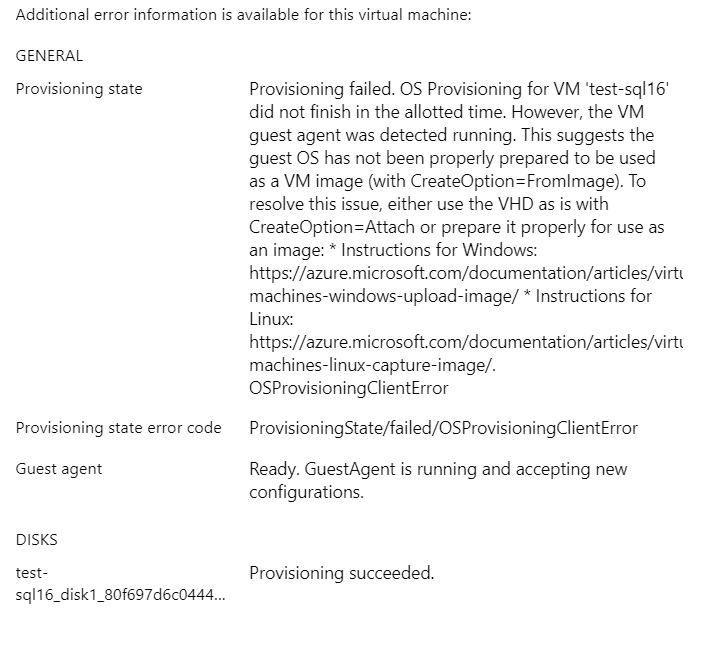
Hi @Karishma-Tiwari-MSFT , can you help me with this, I'm using my own custom image build using packer and the error is attached. I suspect it is because of sysprep. the image I used is win2016 with sql2016 what I should do now to able to work on this image.
 sriman-biarca
on 3 Dec 2019
sriman-biarca
on 3 Dec 2019
I think, I fixed this running sysprep cmds. Thanks
sriman-biarca
on 4 Dec 2019
Hi @Karishma-Tiwari-MSFT
Good Day!
I'm also facing the attached error while provisioning a Linux (CentOS) VM using Packer from a custom built image in Azure.
Please advise if you have any suggestions on my below query.
How I built the custom image?
- Created a Linux VM using CentOS7.7 Image chosen from Azure Marketplace.
- Deprovision it using the below command.
waagent -deprovision+user - Deallocated and Generalized it.
Link referred for step2 & 3: https://docs.microsoft.com/en-us/azure/virtual-machines/linux/capture-image - Created a Image using that VM (Ex: Name - Centos-Custom-Image-v1)
I'm able to launch a new VM without any errors with that image from Azure Portal.
Now, I tried to create a new image (Ex: New-Centos-Custom-Image-v1) by installing necessary packages, perform CIS benchmark standard practices in it by "Packer" on "Centos-Custom-Image-v1".
I created it without any errors. While launching a new VM from that new custom image (built using packer), it is taking long time for deploying (25-30 min) before session timeout . And when I refresh the page after session timeout, it is showing the attached error message though the VM created successfully.

I'm unable to create a VM backup in Azure with this errors. Could you please guide me to correct my errors if you have any idea?
It would be much helpful. Attached the packer build script also for your reference.

Regards,
Guru Mohan
 gm27rjpm
on 10 Apr 2020
gm27rjpm
on 10 Apr 2020
Related issues
 Ponant
·
3Comments
Ponant
·
3Comments
 spottedmahn
·
3Comments
spottedmahn
·
3Comments
 AronT-TLV
·
3Comments
AronT-TLV
·
3Comments
 varma31
·
3Comments
varma31
·
3Comments
 jharbieh
·
3Comments
jharbieh
·
3Comments